ID-JAG explained: how AI agents get cross-app access under enterprise control
How ID-JAG and Cross App Access let a company's identity provider approve AI agent access to other apps, with lab screenshots and the draft's current status.
Paste a string, pick a step or let the page guess. Stack steps to undo several layers, such as URL, Base64 and deflate. I keep this open next to the other tools.
Runs in your browser. Nothing you paste is sent anywhere. Don't paste production private keys.
The page makes no network request while you work. The only exceptions are the buttons that say Fetch, which call the address you type. Keep real private keys out of any web page, including this one.
Any string you want to encode or decode: Base64, a URL component, hex, HTML entities, or a SAML redirect value.
Steps
Samples are made with throwaway keys and example.test names. They mean nothing outside this page.
Any string you want to encode or decode: Base64, a URL component, hex, HTML entities, or a SAML redirect value.
Paste the text, choose the codec and set the direction to Decode. Or press Auto-detect and the page tries every common decoding for you. Nothing leaves your browser.
Choose the SAML redirect codec and paste the SAMLRequest value or the whole URL. It does the URL decode, the Base64 decode and the raw deflate inflate in one step.
Component encoding escapes every reserved character, including / ? & and =, so it suits a single value. Full URL encoding keeps those characters so the address still works.
The newest posts and labs on the same topic, picked automatically.
How ID-JAG and Cross App Access let a company's identity provider approve AI agent access to other apps, with lab screenshots and the draft's current status.
Lab in a test tenant: device-code sign-in, an agent API exchanging the token on-behalf-of with a certificate and no secret, and an unconsented scope failing.
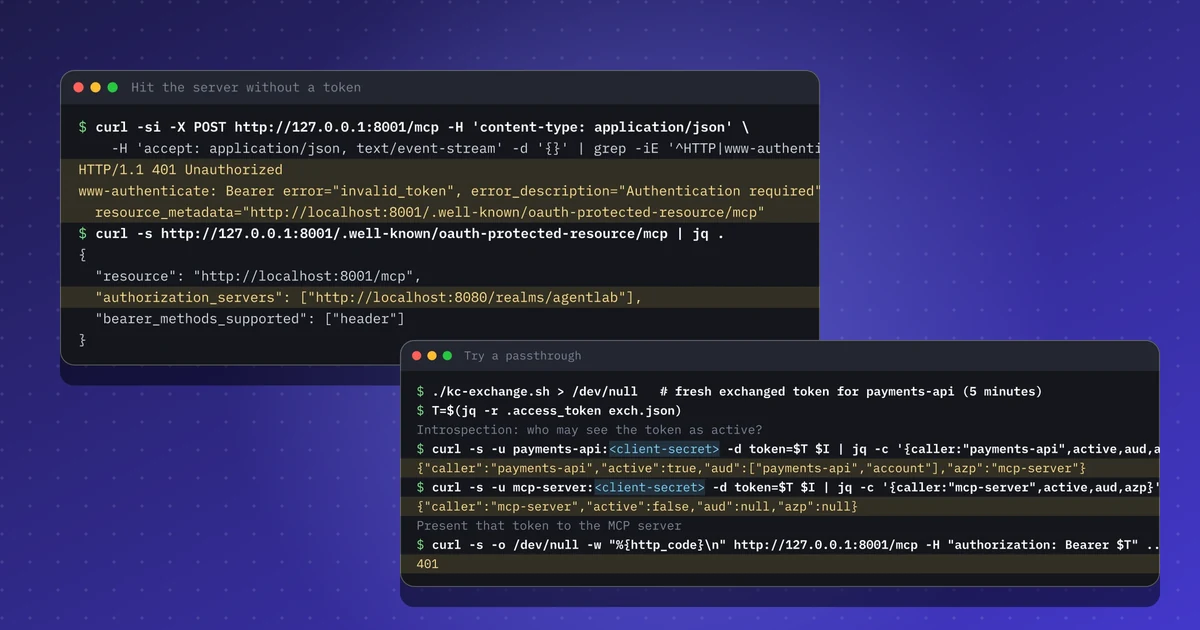
A lab with the official MCP Python SDK and Keycloak: the 401 handshake, audience checks, an RFC 8693 exchange for the payments API, and a refused passthrough.