TL;DR
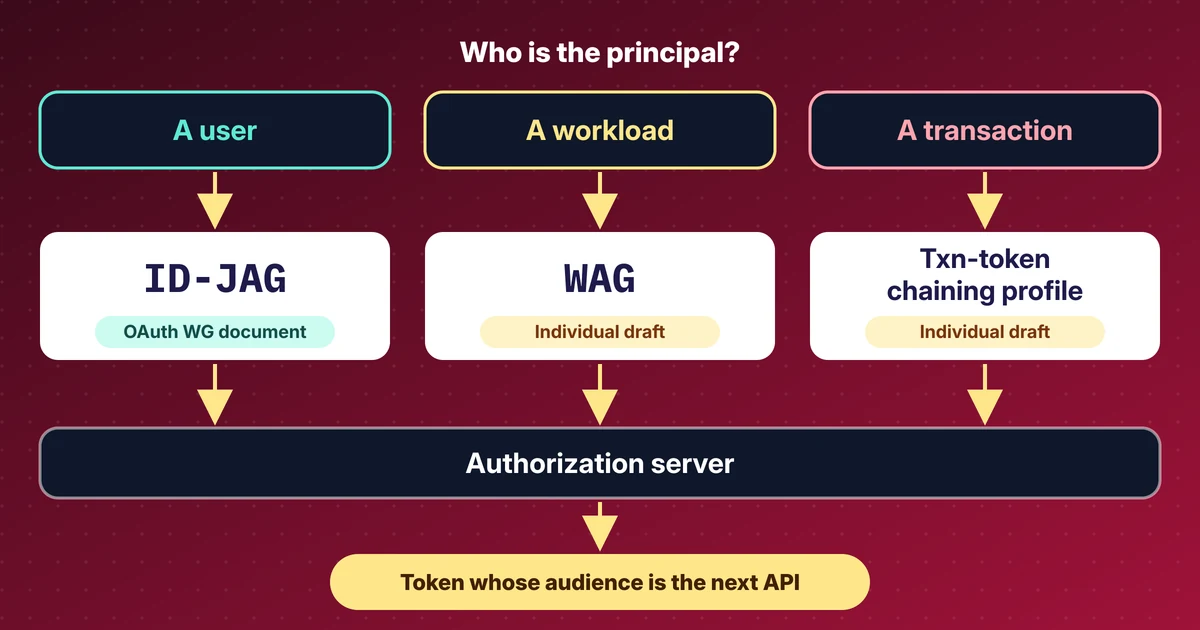
- For agents that call APIs on behalf of a signed-in user, Entra's current answer is the on-behalf-of (OBO) flow; ID-JAG is only a readiness survey there today.
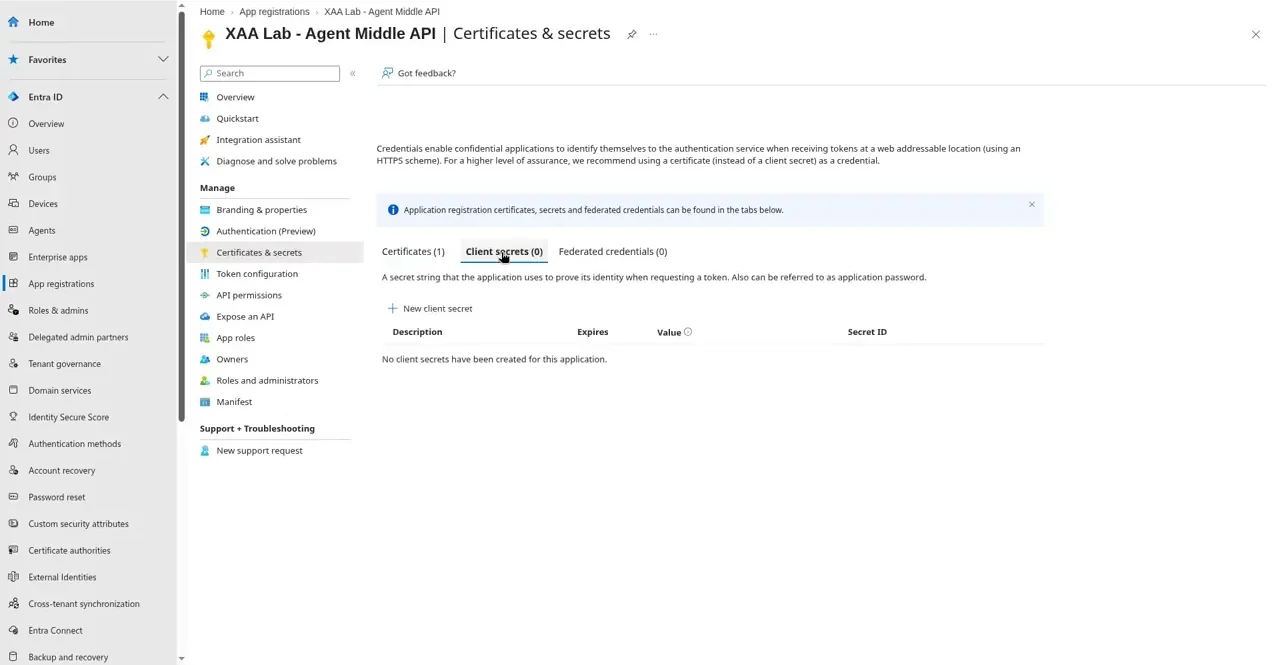
- The middle API proves itself with a certificate-signed assertion and holds zero client secrets.
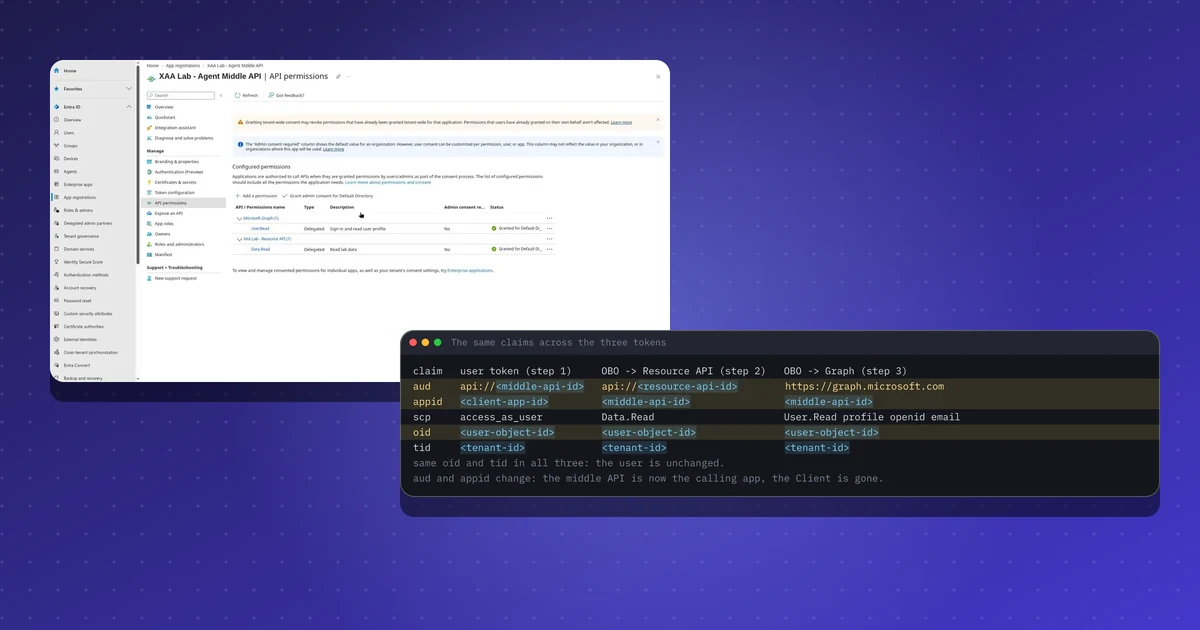
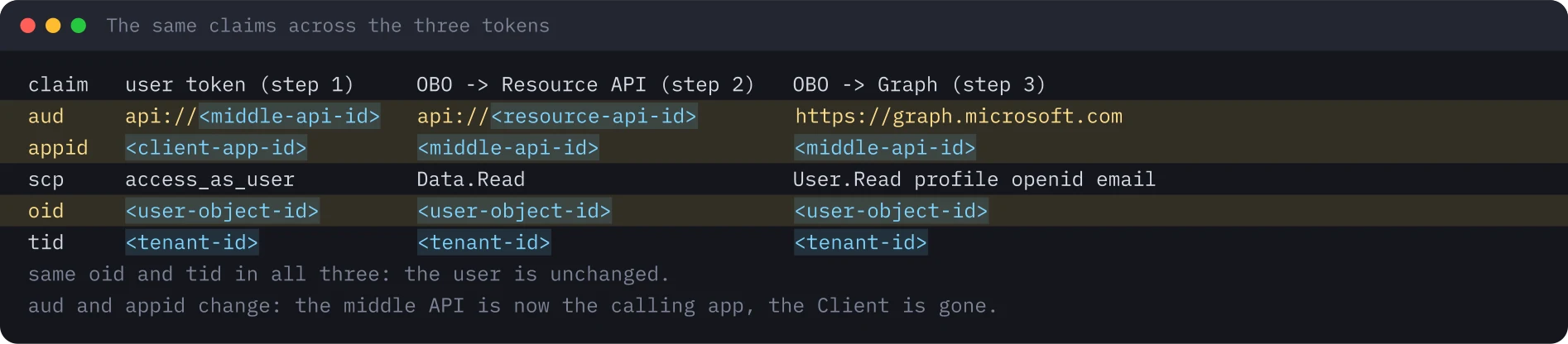
- One sign-in yields separate tokens per audience: the user stays the same and the calling application changes.
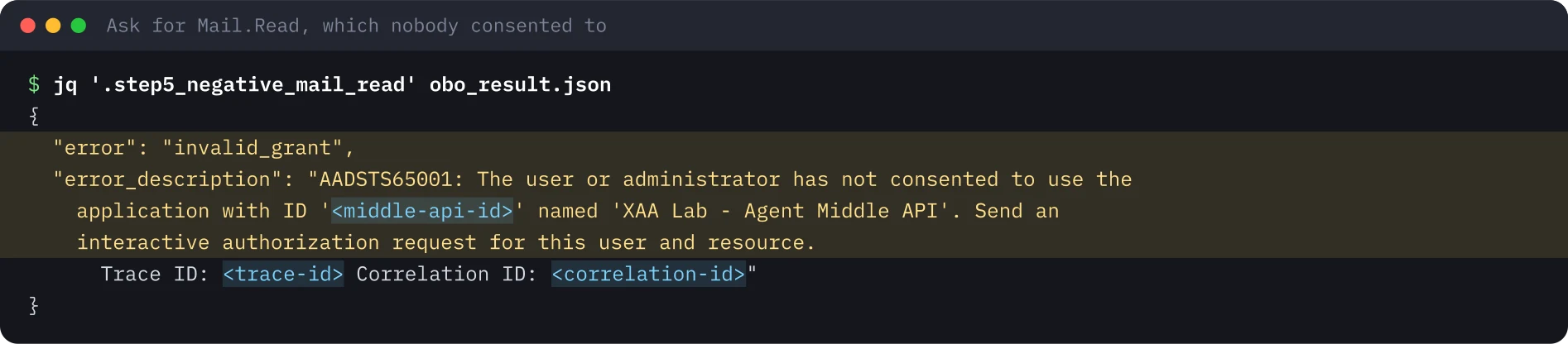
- A scope nobody consented to fails with AADSTS65001; consent at the service principal is what counts.
- OBO tokens do not keep the original client, so audits must join sign-in logs.
Repeat this lab
I wrote this lab so you can run it yourself. Each step has the commands to copy and the output I got, and you can tick it as done. Your ticks stay in this browser only.
Copies a ready-made prompt for Claude Code, Cursor, Codex or any coding agent. For test environments only.
Show prompt
I want to run a hands-on lab from iamops.dev, and I would like your help to do it safely.

Lab: Microsoft Entra on-behalf-of flow for an agent middle tier: certificate credential, no client secrets
Read the whole lab here (Markdown): https://iamops.dev/entra-on-behalf-of-agent-middle-tier.md

What the lab needs before the first step:
- A separate test tenant (Entra ID Free is enough) where you are Global Administrator
- Never do this in a production tenant: OBO tokens carry real user claims
- Values I have to set myself (the lab uses placeholders): <TENANT_ID>, <CLIENT_APP_ID>, <MIDDLE_API_APP_ID>, <RESOURCE_API_APP_ID>

How I want you to work:
1. Read the lab from start to finish first (each step lists its own prerequisites). Then check that the prerequisites are in place and that the tool versions match what the lab expects. Tell me what is missing before you run anything.
2. Run one step at a time. Before each command, show it to me and say in a sentence what it does.
3. Ask me before anything that costs money, creates cloud resources, touches a real tenant or account, or deletes anything. Wait for my answer.
4. Use the placeholders from the lab. Never paste real secrets, tokens or production identities into a command, a file or this chat. If a value is needed, tell me where to set it myself.
5. After each step, compare the output with the expected output in the lab. If it does not match, stop and tell me what differs. Do not carry on or invent a fix without asking me.
6. At the end, report what passed, what failed and which cleanup you did. Then offer to tick the steps off for me. The lab page keeps ticks only in my browser, so if you cannot do that, list the steps I should tick.

This lab is for test environments only. Do not run it against production, or against a tenant or account that holds real data or real users.

You may answer in my language.
On 14 November 2026 Microsoft added a Learn article that, for the first time, names ID-JAG next to Microsoft Entra Agent ID and opens an interest form for it. It is a readiness survey, not a shipped feature: Entra neither issues nor accepts ID-JAGs today. For agents that need to call APIs for a signed-in user, Entra’s current answer is the on-behalf-of (OBO) flow. I ran it end to end in a throwaway tenant and wrote down what each step does.
What this lab shows#
Three app registrations stand in for an agent system:
| App | Role | Credential |
|---|---|---|
| Client | The agent’s UI or command line. A public client, device-code sign-in. | None |
| Agent Middle API | The agent’s back end. It performs the OBO exchange. | One X.509 certificate, zero client secrets |
| Resource API | The downstream API. Exposes the delegated scope Data.Read. |
n/a |
The user signs in once at the Client. The Client holds a token whose audience is the middle API only. The middle API exchanges it for a token for the Resource API and another for Microsoft Graph, proving who it is with a certificate-signed assertion instead of a secret.
Setup#
Use a separate test tenant (Entra ID Free is enough, no Azure resources are needed). OBO tokens carry real user claims, and a throwaway tenant keeps experiments away from production consent, Conditional Access and audit logs. In the portal:
- Register the Resource API and expose a delegated scope
Data.Read(admins and users). - Register the Agent Middle API, expose
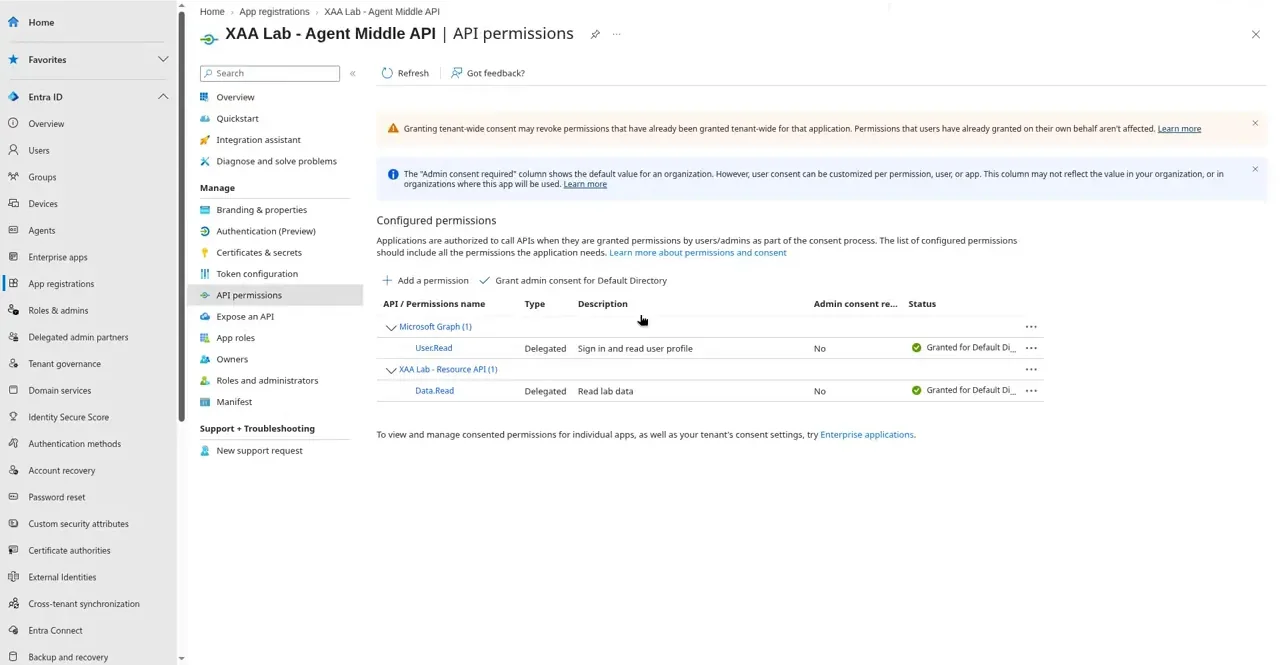
access_as_user, and add delegated permissionsData.Readand Microsoft GraphUser.Read, then grant admin consent. - Generate a 2048-bit RSA key and a 60-day self-signed certificate with
openssl, keep the private key on the machine (mode 0600), and upload only the public certificate under Certificates & secrets. - Register the Client as a public client (redirect
http://localhost, Allow public client flows on) with permission foraccess_as_userandUser.Read.

The run#
Device-code sign-in. The Client asks the v2.0 devicecode endpoint for a code. The request carries only the Client’s ID and the middle API’s scope, no secret. The user enters the code on a second device and Entra shows an “approve sign-in on another device” check that names the app and the location; the user has to approve it by hand.
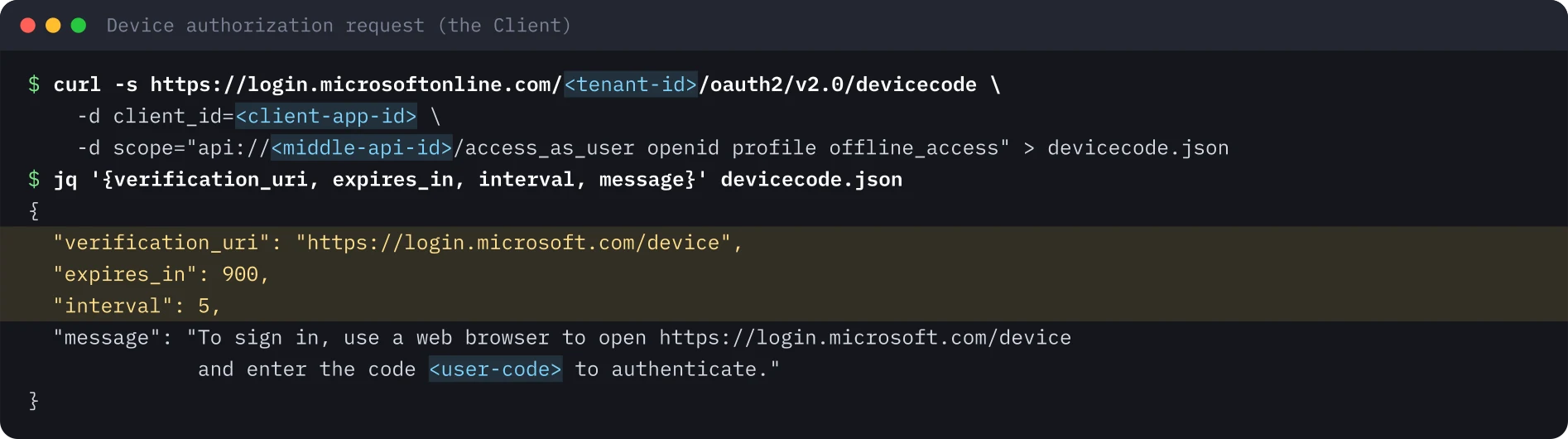
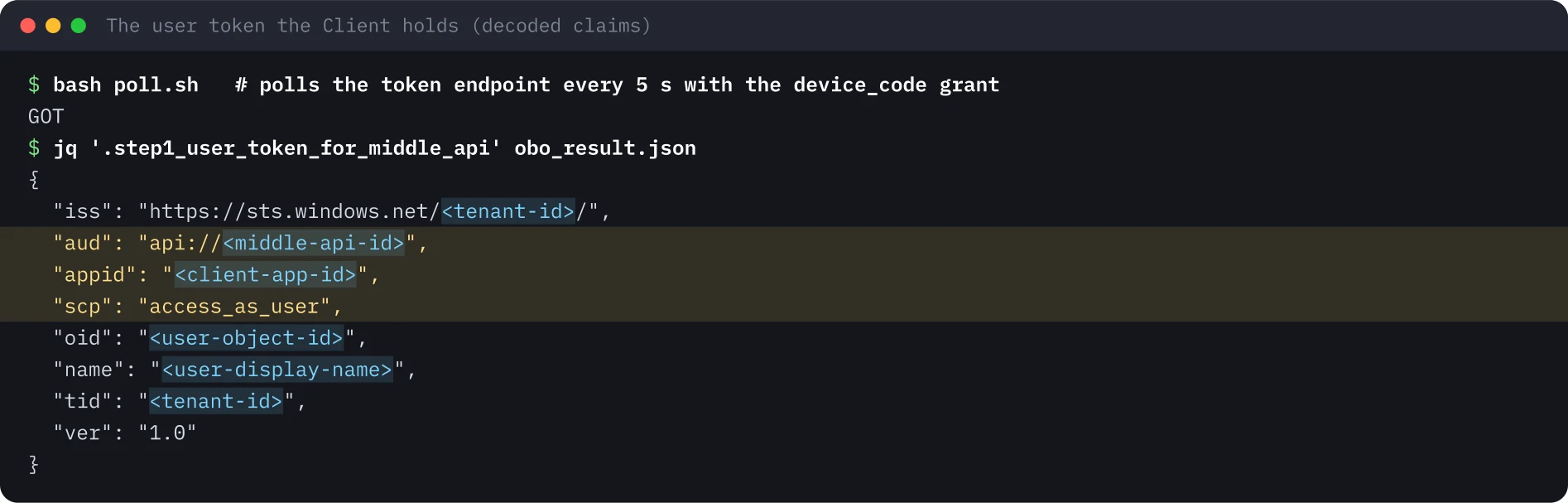
The user token. After approval the Client polls the token endpoint. Its token is useless against the Resource API or Graph directly, because its audience is the middle API.
The exchange. The middle API builds a client assertion (an RS256 JWT with the certificate’s thumbprint in x5t; issuer and subject are its own client ID; audience is the token endpoint; ten minutes of life), signs it with the private key and posts the OBO request:
POST https://login.microsoftonline.com/<tenant-id>/oauth2/v2.0/token
  grant_type=urn:ietf:params:oauth:grant-type:jwt-bearer
  client_id=<middle-api-id>
  client_assertion_type=urn:ietf:params:oauth:client-assertion-type:jwt-bearer
  client_assertion=<RS256 JWT with x5t in the header>
  assertion=<the user token>
  scope=api://<resource-api-id>/Data.Read
  requested_token_use=on_behalf_of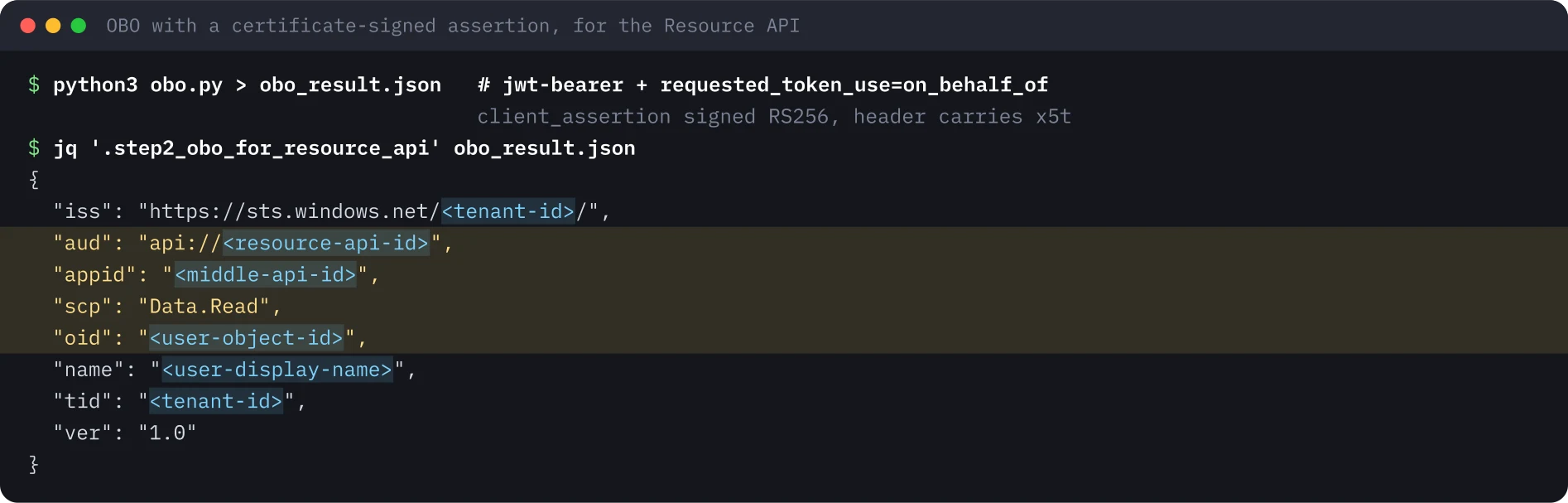
The same assertion with scope https://graph.microsoft.com/User.Read returns a Graph token, which the lab uses once for GET /v1.0/me.
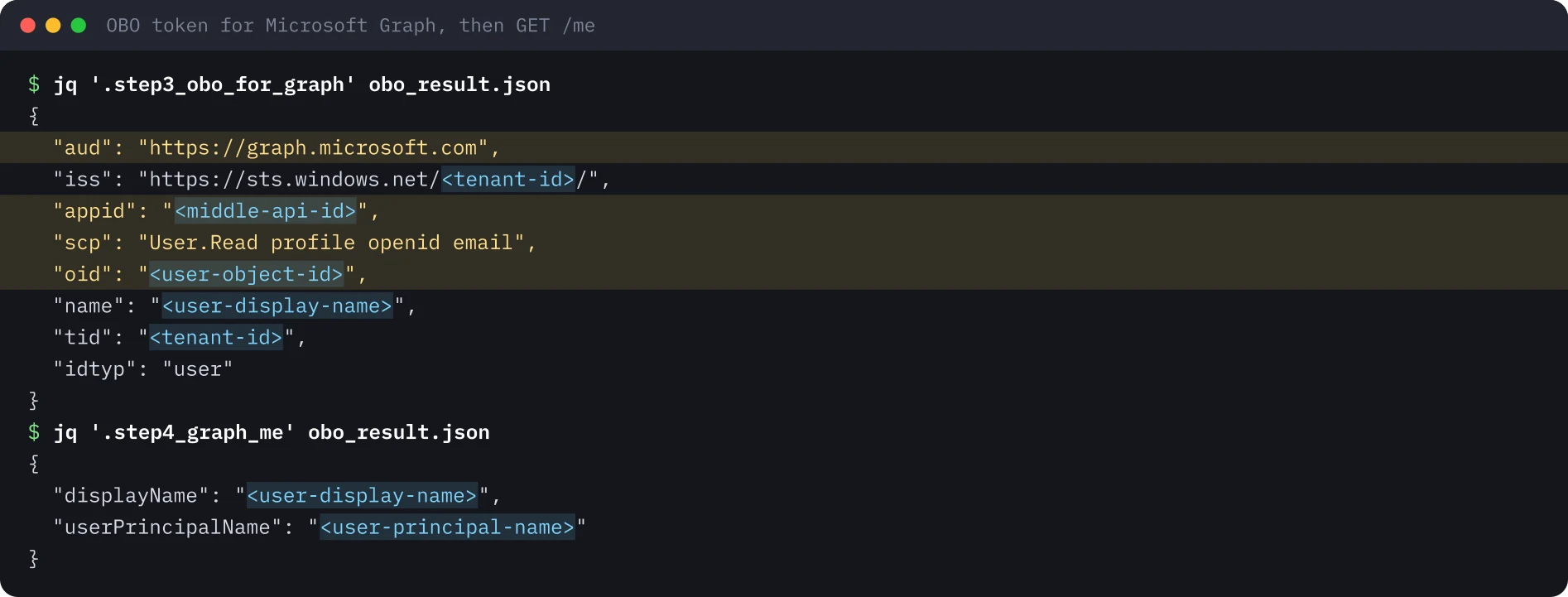
Compare the three tokens. The user never changes. The audience follows the API being called, and appid switches from the Client to the middle API.
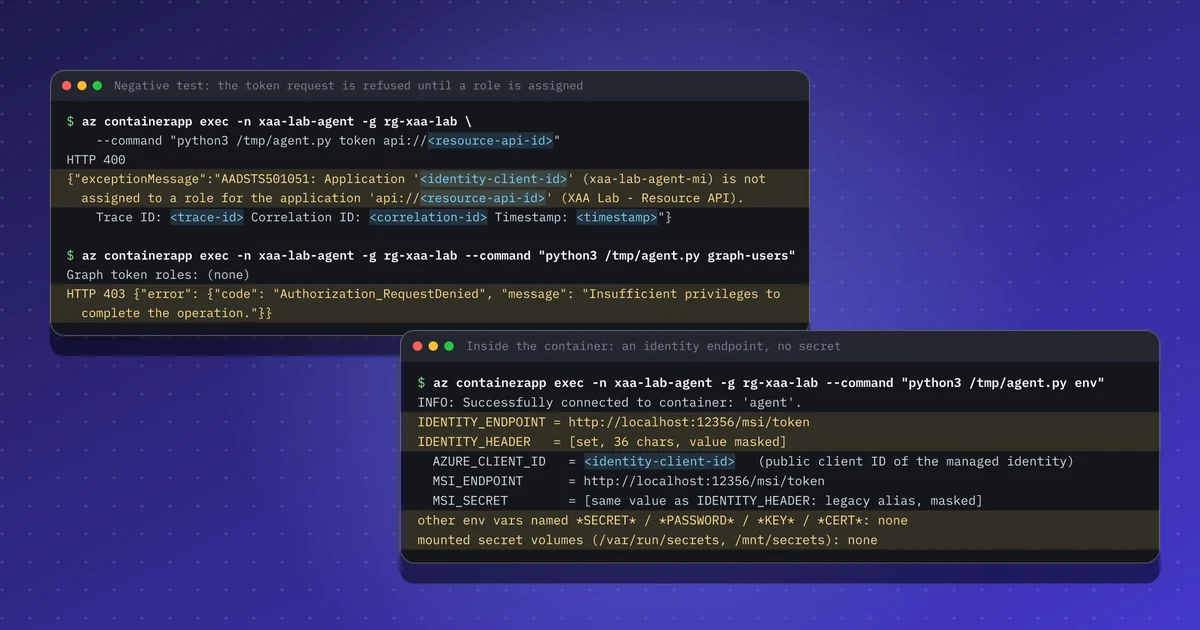
The negative test. Asking for https://graph.microsoft.com/Mail.Read, which nobody consented to, fails at the token service:
Gotchas#
- The original client is lost. Version 1 OBO tokens record only the last application (
appid). There is noactclaim as in an RFC 8693 implementation, so an audit has to join sign-in logs to rebuild the chain. - The incoming audience must be the middle API. A token aimed at another app is rejected, which is the confused-deputy guard.
- Device code needs “Allow public client flows”. It is also the flow that device-code phishing abuses. The “approve sign-in on another device” screen is Microsoft’s mitigation; train users to press “This wasn’t me”, and restrict the flow with Conditional Access where agents do not need it.
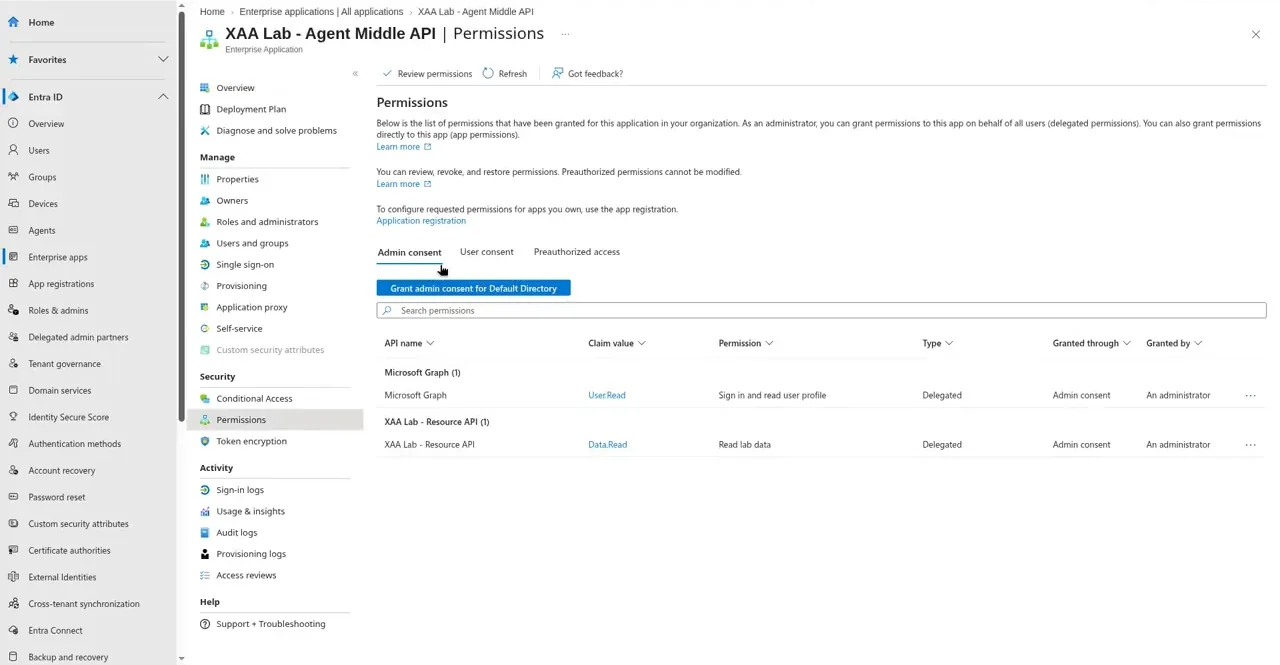
- Admin consent at the service principal is what counts, not what the registration lists.
Security takeaways#
- Use a certificate or federated credential for the middle tier. No secret means nothing reusable to leak from configuration, CI variables or logs.
- Keep the delegated scopes of the middle tier minimal and review them on the service principal.
- Keep the Client credential-free. It can only ever hold the user’s token for the middle API, never a downstream token.
- Plan the audit join (user, agent, downstream audience) because OBO tokens do not keep the first hop.
- Record which grant each hop uses (OBO today; ID-JAG once Entra supports it) and where consent lives, so access reviews can see service-principal grants.
What was not run#
Entra Agent ID blueprints and agent identities (the same lab with inheritable permissions) were not run. The Conditional Access policy that blocks device code was not tested. The stretch tasks (removing consent and repeating the exchange, optional claims, v2 tokens) were not run. The portal screenshots were cropped to the page content; the browser bar, the profile menu and all tenant, application and user identifiers are removed. No recording is published for this lab.
Terminal images were rendered from the saved output of the run, with identifiers replaced by placeholders. Portal screenshots show the page content only.
Repeat this lab#
This lab needs a throwaway Entra tenant, openssl, curl, jq and Python 3 with nothing else installed. Plan for about 60 minutes, most of it clicking through the portal once. Open each step, copy the blocks and compare the output with mine.
Every value in angle brackets is a placeholder for your own test environment. Nothing on this page is a real identifier or secret.
Set your variables once
# Paste into every terminal you use for this lab. Replace each <PLACEHOLDER> with the value from your own test tenant.
export TENANT_ID='<TENANT_ID>'
export CLIENT_ID='<CLIENT_APP_ID>'          # the public client (the agent's UI)
export MIDDLE_ID='<MIDDLE_API_APP_ID>'      # the agent's middle API
export RESOURCE_ID='<RESOURCE_API_APP_ID>'  # the downstream Resource API
export AUTHORITY="https://login.microsoftonline.com/$TENANT_ID"
export KEY_FILE="middle-api.key"
export CERT_FILE="middle-api.pem"
0 of 6 steps done
Step 1Register the three apps in a test tenant
Goal. Create the Resource API, the Agent Middle API and the Client. Only the middle API gets a credential, and it is a certificate.
Prerequisites
- A separate test tenant (Entra ID Free is enough) where you are Global Administrator
- Never do this in a production tenant: OBO tokens carry real user claims
Resource API
  Entra admin center > App registrations > New registration, single tenant.
  Expose an API > Application ID URI: api://<RESOURCE_API_APP_ID>
  Add a scope: Data.Read (admins and users can consent).

Agent Middle API
  New registration, single tenant.
  Expose an API > Application ID URI: api://<MIDDLE_API_APP_ID>, scope access_as_user.
  API permissions > Add: your Resource API / Data.Read (delegated) and Microsoft Graph / User.Read (delegated).
  Grant admin consent for the tenant.
  Certificates & secrets: leave the Client secrets tab empty (0 secrets). The certificate comes in the next step.

Client
  New registration, single tenant, redirect URI (public client): http://localhost
  Authentication > Allow public client flows: Yes.
  API permissions > Add: Agent Middle API / access_as_user and Microsoft Graph / User.Read (delegated).

Copy the three Application (client) IDs and the Directory (tenant) ID into env.sh.
Expected output
Three app registrations, each with an Application (client) ID.
Agent Middle API > Certificates & secrets > Client secrets: 0
Agent Middle API > API permissions: Data.Read and User.Read, both "Granted for <tenant name>"Step 2Create the middle API's certificate
Goal. Make a 2048-bit key and a 60-day self-signed certificate. The private key stays on this machine; only the public certificate goes to Entra.
Prerequisites
- openssl 1.1 or newer
- env.sh loaded in this terminal
umask 077
openssl req -x509 -newkey rsa:2048 -nodes -keyout "$KEY_FILE" -out "$CERT_FILE" -days 60 -subj "/CN=agent-middle-api"
openssl x509 -in "$CERT_FILE" -outform DER -out middle-api.cer
openssl x509 -in "$CERT_FILE" -noout -subject -startdate -enddate -fingerprint -sha1# Upload only the public part: middle-api.cer
# Agent Middle API > Certificates & secrets > Certificates > Upload certificate.
# The private key ($KEY_FILE) never leaves this machine.Expected output
subject=CN = agent-middle-api
notBefore=<start-date>
notAfter=<end-date>
sha1 Fingerprint=<certificate-thumbprint>Step 3Sign in the user with device code
Goal. The Client asks for a device code with only its ID and the middle API's scope. You approve the sign-in in a browser on another device, and the script waits for it.
Prerequisites
- The Client has Allow public client flows switched on
- A test user in the tenant that can sign in
curl -s "$AUTHORITY/oauth2/v2.0/devicecode" \
  -d client_id="$CLIENT_ID" \
  -d scope="api://$MIDDLE_ID/access_as_user openid profile offline_access" > devicecode.json
jq '{verification_uri, expires_in, interval, message}' devicecode.json#!/usr/bin/env bash
# Poll the token endpoint every 5 seconds until you have approved the sign-in in the browser.
DC=$(jq -r .device_code devicecode.json)
for i in $(seq 1 170); do
curl -s -X POST "$AUTHORITY/oauth2/v2.0/token" -d grant_type=urn:ietf:params:oauth:grant-type:device_code \
-d client_id="$CLIENT_ID" -d device_code="$DC" > user_token.json
if grep -q access_token user_token.json; then echo GOT; exit 0; fi
grep -q authorization_pending user_token.json || { jq . user_token.json; exit 1; }
sleep 5
donechmod +x poll.sh && ./poll.sh # now open the verification URI, enter the code and approveExpected output
{
  "verification_uri": "https://login.microsoft.com/device",
  "expires_in": 900,
  "interval": 5,
  "message": "To sign in, use a web browser to open https://login.microsoft.com/device and enter the code <user-code> to authenticate."
}
GOTStep 4Exchange the token on behalf of the user
Goal. The middle API signs a client assertion with the certificate and exchanges the user's token for one for the Resource API and one for Microsoft Graph.
Prerequisites
- user_token.json from the previous step and the certificate uploaded to the middle API
- Python 3.9 or newer; no packages to install
"""On-behalf-of exchange with a certificate-signed client assertion. Standard library plus openssl only."""
import base64, hashlib, json, os, subprocess, time, urllib.error, urllib.parse, urllib.request, uuid

TENANT, MIDDLE, RESOURCE = os.environ["TENANT_ID"], os.environ["MIDDLE_ID"], os.environ["RESOURCE_ID"]
KEY, PEM = os.environ["KEY_FILE"], os.environ["CERT_FILE"]
b64 = lambda b: base64.urlsafe_b64encode(b).rstrip(b"=").decode()

der = subprocess.check_output(["openssl", "x509", "-in", PEM, "-outform", "DER"])
x5t = b64(hashlib.sha1(der).digest())                       # certificate thumbprint for the JWT header
token_endpoint = f"https://login.microsoftonline.com/{TENANT}/oauth2/v2.0/token"
now = int(time.time())
header = {"alg": "RS256", "typ": "JWT", "x5t": x5t}
payload = {"aud": token_endpoint, "iss": MIDDLE, "sub": MIDDLE, "jti": str(uuid.uuid4()), "nbf": now, "exp": now + 600}
signing_input = (b64(json.dumps(header).encode()) + "." + b64(json.dumps(payload).encode())).encode()
signature = subprocess.run(["openssl", "dgst", "-sha256", "-sign", KEY], input=signing_input, capture_output=True, check=True).stdout
assertion = signing_input.decode() + "." + b64(signature)
user_token = json.load(open("user_token.json"))["access_token"]


def obo(scope):
    data = urllib.parse.urlencode({
        "grant_type": "urn:ietf:params:oauth:grant-type:jwt-bearer", "client_id": MIDDLE,
        "client_assertion_type": "urn:ietf:params:oauth:client-assertion-type:jwt-bearer", "client_assertion": assertion,
        "assertion": user_token, "scope": scope, "requested_token_use": "on_behalf_of"}).encode()
    try:
        return json.load(urllib.request.urlopen(token_endpoint, data))
    except urllib.error.HTTPError as e:
        return json.load(e)


def claims(token):
    part = token.split(".")[1]
    return json.loads(base64.urlsafe_b64decode(part + "=" * (-len(part) % 4)))


keep = ["aud", "iss", "appid", "azp", "scp", "roles", "oid", "upn", "preferred_username", "name", "tid", "ver", "idtyp", "exp", "iat"]
show = lambda c: {k: c[k] for k in keep if k in c}
out = {"step1_user_token_for_middle_api": show(claims(user_token))}

r = obo(f"api://{RESOURCE}/Data.Read")
out["step2_obo_for_resource_api"] = show(claims(r["access_token"])) if "access_token" in r else r

g = obo("https://graph.microsoft.com/User.Read")
out["step3_obo_for_graph"] = show(claims(g["access_token"])) if "access_token" in g else {k: g.get(k) for k in ("error", "error_description")}
if "access_token" in g:
    req = urllib.request.Request("https://graph.microsoft.com/v1.0/me?$select=displayName,userPrincipalName",
                                 headers={"Authorization": "Bearer " + g["access_token"]})
    out["step4_graph_me"] = json.load(urllib.request.urlopen(req))

# negative test: a scope the middle API has no consent for
n = obo("https://graph.microsoft.com/Mail.Read")
out["step5_negative_mail_read"] = {k: (n.get(k) or "")[:300] for k in ("error", "error_description")} if "access_token" not in n else {"unexpected": "token issued"}
print(json.dumps(out, indent=2))python3 obo.py > obo_result.json
jq '.step2_obo_for_resource_api, .step3_obo_for_graph, .step4_graph_me' obo_result.jsonExpected output
{
  "iss": "https://sts.windows.net/<tenant-id>/",
  "aud": "api://<resource-api-id>",
  "appid": "<middle-api-id>",
  "scp": "Data.Read",
  "oid": "<user-object-id>",
  "name": "<user-display-name>",
  "tid": "<tenant-id>",
  "ver": "1.0"
}
{
  "aud": "https://graph.microsoft.com",
  "iss": "https://sts.windows.net/<tenant-id>/",
  "appid": "<middle-api-id>",
  "scp": "User.Read profile openid email",
  "oid": "<user-object-id>",
  "name": "<user-display-name>",
  "tid": "<tenant-id>",
  "idtyp": "user"
}
{
  "displayName": "<user-display-name>",
  "userPrincipalName": "<user-principal-name>"
}Step 5Compare the tokens and ask for a scope nobody consented to
Goal. Read the three tokens side by side, then look at the AADSTS65001 error for Mail.Read.
Prerequisites
- obo_result.json from the previous step
- column (from util-linux or bsdmainutils) for the table
jq '.step5_negative_mail_read' obo_result.json
echo "--- claims across the three tokens"
jq -r '[.step1_user_token_for_middle_api, .step2_obo_for_resource_api, .step3_obo_for_graph]
  | (["claim","user token","OBO resource","OBO graph"] | @tsv),
    (["aud","appid","scp","oid","tid"] as $ks | $ks[] as $k | [$k] + map(.[$k] // "-") | @tsv)' obo_result.json | column -t -s$'\t'
Expected output
{
  "error": "invalid_grant",
  "error_description": "AADSTS65001: The user or administrator has not consented to use the application with ID '<middle-api-id>' named '<middle-api-name>'. Send an interactive authorization request for this user and resource. Trace ID: <trace-id> Correlation ID: <correlation-id>"
}
--- claims across the three tokens
claim  user token             OBO resource           OBO graph
aud    api://<middle-api-id>  api://<resource-api-id>  https://graph.microsoft.com
appid  <client-app-id>        <middle-api-id>        <middle-api-id>
scp    access_as_user         Data.Read              User.Read profile openid email
oid    <user-object-id>       <user-object-id>       <user-object-id>
tid <tenant-id> <tenant-id> <tenant-id>Step 6Clean up
Goal. Delete the key, the certificate, the token files and the app registrations.
Prerequisites
- You are in the directory where you ran the lab
rm -f "$KEY_FILE" "$CERT_FILE" middle-api.cer devicecode.json user_token.json obo.py obo_result.json poll.sh
ls "$KEY_FILE" 2>&1   # check: the key is gone
unset TENANT_ID CLIENT_ID MIDDLE_ID RESOURCE_ID
# Portal: delete the three app registrations (App registrations > select > Delete),
# or delete the whole test tenant if you created it just for this lab.
Expected output
ls: cannot access 'middle-api.key': No such file or directorySources#
- Microsoft Learn: OAuth 2.0 on-behalf-of flow
- Microsoft Learn, 14 Nov 2026: Understand agent SSO, provisioning, and authorization (Microsoft Entra Agent ID)
- Entra.News Daily, 14 Nov 2026: documentation change for the same article
- Microsoft Learn: Microsoft identity platform and the OAuth 2.0 device authorization grant
- RFC 8693: OAuth 2.0 Token Exchange
Discuss this post#
Found it useful? Share it, and tell me what you think.
This post as Markdown · RSS · JSON feed
New posts by email
One email a week with new posts and labs. Unsubscribe anytime.
Your address is stored with Kit, which sends the emails. Details