TL;DR
- A GitHub workflow can sign in to Azure with no client secret. GitHub signs a short-lived token, and an Entra federated credential trusts one exact sub claim.
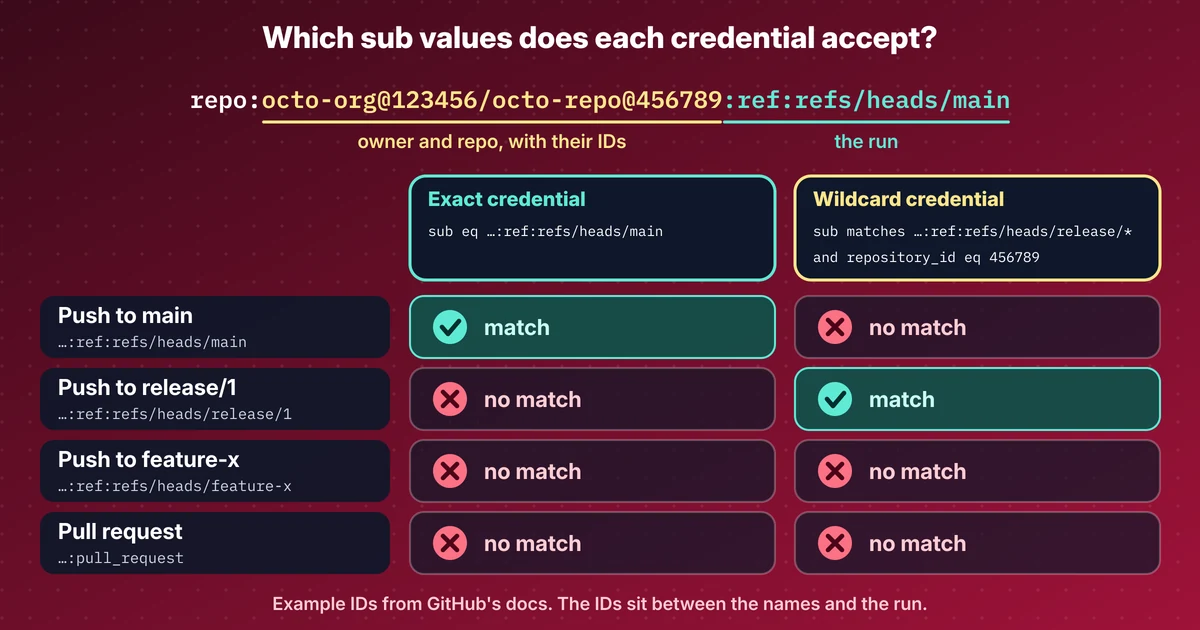
- New repositories send an immutable sub with the owner and repository IDs in it. Create the repository first, read the IDs, then write the credential.
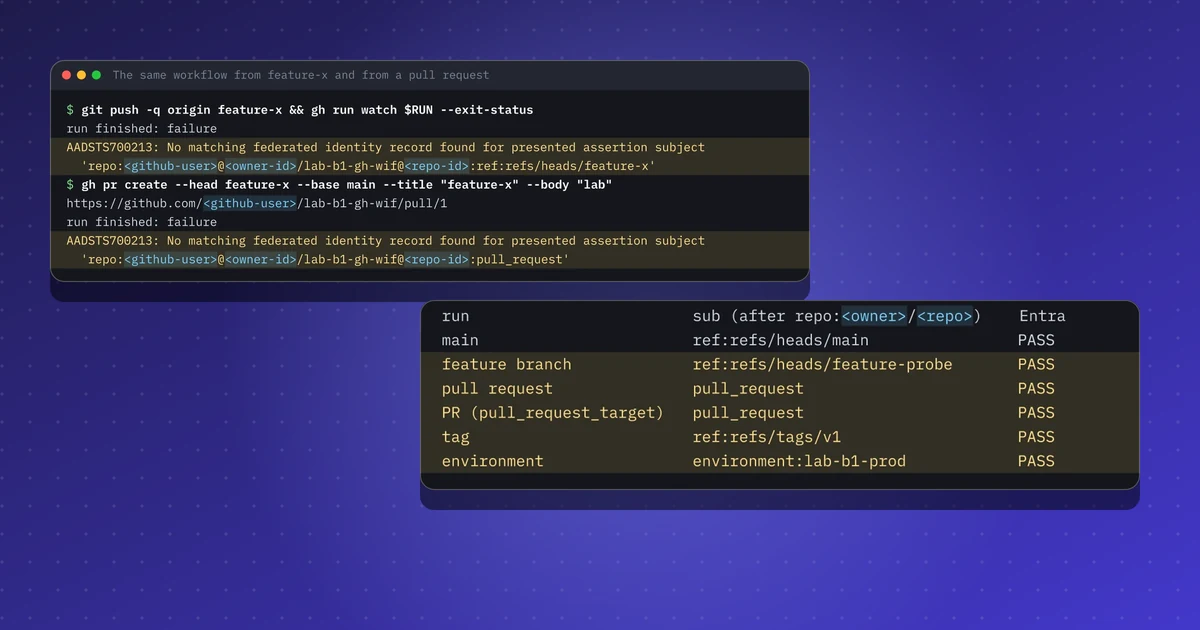
- With only a credential for main, 1 of 6 kinds of run passed. An environment credential, a pull_request credential and two wildcard expressions made it 6 of 6.
- pull_request and pull_request_target send the same sub, so a pull_request credential also trusts pull_request_target jobs, which run with secrets. Never check out the PR head there.
- Fork pull requests were not tested. By GitHub's docs they get no write permissions, so I expect no token, but I have not seen it.
Repeat this lab
I wrote this lab so you can run it yourself. Each step has the commands to copy and the output I got, and you can tick it as done. Your ticks stay in this browser only.
Copies a ready-made prompt for Claude Code, Cursor, Codex or any coding agent. For test environments only.
Show prompt
I want to run a hands-on lab from iamops.dev, and I would like your help to do it safely.

Lab: GitHub Actions to Azure with workload identity federation: which runs get a token, and why
Read the whole lab here (Markdown): https://iamops.dev/github-actions-azure-workload-identity-federation.md

What the lab needs before the first step:
- Azure CLI signed in to a throwaway tenant and subscription, with rights to create app registrations and role assignments
- jq and python3
- Values I have to set myself (the lab uses placeholders): <GITHUB_USER>, <TENANT_ID>, <SUBSCRIPTION_ID>, <AZURE_REGION>

How I want you to work:
1. Read the lab from start to finish first (each step lists its own prerequisites). Then check that the prerequisites are in place and that the tool versions match what the lab expects. Tell me what is missing before you run anything.
2. Run one step at a time. Before each command, show it to me and say in a sentence what it does.
3. Ask me before anything that costs money, creates cloud resources, touches a real tenant or account, or deletes anything. Wait for my answer.
4. Use the placeholders from the lab. Never paste real secrets, tokens or production identities into a command, a file or this chat. If a value is needed, tell me where to set it myself.
5. After each step, compare the output with the expected output in the lab. If it does not match, stop and tell me what differs. Do not carry on or invent a fix without asking me.
6. At the end, report what passed, what failed and which cleanup you did. Then offer to tick the steps off for me. The lab page keeps ticks only in my browser, so if you cannot do that, list the steps I should tick.

This lab is for test environments only. Do not run it against production, or against a tenant or account that holds real data or real users.

You may answer in my language.
A deployment pipeline with a client secret in it is a secret waiting to leak. GitHub Actions can sign in to Azure without one: GitHub signs a short-lived OIDC token for the job, and Entra trusts it through a federated credential. Two things changed this year. Since 15 July 2026, new repositories get an immutable sub claim with the owner and repository IDs in it, and Entra’s wildcard credentials are still in preview. I wrote up both in a news post. This lab is the hands-on side.
What this lab shows#
One app registration with Reader on one empty resource group, one private repository, no secret anywhere. The lab:
- Trusts the main branch with one exact credential and sees
azure/loginsucceed. - Pushes a feature branch and opens a pull request, and sees both refused with AADSTS700213.
- Allows
release/*with a claims-matching expression. - Prints the exact
subfor six kinds of run, then adds the credentials that make each one pass. - Looks at pull requests from forks, from the docs only, because I could not test them.
Setup#
Use a throwaway tenant and subscription, and a GitHub account that is yours. The app registration gets Reader on one empty resource group, so a working login proves the federation and nothing else. The three IDs the workflow needs (client, tenant, subscription) are not secrets, so they go into repository variables.
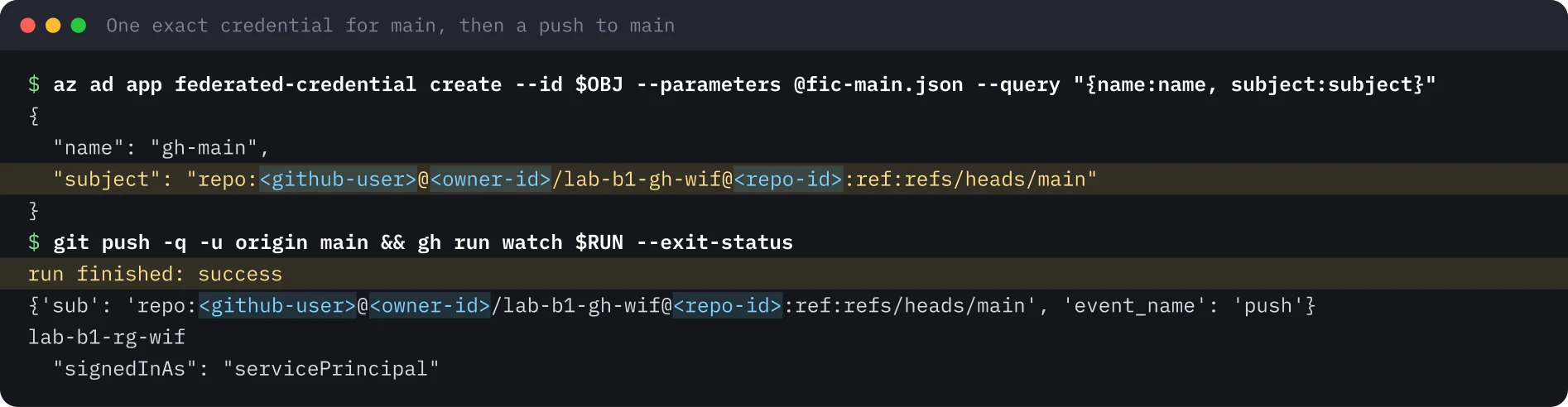
Create the repository before the credential. A new repository sends repo:<owner>@<owner-id>/<repo>@<repo-id>:..., and you only know the two IDs once the repository exists. A subject written the classic way, repo:<owner>/<repo>:ref:refs/heads/main, no longer matches.
{"name": "gh-main", "issuer": "https://token.actions.githubusercontent.com",
 "subject": "repo:<github-user>@<owner-id>/lab-b1-gh-wif@<repo-id>:ref:refs/heads/main",
 "audiences": ["api://AzureADTokenExchange"]}
The run#
main logs in. The workflow prints the claims GitHub presents, then runs azure/login and lists resource groups. My first run failed after the login with “No subscriptions found”, because the Reader role had not propagated yet. A one-minute wait fixed it.
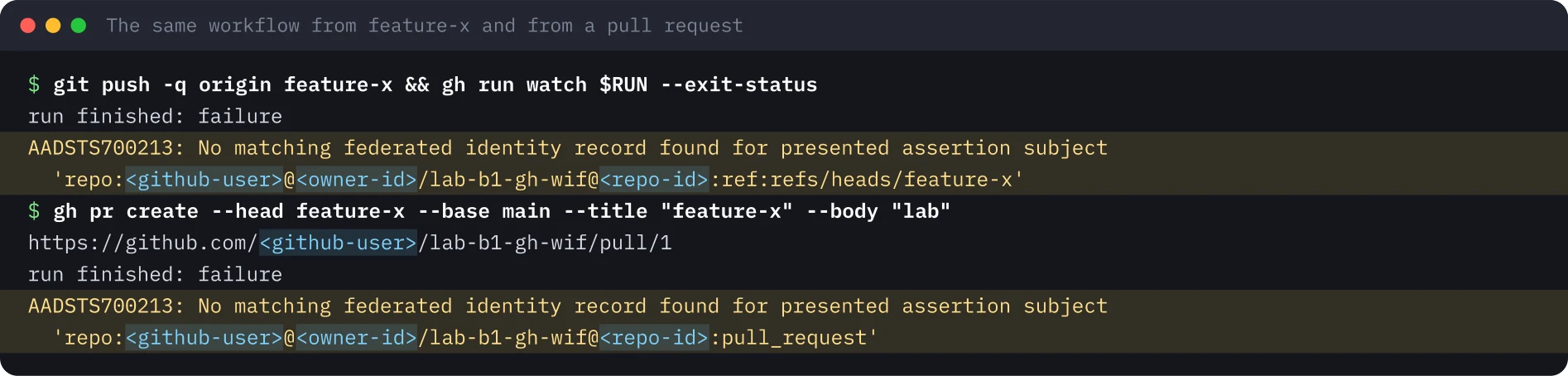
A feature branch and a pull request are refused. Same workflow, different sub. Entra answers AADSTS700213 and the message names the subject it got, which is the fastest way to debug a credential.
release/ with an expression.* A flexible federated credential holds a claimsMatchingExpression instead of a subject. For app registrations I created it through the Graph beta endpoint with az rest. I followed Microsoft’s doc and pinned repository_id as well:
claims['sub'] matches 'repo:<github-user>@<owner-id>/lab-b1-gh-wif@<repo-id>:ref:refs/heads/release/*' and claims['repository_id'] eq '<repo-id>'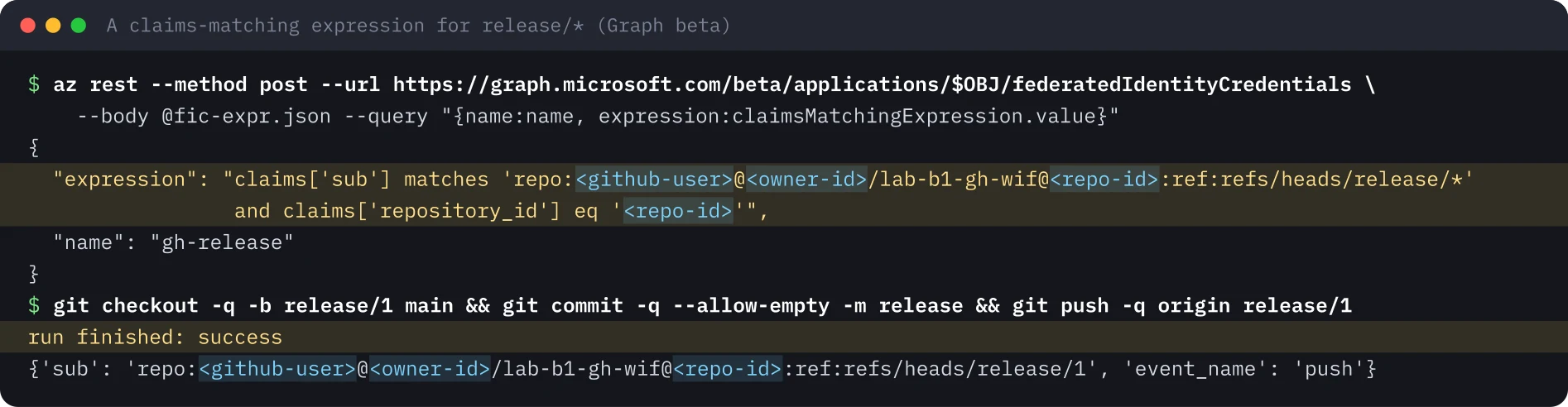
Deeper check: the sub for every kind of run#
A reader asked whether refusing a feature branch and a pull request is a bug. It is not, and I wanted to show it. A small script, probe.sh, asks GitHub for a token, decodes the sub, offers the token to Entra and prints one result line. The workflow runs it on a push to main, a push to a feature branch, pull_request, pull_request_target, a tag push, and a second job that uses an environment. I used a new app and the same private repository.
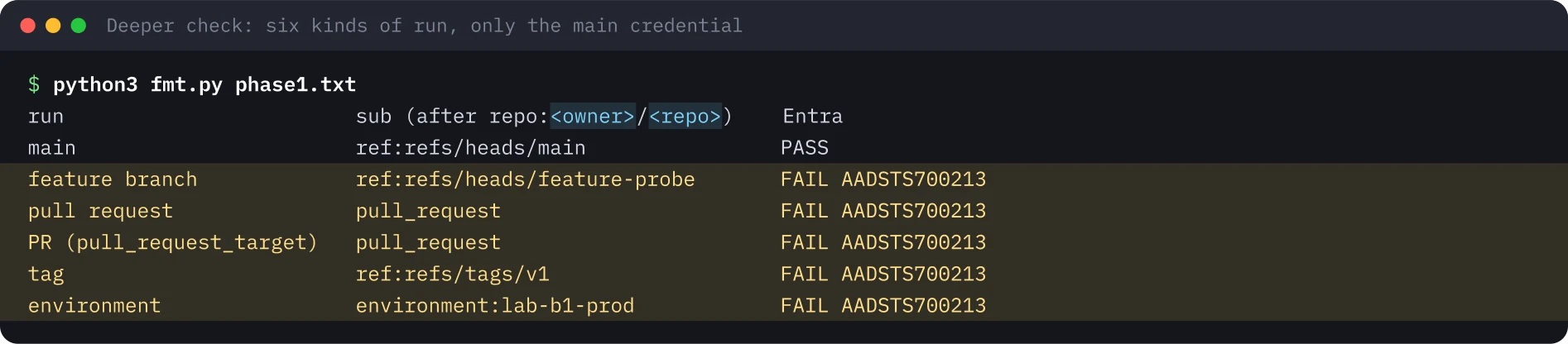
Then I added four credentials: an exact one for the environment, an exact one for pull_request, and two expressions for feature-* branches and v* tags. I re-ran the same runs.
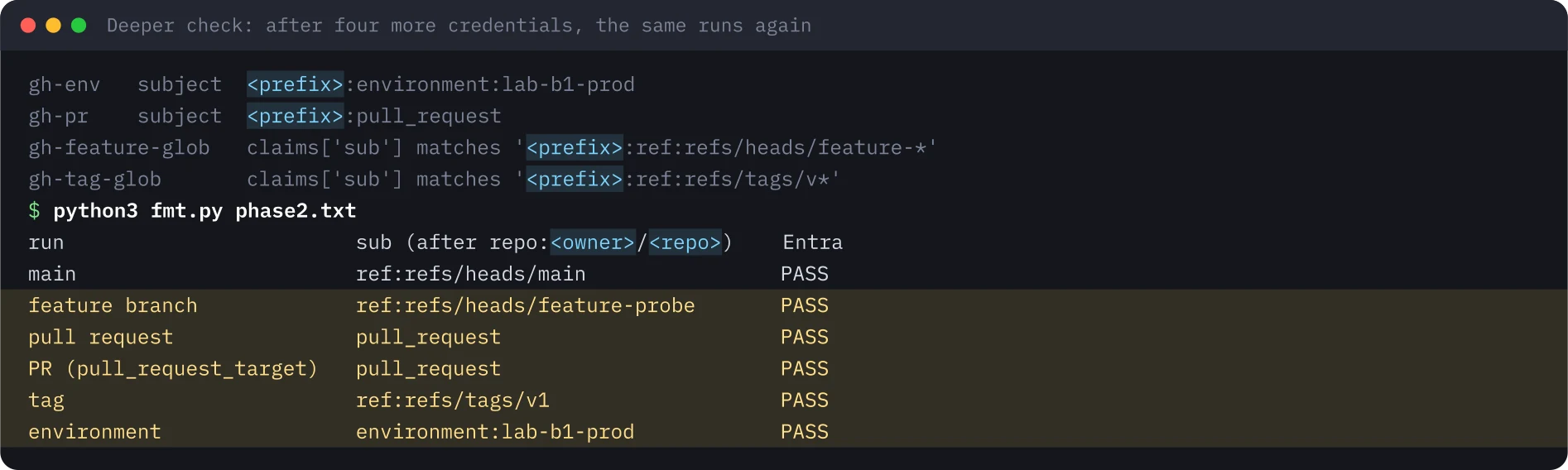
| Run | sub after the repository prefix |
Credential that makes it pass | Only main | After |
|---|---|---|---|---|
| Push to main | ref:refs/heads/main |
Exact subject | Pass | Pass |
| Push to feature-probe | ref:refs/heads/feature-probe |
Expression ...ref:refs/heads/feature-* |
AADSTS700213 | Pass |
pull_request |
pull_request |
Exact subject | AADSTS700213 | Pass |
pull_request_target |
pull_request |
The same pull_request credential |
AADSTS700213 | Pass |
| Tag v1 | ref:refs/tags/v1 |
Expression ...ref:refs/tags/v* |
AADSTS700213 | Pass |
| Job with environment lab-b1-prod | environment:lab-b1-prod |
Exact subject | AADSTS700213 | Pass |
A difference from Microsoft’s doc. The feature-* and v* expressions had only a sub clause, with no repository_id. Entra accepted both and the runs passed. My patterns had the owner and repository IDs inside them, so they were pinned anyway. In a later check the same day, Entra also accepted an owner-wide expression with no repository_id or repository_owner_id clause, and that credential issued a token to a different repository of the same owner. Microsoft’s pages say a GitHub expression must match sub and repository_id or repository_owner_id. I still recommend adding repository_id to every expression. The rule is documented and the feature is in preview, so a sub-only credential may be refused or stop matching later. And the ID check does not depend on writing the pattern right: an owner-wide wildcard already issued a token to another of my repositories, and a name-only sub of an older repository can match a name you no longer own.
pull_request and pull_request_target share one subject#
Both events send sub ending in pull_request, whatever the branch. So a pull_request credential in Entra also trusts pull_request_target jobs. Those run from the base branch, with secrets and with an OIDC token. If such a workflow checks out the pull request head, the author of the pull request runs code with your cloud identity. My probe workflow used the default checkout, which takes the base branch. Do not change that in a workflow that can get a token.
A job that uses an environment is the other surprise. It sends environment:<name> instead of the branch. Moving a deploy job into an environment breaks a credential written for main.
Fork pull requests: from the docs, not tested#
I did not test a pull request from a fork. That needs a second GitHub account, and I will not use one that is not mine. What follows is GitHub’s documentation and my reading of it.
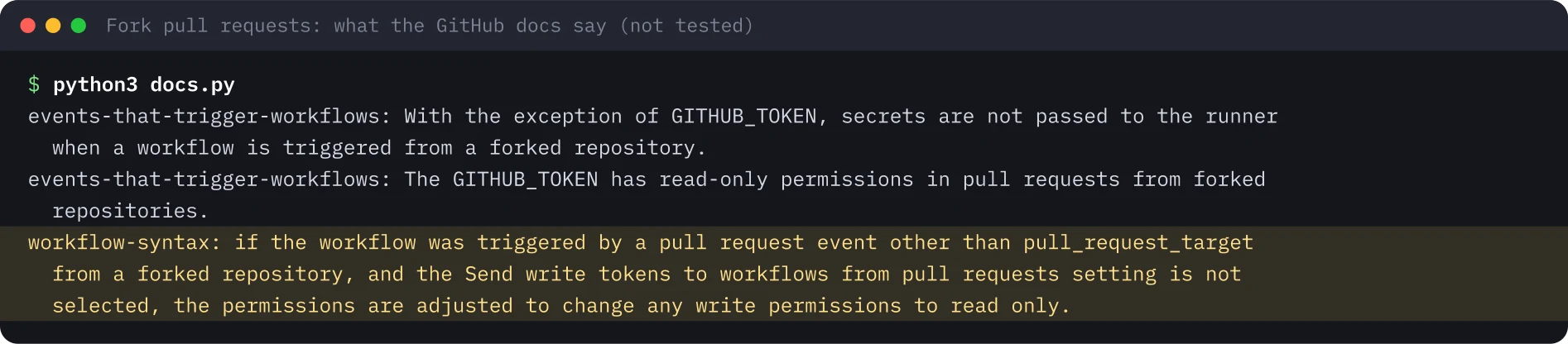
id-token: write is a write permission. For a pull_request from a fork it is lowered to read, so my reading is that the job gets no OIDC token at all. probe.sh handles that case and would print “no OIDC token was offered”. I have not seen it happen. pull_request_target is the exception in those docs, and that is the trap above.
Gotchas#
- Read the
subfrom a real run before you write a credential. The log line and the AADSTS700213 message both show it. - Wait after the role assignment. Without the wait, the login worked and the next command failed with “No subscriptions found”.
- Expressions are preview and Graph beta. For app registrations I used
az rest. Microsoft’s concept page says the CLI has no explicit support yet, whileaz identity federated-credential(user-assigned managed identities) lists preview parameters for it. - Old repositories keep the name-only
subuntil someone opts in. Write the credential for the format the repository really sends.
Security takeaways#
- Use federation instead of a client secret in CI. There is nothing to store, leak or rotate.
- Use the narrowest credential that fits: exact for main and for an environment, an expression only for a real family of refs.
- Keep the owner and repository IDs in every subject and pattern, and add
repository_idto every expression. - Treat a
pull_requestcredential as also trustingpull_request_target. Never check out untrusted code in a workflow that can get a token. - Delete credentials whose repository is gone. With the old name-only format, someone else can claim the name.
Clean up#
I deleted the app registration, which removes its credentials, deleted the resource group, checked both were gone and archived the private repository. After the deeper check I also removed the extra app, the branch, the tag, the pull request, the environment and the variables.

What was not run#
- A pull request from a fork. That part rests on GitHub’s docs.
- An existing repository opted in to the immutable format, and GitHub’s preview endpoint for the subject prefix.
- A role that can deploy. The app only had Reader on one empty resource group.
- An expression with
repository_owner_idorjob_workflow_ref. - Other clouds. GitHub documents AWS, Google Cloud and Vault, and I only ran Azure.
Run on 20 November 2026 with the Azure CLI, the GitHub CLI and azure/login@v2 on a GitHub-hosted runner, in a throwaway tenant and a private repository. Terminal images were re-rendered from the saved output, with users, IDs and timestamps replaced by placeholders.
Repeat this lab#
About 30 minutes: the Azure CLI and the GitHub CLI on your machine, a throwaway Entra tenant and subscription, and a GitHub account that is yours. It costs nothing: one app registration, one empty resource group, a private repository and a few minutes of GitHub Actions time. Open each step, copy the blocks and compare your output with mine.
Every value in angle brackets is a placeholder for your own test environment. Nothing on this page is a real identifier or secret.
Set your variables once
# Paste into every terminal you use for this lab. Replace each <PLACEHOLDER> with a value from your own test tenant and GitHub account.
export GH_USER='<GITHUB_USER>'
export TENANT='<TENANT_ID>'
export SUBSCRIPTION='<SUBSCRIPTION_ID>'
export REPO='lab-b1-gh-wif'
export RG='lab-b1-rg-wif'
export LOCATION='<AZURE_REGION>'
mkdir -p gh-lab && cd gh-lab
0 of 9 steps done
Step 1Create a resource group, an app registration and a Reader role
Goal. Create the identity the pipeline will become and give it Reader on one empty resource group, nothing more. A login that works then proves the federation and not a broad permission.
Prerequisites
- Azure CLI signed in to a throwaway tenant and subscription, with rights to create app registrations and role assignments
- jq and python3
az account set --subscription "$SUBSCRIPTION"
az group create -n $RG -l $LOCATION --query "{name:name, location:location}" -o json
export APPID=$(az ad app create --display-name lab-b1-gh-app --sign-in-audience AzureADMyOrg --query appId -o tsv)
export OBJ=$(az ad app show --id $APPID --query id -o tsv)
az ad sp create --id $APPID --query id -o tsv > /dev/null
echo "app registration created"
sleep 15
az role assignment create --assignee $APPID --role Reader --scope $(az group show -n $RG --query id -o tsv) -o none
az role assignment list --assignee $APPID --all --query "[].{role:roleDefinitionName, scope:scope}" -o json
Expected output
{
  "location": "<AZURE_REGION>",
  "name": "lab-b1-rg-wif"
}
app registration created
[
  {
    "role": "Reader",
    "scope": "/subscriptions/<SUBSCRIPTION_ID>/resourceGroups/lab-b1-rg-wif"
  }
]Step 2Create the private repo first, then set three IDs as variables
Goal. Add a workflow that prints the claims GitHub presents and then runs azure/login. Create the repository before the federated credential: new repositories use an immutable sub with the owner and repository IDs, and those exist only after the repository does.
Prerequisites
- GitHub CLI signed in, with permission to create a private repository
- The variables APPID and OBJ from the previous step in this terminal
- Save login.yml as .github/workflows/login.yml inside gh-lab before you run repo.sh
name: login
on:
  push:
    branches: [main, feature-x, 'release/**']
  pull_request:
permissions:
  id-token: write
  contents: read
jobs:
  azure:
    runs-on: ubuntu-latest
    steps:
      - name: Show the claims GitHub presents to Entra
        run: |
          TOKEN=$(curl -s -H "Authorization: bearer $ACTIONS_ID_TOKEN_REQUEST_TOKEN" "$ACTIONS_ID_TOKEN_REQUEST_URL&audience=api://AzureADTokenExchange" | jq -r .value)
          echo "$TOKEN" | python3 -c 'import sys,json,base64;t=sys.stdin.read().split(".")[1];c=json.loads(base64.urlsafe_b64decode(t+"="*(-len(t)%4)));print({k:c[k] for k in ("sub","event_name","ref")})'
      - uses: azure/login@v2
        with:
          client-id: ${{ vars.AZURE_CLIENT_ID }}
          tenant-id: ${{ vars.AZURE_TENANT_ID }}
          subscription-id: ${{ vars.AZURE_SUBSCRIPTION_ID }}
      - name: Use the identity
        run: |
          az group list --query "[].name" -o tsv
az account show --query "{signedInAs: user.type}" -o jsongit init -q -b main && git add -A && git commit -q -m "Login workflow"
gh repo create $GH_USER/$REPO --private --source . --remote origin
export OWNERID=$(gh api repos/$GH_USER/$REPO --jq .owner.id)
export REPOID=$(gh api repos/$GH_USER/$REPO --jq .id)
for kv in AZURE_CLIENT_ID=$APPID AZURE_TENANT_ID=$TENANT AZURE_SUBSCRIPTION_ID=$SUBSCRIPTION; do gh variable set ${kv%%=*} --body ${kv#*=} -R $GH_USER/$REPO; done
gh variable list -R $GH_USER/$REPO | cut -f1Expected output
https://github.com/<GITHUB_USER>/lab-b1-gh-wif
AZURE_CLIENT_ID
AZURE_SUBSCRIPTION_ID
AZURE_TENANT_IDStep 3Trust main with one exact credential and push
Goal. Write a federated credential whose subject is the exact sub of a push to main, wait for the role to propagate, push, and see the job log in as a service principal.
Prerequisites
- The variables OBJ, OWNERID and REPOID from the previous steps in this terminal
- No secret is created in this step
cat > fic-main.json <<EOF
{"name": "gh-main", "issuer": "https://token.actions.githubusercontent.com",
 "subject": "repo:$GH_USER@$OWNERID/$REPO@$REPOID:ref:refs/heads/main",
 "audiences": ["api://AzureADTokenExchange"]}
EOF
az ad app federated-credential create --id $OBJ --parameters @fic-main.json --query "{name:name, subject:subject}" -o json
sleep 60  # give the Reader role assignment time to propagate
git push -q -u origin main 2>&1 | tail -1
for i in $(seq 1 30); do RUN=$(gh run list -R $GH_USER/$REPO --branch main --limit 1 --json databaseId -q ".[0].databaseId"); [ -n "$RUN" ] && break; sleep 3; done
gh run watch $RUN -R $GH_USER/$REPO --exit-status > /dev/null 2>&1; echo "run finished: $(gh run view $RUN -R $GH_USER/$REPO --json conclusion -q .conclusion)"
gh run view $RUN -R $GH_USER/$REPO --log | grep -E "'sub'|Login successful|signedInAs|lab-b1-rg-wif" | sed -E "s/^[^\t]*\t[^\t]*\t[0-9TZ:.-]+ //" | sort -u
Expected output
{
  "name": "gh-main",
  "subject": "repo:<GITHUB_USER>@<OWNER_ID>/lab-b1-gh-wif@<REPO_ID>:ref:refs/heads/main"
}
run finished: success
  "signedInAs": "servicePrincipal"
lab-b1-rg-wif
{'sub': 'repo:<GITHUB_USER>@<OWNER_ID>/lab-b1-gh-wif@<REPO_ID>:ref:refs/heads/main', 'event_name': 'push', 'ref': 'refs/heads/main'}Step 4Negative tests: a feature branch and a pull request
Goal. Push a branch the credential does not cover, then open a pull request from it. Both logins fail with AADSTS700213, and the message names the exact subject that was presented.
Prerequisites
- The main run from the previous step finished with success
git checkout -q -b feature-x && echo "# change" >> README.md && git add -A && git commit -q -m "feature-x"
git push -q origin feature-x 2>&1 | tail -1
for i in $(seq 1 30); do RUN=$(gh run list -R $GH_USER/$REPO --branch feature-x --limit 1 --json databaseId -q ".[0].databaseId"); [ -n "$RUN" ] && break; sleep 3; done
gh run watch $RUN -R $GH_USER/$REPO --exit-status > /dev/null 2>&1; echo "run finished: $(gh run view $RUN -R $GH_USER/$REPO --json conclusion -q .conclusion)"
gh run view $RUN -R $GH_USER/$REPO --log-failed | grep -E "AADSTS|'sub'" | sed -E "s/^[^\t]*\t[^\t]*\t[0-9TZ:.-]+ //" | cut -c1-230 | sort -u
gh pr create -R $GH_USER/$REPO --head feature-x --base main --title "feature-x" --body "lab"
for i in $(seq 1 30); do RUN=$(gh run list -R $GH_USER/$REPO --event pull_request --limit 1 --json databaseId -q ".[0].databaseId"); [ -n "$RUN" ] && break; sleep 3; done
gh run watch $RUN -R $GH_USER/$REPO --exit-status > /dev/null 2>&1; echo "run finished: $(gh run view $RUN -R $GH_USER/$REPO --json conclusion -q .conclusion)"
gh run view $RUN -R $GH_USER/$REPO --log-failed | grep -E "AADSTS" | sed -E "s/^[^\t]*\t[^\t]*\t[0-9TZ:.-]+ //" | cut -c1-230 | sort -u
Expected output
run finished: failure
##[error]AADSTS700213: No matching federated identity record found for presented assertion subject 'repo:<GITHUB_USER>@<OWNER_ID>/lab-b1-gh-wif@<REPO_ID>:ref:refs/heads/feature-x'. Check your federated identity credential Subject, Audience and Issu
https://github.com/<GITHUB_USER>/lab-b1-gh-wif/pull/1
run finished: failure
##[error]AADSTS700213: No matching federated identity record found for presented assertion subject 'repo:<GITHUB_USER>@<OWNER_ID>/lab-b1-gh-wif@<REPO_ID>:pull_request'. Check your federated identity credential Subject, Audience and IssuStep 5Allow release/* with a claims-matching expression
Goal. Create a flexible federated credential through the Graph beta endpoint: sub matches the release branches of this repository, and repository_id is checked on its own, as Microsoft's doc asks. Then push release/1.
Prerequisites
- Flexible federated credentials are in preview; for app registrations they are created with az rest against Graph beta
cat > fic-expr.json <<EOF
{"name": "gh-release", "issuer": "https://token.actions.githubusercontent.com",
 "audiences": ["api://AzureADTokenExchange"],
 "claimsMatchingExpression": {"languageVersion": 1,
  "value": "claims['sub'] matches 'repo:$GH_USER@$OWNERID/$REPO@$REPOID:ref:refs/heads/release/*' and claims['repository_id'] eq '$REPOID'"}}
EOF
az rest --method post --url https://graph.microsoft.com/beta/applications/$OBJ/federatedIdentityCredentials --body @fic-expr.json --query "{name:name, expression:claimsMatchingExpression.value}" -o json 2>&1 | grep -v WARNING
git checkout -q -b release/1 main && git commit -q --allow-empty -m "release" && git push -q origin release/1 2>&1 | tail -1
for i in $(seq 1 30); do RUN=$(gh run list -R $GH_USER/$REPO --branch release/1 --limit 1 --json databaseId -q ".[0].databaseId"); [ -n "$RUN" ] && break; sleep 3; done
gh run watch $RUN -R $GH_USER/$REPO --exit-status > /dev/null 2>&1; echo "run finished: $(gh run view $RUN -R $GH_USER/$REPO --json conclusion -q .conclusion)"
gh run view $RUN -R $GH_USER/$REPO --log | grep -E "'sub'|Login successful" | sed -E "s/^[^\t]*\t[^\t]*\t[0-9TZ:.-]+ //" | sort -u
Expected output
{
  "expression": "claims['sub'] matches 'repo:<GITHUB_USER>@<OWNER_ID>/lab-b1-gh-wif@<REPO_ID>:ref:refs/heads/release/*' and claims['repository_id'] eq '<REPO_ID>'",
  "name": "gh-release"
}
run finished: success
{'sub': 'repo:<GITHUB_USER>@<OWNER_ID>/lab-b1-gh-wif@<REPO_ID>:ref:refs/heads/release/1', 'event_name': 'push', 'ref': 'refs/heads/release/1'}Step 6Deeper check: print the sub for six kinds of run
Goal. Run probe.sh on a push to main, a feature branch, pull_request, pull_request_target, a tag and a job with an environment. It decodes the sub, offers the token to Entra and prints one RESULT line. With only the main credential, only main passes.
Prerequisites
- Save probe.sh in the repository root, probe.yml under .github/workflows/ and fmt.py next to them
- This step replaces login.yml with probe.yml, so only the probe runs
#!/usr/bin/env bash
# Print the sub claim GitHub issues for this run, then try to exchange it at Entra.
JOB=$1
if [ -z "$ACTIONS_ID_TOKEN_REQUEST_URL" ]; then echo "RESULT job=$JOB event=$GITHUB_EVENT_NAME ref=$GITHUB_REF sub=none entra=no OIDC token was offered to this job"; exit 0; fi
T=$(curl -s -H "Authorization: bearer $ACTIONS_ID_TOKEN_REQUEST_TOKEN" "$ACTIONS_ID_TOKEN_REQUEST_URL&audience=api://AzureADTokenExchange" | jq -r .value)
SUB=$(echo "$T" | cut -d. -f2 | tr '_-' '/+' | awk '{while(length($0)%4)$0=$0"=";print}' | base64 -d 2>/dev/null | jq -r .sub)
R=$(curl -s -X POST "https://login.microsoftonline.com/$TID/oauth2/v2.0/token" -d client_id=$CID -d grant_type=client_credentials -d scope=https://graph.microsoft.com/.default -d client_assertion_type=urn:ietf:params:oauth:client-assertion-type:jwt-bearer -d client_assertion="$T")
OUT=$(echo "$R" | jq -r 'if .access_token then "token issued" else (.error_description | split(":")[0]) end')
echo "RESULT job=$JOB event=$GITHUB_EVENT_NAME ref=$GITHUB_REF sub=$SUB entra=$OUT"name: probe
on:
push:
branches: [main, 'feature-*']
tags: ['v*']
pull_request:
pull_request_target:
permissions:
id-token: write
contents: read
env:
CID: ${{ vars.AZURE_CLIENT_ID }}
TID: ${{ vars.AZURE_TENANT_ID }}
jobs:
plain:
runs-on: ubuntu-latest
steps:
- uses: actions/checkout@v4
- run: ./probe.sh plain
with-environment:
if: github.event_name == 'push' && github.ref == 'refs/heads/main'
runs-on: ubuntu-latest
environment: lab-b1-prod
steps:
- uses: actions/checkout@v4
- run: ./probe.sh environmentimport sys, re
rows = []
for l in open(sys.argv[1]):
m = re.search(r'job=(\S+) event=(\S+) ref=(\S+) sub=(\S+) entra=(.*)', l)
if not m: continue
job, ev, ref, sub, res = m.groups()
ctx = sub.split(':', 1)[1].split(':', 1)[1] if sub.count(':') > 1 else sub
ctx = re.sub(r'^repo:[^:]*:', '', sub)
case = {'refs/heads/main': 'main', 'refs/heads/feature-probe': 'feature branch', 'refs/tags/v1': 'tag', }.get(ref, 'pull request' if ev == 'pull_request' else 'PR (pull_request_target)' if ev == 'pull_request_target' else ref)
if job == 'environment': case = 'environment'
if ev == 'pull_request_target': case = 'PR (pull_request_target)'
rows.append((case, ctx, 'PASS' if 'issued' in res else 'FAIL ' + res))
order = ['main', 'feature branch', 'pull request', 'PR (pull_request_target)', 'tag', 'environment']
rows.sort(key=lambda r: order.index(r[0]))
print('%-26s %-34s %s' % ('run', 'sub (after repo:<owner>/<repo>)', 'Entra'))
for r in rows: print('%-26s %-34s %s' % r)git checkout -q main && git rm -q .github/workflows/login.yml
chmod +x probe.sh && git add probe.sh .github/workflows/probe.yml
gh api -X PUT repos/$GH_USER/$REPO/environments/lab-b1-prod > /dev/null
git commit -q -m probe && git push -q origin main
git switch -q -c feature-probe && echo x > note.txt && git add . && git commit -q -m f && git push -q -u origin feature-probe
gh pr create --head feature-probe --base main --title probe --body lab
git tag v1 main && git push -q origin v1
sleep 60
RUN_IDS=$(gh run list --workflow probe.yml --limit 5 --json databaseId -q ".[].databaseId")
for id in $RUN_IDS; do gh run view $id --log | grep -o "RESULT.*"; done | sort -u > phase1.txt
python3 fmt.py phase1.txtExpected output
run                        sub (after repo:<owner>/<repo>)    Entra
main                       ref:refs/heads/main                PASS
feature branch             ref:refs/heads/feature-probe       FAIL AADSTS700213
pull request               pull_request                       FAIL AADSTS700213
PR (pull_request_target)   pull_request                       FAIL AADSTS700213
tag                        ref:refs/tags/v1                   FAIL AADSTS700213
environment environment:lab-b1-prod FAIL AADSTS700213Step 7Deeper check: add the credentials that make each run pass
Goal. Add an exact credential for the environment, an exact one for pull_request, and two expressions for feature-* and v*. Re-run the same runs: all six pass. Note that the pull_request credential also lets the pull_request_target run in.
Prerequisites
- RUN_IDS from the previous step still set in this terminal
- These two expressions match only sub; Microsoft's doc asks for repository_id as well, see the post
P="repo:$GH_USER@$OWNERID/$REPO@$REPOID"
mk() { az ad app federated-credential create --id $OBJ --parameters "{\"name\":\"$1\",\"issuer\":\"https://token.actions.githubusercontent.com\",\"subject\":\"$2\",\"audiences\":[\"api://AzureADTokenExchange\"]}" -o none; }
mk gh-env "$P:environment:lab-b1-prod"
mk gh-pr  "$P:pull_request"
for n in feature:heads/feature- tag:tags/v; do
  cat > expr-${n%%:*}.json <<EOF
{"name":"gh-${n%%:*}-glob","issuer":"https://token.actions.githubusercontent.com","audiences":["api://AzureADTokenExchange"],
 "claimsMatchingExpression":{"languageVersion":1,"value":"claims['sub'] matches '$P:ref:refs/${n#*:}*'"}}
EOF
  az rest -m POST -u "https://graph.microsoft.com/beta/applications/$OBJ/federatedIdentityCredentials" --headers Content-Type=application/json -b @expr-${n%%:*}.json -o none
done
sleep 40
for id in $RUN_IDS; do gh run rerun $id; done
sleep 60
for id in $RUN_IDS; do gh run view $id --attempt 2 --log | grep -o 'RESULT.*'; done | sort -u > phase2.txt
python3 fmt.py phase2.txt
Expected output
run                        sub (after repo:<owner>/<repo>)    Entra
main                       ref:refs/heads/main                PASS
feature branch             ref:refs/heads/feature-probe       PASS
pull request               pull_request                       PASS
PR (pull_request_target)   pull_request                       PASS
tag                        ref:refs/tags/v1                   PASS
environment environment:lab-b1-prod PASSStep 8Fork pull requests: print what the GitHub docs say
Goal. I could not test a real fork. docs.py prints the three sentences from GitHub's docs that decide it: no secrets for forks, a read-only GITHUB_TOKEN, and write permissions lowered to read for every pull request event except pull_request_target.
Prerequisites
- python3 with internet access; this step only reads docs.github.com
- Not tested: whether a fork pull_request job gets an OIDC token. My reading of the docs is that it does not
import re, html, urllib.request
t = urllib.request.urlopen('https://docs.github.com/en/actions/reference/workflows-and-actions/events-that-trigger-workflows').read().decode()
t = html.unescape(re.sub(r'<[^>]+>', ' ', t)); t = re.sub(r'\s+', ' ', t)
for pat in [r"With the exception of GITHUB_TOKEN , secrets are not passed to the runner when a workflow is triggered from a forked repository\.", r"The GITHUB_TOKEN has read-only permissions in pull requests from forked repositories\."]:
    print('events-that-trigger-workflows: ' + re.search(pat, t).group(0).replace(' ,', ','))
t = urllib.request.urlopen('https://docs.github.com/en/actions/reference/workflows-and-actions/workflow-syntax').read().decode()
t = html.unescape(re.sub(r'<[^>]+>', ' ', t)); t = re.sub(r'\s+', ' ', t)
print('workflow-syntax: ' + re.search(r"if the workflow was triggered by a pull request event other than pull_request_target from a forked repository.{0,160}?read only\.", t).group(0))python3 docs.pyExpected output
events-that-trigger-workflows: With the exception of GITHUB_TOKEN, secrets are not passed to the runner when a workflow is triggered from a forked repository.
events-that-trigger-workflows: The GITHUB_TOKEN has read-only permissions in pull requests from forked repositories.
workflow-syntax: if the workflow was triggered by a pull request event other than pull_request_target from a forked repository, and the Send write tokens to workflows from pull requests setting is not selected, the permissions are adjusted to change any write permissions to read only.Step 9Clean up: Entra, Azure and the repo
Goal. Delete the app registration, which removes all its federated credentials, delete the resource group, check both are gone and archive or delete the private repository.
Prerequisites
- Run from the gh-lab folder with the env block and OBJ still set
az ad app delete --id $OBJ
az group delete -n $RG --yes
az group exists -n $RG
az ad app list --display-name lab-b1-gh-app --query "length(@)" -o tsv
gh repo archive $GH_USER/$REPO --yes 2>&1 | tail -1
Expected output
false
0Sources#
- GitHub Changelog, 23 Apr 2026 (edited 10 Jun 2026): Immutable subject claims for GitHub Actions OIDC tokens
- GitHub Docs: OpenID Connect reference
- GitHub Docs: Events that trigger workflows
- GitHub Docs: Workflow syntax (permissions)
- GitHub Docs: Securely using pull_request_target
- Microsoft Learn: Configure an app to trust an external identity provider
- Microsoft Learn: Flexible federated identity credentials (preview)
- Microsoft Learn: Migrate GitHub Actions federated credentials to immutable subjects
Discuss this post#
Found it useful? Share it, and tell me what you think.
This post as Markdown · RSS · JSON feed
New posts by email
One email a week with new posts and labs. Unsubscribe anytime.
Your address is stored with Kit, which sends the emails. Details