In breve
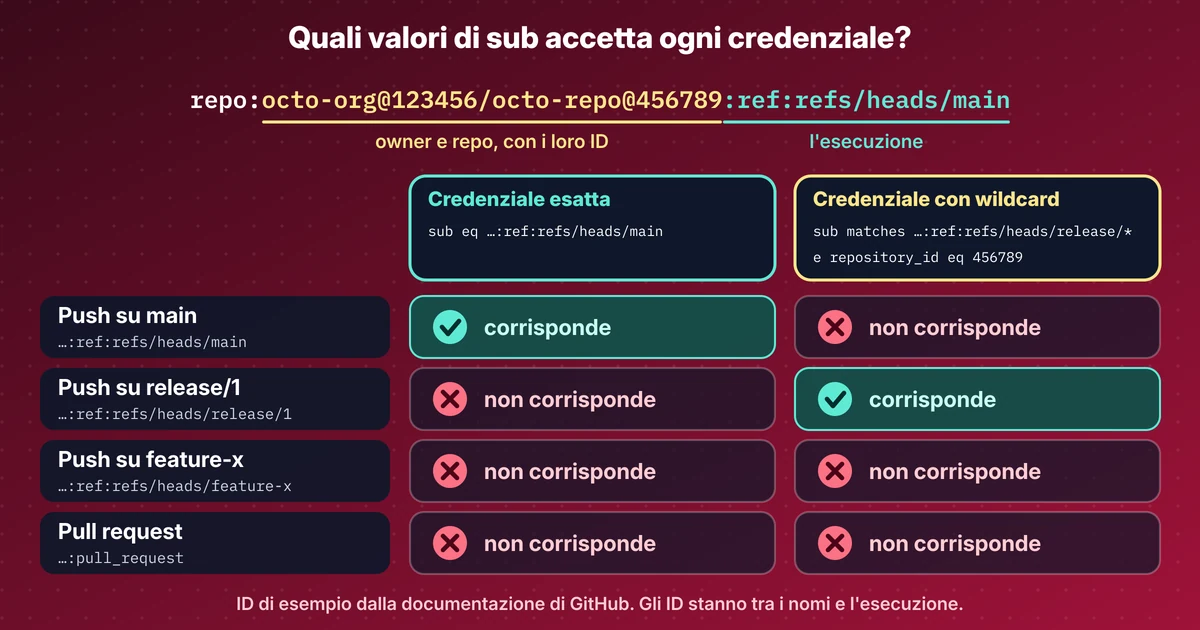
- Un workflow GitHub può accedere ad Azure senza client secret. GitHub firma un token di breve durata e una credenziale federata in Entra si fida di un solo claim sub esatto.
- I repository nuovi inviano un sub immutabile con dentro gli ID di owner e repository. Crea prima il repository, leggi gli ID, poi scrivi la credenziale.
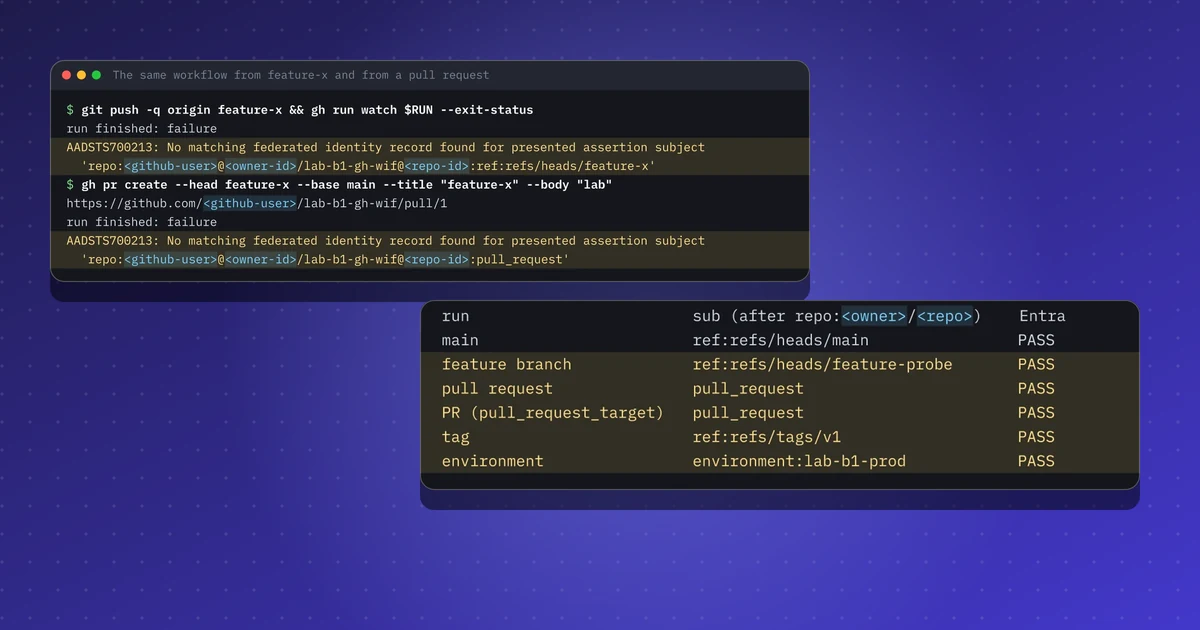
- Con la sola credenziale per main è passato 1 tipo di run su 6. Una credenziale per l'environment, una per pull_request e due espressioni con wildcard hanno portato a 6 su 6.
- pull_request e pull_request_target inviano lo stesso sub, quindi una credenziale pull_request si fida anche dei job pull_request_target, che girano con i segreti. Lì non fare mai checkout della head della PR.
- Le pull request da fork non le ho provate. Secondo la documentazione GitHub non ricevono permessi di scrittura, quindi mi aspetto nessun token, ma non l'ho visto.
Ripeti questo lab
Ho scritto questo lab perché tu possa rifarlo per conto tuo. Ogni passo ha i comandi da copiare e l'output che ho ottenuto io, e puoi segnarlo come fatto. Le spunte restano solo nel tuo browser.
Copia un prompt già pronto per Claude Code, Cursor, Codex o un altro agente di codice. Solo per ambienti di test.
Mostra il prompt
I want to run a hands-on lab from iamops.dev, and I would like your help to do it safely.

Lab: Da GitHub Actions ad Azure con la workload identity federation: quali run ricevono un token, e perché
Read the whole lab here (Markdown): https://iamops.dev/it/github-actions-azure-workload-identity-federation.md

What the lab needs before the first step:
- Azure CLI signed in to a throwaway tenant and subscription, with rights to create app registrations and role assignments
- jq and python3
- Values I have to set myself (the lab uses placeholders): <GITHUB_USER>, <TENANT_ID>, <SUBSCRIPTION_ID>, <AZURE_REGION>

How I want you to work:
1. Read the lab from start to finish first (each step lists its own prerequisites). Then check that the prerequisites are in place and that the tool versions match what the lab expects. Tell me what is missing before you run anything.
2. Run one step at a time. Before each command, show it to me and say in a sentence what it does.
3. Ask me before anything that costs money, creates cloud resources, touches a real tenant or account, or deletes anything. Wait for my answer.
4. Use the placeholders from the lab. Never paste real secrets, tokens or production identities into a command, a file or this chat. If a value is needed, tell me where to set it myself.
5. After each step, compare the output with the expected output in the lab. If it does not match, stop and tell me what differs. Do not carry on or invent a fix without asking me.
6. At the end, report what passed, what failed and which cleanup you did. Then offer to tick the steps off for me. The lab page keeps ticks only in my browser, so if you cannot do that, list the steps I should tick.

This lab is for test environments only. Do not run it against production, or against a tenant or account that holds real data or real users.

You may answer in my language.
Una pipeline di deploy con dentro un client secret è un segreto che aspetta di trapelare. GitHub Actions può accedere ad Azure senza: GitHub firma un token OIDC di breve durata per il job ed Entra se ne fida tramite una credenziale federata. Quest’anno sono cambiate due cose. Dal 15 luglio 2026 i repository nuovi ricevono un claim sub immutabile con dentro gli ID di owner e repository, e le credenziali con wildcard di Entra sono ancora in preview. Ho raccolto entrambe le notizie in un articolo. Questo lab è la parte pratica.
Cosa mostra questo lab#
Una app registration con Reader su un solo resource group vuoto, un repository privato, nessun segreto da nessuna parte. Il lab:
- Si fida del branch main con una credenziale esatta e vede
azure/loginriuscire. - Fa push di un feature branch e apre una pull request, e li vede rifiutati entrambi con AADSTS700213.
- Consente
release/*con una claims-matching expression. - Stampa il
subesatto di sei tipi di run, poi aggiunge le credenziali che li fanno passare tutti. - Guarda le pull request da fork, solo dalla documentazione, perché non ho potuto provarle.
Preparazione#
Usa un tenant e una sottoscrizione usa e getta, e un account GitHub tuo. La app registration riceve Reader su un solo resource group vuoto, così un login riuscito prova la federazione e nient’altro. I tre ID che servono al workflow (client, tenant, sottoscrizione) non sono segreti e vanno nelle variabili del repository.
Crea il repository prima della credenziale. Un repository nuovo invia repo:<owner>@<owner-id>/<repo>@<repo-id>:..., e i due ID li conosci solo quando il repository esiste. Un subject scritto alla vecchia maniera, repo:<owner>/<repo>:ref:refs/heads/main, non corrisponde più.
{"name": "gh-main", "issuer": "https://token.actions.githubusercontent.com",
 "subject": "repo:<github-user>@<owner-id>/lab-b1-gh-wif@<repo-id>:ref:refs/heads/main",
"audiences": ["api://AzureADTokenExchange"]}L’esecuzione#
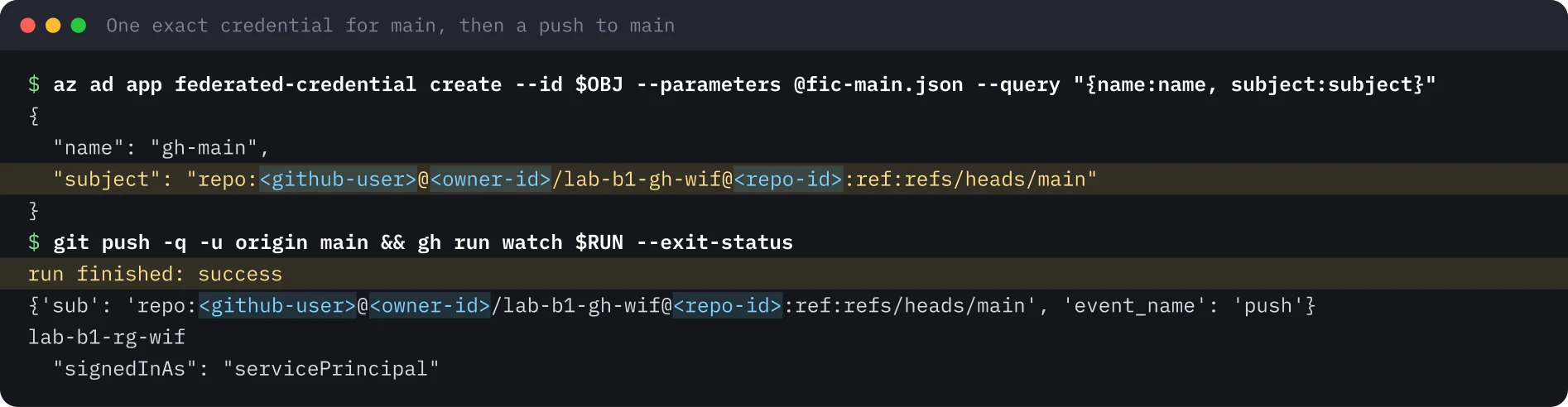
main accede. Il workflow stampa i claim che GitHub presenta, poi esegue azure/login ed elenca i resource group. Il mio primo run è fallito dopo il login con “No subscriptions found”, perché il ruolo Reader non si era ancora propagato. Un minuto di attesa ha risolto.
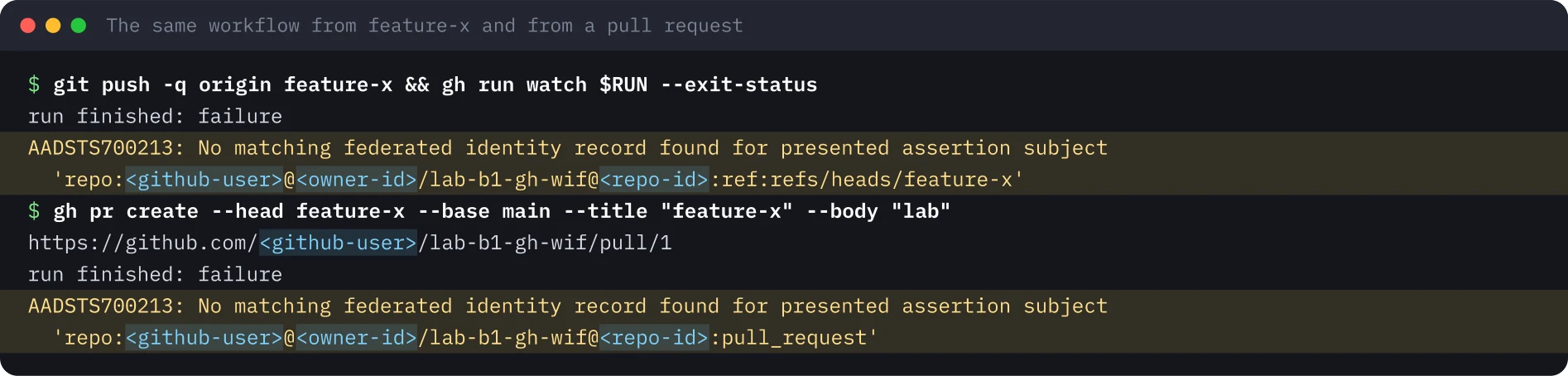
Un feature branch e una pull request vengono rifiutati. Stesso workflow, sub diverso. Entra risponde AADSTS700213 e il messaggio riporta il subject ricevuto, che è il modo più rapido per correggere una credenziale.
release/ con un’espressione.* Una credenziale federata flessibile contiene una claimsMatchingExpression al posto del subject. Per le app registration l’ho creata con az rest sull’endpoint beta di Graph. Ho seguito la documentazione Microsoft e ho fissato anche repository_id:
claims['sub'] matches 'repo:<github-user>@<owner-id>/lab-b1-gh-wif@<repo-id>:ref:refs/heads/release/*' and claims['repository_id'] eq '<repo-id>'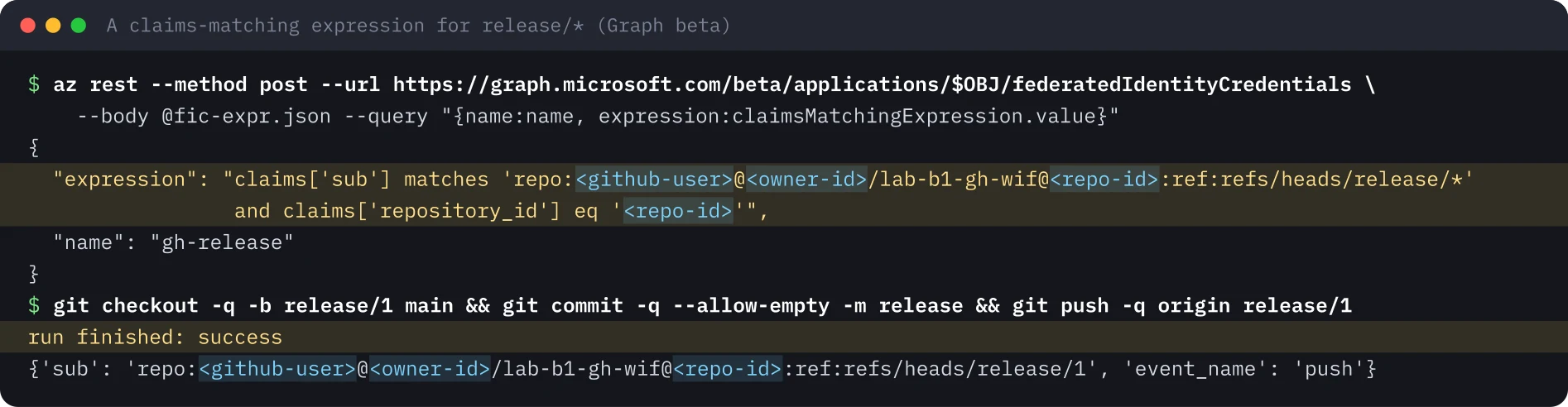
Verifica approfondita: il sub di ogni tipo di run#
Un lettore mi ha chiesto se il rifiuto di un feature branch e di una pull request sia un bug. Non lo è, e volevo dimostrarlo. Un piccolo script, probe.sh, chiede un token a GitHub, decodifica il sub, offre il token a Entra e stampa una riga di risultato. Il workflow lo esegue su un push a main, un push su un feature branch, pull_request, pull_request_target, un push di tag e un secondo job che usa un environment. Ho usato una nuova app e lo stesso repository privato.
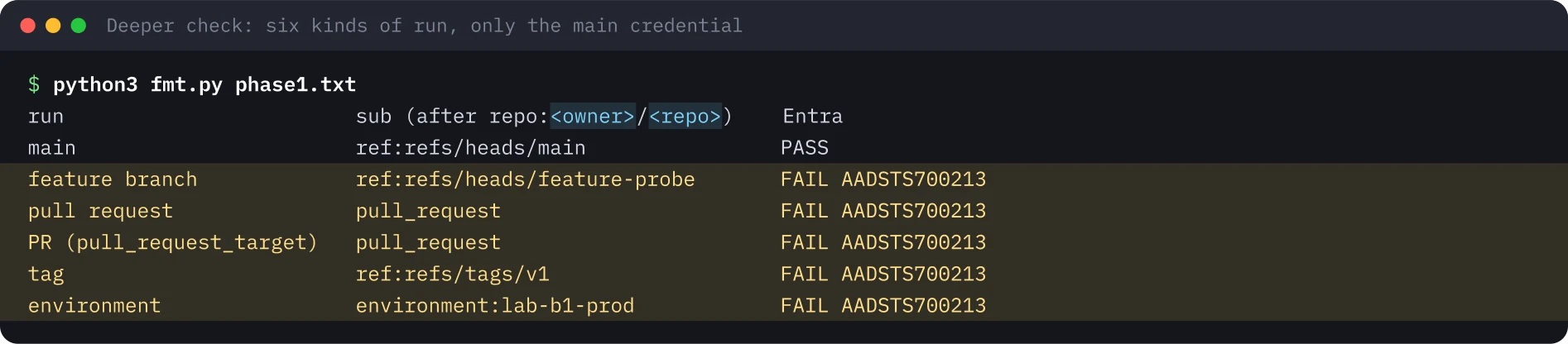
Poi ho aggiunto quattro credenziali: una esatta per l’environment, una esatta per pull_request e due espressioni per i branch feature-* e i tag v*. Ho rilanciato gli stessi run.
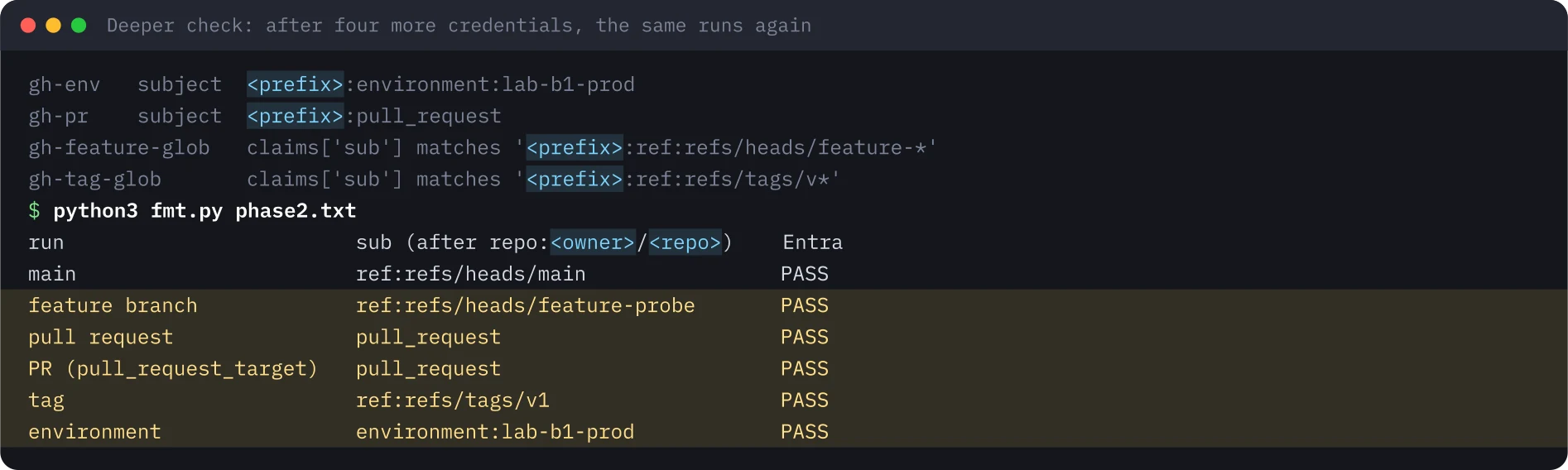
| Run | sub dopo il prefisso del repository |
Credenziale che lo fa passare | Solo main | Dopo |
|---|---|---|---|---|
| Push su main | ref:refs/heads/main |
Subject esatto | Passa | Passa |
| Push su feature-probe | ref:refs/heads/feature-probe |
Espressione ...ref:refs/heads/feature-* |
AADSTS700213 | Passa |
pull_request |
pull_request |
Subject esatto | AADSTS700213 | Passa |
pull_request_target |
pull_request |
La stessa credenziale pull_request |
AADSTS700213 | Passa |
| Tag v1 | ref:refs/tags/v1 |
Espressione ...ref:refs/tags/v* |
AADSTS700213 | Passa |
| Job con environment lab-b1-prod | environment:lab-b1-prod |
Subject esatto | AADSTS700213 | Passa |
Una differenza rispetto alla documentazione Microsoft. Le espressioni feature-* e v* avevano solo una condizione sul sub, senza repository_id. Entra le ha accettate entrambe e i run sono passati. I miei pattern contenevano già gli ID di owner e repository, quindi erano vincolati comunque. In un controllo successivo, lo stesso giorno, Entra ha accettato anche un’espressione a livello di owner senza repository_id né repository_owner_id, e quella credenziale ha emesso un token a un altro repository dello stesso owner. Le pagine Microsoft dicono che un’espressione per GitHub deve verificare sub e repository_id o repository_owner_id. Consiglio lo stesso di aggiungere repository_id a ogni espressione. La regola è documentata e la funzione è in preview, quindi una credenziale solo sul sub potrebbe essere rifiutata o smettere di corrispondere più avanti. E il controllo sull’ID non dipende dallo scrivere bene il pattern: un wildcard a livello di owner ha già emesso un token a un altro dei miei repository, e il sub solo con i nomi di un repository più vecchio può corrispondere a un nome che non è più tuo.
pull_request e pull_request_target condividono lo stesso subject#
Entrambi gli eventi inviano un sub che finisce con pull_request, qualunque sia il branch. Quindi una credenziale pull_request in Entra si fida anche dei job pull_request_target. Questi girano dal branch base, con i segreti e con un token OIDC. Se un workflow del genere fa checkout della head della pull request, l’autore della pull request esegue codice con la tua identità cloud. Il mio workflow di prova usava il checkout predefinito, che prende il branch base. Non cambiarlo in un workflow che può ottenere un token.
Un job che usa un environment è l’altra sorpresa. Invia environment:<name> al posto del branch. Spostare un job di deploy in un environment rompe una credenziale scritta per main.
Pull request da fork: dalla documentazione, non provate#
Non ho provato una pull request da un fork. Serve un secondo account GitHub, e non ne uso uno che non sia mio. Quello che segue è la documentazione GitHub e la mia lettura.
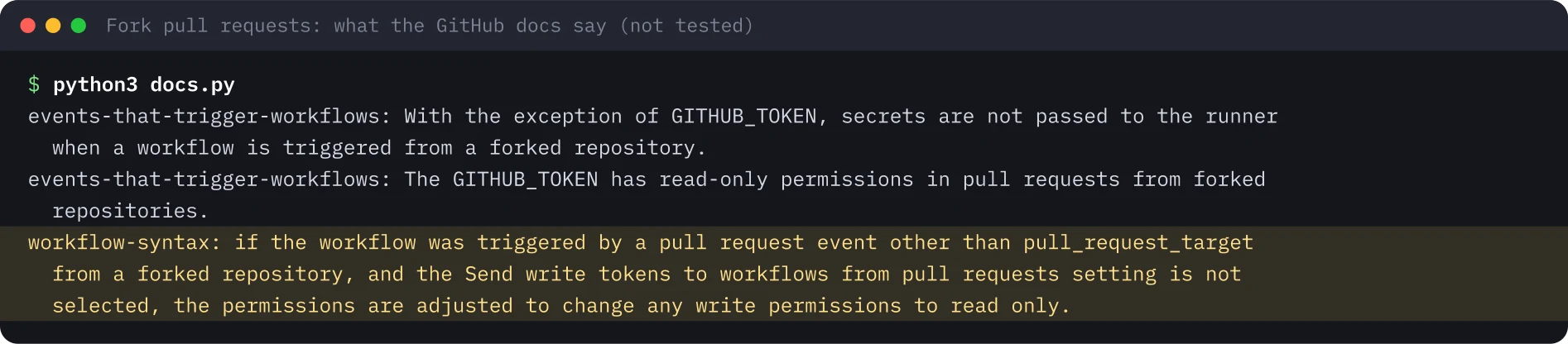
id-token: write è un permesso di scrittura. Per una pull_request da un fork viene ridotto a lettura, quindi secondo me il job non riceve alcun token OIDC. probe.sh gestisce questo caso e stamperebbe “no OIDC token was offered”. Non l’ho visto succedere. pull_request_target è l’eccezione in quella documentazione, ed è la trappola descritta sopra.
Insidie#
- Leggi il
subda un run reale prima di scrivere una credenziale. Lo mostrano sia la riga nel log sia il messaggio AADSTS700213. - Aspetta dopo l’assegnazione del ruolo. Senza attesa il login funzionava e il comando successivo falliva con “No subscriptions found”.
- Le espressioni sono in preview e su Graph beta. Per le app registration ho usato
az rest. La pagina concettuale di Microsoft dice che la CLI non le supporta ancora in modo esplicito, mentreaz identity federated-credential(identità gestite assegnate dall’utente) elenca parametri in preview per farlo. - I repository vecchi mantengono il
subsolo con i nomi finché qualcuno non fa l’opt-in. Scrivi la credenziale per il formato che il repository invia davvero.
Cosa portarsi a casa sulla sicurezza#
- In CI usa la federazione al posto di un client secret. Non c’è niente da conservare, far trapelare o ruotare.
- Usa la credenziale più stretta possibile: esatta per main e per un environment, un’espressione solo per una vera famiglia di ref.
- Mantieni gli ID di owner e repository in ogni subject e pattern, e aggiungi
repository_ida ogni espressione. - Considera che una credenziale
pull_requestsi fida anche dipull_request_target. Mai fare checkout di codice non fidato in un workflow che può ottenere un token. - Elimina le credenziali il cui repository non esiste più. Con il vecchio formato solo con i nomi, qualcun altro può prendersi quel nome.
Pulizia#
Ho eliminato la app registration, che rimuove le sue credenziali, ho eliminato il resource group, ho verificato che non esistessero più e ho archiviato il repository privato. Dopo la verifica approfondita ho rimosso anche l’app aggiuntiva, il branch, il tag, la pull request, l’environment e le variabili.

Cosa non è stato eseguito#
- Una pull request da un fork. Quella parte si basa sulla documentazione GitHub.
- Un repository esistente passato al formato immutabile, e l’endpoint di anteprima di GitHub per il prefisso del subject.
- Un ruolo che può fare deploy. L’app aveva solo Reader su un resource group vuoto.
- Un’espressione con
repository_owner_idojob_workflow_ref. - Altri cloud. GitHub documenta AWS, Google Cloud e Vault, io ho provato solo Azure.
Eseguito il 20 novembre 2026 con l’Azure CLI, la GitHub CLI e azure/login@v2 su un runner ospitato da GitHub, in un tenant usa e getta e in un repository privato. Le immagini di terminale sono state ridisegnate dall’output salvato, con utenti, ID e orari sostituiti da segnaposto.
Ripeti questo lab#
Circa 30 minuti: l'Azure CLI e la GitHub CLI sul tuo computer, un tenant Entra e una sottoscrizione usa e getta, e un account GitHub tuo. Non costa nulla: una app registration, un resource group vuoto, un repository privato e qualche minuto di GitHub Actions. Apri ogni passo, copia i blocchi e confronta il tuo output con il mio.
Ogni valore tra parentesi angolari è un segnaposto per il tuo ambiente di test. Nulla in questa pagina è un identificativo o un segreto reale.
Imposta le variabili una sola volta
# Paste into every terminal you use for this lab. Replace each <PLACEHOLDER> with a value from your own test tenant and GitHub account.
export GH_USER='<GITHUB_USER>'
export TENANT='<TENANT_ID>'
export SUBSCRIPTION='<SUBSCRIPTION_ID>'
export REPO='lab-b1-gh-wif'
export RG='lab-b1-rg-wif'
export LOCATION='<AZURE_REGION>'
mkdir -p gh-lab && cd gh-lab
0 di 9 passi fatti
Passo 1Crea un resource group, una app registration e il ruolo Reader
Obiettivo. Crea l'identità che la pipeline userà e dalle Reader su un solo resource group vuoto, niente di più. Un login riuscito prova così la federazione e non un permesso ampio.
Prerequisiti
- Azure CLI collegata a un tenant e a una sottoscrizione di prova, con i diritti per creare app registration e assegnazioni di ruolo
- jq e python3
az account set --subscription "$SUBSCRIPTION"
az group create -n $RG -l $LOCATION --query "{name:name, location:location}" -o json
export APPID=$(az ad app create --display-name lab-b1-gh-app --sign-in-audience AzureADMyOrg --query appId -o tsv)
export OBJ=$(az ad app show --id $APPID --query id -o tsv)
az ad sp create --id $APPID --query id -o tsv > /dev/null
echo "app registration created"
sleep 15
az role assignment create --assignee $APPID --role Reader --scope $(az group show -n $RG --query id -o tsv) -o none
az role assignment list --assignee $APPID --all --query "[].{role:roleDefinitionName, scope:scope}" -o json
Output atteso
{
  "location": "<AZURE_REGION>",
  "name": "lab-b1-rg-wif"
}
app registration created
[
  {
    "role": "Reader",
    "scope": "/subscriptions/<SUBSCRIPTION_ID>/resourceGroups/lab-b1-rg-wif"
  }
]Passo 2Crea prima il repo privato, poi imposta tre ID come variabili
Obiettivo. Aggiungi un workflow che stampa i claim presentati da GitHub e poi esegue azure/login. Crea il repository prima della credenziale federata: i nuovi repository usano un sub immutabile con gli ID di owner e repository, che esistono solo dopo il repository.
Prerequisiti
- GitHub CLI collegata, con il permesso di creare un repository privato
- Le variabili APPID e OBJ del passo precedente in questo terminale
- Salva login.yml come .github/workflows/login.yml dentro gh-lab prima di eseguire repo.sh
name: login
on:
  push:
    branches: [main, feature-x, 'release/**']
  pull_request:
permissions:
  id-token: write
  contents: read
jobs:
  azure:
    runs-on: ubuntu-latest
    steps:
      - name: Show the claims GitHub presents to Entra
        run: |
          TOKEN=$(curl -s -H "Authorization: bearer $ACTIONS_ID_TOKEN_REQUEST_TOKEN" "$ACTIONS_ID_TOKEN_REQUEST_URL&audience=api://AzureADTokenExchange" | jq -r .value)
          echo "$TOKEN" | python3 -c 'import sys,json,base64;t=sys.stdin.read().split(".")[1];c=json.loads(base64.urlsafe_b64decode(t+"="*(-len(t)%4)));print({k:c[k] for k in ("sub","event_name","ref")})'
      - uses: azure/login@v2
        with:
          client-id: ${{ vars.AZURE_CLIENT_ID }}
          tenant-id: ${{ vars.AZURE_TENANT_ID }}
          subscription-id: ${{ vars.AZURE_SUBSCRIPTION_ID }}
      - name: Use the identity
        run: |
          az group list --query "[].name" -o tsv
az account show --query "{signedInAs: user.type}" -o jsongit init -q -b main && git add -A && git commit -q -m "Login workflow"
gh repo create $GH_USER/$REPO --private --source . --remote origin
export OWNERID=$(gh api repos/$GH_USER/$REPO --jq .owner.id)
export REPOID=$(gh api repos/$GH_USER/$REPO --jq .id)
for kv in AZURE_CLIENT_ID=$APPID AZURE_TENANT_ID=$TENANT AZURE_SUBSCRIPTION_ID=$SUBSCRIPTION; do gh variable set ${kv%%=*} --body ${kv#*=} -R $GH_USER/$REPO; done
gh variable list -R $GH_USER/$REPO | cut -f1Output atteso
https://github.com/<GITHUB_USER>/lab-b1-gh-wif
AZURE_CLIENT_ID
AZURE_SUBSCRIPTION_ID
AZURE_TENANT_IDPasso 3Fidati di main con una credenziale esatta e fai push
Obiettivo. Scrivi una credenziale federata il cui subject è esattamente il sub di un push su main, aspetta che il ruolo si propaghi, fai push e guarda il job autenticarsi come service principal.
Prerequisiti
- Le variabili OBJ, OWNERID e REPOID dei passi precedenti in questo terminale
- In questo passo non si crea nessun segreto
cat > fic-main.json <<EOF
{"name": "gh-main", "issuer": "https://token.actions.githubusercontent.com",
 "subject": "repo:$GH_USER@$OWNERID/$REPO@$REPOID:ref:refs/heads/main",
 "audiences": ["api://AzureADTokenExchange"]}
EOF
az ad app federated-credential create --id $OBJ --parameters @fic-main.json --query "{name:name, subject:subject}" -o json
sleep 60  # give the Reader role assignment time to propagate
git push -q -u origin main 2>&1 | tail -1
for i in $(seq 1 30); do RUN=$(gh run list -R $GH_USER/$REPO --branch main --limit 1 --json databaseId -q ".[0].databaseId"); [ -n "$RUN" ] && break; sleep 3; done
gh run watch $RUN -R $GH_USER/$REPO --exit-status > /dev/null 2>&1; echo "run finished: $(gh run view $RUN -R $GH_USER/$REPO --json conclusion -q .conclusion)"
gh run view $RUN -R $GH_USER/$REPO --log | grep -E "'sub'|Login successful|signedInAs|lab-b1-rg-wif" | sed -E "s/^[^\t]*\t[^\t]*\t[0-9TZ:.-]+ //" | sort -u
Output atteso
{
  "name": "gh-main",
  "subject": "repo:<GITHUB_USER>@<OWNER_ID>/lab-b1-gh-wif@<REPO_ID>:ref:refs/heads/main"
}
run finished: success
  "signedInAs": "servicePrincipal"
lab-b1-rg-wif
{'sub': 'repo:<GITHUB_USER>@<OWNER_ID>/lab-b1-gh-wif@<REPO_ID>:ref:refs/heads/main', 'event_name': 'push', 'ref': 'refs/heads/main'}Passo 4Test negativi: un feature branch e una pull request
Obiettivo. Fai push di un branch che la credenziale non copre, poi apri una pull request da quel branch. Entrambi i login falliscono con AADSTS700213 e il messaggio riporta il subject esatto presentato.
Prerequisiti
- Il run su main del passo precedente è terminato con successo
git checkout -q -b feature-x && echo "# change" >> README.md && git add -A && git commit -q -m "feature-x"
git push -q origin feature-x 2>&1 | tail -1
for i in $(seq 1 30); do RUN=$(gh run list -R $GH_USER/$REPO --branch feature-x --limit 1 --json databaseId -q ".[0].databaseId"); [ -n "$RUN" ] && break; sleep 3; done
gh run watch $RUN -R $GH_USER/$REPO --exit-status > /dev/null 2>&1; echo "run finished: $(gh run view $RUN -R $GH_USER/$REPO --json conclusion -q .conclusion)"
gh run view $RUN -R $GH_USER/$REPO --log-failed | grep -E "AADSTS|'sub'" | sed -E "s/^[^\t]*\t[^\t]*\t[0-9TZ:.-]+ //" | cut -c1-230 | sort -u
gh pr create -R $GH_USER/$REPO --head feature-x --base main --title "feature-x" --body "lab"
for i in $(seq 1 30); do RUN=$(gh run list -R $GH_USER/$REPO --event pull_request --limit 1 --json databaseId -q ".[0].databaseId"); [ -n "$RUN" ] && break; sleep 3; done
gh run watch $RUN -R $GH_USER/$REPO --exit-status > /dev/null 2>&1; echo "run finished: $(gh run view $RUN -R $GH_USER/$REPO --json conclusion -q .conclusion)"
gh run view $RUN -R $GH_USER/$REPO --log-failed | grep -E "AADSTS" | sed -E "s/^[^\t]*\t[^\t]*\t[0-9TZ:.-]+ //" | cut -c1-230 | sort -u
Output atteso
run finished: failure
##[error]AADSTS700213: No matching federated identity record found for presented assertion subject 'repo:<GITHUB_USER>@<OWNER_ID>/lab-b1-gh-wif@<REPO_ID>:ref:refs/heads/feature-x'. Check your federated identity credential Subject, Audience and Issu
https://github.com/<GITHUB_USER>/lab-b1-gh-wif/pull/1
run finished: failure
##[error]AADSTS700213: No matching federated identity record found for presented assertion subject 'repo:<GITHUB_USER>@<OWNER_ID>/lab-b1-gh-wif@<REPO_ID>:pull_request'. Check your federated identity credential Subject, Audience and IssuPasso 5Consenti release/* con una claims-matching expression
Obiettivo. Crea una credenziale federata flessibile tramite l'endpoint beta di Graph: il sub corrisponde ai branch release di questo repository e repository_id viene controllato a parte, come chiede la documentazione Microsoft. Poi fai push di release/1.
Prerequisiti
- Le credenziali federate flessibili sono in preview; per le app registration si creano con az rest su Graph beta
cat > fic-expr.json <<EOF
{"name": "gh-release", "issuer": "https://token.actions.githubusercontent.com",
 "audiences": ["api://AzureADTokenExchange"],
 "claimsMatchingExpression": {"languageVersion": 1,
  "value": "claims['sub'] matches 'repo:$GH_USER@$OWNERID/$REPO@$REPOID:ref:refs/heads/release/*' and claims['repository_id'] eq '$REPOID'"}}
EOF
az rest --method post --url https://graph.microsoft.com/beta/applications/$OBJ/federatedIdentityCredentials --body @fic-expr.json --query "{name:name, expression:claimsMatchingExpression.value}" -o json 2>&1 | grep -v WARNING
git checkout -q -b release/1 main && git commit -q --allow-empty -m "release" && git push -q origin release/1 2>&1 | tail -1
for i in $(seq 1 30); do RUN=$(gh run list -R $GH_USER/$REPO --branch release/1 --limit 1 --json databaseId -q ".[0].databaseId"); [ -n "$RUN" ] && break; sleep 3; done
gh run watch $RUN -R $GH_USER/$REPO --exit-status > /dev/null 2>&1; echo "run finished: $(gh run view $RUN -R $GH_USER/$REPO --json conclusion -q .conclusion)"
gh run view $RUN -R $GH_USER/$REPO --log | grep -E "'sub'|Login successful" | sed -E "s/^[^\t]*\t[^\t]*\t[0-9TZ:.-]+ //" | sort -u
Output atteso
{
  "expression": "claims['sub'] matches 'repo:<GITHUB_USER>@<OWNER_ID>/lab-b1-gh-wif@<REPO_ID>:ref:refs/heads/release/*' and claims['repository_id'] eq '<REPO_ID>'",
  "name": "gh-release"
}
run finished: success
{'sub': 'repo:<GITHUB_USER>@<OWNER_ID>/lab-b1-gh-wif@<REPO_ID>:ref:refs/heads/release/1', 'event_name': 'push', 'ref': 'refs/heads/release/1'}Passo 6Verifica approfondita: stampa il sub di sei tipi di run
Obiettivo. Esegui probe.sh su un push a main, un feature branch, pull_request, pull_request_target, un tag e un job con un environment. Decodifica il sub, offre il token a Entra e stampa una riga RESULT. Con la sola credenziale per main, passa solo main.
Prerequisiti
- Salva probe.sh nella radice del repository, probe.yml in .github/workflows/ e fmt.py accanto
- Questo passo sostituisce login.yml con probe.yml, così gira solo la sonda
#!/usr/bin/env bash
# Print the sub claim GitHub issues for this run, then try to exchange it at Entra.
JOB=$1
if [ -z "$ACTIONS_ID_TOKEN_REQUEST_URL" ]; then echo "RESULT job=$JOB event=$GITHUB_EVENT_NAME ref=$GITHUB_REF sub=none entra=no OIDC token was offered to this job"; exit 0; fi
T=$(curl -s -H "Authorization: bearer $ACTIONS_ID_TOKEN_REQUEST_TOKEN" "$ACTIONS_ID_TOKEN_REQUEST_URL&audience=api://AzureADTokenExchange" | jq -r .value)
SUB=$(echo "$T" | cut -d. -f2 | tr '_-' '/+' | awk '{while(length($0)%4)$0=$0"=";print}' | base64 -d 2>/dev/null | jq -r .sub)
R=$(curl -s -X POST "https://login.microsoftonline.com/$TID/oauth2/v2.0/token" -d client_id=$CID -d grant_type=client_credentials -d scope=https://graph.microsoft.com/.default -d client_assertion_type=urn:ietf:params:oauth:client-assertion-type:jwt-bearer -d client_assertion="$T")
OUT=$(echo "$R" | jq -r 'if .access_token then "token issued" else (.error_description | split(":")[0]) end')
echo "RESULT job=$JOB event=$GITHUB_EVENT_NAME ref=$GITHUB_REF sub=$SUB entra=$OUT"name: probe
on:
push:
branches: [main, 'feature-*']
tags: ['v*']
pull_request:
pull_request_target:
permissions:
id-token: write
contents: read
env:
CID: ${{ vars.AZURE_CLIENT_ID }}
TID: ${{ vars.AZURE_TENANT_ID }}
jobs:
plain:
runs-on: ubuntu-latest
steps:
- uses: actions/checkout@v4
- run: ./probe.sh plain
with-environment:
if: github.event_name == 'push' && github.ref == 'refs/heads/main'
runs-on: ubuntu-latest
environment: lab-b1-prod
steps:
- uses: actions/checkout@v4
- run: ./probe.sh environmentimport sys, re
rows = []
for l in open(sys.argv[1]):
m = re.search(r'job=(\S+) event=(\S+) ref=(\S+) sub=(\S+) entra=(.*)', l)
if not m: continue
job, ev, ref, sub, res = m.groups()
ctx = sub.split(':', 1)[1].split(':', 1)[1] if sub.count(':') > 1 else sub
ctx = re.sub(r'^repo:[^:]*:', '', sub)
case = {'refs/heads/main': 'main', 'refs/heads/feature-probe': 'feature branch', 'refs/tags/v1': 'tag', }.get(ref, 'pull request' if ev == 'pull_request' else 'PR (pull_request_target)' if ev == 'pull_request_target' else ref)
if job == 'environment': case = 'environment'
if ev == 'pull_request_target': case = 'PR (pull_request_target)'
rows.append((case, ctx, 'PASS' if 'issued' in res else 'FAIL ' + res))
order = ['main', 'feature branch', 'pull request', 'PR (pull_request_target)', 'tag', 'environment']
rows.sort(key=lambda r: order.index(r[0]))
print('%-26s %-34s %s' % ('run', 'sub (after repo:<owner>/<repo>)', 'Entra'))
for r in rows: print('%-26s %-34s %s' % r)git checkout -q main && git rm -q .github/workflows/login.yml
chmod +x probe.sh && git add probe.sh .github/workflows/probe.yml
gh api -X PUT repos/$GH_USER/$REPO/environments/lab-b1-prod > /dev/null
git commit -q -m probe && git push -q origin main
git switch -q -c feature-probe && echo x > note.txt && git add . && git commit -q -m f && git push -q -u origin feature-probe
gh pr create --head feature-probe --base main --title probe --body lab
git tag v1 main && git push -q origin v1
sleep 60
RUN_IDS=$(gh run list --workflow probe.yml --limit 5 --json databaseId -q ".[].databaseId")
for id in $RUN_IDS; do gh run view $id --log | grep -o "RESULT.*"; done | sort -u > phase1.txt
python3 fmt.py phase1.txtOutput atteso
run                        sub (after repo:<owner>/<repo>)    Entra
main                       ref:refs/heads/main                PASS
feature branch             ref:refs/heads/feature-probe       FAIL AADSTS700213
pull request               pull_request                       FAIL AADSTS700213
PR (pull_request_target)   pull_request                       FAIL AADSTS700213
tag                        ref:refs/tags/v1                   FAIL AADSTS700213
environment environment:lab-b1-prod FAIL AADSTS700213Passo 7Verifica approfondita: aggiungi le credenziali che fanno passare ogni run
Obiettivo. Aggiungi una credenziale esatta per l'environment, una esatta per pull_request e due espressioni per feature-* e v*. Rilancia gli stessi run: passano tutti e sei. Nota che la credenziale pull_request fa passare anche il run pull_request_target.
Prerequisiti
- RUN_IDS del passo precedente ancora impostato in questo terminale
- Queste due espressioni controllano solo il sub; la documentazione Microsoft chiede anche repository_id, vedi l'articolo
P="repo:$GH_USER@$OWNERID/$REPO@$REPOID"
mk() { az ad app federated-credential create --id $OBJ --parameters "{\"name\":\"$1\",\"issuer\":\"https://token.actions.githubusercontent.com\",\"subject\":\"$2\",\"audiences\":[\"api://AzureADTokenExchange\"]}" -o none; }
mk gh-env "$P:environment:lab-b1-prod"
mk gh-pr  "$P:pull_request"
for n in feature:heads/feature- tag:tags/v; do
  cat > expr-${n%%:*}.json <<EOF
{"name":"gh-${n%%:*}-glob","issuer":"https://token.actions.githubusercontent.com","audiences":["api://AzureADTokenExchange"],
 "claimsMatchingExpression":{"languageVersion":1,"value":"claims['sub'] matches '$P:ref:refs/${n#*:}*'"}}
EOF
  az rest -m POST -u "https://graph.microsoft.com/beta/applications/$OBJ/federatedIdentityCredentials" --headers Content-Type=application/json -b @expr-${n%%:*}.json -o none
done
sleep 40
for id in $RUN_IDS; do gh run rerun $id; done
sleep 60
for id in $RUN_IDS; do gh run view $id --attempt 2 --log | grep -o 'RESULT.*'; done | sort -u > phase2.txt
python3 fmt.py phase2.txt
Output atteso
run                        sub (after repo:<owner>/<repo>)    Entra
main                       ref:refs/heads/main                PASS
feature branch             ref:refs/heads/feature-probe       PASS
pull request               pull_request                       PASS
PR (pull_request_target)   pull_request                       PASS
tag                        ref:refs/tags/v1                   PASS
environment environment:lab-b1-prod PASSPasso 8Pull request da fork: stampa cosa dice la documentazione GitHub
Obiettivo. Non ho potuto provare un vero fork. docs.py stampa le tre frasi della documentazione GitHub che decidono la questione: niente segreti per i fork, un GITHUB_TOKEN in sola lettura e permessi di scrittura ridotti a lettura per ogni evento di pull request tranne pull_request_target.
Prerequisiti
- python3 con accesso a internet; questo passo legge solo docs.github.com
- Non provato: se un job pull_request da un fork riceve un token OIDC. Secondo la mia lettura della documentazione, no
import re, html, urllib.request
t = urllib.request.urlopen('https://docs.github.com/en/actions/reference/workflows-and-actions/events-that-trigger-workflows').read().decode()
t = html.unescape(re.sub(r'<[^>]+>', ' ', t)); t = re.sub(r'\s+', ' ', t)
for pat in [r"With the exception of GITHUB_TOKEN , secrets are not passed to the runner when a workflow is triggered from a forked repository\.", r"The GITHUB_TOKEN has read-only permissions in pull requests from forked repositories\."]:
    print('events-that-trigger-workflows: ' + re.search(pat, t).group(0).replace(' ,', ','))
t = urllib.request.urlopen('https://docs.github.com/en/actions/reference/workflows-and-actions/workflow-syntax').read().decode()
t = html.unescape(re.sub(r'<[^>]+>', ' ', t)); t = re.sub(r'\s+', ' ', t)
print('workflow-syntax: ' + re.search(r"if the workflow was triggered by a pull request event other than pull_request_target from a forked repository.{0,160}?read only\.", t).group(0))python3 docs.pyOutput atteso
events-that-trigger-workflows: With the exception of GITHUB_TOKEN, secrets are not passed to the runner when a workflow is triggered from a forked repository.
events-that-trigger-workflows: The GITHUB_TOKEN has read-only permissions in pull requests from forked repositories.
workflow-syntax: if the workflow was triggered by a pull request event other than pull_request_target from a forked repository, and the Send write tokens to workflows from pull requests setting is not selected, the permissions are adjusted to change any write permissions to read only.Passo 9Pulizia: Entra, Azure e il repo
Obiettivo. Elimina la app registration, che rimuove tutte le sue credenziali federate, elimina il resource group, verifica che non esistano più e archivia o elimina il repository privato.
Prerequisiti
- Esegui dalla cartella gh-lab con il blocco env e OBJ ancora impostati
az ad app delete --id $OBJ
az group delete -n $RG --yes
az group exists -n $RG
az ad app list --display-name lab-b1-gh-app --query "length(@)" -o tsv
gh repo archive $GH_USER/$REPO --yes 2>&1 | tail -1
Output atteso
false
0Fonti#
- GitHub Changelog, 23 Apr 2026 (edited 10 Jun 2026): Immutable subject claims for GitHub Actions OIDC tokens
- GitHub Docs: OpenID Connect reference
- GitHub Docs: Events that trigger workflows
- GitHub Docs: Workflow syntax (permissions)
- GitHub Docs: Securely using pull_request_target
- Microsoft Learn: Configure an app to trust an external identity provider
- Microsoft Learn: Flexible federated identity credentials (preview)
- Microsoft Learn: Migrate GitHub Actions federated credentials to immutable subjects
Discuti questo articolo#
Ti è stato utile? Condividilo e dimmi cosa ne pensi.
Questo articolo in formato Markdown · RSS · JSON feed
Nuovi articoli via email
Una email a settimana con nuovi articoli e lab. Disiscrizione in qualsiasi momento.
Il tuo indirizzo è salvato su Kit, il servizio che invia le email. Dettagli