In breve
- Un agente autonomo che non possiede segreti non ha nulla da far trapelare: una Container App con managed identity assegnata dall'utente, senza client secret, certificato né ingress.
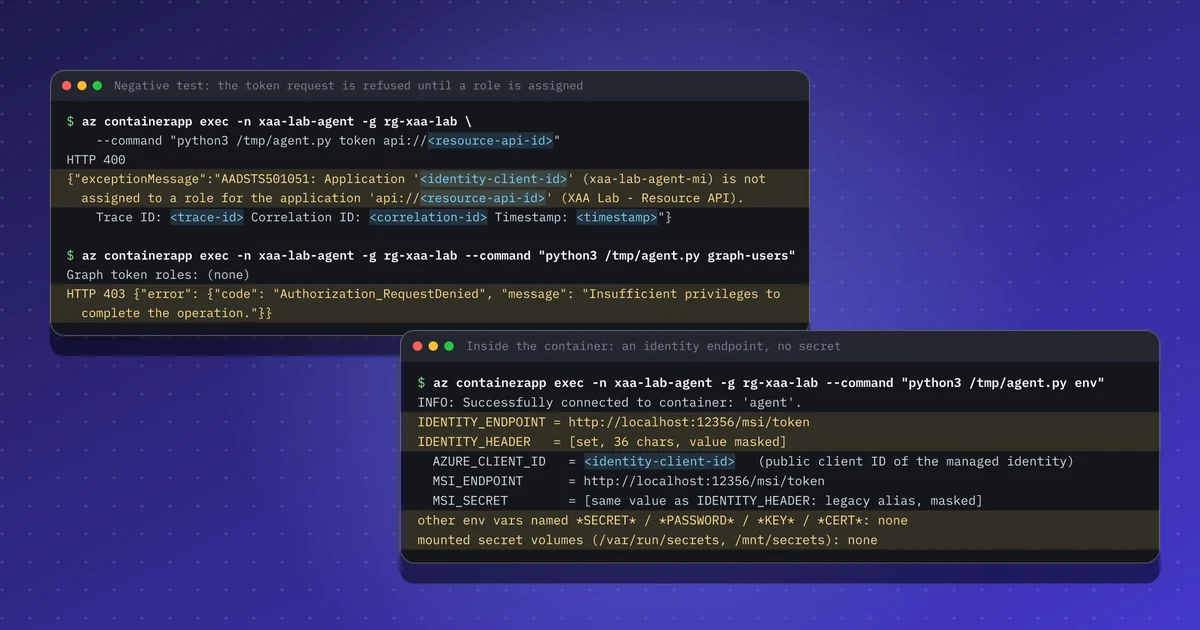
- L'identità parte senza ruoli; con l'assegnazione obbligatoria sull'API, la richiesta di token viene rifiutata (AADSTS501051) finché non viene concesso un solo ruolo ristretto.
- Il token app-only contiene roles e non scp, e l'API convalida comunque firma, audience, emittente e ruolo.
- I token restano in cache per circa 24 ore, quindi rimuovere un ruolo non è una revoca immediata.
- Tratta l'identità come un account privilegiato: un responsabile, una data di revisione e un avviso sulle assegnazioni di ruolo.
Ripeti questo lab
Ho scritto questo lab perché tu possa rifarlo per conto tuo. Ogni passo ha i comandi da copiare e l'output che ho ottenuto io, e puoi segnarlo come fatto. Le spunte restano solo nel tuo browser.
Copia un prompt già pronto per Claude Code, Cursor, Codex o un altro agente di codice. Solo per ambienti di test.
Mostra il prompt
I want to run a hands-on lab from iamops.dev, and I would like your help to do it safely.

Lab: Un agente AI autonomo senza segreti su Azure: chiamare un'API con una managed identity da Container Apps
Read the whole lab here (Markdown): https://iamops.dev/it/secretless-agent-managed-identity-container-app.md

What the lab needs before the first step:
- A test tenant and subscription; never use a production one
- Azure CLI 2.60 or newer, jq and uuidgen
- Values I have to set myself (the lab uses placeholders): <TENANT_ID>, <SUBSCRIPTION_ID>, <AZURE_REGION>

How I want you to work:
1. Read the lab from start to finish first (each step lists its own prerequisites). Then check that the prerequisites are in place and that the tool versions match what the lab expects. Tell me what is missing before you run anything.
2. Run one step at a time. Before each command, show it to me and say in a sentence what it does.
3. Ask me before anything that costs money, creates cloud resources, touches a real tenant or account, or deletes anything. Wait for my answer.
4. Use the placeholders from the lab. Never paste real secrets, tokens or production identities into a command, a file or this chat. If a value is needed, tell me where to set it myself.
5. After each step, compare the output with the expected output in the lab. If it does not match, stop and tell me what differs. Do not carry on or invent a fix without asking me.
6. At the end, report what passed, what failed and which cleanup you did. Then offer to tick the steps off for me. The lab page keeps ticks only in my browser, so if you cannot do that, list the steps I should tick.

This lab is for test environments only. Do not run it against production, or against a tenant or account that holds real data or real users.

You may answer in my language.
Il 5 novembre 2026 Microsoft Threat Intelligence ha descritto autori di attacchi che usano un framework offensivo basato su agenti per cercare segreti esposti in repository pubblici e poi usare credenziali applicative valide per accedere come carichi di lavoro. La lettura difensiva è semplice: un agente autonomo che non possiede alcun segreto non ha nulla da far trapelare. Ne ho costruito uno su Azure e ho verificato ogni affermazione.
Cosa mostra il laboratorio#
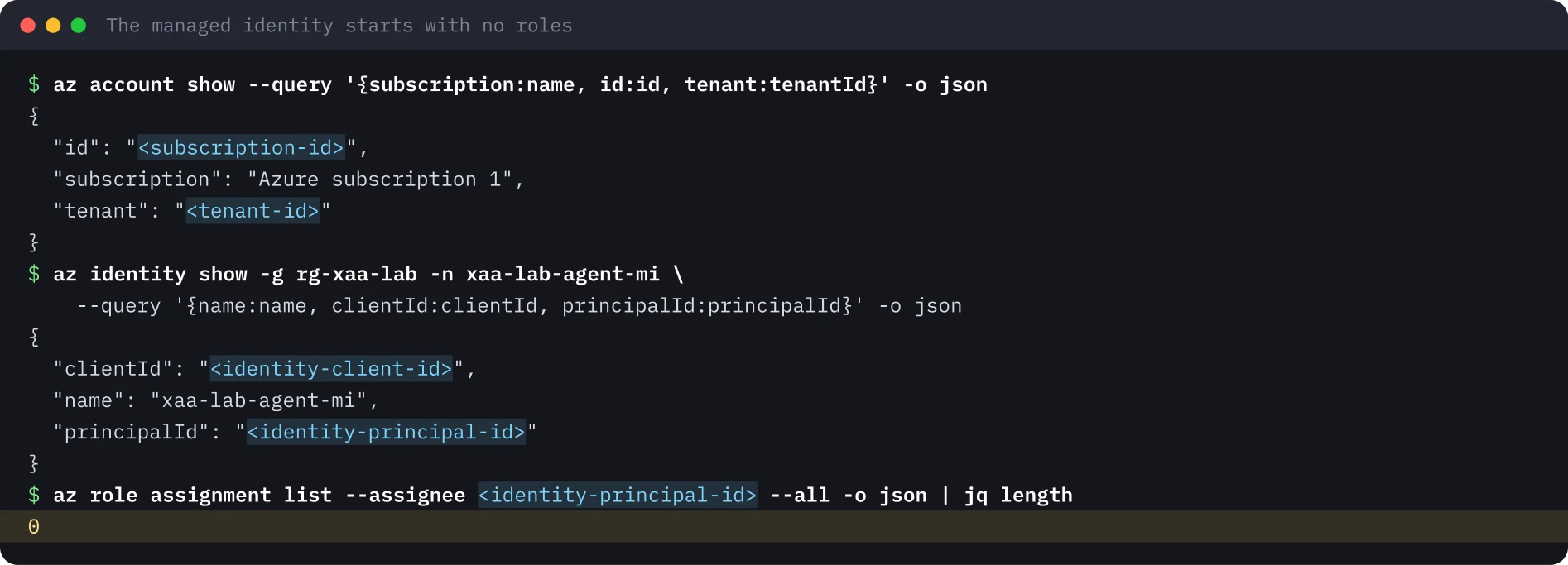
Un piccolo agente gira come Azure Container App. Non ha utente, né client secret, né certificato. La sua identità è una managed identity assegnata dall’utente che parte senza ruoli. Il laboratorio poi:
- Collega l’identità all’app e dimostra che il container non contiene alcun segreto.
- Fa richiedere all’API a valle (la Resource API, una registrazione di app) un’assegnazione di ruolo applicativo.
- Mostra la richiesta di token rifiutata, poi concede un solo ruolo app-only ristretto.
- Legge il token app-only che l’agente ottiene e lo verifica come farebbe l’API.
Configurazione#
Usate un tenant e una sottoscrizione di prova separati. L’agente gira con 0,25 vCPU e 0,5 GiB sul piano Consumption, senza ingress e senza workspace Log Analytics. I primi 180.000 vCPU-secondi al mese sono gratuiti, che questa dimensione esaurisce in circa 200 ore di esecuzione: eliminate l’app quando avete finito. La managed identity e il ruolo applicativo sono gratuiti.
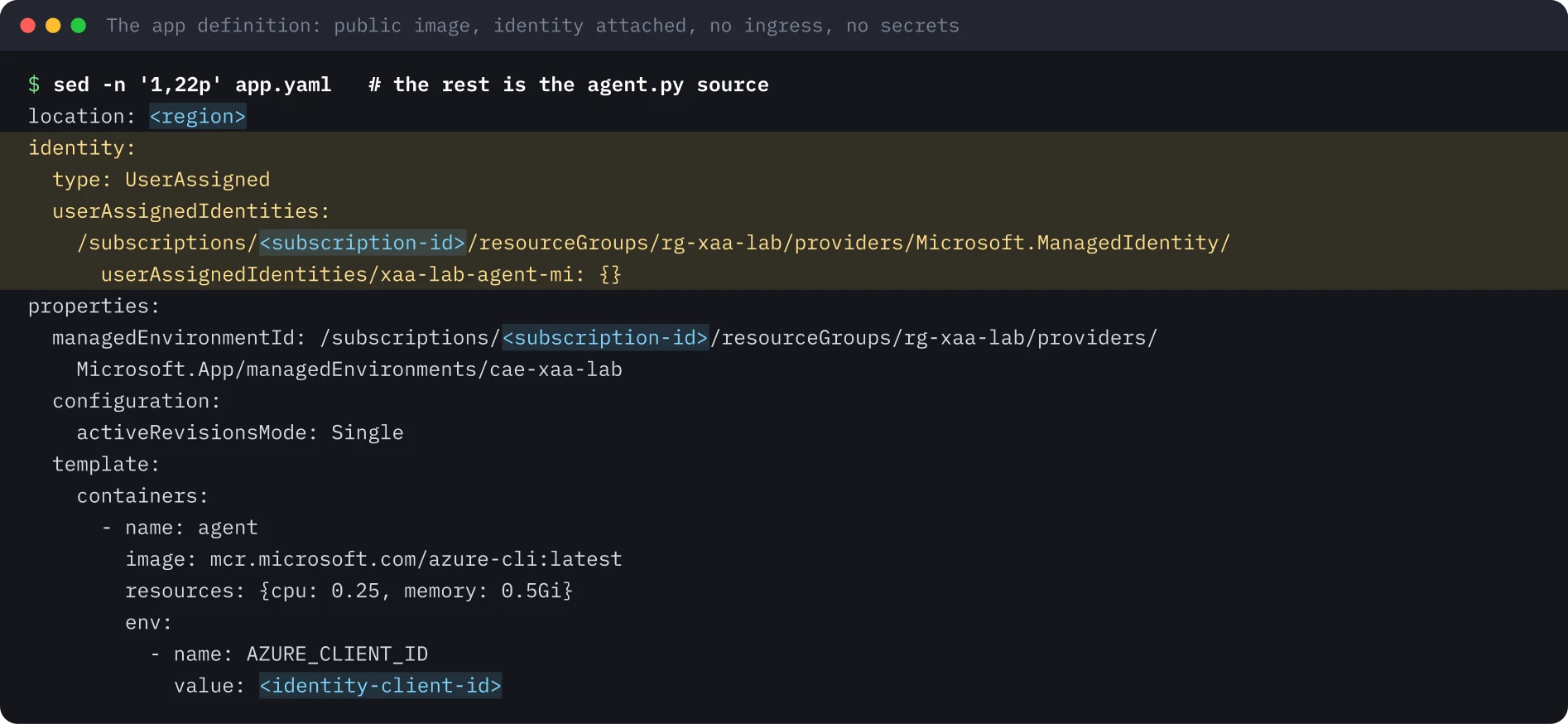
L’app è definita in YAML. L’immagine è pubblica e serve solo per il suo Python, quindi non occorre alcuna credenziale di registry. Il blocco identity collega la managed identity. Non c’è una sezione ingress, quindi nessuno può chiamare dall’esterno.
L’esecuzione#
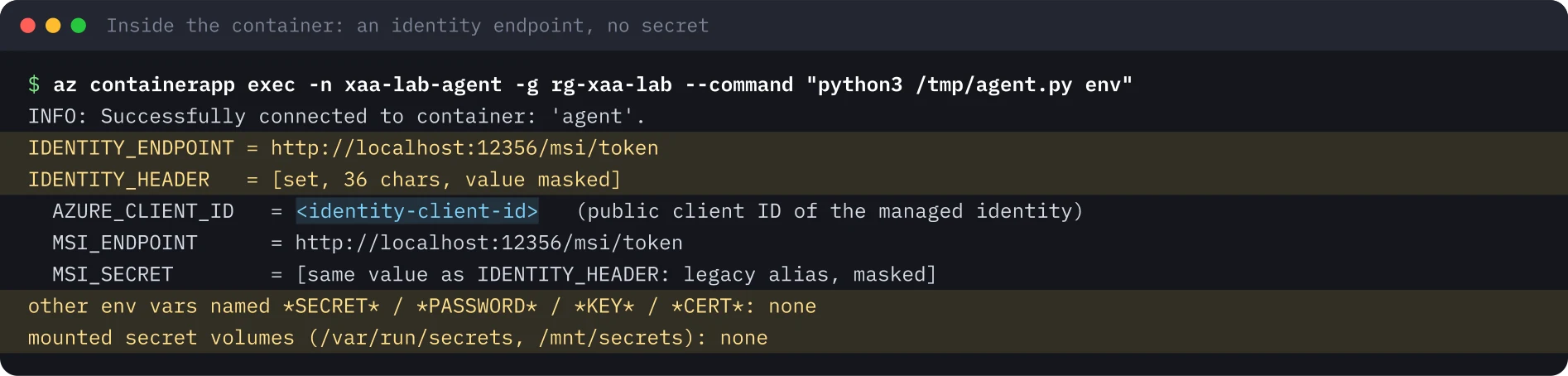
Il container ha un endpoint di identità, non un segreto. La piattaforma inietta IDENTITY_ENDPOINT, un URL su localhost, e IDENTITY_HEADER, un valore per container (mascherato nell’output). Nessun’altra variabile somiglia a un segreto e non è montato alcun volume di segreti.
Richiedere l’assegnazione sull’API. Per impostazione predefinita Entra emette un token app-only a qualsiasi service principal del tenant che lo chieda, con un claim roles vuoto. Impostare appRoleAssignmentRequired a true sul service principal della Resource API fa sì che Entra rifiuti chi non è assegnato:
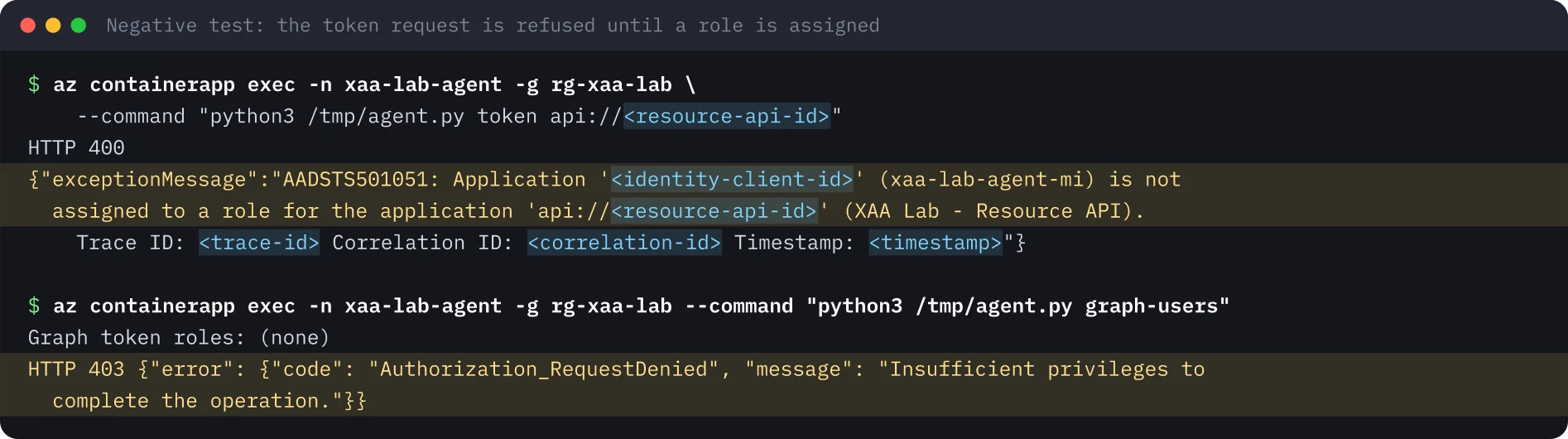
az ad sp update --id <resource-sp-id> --set appRoleAssignmentRequired=trueDue test negativi. La richiesta dell’agente di un token per la Resource API viene rifiutata dal servizio dei token con AADSTS501051, e un token per Graph (Graph non richiede l’assegnazione) non contiene ruoli, quindi GET /v1.0/users restituisce 403.
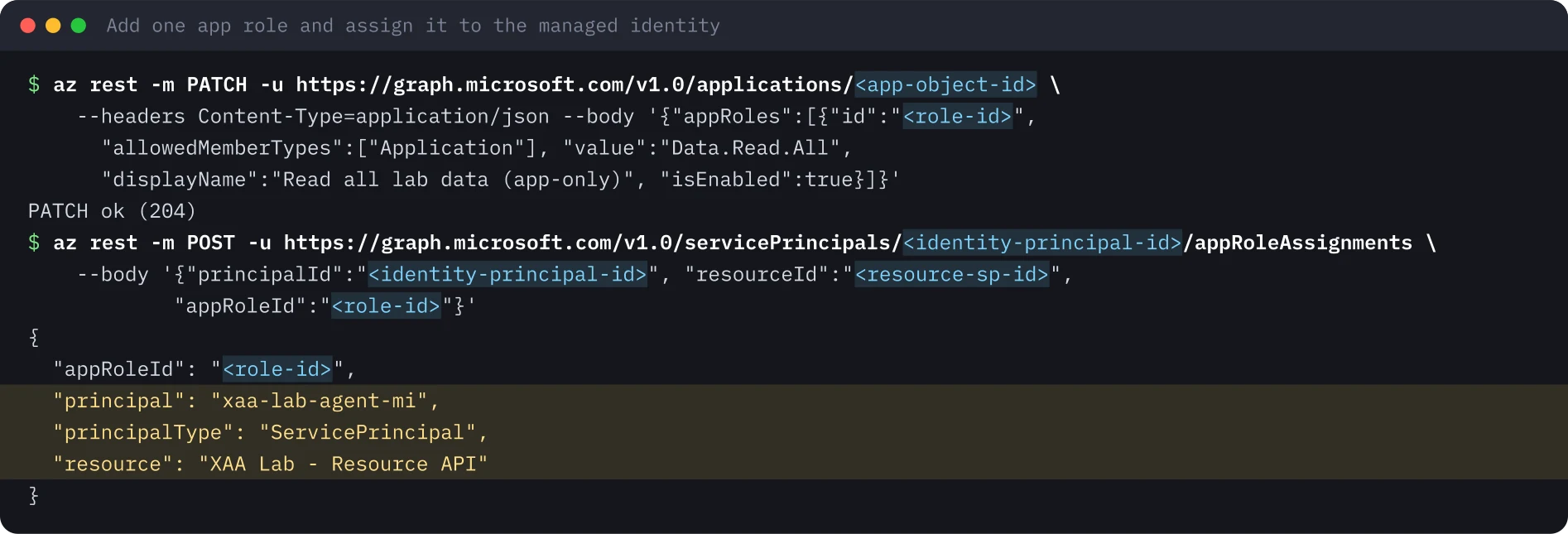
Una concessione ristretta. Aggiungete alla Resource API un ruolo applicativo solo app-only Data.Read.All (tipo di membro consentito: applicazione) e assegnatelo alla managed identity tramite Microsoft Graph. L’interfaccia di amministrazione non può assegnare un ruolo applicativo a una managed identity, quindi si passa da Graph, PowerShell o dalla CLI.
Il token app-only. Entra mette in cache i token delle managed identity, quindi il container continua a ricevere il vecchio token fino a un giorno. Riavviando la revisione se ne ottiene uno nuovo, che ora contiene il ruolo.
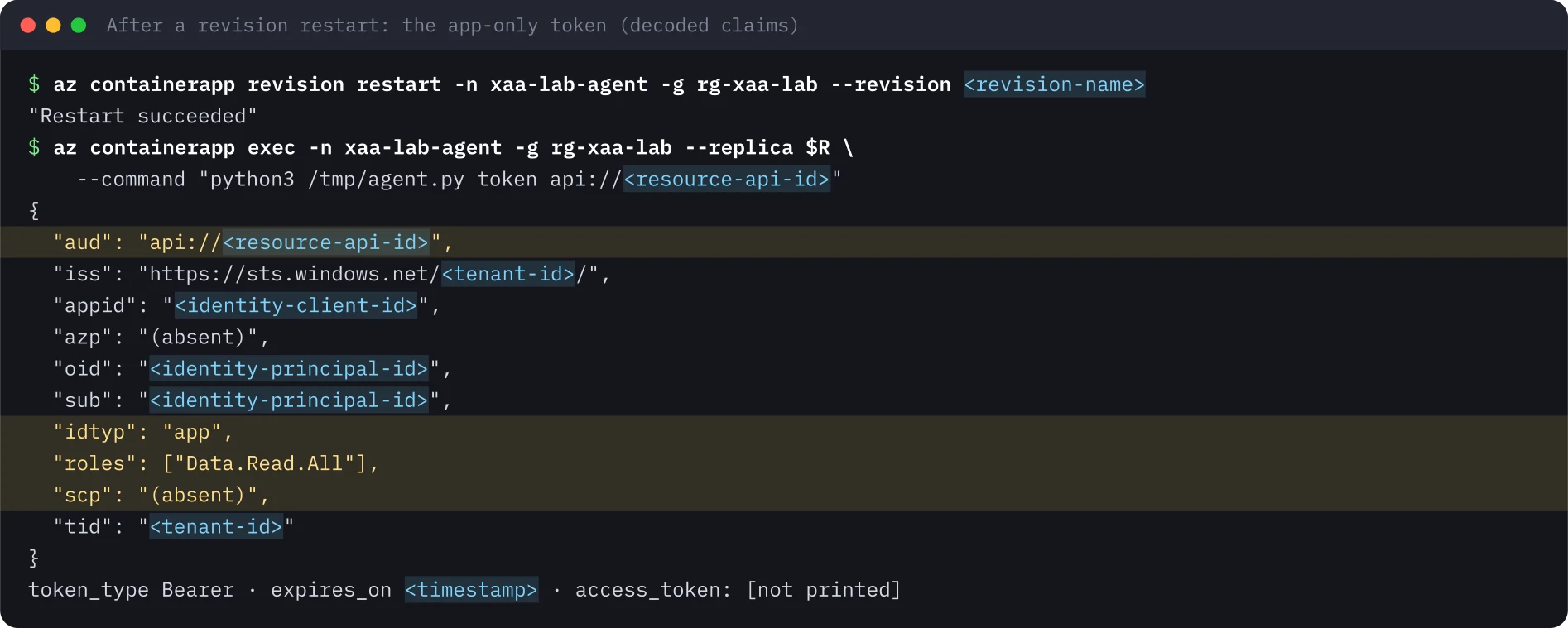
roles senza scp è il modo in cui un'API distingue una chiamata app-only da una delegata. Non c'è alcun utente; gli unici limiti sono le concessioni dell'identità.Fare la parte dell’API. Il token passa dal container a un file temporaneo con modalità 0600 e viene distrutto alla fine; non viene mai stampato. Uno script di convalida verifica la firma RS256 con le chiavi del tenant, l’audience, l’emittente e la scadenza, poi autorizza ogni route in base al ruolo.

Insidie#
- I token restano in cache per circa 24 ore. Rimuovere il ruolo non basta per una revoca urgente. Riavviate o ridistribuite il carico di lavoro, oppure disabilitate l’identità.
execha un limite di frequenza. Senza--replica,az containerapp execpuò scegliere una replica ferma e i tentativi successivi incontrano HTTP 429 con attesa di dieci minuti. Indicate la replica in esecuzione.- «Assignment required» è un interruttore da attivare. Senza di esso «poter ottenere un token» e «essere autorizzati» sono cose diverse, e ogni API deve controllare i ruoli da sé.
- I tenant gratuiti registrano meno. Il log di audit della directory mostra la concessione. I log di accesso delle managed identity richiedono Entra ID P1 o P2 e vanno esportati nel SIEM.
- Eliminate il calcolo quando avete finito. Il calcolo costa denaro; identità e ruolo portano il rischio e richiedono un responsabile e una data di revisione come qualsiasi altro account privilegiato.
Indicazioni di sicurezza#
- Un carico di lavoro senza segreti non ha nulla da far trapelare. Preferite managed identity o credenziali federate ai client secret.
- Partite senza ruoli e aggiungete un ruolo con l’ambito più stretto. Chiamate i ruoli app-only
*.Allperché chi revisiona veda che non c’è alcun confine utente. - Richiedete l’assegnazione sulle API interne, così il servizio dei token è il primo cancello.
- Convalidate firma, audience, emittente e ruolo nell’API. Entra decide solo chi ottiene un token.
- Trattate le managed identity che detengono ruoli applicativi come account non umani privilegiati: responsabile, certificazione, un avviso sulle assegnazioni di ruolo ai service principal.
Cosa non è stato eseguito#
Il laboratorio non ha distribuito un blueprint e un’identità di agente di Entra Agent ID, dove un token di managed identity sarebbe la credenziale del blueprint. Il tour del portale sugli oggetti risultanti è stato registrato ma non viene pubblicato, perché le viste del portale mostrano identificatori del tenant. Per questo laboratorio non viene pubblicata alcuna registrazione.
Le immagini del terminale sono state generate dall’output salvato dell’esecuzione, con identificatori, segreti e timestamp sostituiti da segnaposto.
Ripeti questo lab#
Servono una sottoscrizione Azure in un tenant di prova, l'Azure CLI e circa 90 minuti. L'agente gira su Azure Container Apps con 0,25 vCPU, quindi il costo è quasi nullo se cancelli tutto alla fine. Apri ogni passo, copia i blocchi e confronta l'output con il mio.
Ogni valore tra parentesi angolari è un segnaposto per il tuo ambiente di test. Nulla in questa pagina è un identificativo o un segreto reale.
Imposta le variabili una sola volta
# Paste into every terminal you use for this lab. Replace each <PLACEHOLDER> with a value from your own test subscription.
export TENANT_ID='<TENANT_ID>'
export SUBSCRIPTION_ID='<SUBSCRIPTION_ID>'
export LOCATION='<AZURE_REGION>'
export RG='rg-agent-lab'
export IDENTITY='agent-lab-mi'
export ENV_NAME='cae-agent-lab'
export APP_NAME='agent-lab'
export RESOURCE_API_NAME='Agent Lab - Resource API'
0 di 8 passi fatti
Passo 1Crea l'identità e verifica che non abbia ruoli
Obiettivo. Crea una managed identity assegnata all'utente e verifica che non abbia nessuna assegnazione di ruolo. Ogni permesso da qui in poi è una concessione deliberata.
Prerequisiti
- Un tenant e una sottoscrizione di prova, mai quelli di produzione
- Azure CLI 2.60 o successiva, jq e uuidgen
az login --tenant "$TENANT_ID"
az account set --subscription "$SUBSCRIPTION_ID"
az group create -n "$RG" -l "$LOCATION" -o none
az identity create -g "$RG" -n "$IDENTITY" -o none
az identity show -g "$RG" -n "$IDENTITY" --query '{name:name, clientId:clientId, principalId:principalId}' -o json
export IDENTITY_CLIENT_ID=$(az identity show -g "$RG" -n "$IDENTITY" --query clientId -o tsv)
export IDENTITY_PRINCIPAL_ID=$(az identity show -g "$RG" -n "$IDENTITY" --query principalId -o tsv)
export IDENTITY_ID=$(az identity show -g "$RG" -n "$IDENTITY" --query id -o tsv)
az role assignment list --assignee "$IDENTITY_PRINCIPAL_ID" --all -o json | jq length
Output atteso
{
  "clientId": "<identity-client-id>",
  "name": "agent-lab-mi",
  "principalId": "<identity-principal-id>"
}
0Passo 2Crea l'ambiente Container Apps
Obiettivo. Crea l'ambiente sul piano Consumption, senza workspace Log Analytics, così non si paga altro.
Prerequisiti
- Le variabili di env.sh e l'identità del passo precedente
- Diritti per creare risorse nel resource group
az provider register -n Microsoft.App --wait
az extension add -n containerapp
az containerapp env create -n "$ENV_NAME" -g "$RG" -l "$LOCATION" \
  --enable-workload-profiles false --logs-destination none \
  --query '{name:name, provisioningState:properties.provisioningState, logs:properties.appLogsConfiguration.destination}' -o json
export ENV_ID=$(az containerapp env show -n "$ENV_NAME" -g "$RG" --query id -o tsv)
Output atteso
{
  "logs": null,
  "name": "cae-agent-lab",
  "provisioningState": "Succeeded"
}Passo 3Registra la Resource API
Obiettivo. Crea la API a valle come registrazione di app con il suo service principal. Per ora nulla le dà accesso.
Prerequisiti
- Permesso di creare registrazioni di app nel tenant di prova
export RESOURCE_APP_ID=$(az ad app create --display-name "$RESOURCE_API_NAME" --sign-in-audience AzureADMyOrg --query appId -o tsv)
az ad app update --id "$RESOURCE_APP_ID" --identifier-uris "api://$RESOURCE_APP_ID"
az ad sp create --id "$RESOURCE_APP_ID" -o none
export RESOURCE_APP_OBJECT_ID=$(az ad app show --id "$RESOURCE_APP_ID" --query id -o tsv)
export RESOURCE_SP_ID=$(az ad sp show --id "$RESOURCE_APP_ID" --query id -o tsv)
az ad sp show --id "$RESOURCE_APP_ID" --query '{name:displayName, appRoleAssignmentRequired:appRoleAssignmentRequired, appRoles:appRoles}' -o json
Output atteso
{
  "appRoleAssignmentRequired": false,
  "appRoles": [],
  "name": "Agent Lab - Resource API"
}Passo 4Distribuisci l'agente senza segreti
Obiettivo. Esegui un piccolo agente Python come Container App con l'identità collegata, senza ingress e senza segreti, poi guarda cosa contiene davvero il container.
Prerequisiti
- L'ambiente e l'identità dei passi precedenti
- L'immagine è pubblica e serve solo per Python, quindi non serve nessuna credenziale di registro
# Minimal autonomous agent: no user, no secret. Uses the managed identity endpoint of Azure Container Apps.
import base64, json, os, sys, urllib.parse, urllib.request, urllib.error
UAMI = os.environ["AZURE_CLIENT_ID"]          # client ID of agent-lab-mi (not a secret)

def token(resource):
    q = urllib.parse.urlencode({"resource": resource, "api-version": "2019-08-01", "client_id": UAMI})
    req = urllib.request.Request(os.environ["IDENTITY_ENDPOINT"] + "?" + q,
                                 headers={"X-IDENTITY-HEADER": os.environ["IDENTITY_HEADER"]})
    try:
        return json.load(urllib.request.urlopen(req, timeout=30)), None
    except urllib.error.HTTPError as e:
        return None, (e.code, e.read().decode())

def claims(jwt):
    p = jwt.split(".")[1]; return json.loads(base64.urlsafe_b64decode(p + "=" * (-len(p) % 4)))

cmd = sys.argv[1]
if cmd == "env":
    h = os.environ.get("IDENTITY_HEADER", "")
    print("IDENTITY_ENDPOINT =", os.environ.get("IDENTITY_ENDPOINT"))
    print("IDENTITY_HEADER   =", f"[set, {len(h)} chars, value masked]" if h else None)
    print("AZURE_CLIENT_ID   =", UAMI, "(public client ID of the UAMI)")
    for k in sorted(k for k in os.environ if k.startswith("MSI_")):
        same = os.environ[k] == h
        print(f"{k:<18}=", "[same value as IDENTITY_HEADER: legacy alias, masked]" if same else os.environ[k])
    hits = [k for k in os.environ if any(w in k.upper() for w in ("SECRET", "PASSWORD", "KEY", "CERT"))
            and os.environ[k] != h]
    print("other env vars named *SECRET*/*PASSWORD*/*KEY*/*CERT*:", hits or "none")
    print("mounted secret volumes (/var/run/secrets, /mnt/secrets):", [p for p in ("/var/run/secrets", "/mnt/secrets") if os.path.exists(p)] or "none")
elif cmd == "token":                       # agent.py token <resource>  -> prints decoded claims only, never the token
    t, err = token(sys.argv[2])
    if err:
        print("HTTP", err[0]); print(err[1][:600]); sys.exit(1)
    c = claims(t["access_token"])
    keep = ["aud", "iss", "appid", "azp", "oid", "sub", "idtyp", "roles", "scp", "xms_mirid", "tid", "iat", "exp"]
    print(json.dumps({k: c.get(k, "(absent)") for k in keep}, indent=1))
    print("token_type", t.get("token_type"), "· expires_on", t.get("expires_on"), "· access_token: [not printed]")
elif cmd == "graph-users":                 # app-only call to Microsoft Graph with no Graph permission
    t, err = token("https://graph.microsoft.com")
    if err: print("HTTP", err[0], err[1][:400]); sys.exit(1)
    print("Graph token roles:", claims(t["access_token"]).get("roles", "(none)"))
    req = urllib.request.Request("https://graph.microsoft.com/v1.0/users?$top=1&$select=displayName",
                                 headers={"Authorization": "Bearer " + t["access_token"]})
    try:
        r = urllib.request.urlopen(req, timeout=30); print("HTTP", r.status, r.read()[:200])
    except urllib.error.HTTPError as e:
        b = json.loads(e.read()); b["error"].pop("innerError", None); print("HTTP", e.code, json.dumps(b))
elif cmd == "handoff":                     # lab only: emit the raw token for the box-side validator, never displayed
t, err = token(sys.argv[2]); print("@@TOKEN@@" + t["access_token"] + "@@END@@"){
cat <<EOF
location: $LOCATION
identity:
type: UserAssigned
userAssignedIdentities:
$IDENTITY_ID: {}
properties:
managedEnvironmentId: $ENV_ID
configuration:
activeRevisionsMode: Single
template:
containers:
- name: agent
image: mcr.microsoft.com/azure-cli:latest
resources: {cpu: 0.25, memory: 0.5Gi}
command: ["/bin/sh", "-c"]
args: ["printf '%s' \"\$AGENT_PY\" > /tmp/agent.py && echo agent ready && sleep infinity"]
env:
- name: AZURE_CLIENT_ID
value: $IDENTITY_CLIENT_ID
- name: AGENT_PY
value: |
EOF
sed 's/^/ /' agent.py
echo ' scale: {minReplicas: 1, maxReplicas: 1}'
} > app.yaml
az containerapp create -n "$APP_NAME" -g "$RG" --yaml app.yaml -o none
export REPLICA=$(az containerapp replica list -n "$APP_NAME" -g "$RG" --query '[0].name' -o tsv)
az containerapp exec -n "$APP_NAME" -g "$RG" --replica "$REPLICA" --command "python3 /tmp/agent.py env"Output atteso
IDENTITY_ENDPOINT = http://localhost:12356/msi/token
IDENTITY_HEADER   = [set, 36 chars, value masked]
AZURE_CLIENT_ID   = <identity-client-id> (public client ID of the UAMI)
MSI_ENDPOINT      = http://localhost:12356/msi/token
MSI_SECRET        = [same value as IDENTITY_HEADER: legacy alias, masked]
other env vars named *SECRET*/*PASSWORD*/*KEY*/*CERT*: none
mounted secret volumes (/var/run/secrets, /mnt/secrets): nonePasso 5Richiedi l'assegnazione e guarda fallire la richiesta di token
Obiettivo. Attiva l'assegnazione obbligatoria per la Resource API, poi chiedi un token da dentro il container. Entra rifiuta, e Graph rifiuta una chiamata che richiede un permesso.
Prerequisiti
- L'agente è in esecuzione (REPLICA è impostata)
- Fissa la replica: senza --replica, exec può scegliere una replica ferma e raggiungere un limite di richieste
az ad sp update --id "$RESOURCE_SP_ID" --set appRoleAssignmentRequired=true
az containerapp exec -n "$APP_NAME" -g "$RG" --replica "$REPLICA" \
  --command "python3 /tmp/agent.py token api://$RESOURCE_APP_ID"
az containerapp exec -n "$APP_NAME" -g "$RG" --replica "$REPLICA" --command "python3 /tmp/agent.py graph-users"
Output atteso
HTTP 400
{"exceptionMessage":"AADSTS501051: Application '<identity-client-id>' (agent-lab-mi) is not assigned to a role for the application 'api://<resource-api-id>' (Agent Lab - Resource API). Trace ID: <trace-id> Correlation ID: <correlation-id> Timestamp: <timestamp>"}
Graph token roles: (none)
HTTP 403 {"error": {"code": "Authorization_RequestDenied", "message": "Insufficient privileges to complete the operation."}}Passo 6Concedi un solo app role ristretto e leggi il token
Obiettivo. Aggiungi un ruolo solo applicativo Data.Read.All alla Resource API e assegnalo alla managed identity tramite Microsoft Graph. Poi leggi il token app-only che riceve l'agente.
Prerequisiti
- Il portale non può assegnare un app role a una managed identity, quindi si passa da az rest
- Diritti per gestire le assegnazioni di app role nel tenant
export ROLE_ID=$(uuidgen)
az rest -m PATCH -u "https://graph.microsoft.com/v1.0/applications/$RESOURCE_APP_OBJECT_ID" \
  --headers Content-Type=application/json \
  --body "{\"appRoles\":[{\"id\":\"$ROLE_ID\",\"allowedMemberTypes\":[\"Application\"],\"value\":\"Data.Read.All\",\"displayName\":\"Read all lab data (app-only)\",\"isEnabled\":true}]}"
az rest -m POST -u "https://graph.microsoft.com/v1.0/servicePrincipals/$IDENTITY_PRINCIPAL_ID/appRoleAssignments" \
  --body "{\"principalId\":\"$IDENTITY_PRINCIPAL_ID\",\"resourceId\":\"$RESOURCE_SP_ID\",\"appRoleId\":\"$ROLE_ID\"}" \
  --query '{appRoleId:appRoleId, principal:principalDisplayName, principalType:principalType, resource:resourceDisplayName}'
# Entra caches managed identity tokens for up to a day: restart the revision to get a fresh one
REVISION=$(az containerapp revision list -n "$APP_NAME" -g "$RG" --query '[0].name' -o tsv)
az containerapp revision restart -n "$APP_NAME" -g "$RG" --revision "$REVISION"
export REPLICA=$(az containerapp replica list -n "$APP_NAME" -g "$RG" --query '[0].name' -o tsv)
az containerapp exec -n "$APP_NAME" -g "$RG" --replica "$REPLICA" \
  --command "python3 /tmp/agent.py token api://$RESOURCE_APP_ID"
Output atteso
{
  "appRoleId": "<role-id>",
  "principal": "agent-lab-mi",
  "principalType": "ServicePrincipal",
  "resource": "Agent Lab - Resource API"
}
"Restart succeeded"
{
 "aud": "api://<resource-api-id>",
 "iss": "https://sts.windows.net/<tenant-id>/",
 "appid": "<identity-client-id>",
 "azp": "(absent)",
 "oid": "<identity-principal-id>",
 "sub": "<identity-principal-id>",
 "idtyp": "app",
 "roles": ["Data.Read.All"],
 "scp": "(absent)",
 "tid": "<tenant-id>"
}
token_type Bearer · expires_on <timestamp> · access_token: [not printed]Passo 7Fai la parte della API: valida il token e autorizza per ruolo
Obiettivo. Controlla firma, audience, issuer e scadenza come farebbe la API, poi autorizza ogni route per ruolo. Un token con ruoli modificati deve fallire.
Prerequisiti
- Python 3 con pip, per installare PyJWT e cryptography
- Il token passa da un file temporaneo 0600 e non viene mai stampato
# Local stand-in for the Resource API: validate an app-only Entra token and authorize by app role.
import base64, json, os, sys
import jwt   # PyJWT
TENANT = os.environ["TENANT_ID"]
AUD = "api://" + os.environ["RESOURCE_APP_ID"]
ISS = f"https://sts.windows.net/{TENANT}/"               # v1 access tokens (requestedAccessTokenVersion = null)
JWKS = jwt.PyJWKClient(f"https://login.microsoftonline.com/{TENANT}/discovery/v2.0/keys")

def check(tok, required_role):
    try:
        key = JWKS.get_signing_key_from_jwt(tok).key
        c = jwt.decode(tok, key, algorithms=["RS256"], audience=AUD, issuer=ISS)
    except Exception as e:
        return f"401 invalid token ({type(e).__name__}: {e})"
    if c.get("idtyp") != "app" or "scp" in c:
        return "403 app-only endpoint: delegated token rejected"
    if required_role not in c.get("roles", []):
        return f"403 missing app role {required_role} (token roles: {c.get('roles', [])})"
    return f"200 allow: oid {c['oid']} (managed identity) has {required_role}"

tok = open(sys.argv[1]).read().strip()
h = jwt.get_unverified_header(tok)
print("header:", {k: h[k] for k in ("alg", "typ") if k in h}, "· kid from tenant JWKS")
print("GET /data   (requires Data.Read.All)  ->", check(tok, "Data.Read.All"))
print("POST /data  (requires Data.Write.All) ->", check(tok, "Data.Write.All"))
hd, pl, sg = tok.split(".")
c = json.loads(base64.urlsafe_b64decode(pl + "=" * (-len(pl) % 4))); c["roles"] = ["Data.Read.All", "Data.Write.All"]
forged = hd + "." + base64.urlsafe_b64encode(json.dumps(c).encode()).decode().rstrip("=") + "." + sg
print("POST /data with roles edited in the payload ->", check(forged, "Data.Write.All"))python3 -m venv .venv && . .venv/bin/activate && pip install pyjwt cryptography
umask 077; T=$(mktemp /tmp/mi-token.XXXXXX) # 0600 temp file, shredded at the end of the step
az containerapp exec -n "$APP_NAME" -g "$RG" --replica "$REPLICA" --command "python3 /tmp/agent.py handoff api://$RESOURCE_APP_ID" \
| sed -n 's/.*@@TOKEN@@\(.*\)@@END@@.*/\1/p' > "$T"
stat -c '%A %s bytes (content never printed)' "$T"
python3 validate.py "$T"
shred -u "$T"Output atteso
-rw------- 1481 bytes (content never printed)
header: {'alg': 'RS256', 'typ': 'JWT'} · kid from tenant JWKS
GET /data   (requires Data.Read.All)  -> 200 allow: oid <identity-principal-id> (managed identity) has Data.Read.All
POST /data  (requires Data.Write.All) -> 403 missing app role Data.Write.All (token roles: ['Data.Read.All'])
POST /data with roles edited in the payload -> 401 invalid token (InvalidSignatureError: Signature verification failed)Passo 8Pulizia
Obiettivo. Elimina l'app, l'ambiente, la registrazione della Resource API e il resource group, e rimuovi i file locali.
Prerequisiti
- Il calcolo costa, quindi non saltare questo passo
az containerapp delete -n "$APP_NAME" -g "$RG" -y -o none && echo app-deleted
az containerapp env delete -n "$ENV_NAME" -g "$RG" -y -o none && echo env-deleted   # can take around 20 minutes
az ad app delete --id "$RESOURCE_APP_ID" && echo resource-api-deleted
az group delete -n "$RG" -y --no-wait && echo group-delete-started
rm -f app.yaml agent.py validate.py
az resource list -g "$RG" -o table
Output atteso
app-deleted
env-deleted
resource-api-deleted
group-delete-started
# then a table of whatever is still being deleted (empty once the group is gone)Fonti#
- Microsoft Security Blog, 5 Nov 2026: Threat actors use agentic AI tooling to find and abuse exposed secrets
- Microsoft Learn: Managed identities in Azure Container Apps
- Microsoft Learn: Managed identities for Azure resources
- Microsoft Learn: Restrict your app to a set of users (app role assignment required)
- Microsoft Learn: Azure Container Apps billing
Discuti questo articolo#
Ti è stato utile? Condividilo e dimmi cosa ne pensi.
Questo articolo in formato Markdown · RSS · JSON feed
Nuovi articoli via email
Una email a settimana con nuovi articoli e lab. Disiscrizione in qualsiasi momento.
Il tuo indirizzo è salvato su Kit, il servizio che invia le email. Dettagli