TL;DR
- An autonomous agent that holds no secret has nothing to leak: a Container App with a user-assigned managed identity, no client secret, no certificate and no ingress.
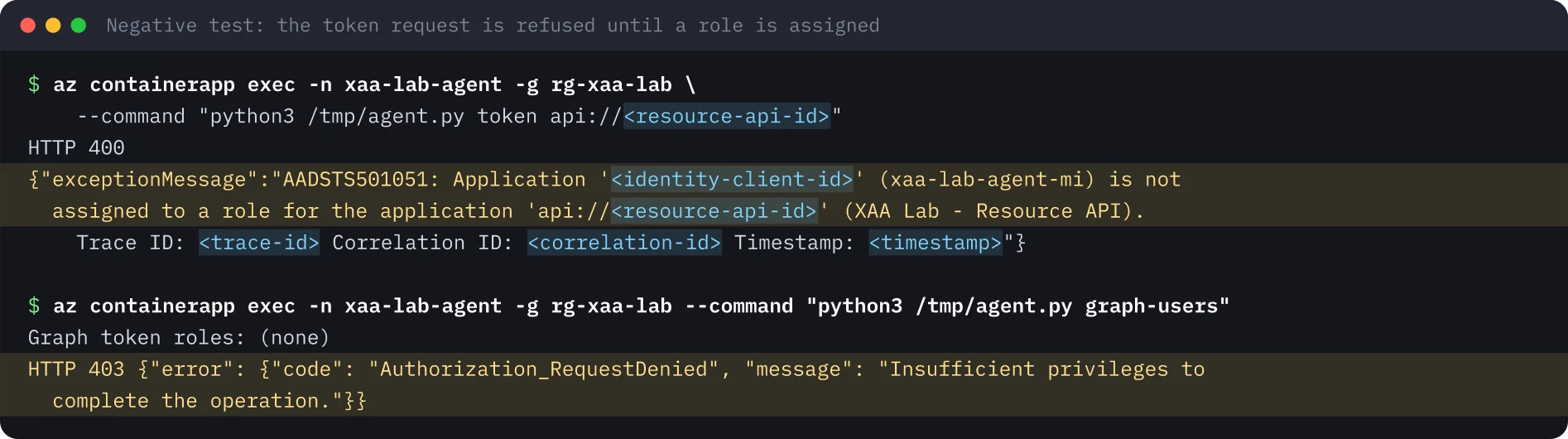
- The identity starts with no roles; with assignment required on the API, the token request is refused (AADSTS501051) until one narrow app role is granted.
- The app-only token carries roles and no scp, and the API still validates signature, audience, issuer and role.
- Tokens are cached for about 24 hours, so removing a role is not an instant revocation.
- Treat the identity like a privileged account: an owner, a review date and an alert on role assignments.
Repeat this lab
I wrote this lab so you can run it yourself. Each step has the commands to copy and the output I got, and you can tick it as done. Your ticks stay in this browser only.
Copies a ready-made prompt for Claude Code, Cursor, Codex or any coding agent. For test environments only.
Show prompt
I want to run a hands-on lab from iamops.dev, and I would like your help to do it safely.

Lab: A secretless autonomous AI agent on Azure: calling an API with a managed identity from Container Apps
Read the whole lab here (Markdown): https://iamops.dev/secretless-agent-managed-identity-container-app.md

What the lab needs before the first step:
- A test tenant and subscription; never use a production one
- Azure CLI 2.60 or newer, jq and uuidgen
- Values I have to set myself (the lab uses placeholders): <TENANT_ID>, <SUBSCRIPTION_ID>, <AZURE_REGION>

How I want you to work:
1. Read the lab from start to finish first (each step lists its own prerequisites). Then check that the prerequisites are in place and that the tool versions match what the lab expects. Tell me what is missing before you run anything.
2. Run one step at a time. Before each command, show it to me and say in a sentence what it does.
3. Ask me before anything that costs money, creates cloud resources, touches a real tenant or account, or deletes anything. Wait for my answer.
4. Use the placeholders from the lab. Never paste real secrets, tokens or production identities into a command, a file or this chat. If a value is needed, tell me where to set it myself.
5. After each step, compare the output with the expected output in the lab. If it does not match, stop and tell me what differs. Do not carry on or invent a fix without asking me.
6. At the end, report what passed, what failed and which cleanup you did. Then offer to tick the steps off for me. The lab page keeps ticks only in my browser, so if you cannot do that, list the steps I should tick.

This lab is for test environments only. Do not run it against production, or against a tenant or account that holds real data or real users.

You may answer in my language.
On 5 November 2026 Microsoft Threat Intelligence described threat actors using an agentic offensive framework to search public repositories for exposed secrets and then use valid application credentials to sign in as workloads. The defensive reading is simple: an autonomous agent that holds no secret has nothing to leak. I built one on Azure and checked every claim about it.
What this lab shows#
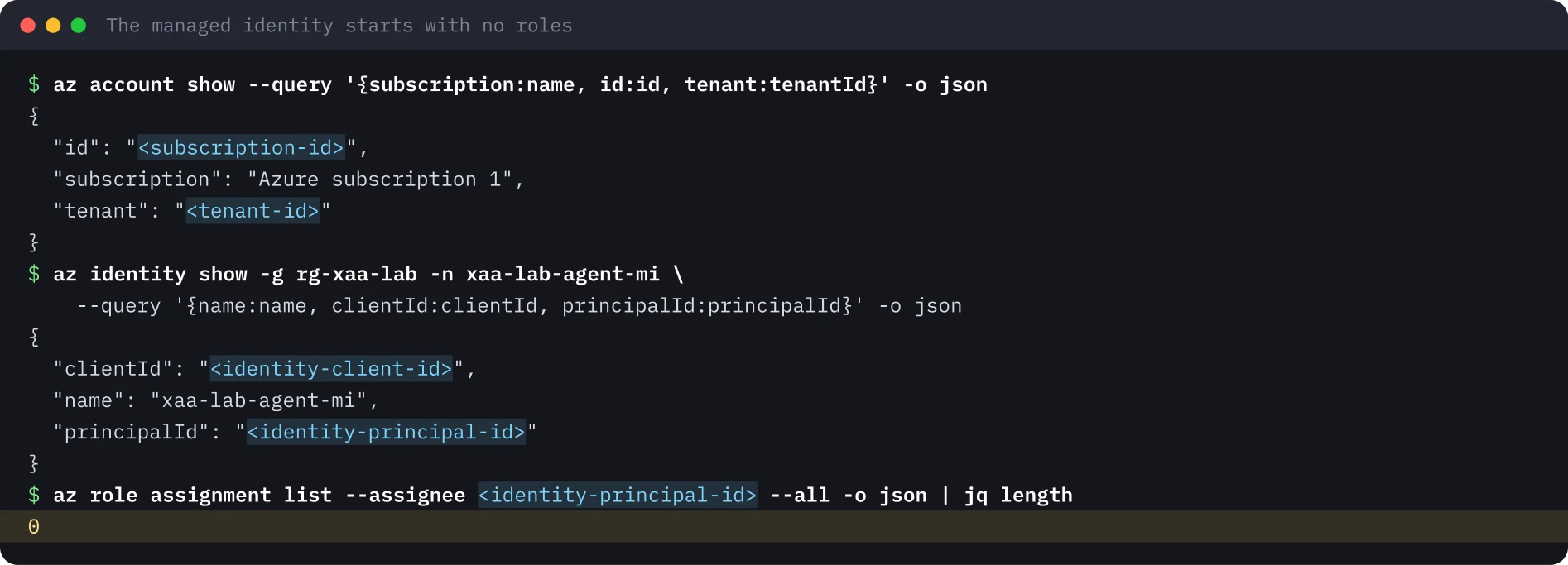
A small agent runs as an Azure Container App. It has no user, no client secret and no certificate. Its identity is a user-assigned managed identity that starts with no roles. The lab then:
- Attaches the identity to the app and proves the container holds no secret.
- Makes the downstream API (the Resource API, an app registration) require an app role assignment.
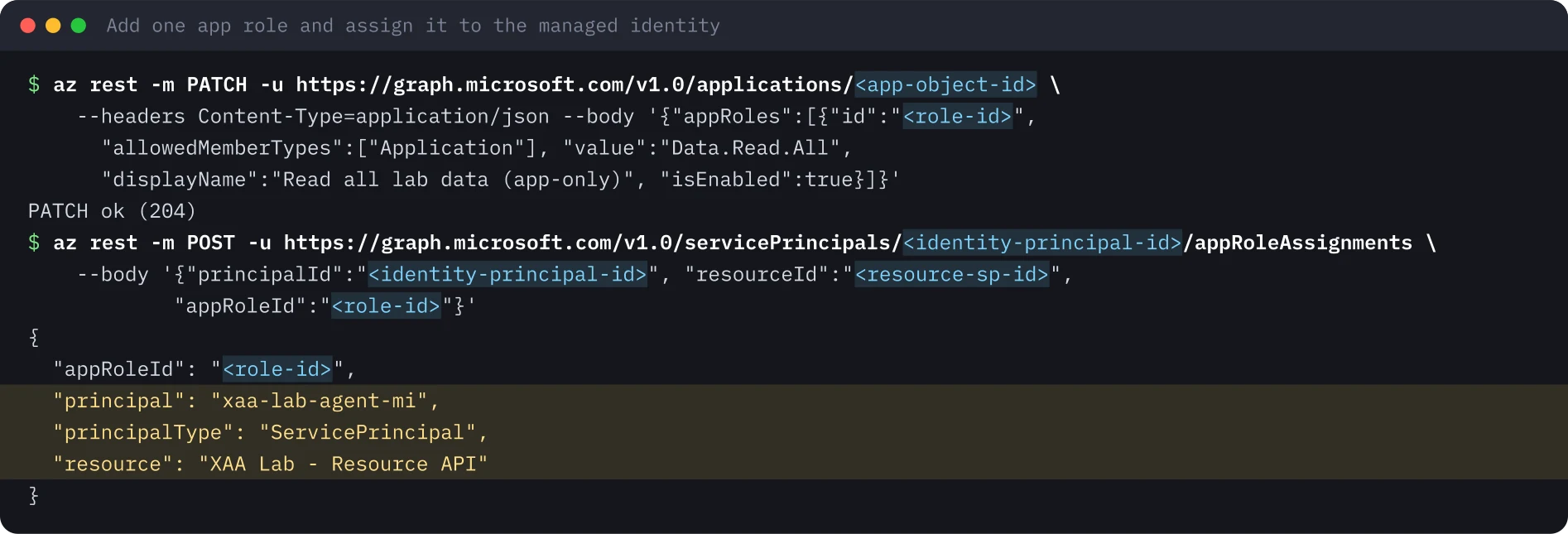
- Shows the token request refused, then grants one narrow app-only role.
- Reads the app-only token the agent gets, and checks it the way the API would.
Setup#
Use a separate test tenant and subscription. The agent runs at 0.25 vCPU and 0.5 GiB on the Consumption plan with no ingress and no Log Analytics workspace. The first 180,000 vCPU-seconds per month are free, which this size uses up in about 200 hours of running, so delete the app when you are done. The managed identity and the app role are free.
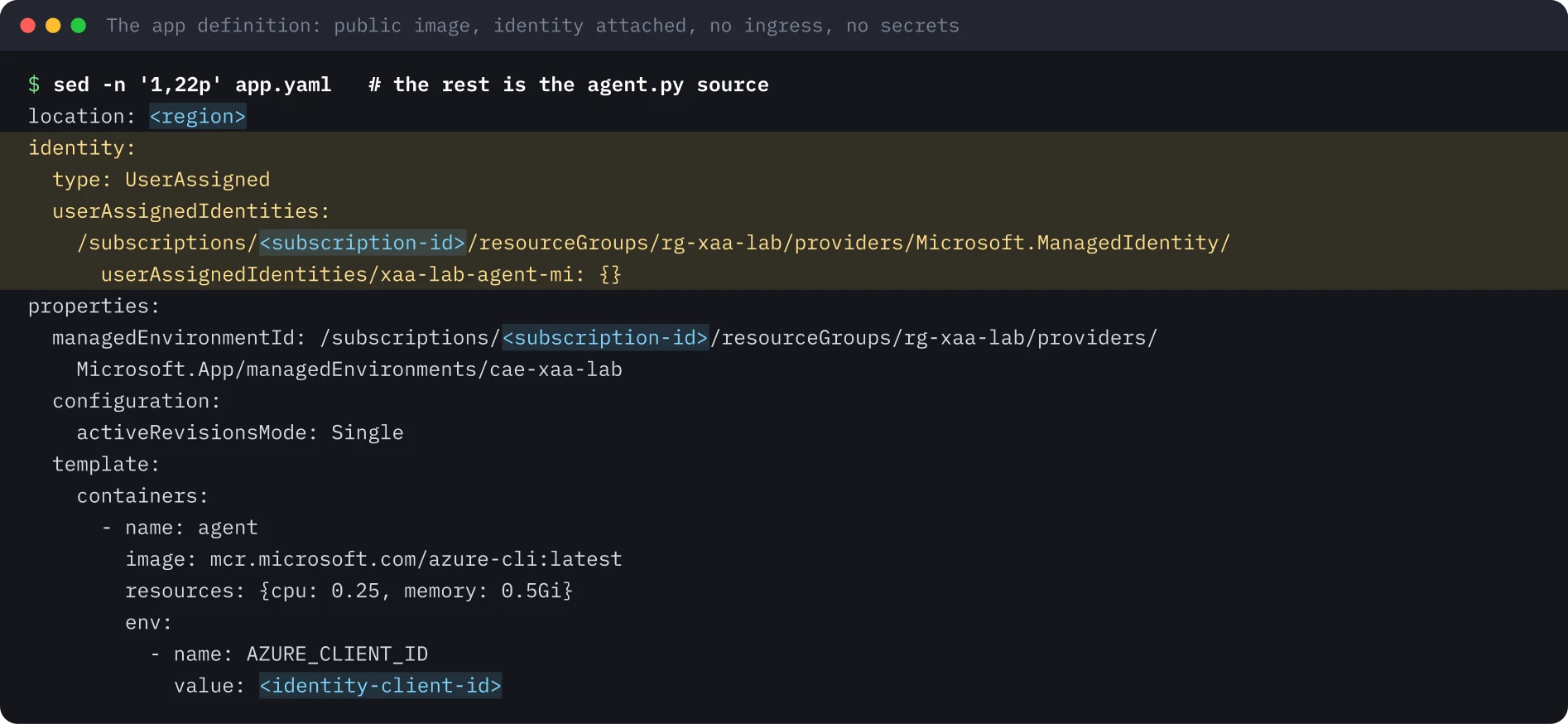
The app is defined in YAML. The image is a public one used only for its Python, so no registry credential is needed. The identity block attaches the managed identity. There is no ingress section, so nothing can call in.
The run#
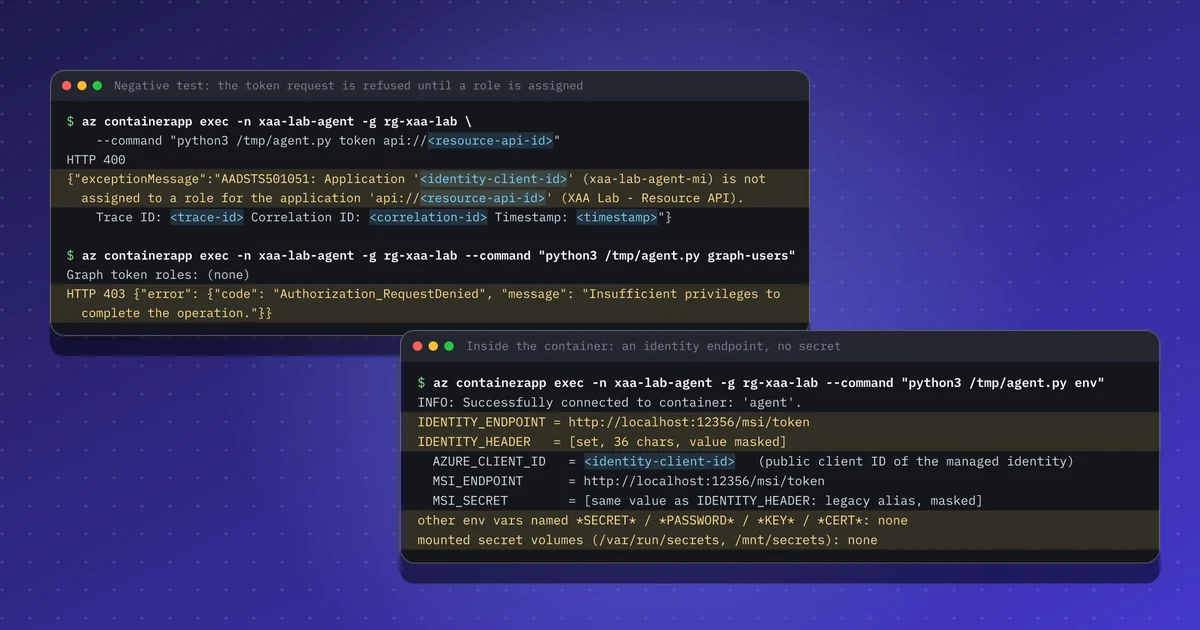
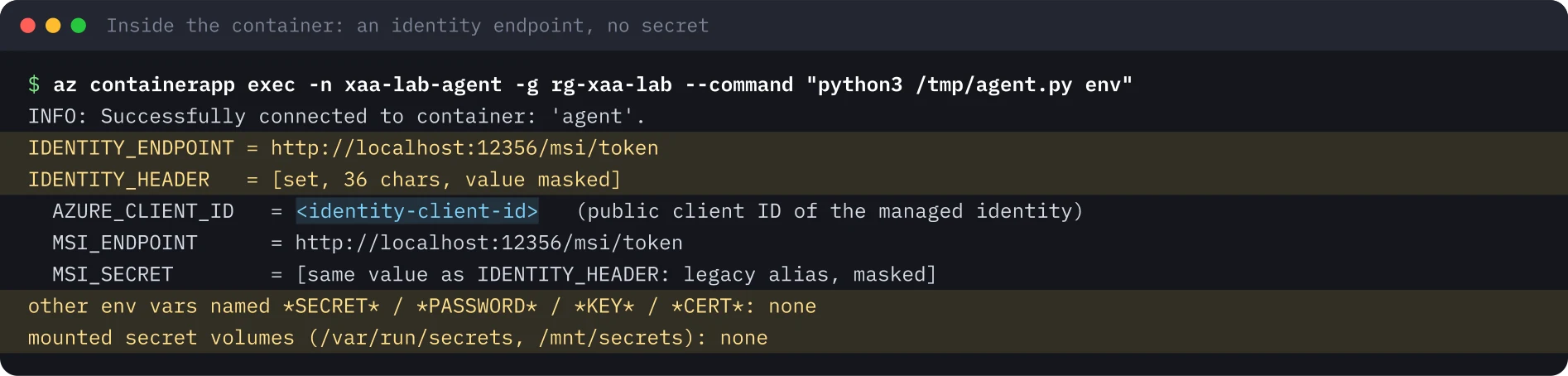
The container holds an identity endpoint, not a secret. The platform injects IDENTITY_ENDPOINT, a localhost URL, and IDENTITY_HEADER, a per-container value (masked in the output). No other variable looks like a secret and no secret volume is mounted.
Require assignment on the API. By default Entra issues an app-only token to any service principal in the tenant that asks, with an empty roles claim. Setting appRoleAssignmentRequired to true on the Resource API’s service principal makes Entra refuse anyone who is not assigned:
az ad sp update --id <resource-sp-id> --set appRoleAssignmentRequired=trueTwo negative tests. The agent’s request for a token for the Resource API is refused at the token service with AADSTS501051, and a Graph token (Graph does not require assignment) carries no roles, so GET /v1.0/users returns 403.
One narrow grant. Add an application-only app role Data.Read.All (allowed member type: application) to the Resource API, then assign it to the managed identity through Microsoft Graph. The admin center cannot assign an app role to a managed identity, so this goes through Graph, PowerShell or the CLI.
The app-only token. Entra caches managed identity tokens, so the container keeps getting its old token for up to a day. Restarting the revision gets a fresh one, which now carries the role.
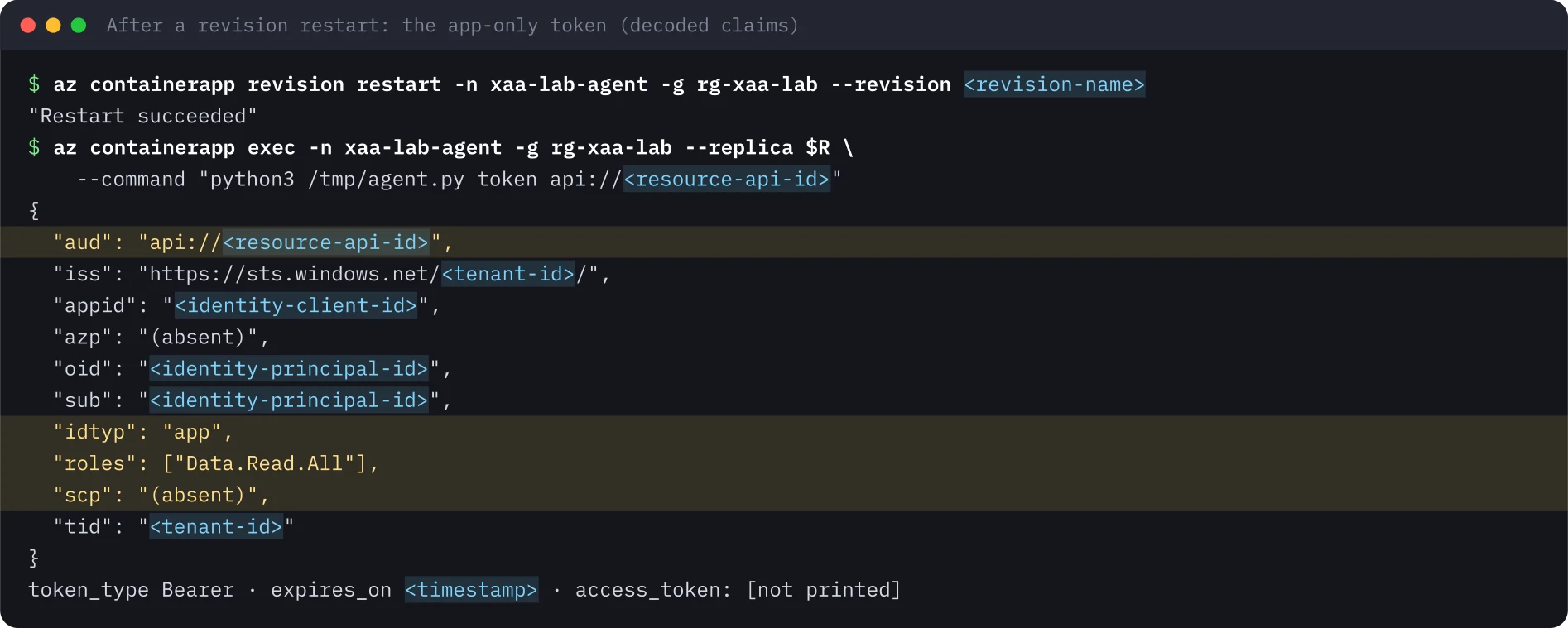
roles claim and no scp is how an API tells an app-only call from a delegated one. There is no user; the identity's own grants are the only limit.Play the API. The token goes from the container to a temporary file with mode 0600 and is shredded at the end; it is never printed. A validation script checks the RS256 signature against the tenant’s keys, the audience, the issuer and the expiry, and then authorizes each route by role.

Gotchas#
- Tokens are cached for about 24 hours. Removing the role is not enough for an urgent revocation. Restart or redeploy the workload, or disable the identity.
exechas a rate limit. Without--replica,az containerapp execcan pick a stopped replica, and retries hit HTTP 429 with a ten-minute wait. Pin the running replica.- Assignment required is a switch you must set. Without it “can get a token” and “is authorized” are different things, and every API has to check roles itself.
- Free tenants log less. The directory audit log shows the grant. Sign-in logs for managed identities need Entra ID P1 or P2 and should be exported to your SIEM.
- Delete the compute when you are done. Compute costs money; the identity and the role carry the risk and need an owner and a review date like any other privileged account.
Security takeaways#
- A workload that holds no secret has nothing to leak. Prefer managed identities or federated credentials over client secrets.
- Start with no roles and add one role at the narrowest scope. Name app-only roles
*.Allso reviewers see that no user boundary applies. - Require assignment on internal APIs, so the token service is the first gate.
- Validate signature, audience, issuer and role in the API. Entra only decides who gets a token.
- Treat managed identities that hold app roles as privileged non-human accounts: owner, certification, an alert on role assignments to service principals.
What was not run#
The lab did not deploy an Entra Agent ID blueprint and agent identity, where a managed identity token would be the blueprint’s credential. The portal tour of the resulting objects was recorded but is not published, because portal views show tenant identifiers. No recording is published for this lab.
Terminal images were rendered from the saved output of the run, with identifiers, secrets and timestamps replaced by placeholders.
Repeat this lab#
You need an Azure subscription in a test tenant, the Azure CLI and about 90 minutes. The agent runs on Azure Container Apps at 0.25 vCPU, so the bill is close to zero if you delete everything at the end. Open each step, copy the blocks and compare the output with mine.
Every value in angle brackets is a placeholder for your own test environment. Nothing on this page is a real identifier or secret.
Set your variables once
# Paste into every terminal you use for this lab. Replace each <PLACEHOLDER> with a value from your own test subscription.
export TENANT_ID='<TENANT_ID>'
export SUBSCRIPTION_ID='<SUBSCRIPTION_ID>'
export LOCATION='<AZURE_REGION>'
export RG='rg-agent-lab'
export IDENTITY='agent-lab-mi'
export ENV_NAME='cae-agent-lab'
export APP_NAME='agent-lab'
export RESOURCE_API_NAME='Agent Lab - Resource API'
0 of 8 steps done
Step 1Create the identity and prove it has no roles
Goal. Make a user-assigned managed identity and check that it holds zero role assignments. Every permission after this is a deliberate grant.
Prerequisites
- A test tenant and subscription; never use a production one
- Azure CLI 2.60 or newer, jq and uuidgen
az login --tenant "$TENANT_ID"
az account set --subscription "$SUBSCRIPTION_ID"
az group create -n "$RG" -l "$LOCATION" -o none
az identity create -g "$RG" -n "$IDENTITY" -o none
az identity show -g "$RG" -n "$IDENTITY" --query '{name:name, clientId:clientId, principalId:principalId}' -o json
export IDENTITY_CLIENT_ID=$(az identity show -g "$RG" -n "$IDENTITY" --query clientId -o tsv)
export IDENTITY_PRINCIPAL_ID=$(az identity show -g "$RG" -n "$IDENTITY" --query principalId -o tsv)
export IDENTITY_ID=$(az identity show -g "$RG" -n "$IDENTITY" --query id -o tsv)
az role assignment list --assignee "$IDENTITY_PRINCIPAL_ID" --all -o json | jq length
Expected output
{
  "clientId": "<identity-client-id>",
  "name": "agent-lab-mi",
  "principalId": "<identity-principal-id>"
}
0Step 2Create the Container Apps environment
Goal. Create the environment on the Consumption plan, with no Log Analytics workspace, so nothing else is billed.
Prerequisites
- The variables from env.sh and the identity from the previous step
- Rights to create resources in the resource group
az provider register -n Microsoft.App --wait
az extension add -n containerapp
az containerapp env create -n "$ENV_NAME" -g "$RG" -l "$LOCATION" \
  --enable-workload-profiles false --logs-destination none \
  --query '{name:name, provisioningState:properties.provisioningState, logs:properties.appLogsConfiguration.destination}' -o json
export ENV_ID=$(az containerapp env show -n "$ENV_NAME" -g "$RG" --query id -o tsv)
Expected output
{
  "logs": null,
  "name": "cae-agent-lab",
  "provisioningState": "Succeeded"
}Step 3Register the Resource API
Goal. Create the downstream API as an app registration with its service principal. Nothing grants access to it yet.
Prerequisites
- Permission to create app registrations in the test tenant
export RESOURCE_APP_ID=$(az ad app create --display-name "$RESOURCE_API_NAME" --sign-in-audience AzureADMyOrg --query appId -o tsv)
az ad app update --id "$RESOURCE_APP_ID" --identifier-uris "api://$RESOURCE_APP_ID"
az ad sp create --id "$RESOURCE_APP_ID" -o none
export RESOURCE_APP_OBJECT_ID=$(az ad app show --id "$RESOURCE_APP_ID" --query id -o tsv)
export RESOURCE_SP_ID=$(az ad sp show --id "$RESOURCE_APP_ID" --query id -o tsv)
az ad sp show --id "$RESOURCE_APP_ID" --query '{name:displayName, appRoleAssignmentRequired:appRoleAssignmentRequired, appRoles:appRoles}' -o json
Expected output
{
  "appRoleAssignmentRequired": false,
  "appRoles": [],
  "name": "Agent Lab - Resource API"
}Step 4Deploy the agent with no secret
Goal. Run a small Python agent as a Container App with the identity attached, no ingress and no secrets, then look at what the container actually holds.
Prerequisites
- The environment and the identity from the previous steps
- The image is public and only used for its Python, so no registry credential is needed
# Minimal autonomous agent: no user, no secret. Uses the managed identity endpoint of Azure Container Apps.
import base64, json, os, sys, urllib.parse, urllib.request, urllib.error
UAMI = os.environ["AZURE_CLIENT_ID"]          # client ID of agent-lab-mi (not a secret)

def token(resource):
    q = urllib.parse.urlencode({"resource": resource, "api-version": "2019-08-01", "client_id": UAMI})
    req = urllib.request.Request(os.environ["IDENTITY_ENDPOINT"] + "?" + q,
                                 headers={"X-IDENTITY-HEADER": os.environ["IDENTITY_HEADER"]})
    try:
        return json.load(urllib.request.urlopen(req, timeout=30)), None
    except urllib.error.HTTPError as e:
        return None, (e.code, e.read().decode())

def claims(jwt):
    p = jwt.split(".")[1]; return json.loads(base64.urlsafe_b64decode(p + "=" * (-len(p) % 4)))

cmd = sys.argv[1]
if cmd == "env":
    h = os.environ.get("IDENTITY_HEADER", "")
    print("IDENTITY_ENDPOINT =", os.environ.get("IDENTITY_ENDPOINT"))
    print("IDENTITY_HEADER   =", f"[set, {len(h)} chars, value masked]" if h else None)
    print("AZURE_CLIENT_ID   =", UAMI, "(public client ID of the UAMI)")
    for k in sorted(k for k in os.environ if k.startswith("MSI_")):
        same = os.environ[k] == h
        print(f"{k:<18}=", "[same value as IDENTITY_HEADER: legacy alias, masked]" if same else os.environ[k])
    hits = [k for k in os.environ if any(w in k.upper() for w in ("SECRET", "PASSWORD", "KEY", "CERT"))
            and os.environ[k] != h]
    print("other env vars named *SECRET*/*PASSWORD*/*KEY*/*CERT*:", hits or "none")
    print("mounted secret volumes (/var/run/secrets, /mnt/secrets):", [p for p in ("/var/run/secrets", "/mnt/secrets") if os.path.exists(p)] or "none")
elif cmd == "token":                       # agent.py token <resource>  -> prints decoded claims only, never the token
    t, err = token(sys.argv[2])
    if err:
        print("HTTP", err[0]); print(err[1][:600]); sys.exit(1)
    c = claims(t["access_token"])
    keep = ["aud", "iss", "appid", "azp", "oid", "sub", "idtyp", "roles", "scp", "xms_mirid", "tid", "iat", "exp"]
    print(json.dumps({k: c.get(k, "(absent)") for k in keep}, indent=1))
    print("token_type", t.get("token_type"), "· expires_on", t.get("expires_on"), "· access_token: [not printed]")
elif cmd == "graph-users":                 # app-only call to Microsoft Graph with no Graph permission
    t, err = token("https://graph.microsoft.com")
    if err: print("HTTP", err[0], err[1][:400]); sys.exit(1)
    print("Graph token roles:", claims(t["access_token"]).get("roles", "(none)"))
    req = urllib.request.Request("https://graph.microsoft.com/v1.0/users?$top=1&$select=displayName",
                                 headers={"Authorization": "Bearer " + t["access_token"]})
    try:
        r = urllib.request.urlopen(req, timeout=30); print("HTTP", r.status, r.read()[:200])
    except urllib.error.HTTPError as e:
        b = json.loads(e.read()); b["error"].pop("innerError", None); print("HTTP", e.code, json.dumps(b))
elif cmd == "handoff":                     # lab only: emit the raw token for the box-side validator, never displayed
t, err = token(sys.argv[2]); print("@@TOKEN@@" + t["access_token"] + "@@END@@"){
cat <<EOF
location: $LOCATION
identity:
type: UserAssigned
userAssignedIdentities:
$IDENTITY_ID: {}
properties:
managedEnvironmentId: $ENV_ID
configuration:
activeRevisionsMode: Single
template:
containers:
- name: agent
image: mcr.microsoft.com/azure-cli:latest
resources: {cpu: 0.25, memory: 0.5Gi}
command: ["/bin/sh", "-c"]
args: ["printf '%s' \"\$AGENT_PY\" > /tmp/agent.py && echo agent ready && sleep infinity"]
env:
- name: AZURE_CLIENT_ID
value: $IDENTITY_CLIENT_ID
- name: AGENT_PY
value: |
EOF
sed 's/^/ /' agent.py
echo ' scale: {minReplicas: 1, maxReplicas: 1}'
} > app.yaml
az containerapp create -n "$APP_NAME" -g "$RG" --yaml app.yaml -o none
export REPLICA=$(az containerapp replica list -n "$APP_NAME" -g "$RG" --query '[0].name' -o tsv)
az containerapp exec -n "$APP_NAME" -g "$RG" --replica "$REPLICA" --command "python3 /tmp/agent.py env"Expected output
IDENTITY_ENDPOINT = http://localhost:12356/msi/token
IDENTITY_HEADER   = [set, 36 chars, value masked]
AZURE_CLIENT_ID   = <identity-client-id> (public client ID of the UAMI)
MSI_ENDPOINT      = http://localhost:12356/msi/token
MSI_SECRET        = [same value as IDENTITY_HEADER: legacy alias, masked]
other env vars named *SECRET*/*PASSWORD*/*KEY*/*CERT*: none
mounted secret volumes (/var/run/secrets, /mnt/secrets): noneStep 5Require assignment and watch the token request fail
Goal. Switch on assignment required for the Resource API, then ask for a token from inside the container. Entra refuses, and so does Graph for a call that needs a permission.
Prerequisites
- The agent is running (REPLICA is set)
- Pin the replica: without --replica, exec can pick a stopped one and hit a rate limit
az ad sp update --id "$RESOURCE_SP_ID" --set appRoleAssignmentRequired=true
az containerapp exec -n "$APP_NAME" -g "$RG" --replica "$REPLICA" \
  --command "python3 /tmp/agent.py token api://$RESOURCE_APP_ID"
az containerapp exec -n "$APP_NAME" -g "$RG" --replica "$REPLICA" --command "python3 /tmp/agent.py graph-users"
Expected output
HTTP 400
{"exceptionMessage":"AADSTS501051: Application '<identity-client-id>' (agent-lab-mi) is not assigned to a role for the application 'api://<resource-api-id>' (Agent Lab - Resource API). Trace ID: <trace-id> Correlation ID: <correlation-id> Timestamp: <timestamp>"}
Graph token roles: (none)
HTTP 403 {"error": {"code": "Authorization_RequestDenied", "message": "Insufficient privileges to complete the operation."}}Step 6Grant one narrow app role and read the token
Goal. Add an application-only role Data.Read.All to the Resource API and assign it to the managed identity through Microsoft Graph. Then read the app-only token the agent gets.
Prerequisites
- The portal cannot assign an app role to a managed identity, so this goes through az rest
- Rights to manage app role assignments in the tenant
export ROLE_ID=$(uuidgen)
az rest -m PATCH -u "https://graph.microsoft.com/v1.0/applications/$RESOURCE_APP_OBJECT_ID" \
  --headers Content-Type=application/json \
  --body "{\"appRoles\":[{\"id\":\"$ROLE_ID\",\"allowedMemberTypes\":[\"Application\"],\"value\":\"Data.Read.All\",\"displayName\":\"Read all lab data (app-only)\",\"isEnabled\":true}]}"
az rest -m POST -u "https://graph.microsoft.com/v1.0/servicePrincipals/$IDENTITY_PRINCIPAL_ID/appRoleAssignments" \
  --body "{\"principalId\":\"$IDENTITY_PRINCIPAL_ID\",\"resourceId\":\"$RESOURCE_SP_ID\",\"appRoleId\":\"$ROLE_ID\"}" \
  --query '{appRoleId:appRoleId, principal:principalDisplayName, principalType:principalType, resource:resourceDisplayName}'
# Entra caches managed identity tokens for up to a day: restart the revision to get a fresh one
REVISION=$(az containerapp revision list -n "$APP_NAME" -g "$RG" --query '[0].name' -o tsv)
az containerapp revision restart -n "$APP_NAME" -g "$RG" --revision "$REVISION"
export REPLICA=$(az containerapp replica list -n "$APP_NAME" -g "$RG" --query '[0].name' -o tsv)
az containerapp exec -n "$APP_NAME" -g "$RG" --replica "$REPLICA" \
  --command "python3 /tmp/agent.py token api://$RESOURCE_APP_ID"
Expected output
{
  "appRoleId": "<role-id>",
  "principal": "agent-lab-mi",
  "principalType": "ServicePrincipal",
  "resource": "Agent Lab - Resource API"
}
"Restart succeeded"
{
 "aud": "api://<resource-api-id>",
 "iss": "https://sts.windows.net/<tenant-id>/",
 "appid": "<identity-client-id>",
 "azp": "(absent)",
 "oid": "<identity-principal-id>",
 "sub": "<identity-principal-id>",
 "idtyp": "app",
 "roles": ["Data.Read.All"],
 "scp": "(absent)",
 "tid": "<tenant-id>"
}
token_type Bearer · expires_on <timestamp> · access_token: [not printed]Step 7Play the API: validate the token and authorize by role
Goal. Check signature, audience, issuer and expiry the way the API would, then authorize each route by role. A token with edited roles must fail.
Prerequisites
- Python 3 with pip, to install PyJWT and cryptography
- The token goes through a 0600 temp file and is never printed
# Local stand-in for the Resource API: validate an app-only Entra token and authorize by app role.
import base64, json, os, sys
import jwt   # PyJWT
TENANT = os.environ["TENANT_ID"]
AUD = "api://" + os.environ["RESOURCE_APP_ID"]
ISS = f"https://sts.windows.net/{TENANT}/"               # v1 access tokens (requestedAccessTokenVersion = null)
JWKS = jwt.PyJWKClient(f"https://login.microsoftonline.com/{TENANT}/discovery/v2.0/keys")

def check(tok, required_role):
    try:
        key = JWKS.get_signing_key_from_jwt(tok).key
        c = jwt.decode(tok, key, algorithms=["RS256"], audience=AUD, issuer=ISS)
    except Exception as e:
        return f"401 invalid token ({type(e).__name__}: {e})"
    if c.get("idtyp") != "app" or "scp" in c:
        return "403 app-only endpoint: delegated token rejected"
    if required_role not in c.get("roles", []):
        return f"403 missing app role {required_role} (token roles: {c.get('roles', [])})"
    return f"200 allow: oid {c['oid']} (managed identity) has {required_role}"

tok = open(sys.argv[1]).read().strip()
h = jwt.get_unverified_header(tok)
print("header:", {k: h[k] for k in ("alg", "typ") if k in h}, "· kid from tenant JWKS")
print("GET /data   (requires Data.Read.All)  ->", check(tok, "Data.Read.All"))
print("POST /data  (requires Data.Write.All) ->", check(tok, "Data.Write.All"))
hd, pl, sg = tok.split(".")
c = json.loads(base64.urlsafe_b64decode(pl + "=" * (-len(pl) % 4))); c["roles"] = ["Data.Read.All", "Data.Write.All"]
forged = hd + "." + base64.urlsafe_b64encode(json.dumps(c).encode()).decode().rstrip("=") + "." + sg
print("POST /data with roles edited in the payload ->", check(forged, "Data.Write.All"))python3 -m venv .venv && . .venv/bin/activate && pip install pyjwt cryptography
umask 077; T=$(mktemp /tmp/mi-token.XXXXXX) # 0600 temp file, shredded at the end of the step
az containerapp exec -n "$APP_NAME" -g "$RG" --replica "$REPLICA" --command "python3 /tmp/agent.py handoff api://$RESOURCE_APP_ID" \
| sed -n 's/.*@@TOKEN@@\(.*\)@@END@@.*/\1/p' > "$T"
stat -c '%A %s bytes (content never printed)' "$T"
python3 validate.py "$T"
shred -u "$T"Expected output
-rw------- 1481 bytes (content never printed)
header: {'alg': 'RS256', 'typ': 'JWT'} · kid from tenant JWKS
GET /data   (requires Data.Read.All)  -> 200 allow: oid <identity-principal-id> (managed identity) has Data.Read.All
POST /data  (requires Data.Write.All) -> 403 missing app role Data.Write.All (token roles: ['Data.Read.All'])
POST /data with roles edited in the payload -> 401 invalid token (InvalidSignatureError: Signature verification failed)Step 8Clean up
Goal. Delete the app, the environment, the Resource API registration and the resource group, and remove the local files.
Prerequisites
- Compute costs money, so do not skip this step
az containerapp delete -n "$APP_NAME" -g "$RG" -y -o none && echo app-deleted
az containerapp env delete -n "$ENV_NAME" -g "$RG" -y -o none && echo env-deleted   # can take around 20 minutes
az ad app delete --id "$RESOURCE_APP_ID" && echo resource-api-deleted
az group delete -n "$RG" -y --no-wait && echo group-delete-started
rm -f app.yaml agent.py validate.py
az resource list -g "$RG" -o table
Expected output
app-deleted
env-deleted
resource-api-deleted
group-delete-started
# then a table of whatever is still being deleted (empty once the group is gone)Sources#
- Microsoft Security Blog, 5 Nov 2026: Threat actors use agentic AI tooling to find and abuse exposed secrets
- Microsoft Learn: Managed identities in Azure Container Apps
- Microsoft Learn: Managed identities for Azure resources
- Microsoft Learn: Restrict your app to a set of users (app role assignment required)
- Microsoft Learn: Azure Container Apps billing
Discuss this post#
Found it useful? Share it, and tell me what you think.
This post as Markdown · RSS · JSON feed
New posts by email
One email a week with new posts and labs. Unsubscribe anytime.
Your address is stored with Kit, which sends the emails. Details