TL;DR
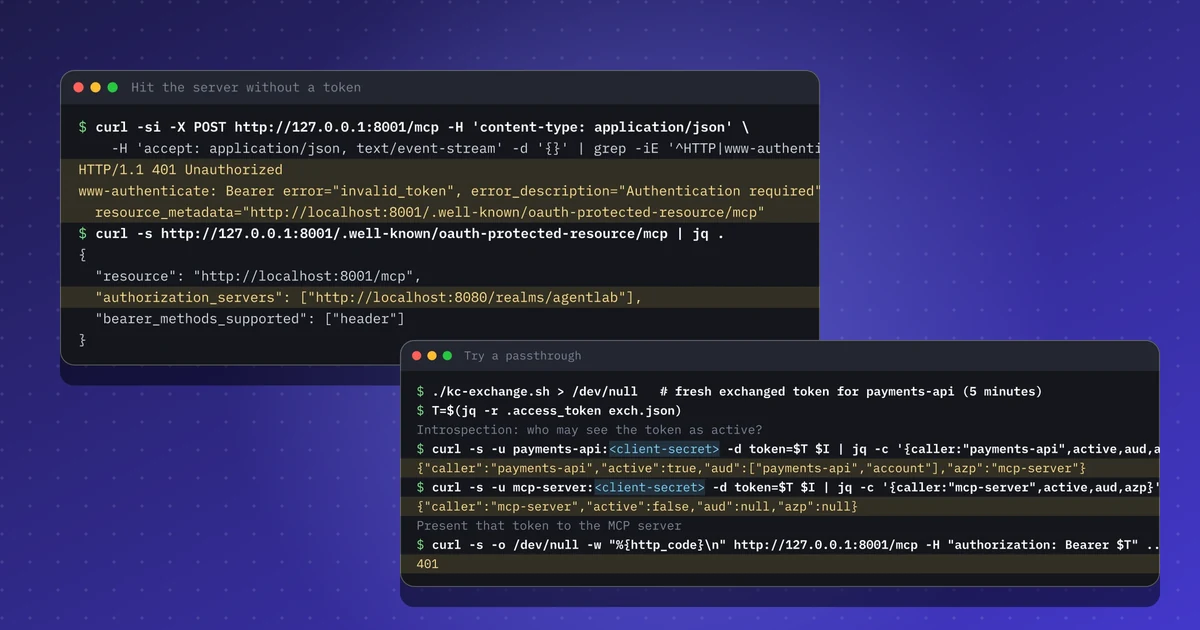
- An MCP server is an OAuth resource server: it answers 401 with Protected Resource Metadata so clients can find the authorization server.
- It introspects every bearer token and refuses one whose audience does not include the MCP server itself.
- For a downstream API it exchanges the token (RFC 8693) instead of forwarding the caller's token.
- A deliberate passthrough fails: the exchanged payments token is inactive for the MCP server, which returns 401.
- Log the user, the agent client and the downstream audience in one line so audits can follow the chain.
Repeat this lab
I wrote this lab so you can run it yourself. Each step has the commands to copy and the output I got, and you can tick it as done. Your ticks stay in this browser only.
Copies a ready-made prompt for Claude Code, Cursor, Codex or any coding agent. For test environments only.
Show prompt
I want to run a hands-on lab from iamops.dev, and I would like your help to do it safely.

Lab: Protecting an MCP server with OAuth: refusing token passthrough and exchanging per downstream API
Read the whole lab here (Markdown): https://iamops.dev/mcp-server-no-token-passthrough.md

What the lab needs before the first step:
- The Keycloak lab is running with its realm, three clients and user alice
- Python 3.12 or newer, curl and jq
- Values I have to set myself (the lab uses placeholders): <ALICE_PASSWORD>, <AGENT_CLIENT_SECRET>, <MCP_SERVER_CLIENT_SECRET>, <PAYMENTS_API_CLIENT_SECRET>

How I want you to work:
1. Read the lab from start to finish first (each step lists its own prerequisites). Then check that the prerequisites are in place and that the tool versions match what the lab expects. Tell me what is missing before you run anything.
2. Run one step at a time. Before each command, show it to me and say in a sentence what it does.
3. Ask me before anything that costs money, creates cloud resources, touches a real tenant or account, or deletes anything. Wait for my answer.
4. Use the placeholders from the lab. Never paste real secrets, tokens or production identities into a command, a file or this chat. If a value is needed, tell me where to set it myself.
5. After each step, compare the output with the expected output in the lab. If it does not match, stop and tell me what differs. Do not carry on or invent a fix without asking me.
6. At the end, report what passed, what failed and which cleanup you did. Then offer to tick the steps off for me. The lab page keeps ticks only in my browser, so if you cannot do that, list the steps I should tick.

This lab is for test environments only. Do not run it against production, or against a tenant or account that holds real data or real users.

You may answer in my language.
On 10 November 2026 WorkOS added token exchange (RFC 8693) to WorkOS Connect so that an MCP server can call downstream APIs for a user without passing the user’s token through. That is the pattern the MCP authorization specification expects. I built it by hand with the official Python SDK to see each rule work.
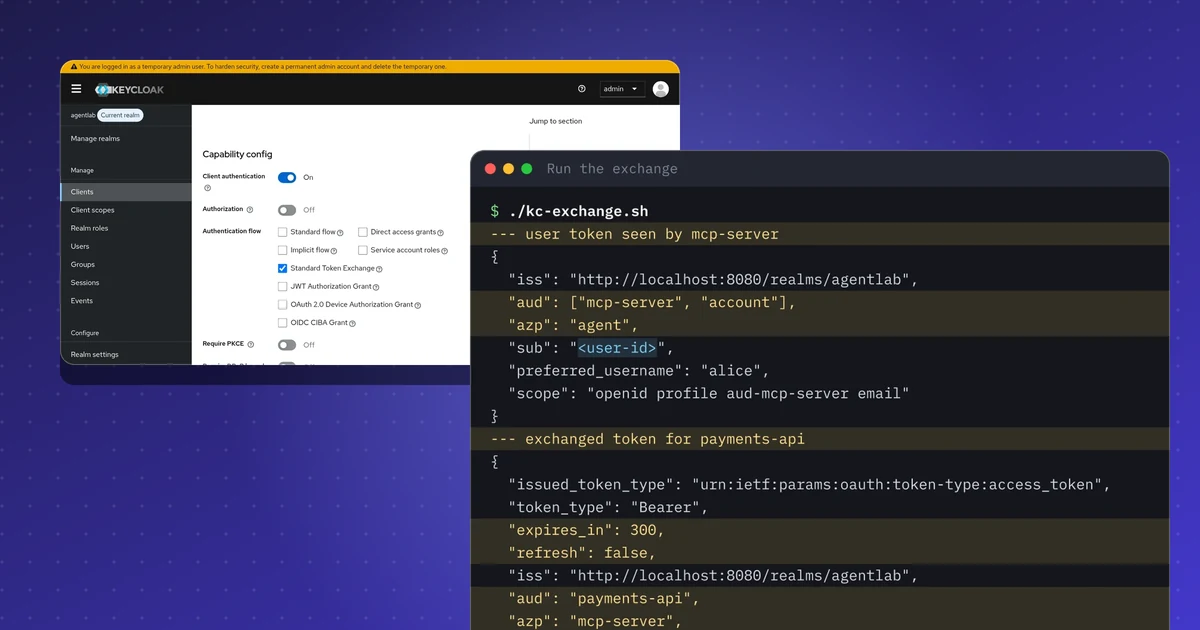
It builds on the Keycloak token exchange lab: same realm, same three clients.
What this lab shows#
An MCP server written with the official Python SDK (mcp 2.3.0) acts as an OAuth resource server for a Keycloak realm. It does four things:
- Answers a request without a token with
401and a pointer to its Protected Resource Metadata (RFC 9728), so a client can find the authorization server without hard-coding it. - Checks every bearer token by introspection at Keycloak and refuses tokens whose audience does not include the MCP server itself.
- For one tool, exchanges the caller’s token for a token meant for the payments API (RFC 8693) instead of forwarding it.
- Refuses a token that was minted for the payments API when someone presents it to the MCP server (a passthrough attempt).
The verifier is short. The decisive line is the audience check:
data = introspect(token)            # RFC 7662, as the mcp-server client
aud = data.get("aud", [])
aud = [aud] if isinstance(aud, str) else aud
if not data.get("active") or "mcp-server" not in aud:
    return None                     # inactive, or minted for another API: no passthrough
The run#
Pin the SDK version: mcp 2.x renamed FastMCP to MCPServer, and SDKs change their auth classes between releases. The server listens on 127.0.0.1:8001.
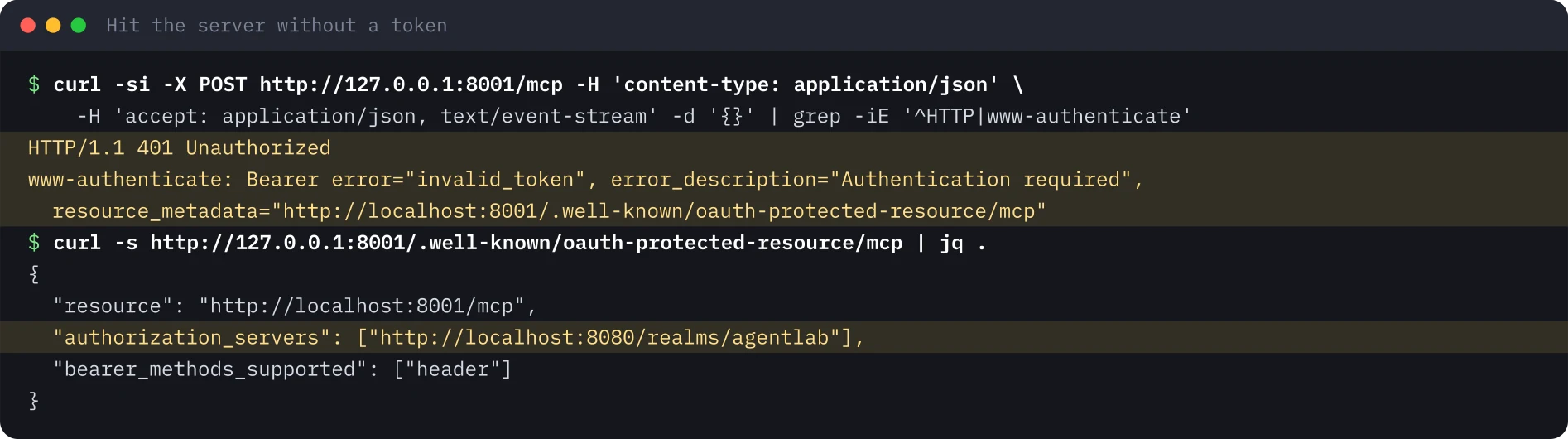
Without a token. The first request is the discovery handshake every MCP client starts with: a 401 whose WWW-Authenticate header carries a resource_metadata URL, and a metadata document that names the realm as the authorization server.
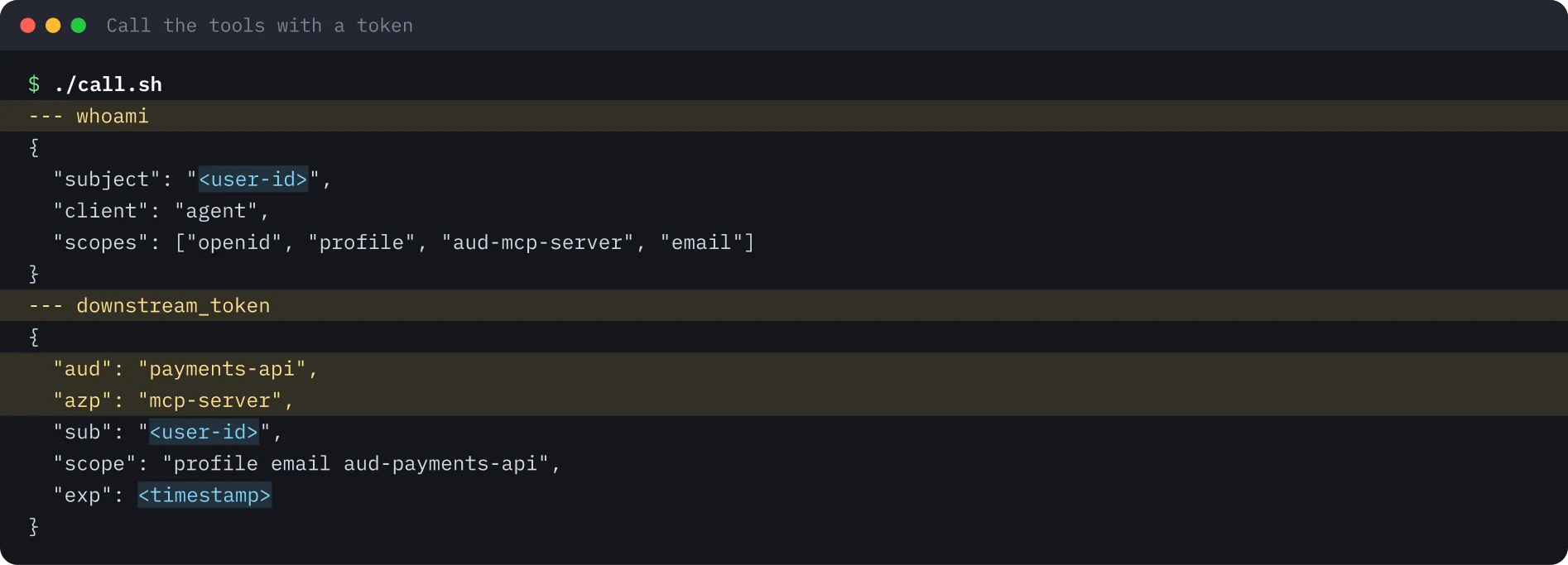
With a token. A small script gets a user token for the agent client, opens an MCP session and calls both tools. whoami shows the server sees the user through the agent client; downstream_token shows the server swapping the token for one that is scoped to the payments API.
The same call works through the MCP Inspector command-line client, which is the standard way to reproduce what any MCP host would do. Pin its version in scripts; this lab used 2.15.0.
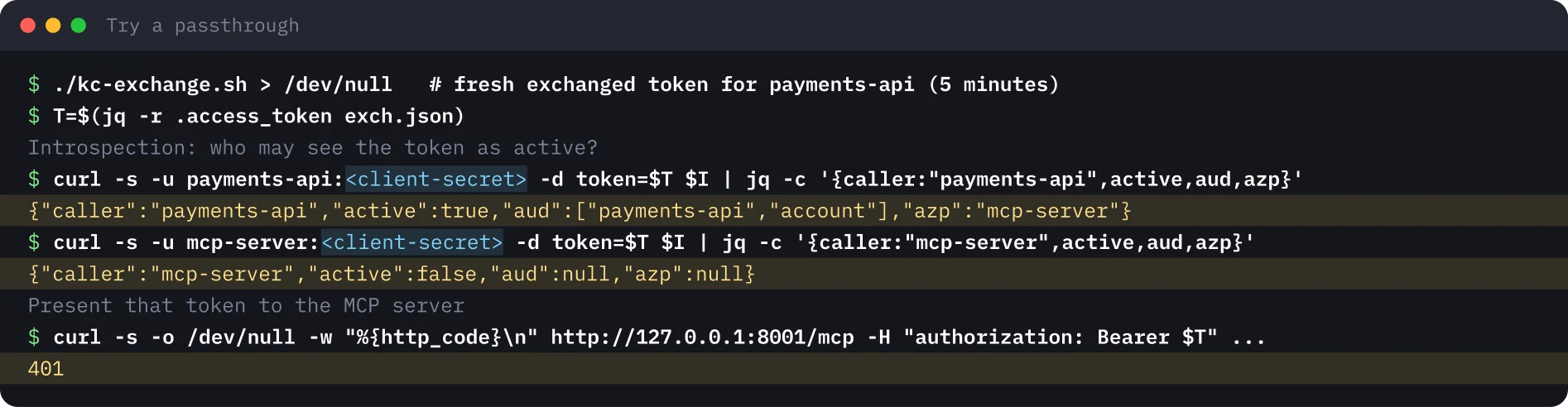
The passthrough attempt. Make a fresh exchanged token, then look at it through introspection from both sides and present it to the MCP server.
Gotchas#
- Introspection or local validation? The lab introspects, which gives instant revocation at the cost of a round trip to the authorization server. Local JWT validation against the JWKS is the alternative; write down what you lose and gain.
- Check the audience, not only the signature. A valid token for another API is still the wrong token. The audience check is what turns the passthrough into a
401. - Tokens live five minutes in this setup, so generate the passthrough token right before the test.
- SDK drift. Class names and auth hooks moved between major versions; test against the version you ship.
Security takeaways#
- An MCP server is an OAuth resource server. It publishes metadata, validates the audience and refuses anything not meant for it.
- Never forward the caller’s token to a downstream API. Exchange it per downstream audience, narrower and short-lived.
- Let the authorization server decide who may see a token as active. A token that works only for its intended recipient limits what a compromised hop can do.
- Log one line that joins user, agent client and downstream audience; the token alone will not tell an auditor the whole story.
What was not run#
The MCP Inspector web interface’s OAuth flow was not run (the lab’s agent client allows a localhost redirect for it). Dynamic client registration was not used; the client is pre-registered. Everything ran on one machine with throwaway accounts. No recording is published for this lab.
Terminal images were rendered from the saved output of the run, with identifiers, secrets and timestamps replaced by placeholders.
Repeat this lab#
Run this lab on a laptop in about 30 minutes. It needs the Keycloak realm from the token exchange lab, a small MCP server in Python and a few curl calls. Open each step, copy the blocks and compare the output with what I got.
Every value in angle brackets is a placeholder for your own test environment. Nothing on this page is a real identifier or secret.
Set your variables once
# Paste into every terminal you use for this lab. Same values as in the Keycloak lab.
export KC_URL="http://localhost:8080"
export KC_REALM="agentlab"
export ALICE_PASSWORD='<ALICE_PASSWORD>'
export AGENT_SECRET='<AGENT_CLIENT_SECRET>'
export MCP_SECRET='<MCP_SERVER_CLIENT_SECRET>'
export PAYMENTS_SECRET='<PAYMENTS_API_CLIENT_SECRET>'
export TOKEN_URL="$KC_URL/realms/$KC_REALM/protocol/openid-connect/token"
export INTROSPECT_URL="$TOKEN_URL/introspect"
export MCP_URL="http://127.0.0.1:8001/mcp"
0 of 6 steps done
Step 1Install the SDK and check the realm
Goal. Get the MCP Python SDK in a clean virtualenv and confirm the Keycloak realm from the first lab is still up.
Prerequisites
- The Keycloak lab is running with its realm, three clients and user alice
- Python 3.12 or newer, curl and jq
python3 -m venv .venv && . .venv/bin/activate
pip install "mcp==2.3.0" httpx
# the realm answers
curl -s -o /dev/null -w "%{http_code}\n" "$KC_URL/realms/$KC_REALM/.well-known/openid-configuration"
Expected output
Successfully installed ... httpx-... mcp-2.3.0 ...
200Step 2Write and start the MCP server
Goal. Run an MCP server that checks every token by introspection and refuses one that is not meant for it.
Prerequisites
- The virtualenv from the previous step is active
- The variables from env.sh are set in this terminal, and port 8001 is free
"""An MCP server that is an OAuth resource server for Keycloak, and calls a downstream API
for the user with RFC 8693 token exchange. Tested with mcp 2.3.0 and Keycloak 26.8.2. Lab use only."""
import base64
import json
import os

import httpx
from mcp.server.auth.middleware.auth_context import get_access_token
from mcp.server.auth.provider import AccessToken
from mcp.server.auth.settings import AuthSettings
from mcp.server.mcpserver import MCPServer

KC = f"{os.environ['KC_URL']}/realms/{os.environ['KC_REALM']}"
CLIENT_ID = "mcp-server"
CLIENT_SECRET = os.environ["MCP_SECRET"]
RESOURCE = "http://localhost:8001/mcp"


class IntrospectionVerifier:
    """RFC 7662 introspection at Keycloak, then an audience check."""

    async def verify_token(self, token: str) -> AccessToken | None:
        async with httpx.AsyncClient() as http:
            r = await http.post(f"{KC}/protocol/openid-connect/token/introspect",
                                data={"token": token}, auth=(CLIENT_ID, CLIENT_SECRET))
        data = r.json()
        aud = data.get("aud", [])
        aud = [aud] if isinstance(aud, str) else aud
        if not data.get("active") or CLIENT_ID not in aud:
            return None  # inactive, or minted for another API: no token passthrough
        return AccessToken(token=token, client_id=data.get("azp", ""),
                           scopes=data.get("scope", "").split(), expires_at=data.get("exp"),
                           subject=data.get("sub"), claims={"iss": data.get("iss")})


mcp = MCPServer(
    "payments-lab",
    token_verifier=IntrospectionVerifier(),
    auth=AuthSettings(issuer_url=KC, resource_server_url=RESOURCE, validate_token_resource=False),
)


def claims(jwt: str) -> dict:
    part = jwt.split(".")[1]
    return json.loads(base64.urlsafe_b64decode(part + "=" * (-len(part) % 4)))


@mcp.tool()
async def whoami() -> dict:
    """Who called this MCP server, according to the bearer token."""
    t = get_access_token()
    return {"subject": t.subject, "client": t.client_id, "scopes": t.scopes}


@mcp.tool()
async def downstream_token() -> dict:
    """Exchange the caller's token for a payments-api token (RFC 8693) and show its claims."""
    t = get_access_token()
    async with httpx.AsyncClient() as http:
        r = await http.post(f"{KC}/protocol/openid-connect/token", auth=(CLIENT_ID, CLIENT_SECRET), data={
            "grant_type": "urn:ietf:params:oauth:grant-type:token-exchange",
            "subject_token": t.token,
            "subject_token_type": "urn:ietf:params:oauth:token-type:access_token",
            "requested_token_type": "urn:ietf:params:oauth:token-type:access_token",
            "audience": "payments-api",
            "scope": "aud-payments-api",
        })
    body = r.json()
    if "access_token" not in body:
        return {"error": body}
    c = claims(body["access_token"])
    return {k: c.get(k) for k in ("aud", "azp", "sub", "scope", "exp")}


if __name__ == "__main__":
mcp.run(transport="streamable-http", host="127.0.0.1", port=8001)python payments_mcp.py # keep this terminal openExpected output
INFO:     Started server process [12345]
INFO:     Waiting for application startup.
INFO:     Application startup complete.
INFO: Uvicorn running on http://127.0.0.1:8001 (Press CTRL+C to quit)Step 3Call the server without a token
Goal. See the discovery handshake: a 401 that points at the Protected Resource Metadata, and a metadata document that names the realm.
Prerequisites
- The server from the previous step is running
- Use a second terminal with env.sh loaded
curl -si -X POST "$MCP_URL" -H 'content-type: application/json' \
  -H 'accept: application/json, text/event-stream' -d '{}' | grep -iE '^HTTP|www-authenticate'
curl -s http://127.0.0.1:8001/.well-known/oauth-protected-resource/mcp | jq .
Expected output
HTTP/1.1 401 Unauthorized
www-authenticate: Bearer error="invalid_token", error_description="Authentication required", resource_metadata="http://localhost:8001/.well-known/oauth-protected-resource/mcp"
{
  "resource": "http://localhost:8001/mcp",
  "authorization_servers": [
    "http://localhost:8080/realms/agentlab"
  ],
  "bearer_methods_supported": [
    "header"
  ]
}Step 4Call both tools with a user token
Goal. Get a token for the agent client, open an MCP session and call whoami and downstream_token.
Prerequisites
- The server is still running in the first terminal
- jq installed; the script uses the password grant, which is only for labs
#!/usr/bin/env bash
# Get a user token for the agent client, open an MCP session and call both tools with curl.
set -euo pipefail
TOKEN=$(curl -s -d grant_type=password -d client_id=agent -d client_secret="$AGENT_SECRET" \
  -d username=alice -d password="$ALICE_PASSWORD" -d scope=openid "$TOKEN_URL" | jq -r .access_token)
H=(-H "authorization: Bearer $TOKEN" -H 'content-type: application/json' -H 'accept: application/json, text/event-stream')
SID=$(curl -s -D - -o /dev/null "${H[@]}" "$MCP_URL" -d '{"jsonrpc":"2.0","id":1,"method":"initialize","params":{"protocolVersion":"2025-06-18","capabilities":{},"clientInfo":{"name":"curl","version":"0"}}}' \
  | awk -F': ' 'tolower($1)=="mcp-session-id"{print $2}' | tr -d '\r')
curl -s "${H[@]}" -H "mcp-session-id: $SID" -H 'mcp-protocol-version: 2025-06-18' "$MCP_URL" -d '{"jsonrpc":"2.0","method":"notifications/initialized"}' >/dev/null
for TOOL in whoami downstream_token; do
  echo "--- $TOOL"
  curl -s "${H[@]}" -H "mcp-session-id: $SID" -H 'mcp-protocol-version: 2025-06-18' "$MCP_URL" \
    -d "{\"jsonrpc\":\"2.0\",\"id\":2,\"method\":\"tools/call\",\"params\":{\"name\":\"$TOOL\",\"arguments\":{}}}" | sed -n 's/^data: //p' | jq -r '.result.content[0].text'
donechmod +x call.sh && ./call.shExpected output
--- whoami
{
  "subject": "<user-id>",
  "client": "agent",
  "scopes": [
    "openid",
    "profile",
    "aud-mcp-server",
    "email"
  ]
}
--- downstream_token
{
  "aud": "payments-api",
  "azp": "mcp-server",
  "sub": "<user-id>",
  "scope": "aud-payments-api profile email",
  "exp": <timestamp>
}Step 5Try a passthrough on purpose
Goal. Take the token minted for the payments API and show it to the MCP server. It must be refused.
Prerequisites
- A fresh exchanged token: they live 5 minutes, so run this right away
# 1. a user token for the agent, then the exchange as the MCP server (same calls as in the Keycloak lab)
USER_AT=$(curl -s -d grant_type=password -d client_id=agent -d client_secret="$AGENT_SECRET" \
  -d username=alice -d password="$ALICE_PASSWORD" -d scope=openid "$TOKEN_URL" | jq -r .access_token)
T=$(curl -s -u "mcp-server:$MCP_SECRET" -d grant_type=urn:ietf:params:oauth:grant-type:token-exchange \
  -d subject_token="$USER_AT" -d subject_token_type=urn:ietf:params:oauth:token-type:access_token \
  -d requested_token_type=urn:ietf:params:oauth:token-type:access_token \
  -d audience=payments-api -d scope=aud-payments-api "$TOKEN_URL" | jq -r .access_token)
# 2. who may see that token as active?
curl -s -u "payments-api:$PAYMENTS_SECRET" -d token="$T" "$INTROSPECT_URL" | jq -c '{caller:"payments-api",active,aud,azp}'
curl -s -u "mcp-server:$MCP_SECRET" -d token="$T" "$INTROSPECT_URL" | jq -c '{caller:"mcp-server",active,aud,azp}'
# 3. present it to the MCP server
curl -s -o /dev/null -w "%{http_code}\n" "$MCP_URL" -H "authorization: Bearer $T" \
  -H 'content-type: application/json' -H 'accept: application/json, text/event-stream' -d '{}'
Expected output
{"caller":"payments-api","active":true,"aud":["payments-api","account"],"azp":"mcp-server"}
{"caller":"mcp-server","active":false,"aud":null,"azp":null}
401Step 6Clean up
Goal. Stop the server, remove the virtualenv and the script, and unset the secrets.
Prerequisites
- Keycloak itself is cleaned up in the Keycloak lab, step Clean up
pkill -f payments_mcp.py || true
deactivate 2>/dev/null || true
rm -rf .venv payments_mcp.py call.sh
unset ALICE_PASSWORD AGENT_SECRET MCP_SECRET PAYMENTS_SECRET USER_AT T
# check: nothing listens on port 8001 any more
curl -s -o /dev/null -w "%{http_code}\n" "$MCP_URL"
Expected output
000Sources#
Discuss this post#
Found it useful? Share it, and tell me what you think.
This post as Markdown · RSS · JSON feed
New posts by email
One email a week with new posts and labs. Unsubscribe anytime.
Your address is stored with Kit, which sends the emails. Details