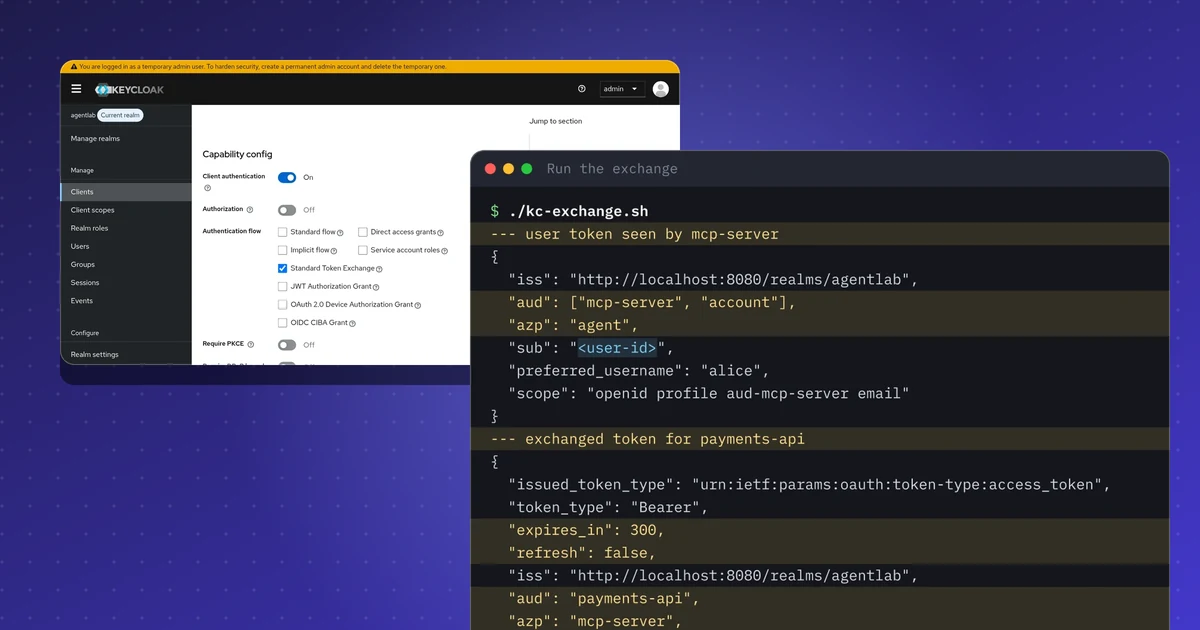
TL;DR
- RFC 8693 token exchange lets an MCP server swap a user's token for a narrower one aimed at a single downstream API.
- In Keycloak it is enabled per client, and the downstream audience is an optional scope.
- The exchanged token keeps the user as subject, has only the downstream audience, lives 300 seconds and carries no refresh token.
- Three bad exchanges are refused: a client without the privilege, an audience with no scope, and a refresh token request.
- There is no act claim in this setup, so the acting client shows up only as the authorized party.
Repeat this lab
I wrote this lab so you can run it yourself. Each step has the commands to copy and the output I got, and you can tick it as done. Your ticks stay in this browser only.
Copies a ready-made prompt for Claude Code, Cursor, Codex or any coding agent. For test environments only.
Show prompt
I want to run a hands-on lab from iamops.dev, and I would like your help to do it safely.

Lab: OAuth token exchange with Keycloak (RFC 8693): narrowing tokens for AI agents and MCP servers
Read the whole lab here (Markdown): https://iamops.dev/keycloak-token-exchange-rfc-8693.md

What the lab needs before the first step:
- Java 21 (for example Eclipse Temurin), curl, jq and unzip
- Port 8080 free; keep this terminal open and use a second one for the next steps
- Values I have to set myself (the lab uses placeholders): <ADMIN_PASSWORD>, <ALICE_PASSWORD>, <AGENT_CLIENT_SECRET>, <MCP_SERVER_CLIENT_SECRET>, <PAYMENTS_API_CLIENT_SECRET>

How I want you to work:
1. Read the lab from start to finish first (each step lists its own prerequisites). Then check that the prerequisites are in place and that the tool versions match what the lab expects. Tell me what is missing before you run anything.
2. Run one step at a time. Before each command, show it to me and say in a sentence what it does.
3. Ask me before anything that costs money, creates cloud resources, touches a real tenant or account, or deletes anything. Wait for my answer.
4. Use the placeholders from the lab. Never paste real secrets, tokens or production identities into a command, a file or this chat. If a value is needed, tell me where to set it myself.
5. After each step, compare the output with the expected output in the lab. If it does not match, stop and tell me what differs. Do not carry on or invent a fix without asking me.
6. At the end, report what passed, what failed and which cleanup you did. Then offer to tick the steps off for me. The lab page keeps ticks only in my browser, so if you cannot do that, list the steps I should tick.

This lab is for test environments only. Do not run it against production, or against a tenant or account that holds real data or real users.

You may answer in my language.
On 12 November 2026 Amazon Cognito added OAuth 2.0 Token Exchange (RFC 8693), a few days after WorkOS Connect did the same. Entra has had its own on-behalf-of flow for years. The pattern is now common to the major identity providers: a service that acts for a user swaps the user’s token for a new token that is narrower, bound to one audience and short-lived, instead of forwarding the original. I ran it against a local Keycloak and wrote down what the server did.
This lab runs that pattern on a laptop with Keycloak, an open-source authorization server, so you can see exactly what changes inside the token and what the server refuses.
What this lab shows#
An AI agent signs the user in and holds a token for an MCP server. The MCP server needs to call a payments API for that user. It must not forward the agent’s token. Instead it presents it to the authorization server and asks for a token for the payments API only.
The lab uses three clients in one realm:
| Client | Role | May exchange tokens? |
|---|---|---|
agent |
Gets the user’s token (password grant, lab shortcut only) | No |
mcp-server |
Exchanges the user’s token | Yes |
payments-api |
Only an audience, the downstream API | No |
Setup#
Keycloak 26.8.2 ran from the zip distribution on Java 21, in development mode, from a fresh unzip. Development mode is for labs only. Lab passwords are throwaway values; they appear in this post as <lab-password> and <client-secret>.
export KC_BOOTSTRAP_ADMIN_USERNAME=admin KC_BOOTSTRAP_ADMIN_PASSWORD=<lab-password>
keycloak-26.8.2/bin/kc.sh start-dev --http-port 8080
./kc-lab.sh   # creates realm agentlab, user alice, the three clients and two audience scopes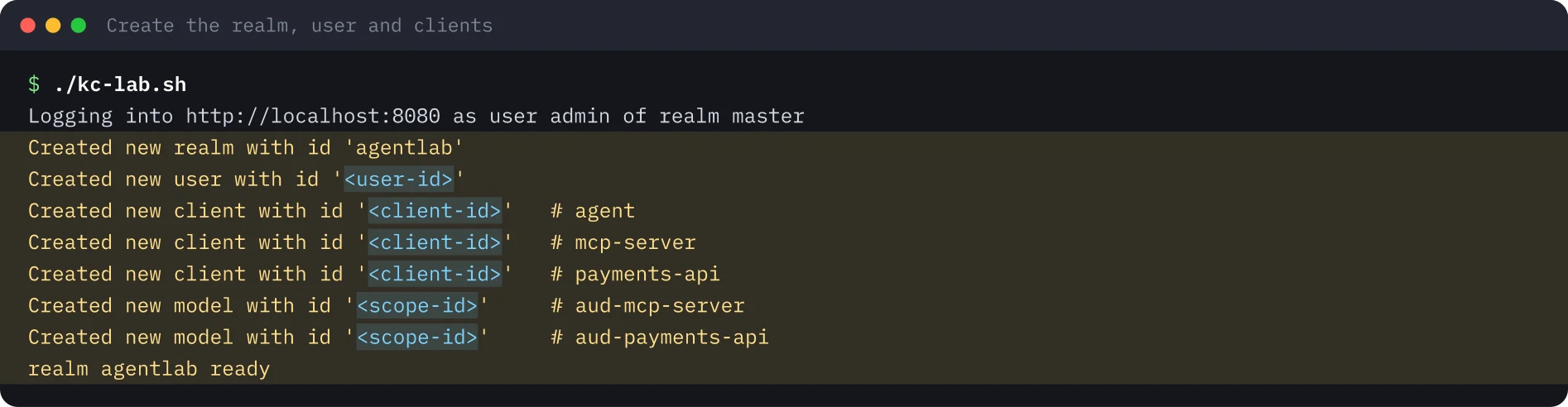
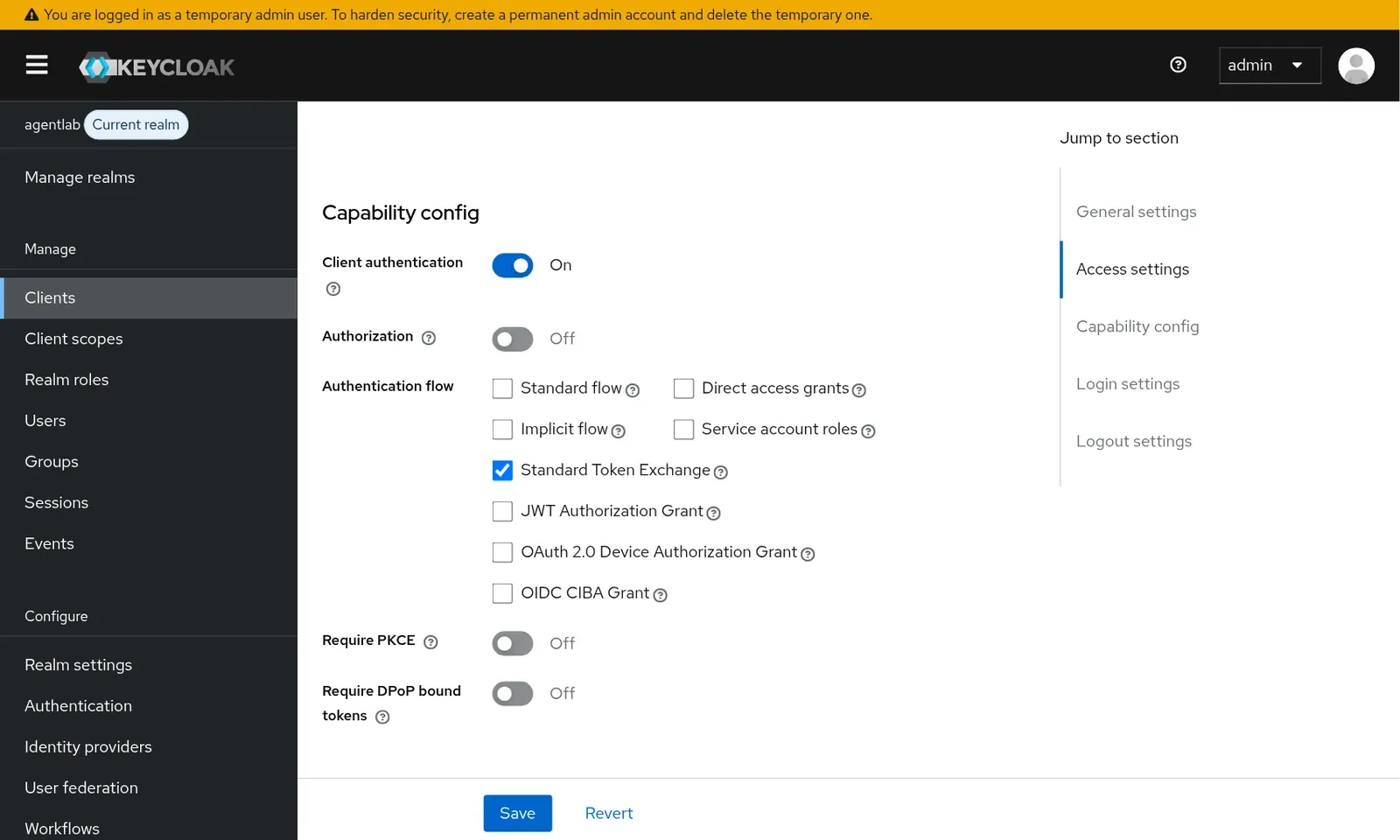
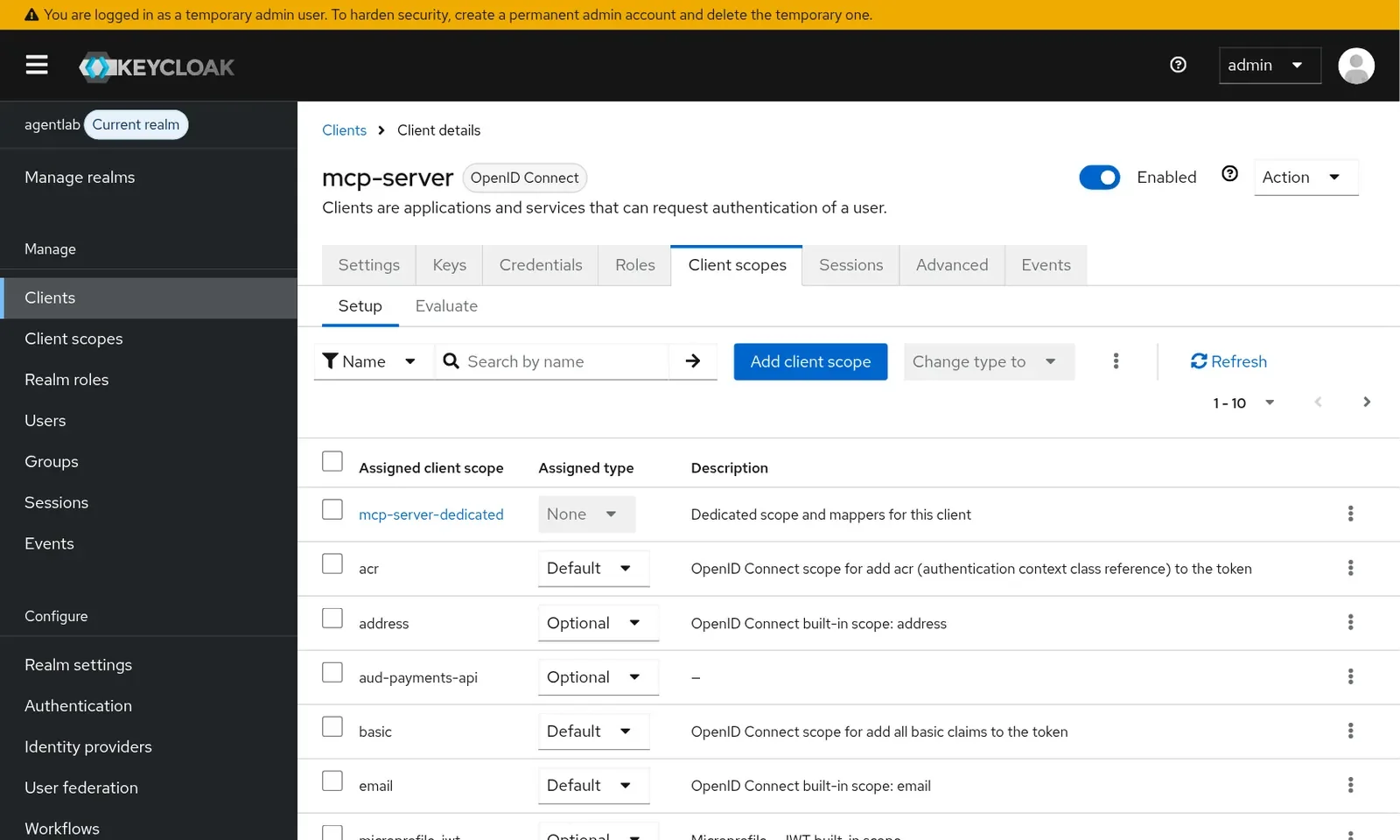
In the admin console, two settings carry the design. Only mcp-server has Standard Token Exchange switched on, and the downstream audience is an optional scope, so it is added only when the exchange asks for it.
The run#
The agent obtains a user token, then the MCP server exchanges it. The core request is a single call to the token endpoint:
curl -s -u mcp-server:<client-secret> \
  -d grant_type=urn:ietf:params:oauth:grant-type:token-exchange \
  -d subject_token="$USER_AT" \
  -d subject_token_type=urn:ietf:params:oauth:token-type:access_token \
  -d requested_token_type=urn:ietf:params:oauth:token-type:access_token \
  -d audience=payments-api -d scope=aud-payments-api "$TOKEN_URL"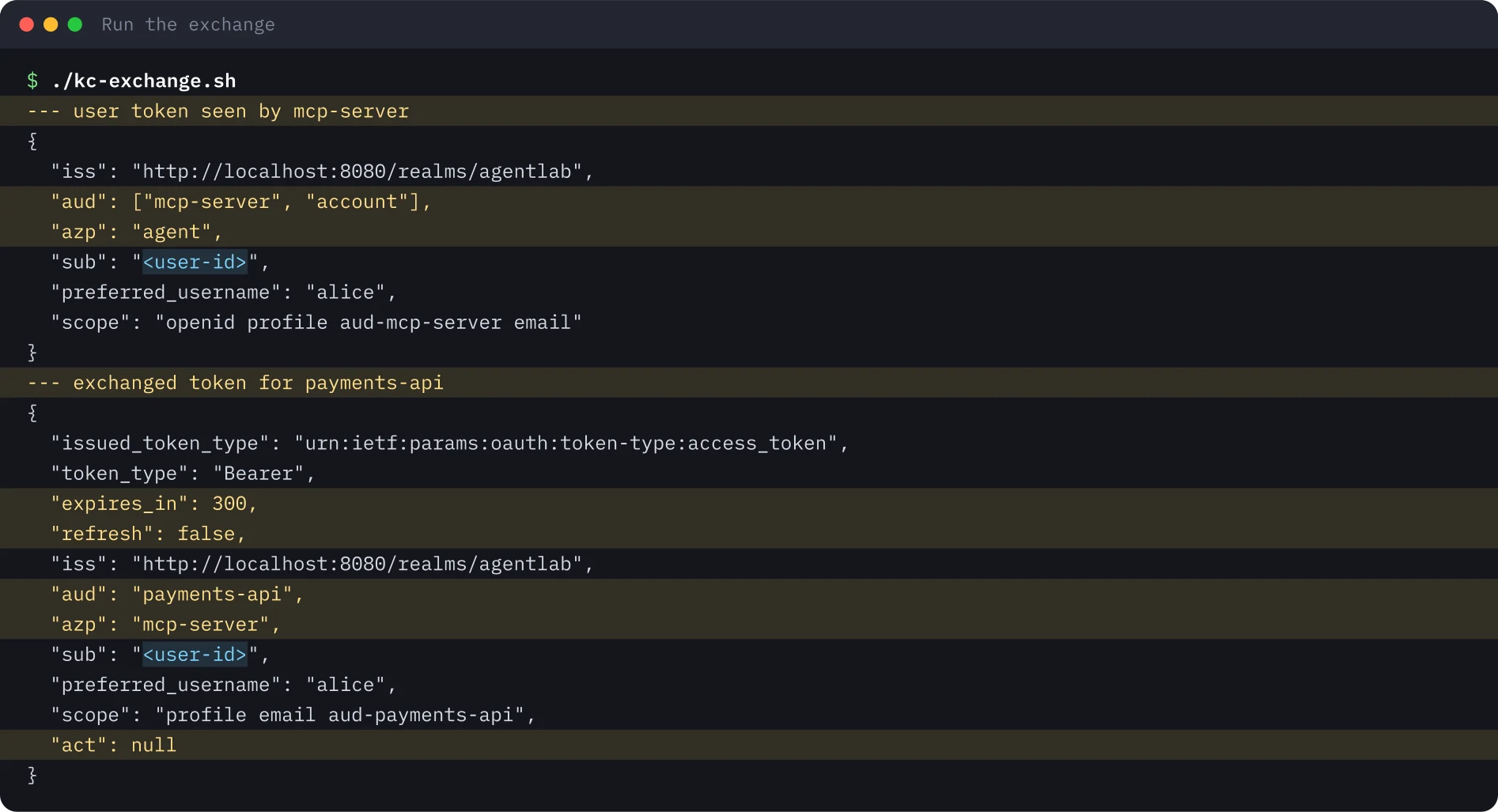
Compare the two tokens: the subject is unchanged, the audience is now the payments API only, the authorized party (azp) names the MCP server, the lifetime is 300 seconds and no refresh token comes back. There is no act claim: Keycloak’s delegation support is a preview feature that is off by default, so the actor is visible only as azp.
Making it fail on purpose#
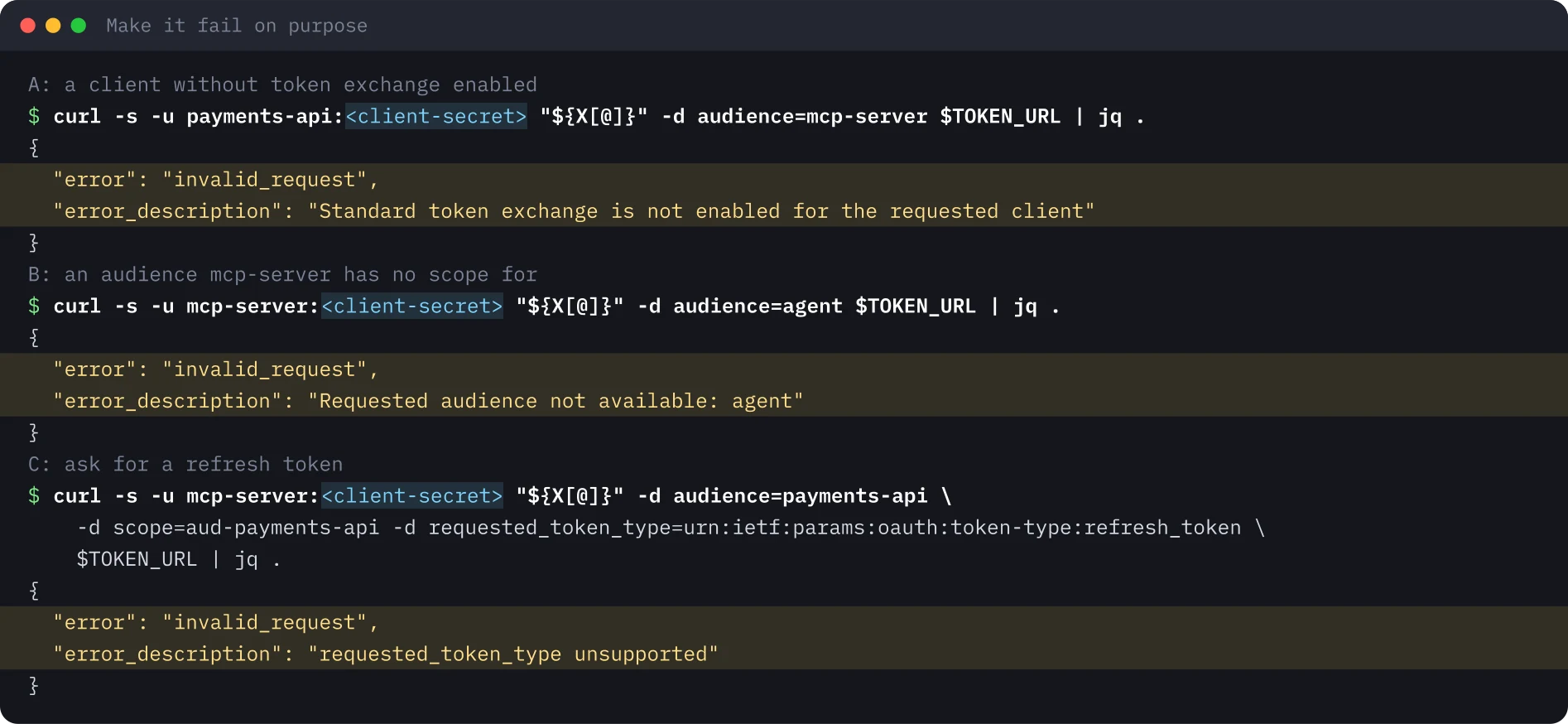
Three exchanges must be refused. Test the same three in any identity provider before you trust it for agent delegation.
Gotchas#
- The password grant is a shortcut. The lab uses it only to get a user token quickly. RFC 9700 and OAuth 2.1 rule it out for real clients; use the authorization code flow with PKCE.
- The
audclaim can list more than you expect. Introspecting the exchanged token showed the payments API andaccount. Understand that before you rely on audience checks. - Scope order varies from run to run, so do not compare scope strings literally.
- No
actclaim by default. If your audit needs the actor, plan for the preview delegation feature or log theazpjoin yourself.
Security takeaways#
- Token exchange is a privilege. Grant it to the one client that needs it.
- Make the downstream audience explicit and optional, so exchanged tokens stay narrow by default.
- Never hand out refresh tokens in an exchange. The lab’s server refuses them.
- A service should reject tokens that were not issued for it and exchange per downstream API, never forward the user’s token.
- Check what your audit trail can reconstruct. If the actor appears only as
azp, a log line joining user, agent and downstream audience has to supply the rest.
What was not run#
The Docker variant, the stretch tasks (refresh tokens in standard exchange, introspection by the downstream API) and the preview delegation feature that would add act were not run. The lab used throwaway accounts only. No recording is published for this lab.
Terminal images were rendered from the saved output of the run, with identifiers and secrets replaced by placeholders. The Keycloak console screenshots show test objects only.
Repeat this lab#
Everything you need to run this lab on a laptop in about 45 minutes: a local Keycloak, one script that builds the realm, one that performs the exchange and three that must fail. Open each step, copy the blocks, and compare your output with the expected output.
Every value in angle brackets is a placeholder for your own test environment. Nothing on this page is a real identifier or secret.
Set your variables once
# Paste into every terminal you use for this lab. Replace each <PLACEHOLDER> with a throwaway value of your own.
export KC_VERSION="26.8.2"
export KC_URL="http://localhost:8080"
export KC_REALM="agentlab"
export KC_ADMIN_USER="admin"
export KC_ADMIN_PASSWORD='<ADMIN_PASSWORD>'
export ALICE_EMAIL="[email protected]"
export ALICE_PASSWORD='<ALICE_PASSWORD>'
export AGENT_SECRET='<AGENT_CLIENT_SECRET>'
export MCP_SECRET='<MCP_SERVER_CLIENT_SECRET>'
export PAYMENTS_SECRET='<PAYMENTS_API_CLIENT_SECRET>'
export TOKEN_URL="$KC_URL/realms/$KC_REALM/protocol/openid-connect/token"
0 of 6 steps done
Step 1Start Keycloak in development mode
Goal. Run a local authorization server you fully control, so you can see what token exchange changes inside a token.
Prerequisites
- Java 21 (for example Eclipse Temurin), curl, jq and unzip
- Port 8080 free; keep this terminal open and use a second one for the next steps
curl -LO "https://github.com/keycloak/keycloak/releases/download/$KC_VERSION/keycloak-$KC_VERSION.zip"
unzip -q "keycloak-$KC_VERSION.zip"
export KC_BOOTSTRAP_ADMIN_USERNAME="$KC_ADMIN_USER" KC_BOOTSTRAP_ADMIN_PASSWORD="$KC_ADMIN_PASSWORD"
"keycloak-$KC_VERSION/bin/kc.sh" start-dev --http-port 8080
Expected output
Running the server in development mode. DO NOT use this configuration in production.
INFO  [org.keycloak.services] (main) KC-SERVICES0077: Created temporary admin user with username admin
INFO  [io.quarkus] (main) Keycloak 26.8.2 on JVM (powered by Quarkus 3.40.1.1) started in 8.418s. Listening on: http://localhost:8080
INFO [io.quarkus] (main) Profile dev activated.Step 2Create the realm, the user and three clients
Goal. Build realm agentlab with user alice and three clients: agent gets the user's token, mcp-server may exchange it, payments-api is only an audience.
Prerequisites
- Step 1 finished and Keycloak running; the variables from the top of this section set in this second terminal
- Run from the folder that contains the keycloak directory
#!/usr/bin/env bash
# Realm, user, three clients and two audience scopes. Lab only: throwaway secrets.
set -euo pipefail
KCADM="keycloak-$KC_VERSION/bin/kcadm.sh"
$KCADM config credentials --server "$KC_URL" --realm master --user "$KC_ADMIN_USER" --password "$KC_ADMIN_PASSWORD"
$KCADM create realms -s realm="$KC_REALM" -s enabled=true
$KCADM create users -r "$KC_REALM" -s username=alice -s enabled=true -s email="$ALICE_EMAIL" -s emailVerified=true -s firstName=Alice -s lastName=Lab
$KCADM set-password -r "$KC_REALM" --username alice --new-password "$ALICE_PASSWORD"
# Downstream API: only an audience
$KCADM create clients -r "$KC_REALM" -s clientId=payments-api -s publicClient=false -s secret="$PAYMENTS_SECRET" -s standardFlowEnabled=false -s directAccessGrantsEnabled=false
# MCP server: confidential, allowed to exchange tokens
$KCADM create clients -r "$KC_REALM" -s clientId=mcp-server -s publicClient=false -s secret="$MCP_SECRET" -s standardFlowEnabled=false -s directAccessGrantsEnabled=false -s 'attributes."standard.token.exchange.enabled"=true'
# Agent: gets the user token (password grant only because this is a lab)
$KCADM create clients -r "$KC_REALM" -s clientId=agent -s publicClient=false -s secret="$AGENT_SECRET" -s directAccessGrantsEnabled=true -s standardFlowEnabled=true -s 'redirectUris=["http://localhost:6274/*"]'
# Client scopes that add audiences
for AUD in mcp-server payments-api; do
  SID=$($KCADM create client-scopes -r "$KC_REALM" -s name=aud-$AUD -s protocol=openid-connect -s 'attributes."include.in.token.scope"=true' -i)
  $KCADM create client-scopes/$SID/protocol-mappers/models -r "$KC_REALM" -s name=aud-$AUD -s protocol=openid-connect -s protocolMapper=oidc-audience-mapper -s "config.\"included.client.audience\"=$AUD" -s 'config."access.token.claim"=true'
done
AGENT=$($KCADM get clients -r "$KC_REALM" -q clientId=agent --fields id --format csv --noquotes)
MCP=$($KCADM get clients -r "$KC_REALM" -q clientId=mcp-server --fields id --format csv --noquotes)
S1=$($KCADM get client-scopes -r "$KC_REALM" --fields id,name --format csv --noquotes | awk -F, '$2=="aud-mcp-server"{print $1}')
S2=$($KCADM get client-scopes -r "$KC_REALM" --fields id,name --format csv --noquotes | awk -F, '$2=="aud-payments-api"{print $1}')
# agent always gets the mcp-server audience; mcp-server may ask for payments-api as an optional scope
$KCADM update clients/$AGENT/default-client-scopes/$S1 -r "$KC_REALM"
$KCADM update clients/$MCP/optional-client-scopes/$S2 -r "$KC_REALM"
echo "realm $KC_REALM ready"chmod +x kc-lab.sh && ./kc-lab.shExpected output
Logging into http://localhost:8080 as user admin of realm master
Created new realm with id 'agentlab'
Created new user with id '<user-id>'
Created new client with id '<client-id>'
Created new client with id '<client-id>'
Created new client with id '<client-id>'
Created new model with id '<scope-id>'
Created new model with id '<scope-id>'
realm agentlab readyStep 3Get the user's token as the agent
Goal. Obtain the token the MCP server will receive and decode it, so you have a baseline to compare the exchanged token with.
Prerequisites
- Step 2 finished (realm agentlab exists)
- The password grant is a lab shortcut only; real clients use the authorization code flow with PKCE
jwtp() { cut -d. -f2 | tr '_-' '/+' | awk '{l=length($0)%4; if(l==2)$0=$0"=="; else if(l==3)$0=$0"="; print}' | base64 -d 2>/dev/null; }
USER_AT=$(curl -s -d grant_type=password -d client_id=agent -d client_secret="$AGENT_SECRET" \
  -d username=alice -d password="$ALICE_PASSWORD" -d scope=openid "$TOKEN_URL" | jq -r .access_token)
echo "--- user token seen by mcp-server"
echo "$USER_AT" | jwtp | jq '{iss,aud,azp,sub,preferred_username,scope}'
Expected output
--- user token seen by mcp-server
{
  "iss": "http://localhost:8080/realms/agentlab",
  "aud": ["mcp-server", "account"],
  "azp": "agent",
  "sub": "<user-id>",
  "preferred_username": "alice",
  "scope": "openid profile aud-mcp-server email"
}Step 4Exchange it as the MCP server (RFC 8693)
Goal. Swap the user's token for a narrower one aimed at the payments API only, and check what changed.
Prerequisites
- Step 3 finished in the same terminal, so USER_AT is set
curl -s -u "mcp-server:$MCP_SECRET" \
  -d grant_type=urn:ietf:params:oauth:grant-type:token-exchange \
  -d subject_token="$USER_AT" \
  -d subject_token_type=urn:ietf:params:oauth:token-type:access_token \
  -d requested_token_type=urn:ietf:params:oauth:token-type:access_token \
  -d audience=payments-api -d scope=aud-payments-api "$TOKEN_URL" > exch.json
jq '{issued_token_type,token_type,expires_in,scope, refresh: (has("refresh_token"))}' exch.json
echo "--- exchanged token for payments-api"
jq -r .access_token exch.json | jwtp | jq '{iss,aud,azp,sub,preferred_username,scope,act}'
Expected output
{
  "issued_token_type": "urn:ietf:params:oauth:token-type:access_token",
  "token_type": "Bearer",
  "expires_in": 300,
  "scope": "aud-payments-api profile email",
  "refresh": false
}
--- exchanged token for payments-api
{
  "iss": "http://localhost:8080/realms/agentlab",
  "aud": "payments-api",
  "azp": "mcp-server",
  "sub": "<user-id>",
  "preferred_username": "alice",
  "scope": "aud-payments-api profile email",
  "act": null
}Step 5Make three exchanges fail on purpose
Goal. Check the three refusals that stop a compromised hop from widening its reach: no privilege, no audience scope, no refresh token.
Prerequisites
- Step 3 finished in the same terminal, so USER_AT is set
- Tokens live five minutes; if you get a token error, repeat step 3 first
X=(-d grant_type=urn:ietf:params:oauth:grant-type:token-exchange -d subject_token="$USER_AT"
   -d subject_token_type=urn:ietf:params:oauth:token-type:access_token)
echo "# A: a client without token exchange enabled"
curl -s -u "payments-api:$PAYMENTS_SECRET" "${X[@]}" -d audience=mcp-server "$TOKEN_URL" | jq .
echo "# B: an audience mcp-server has no scope for"
curl -s -u "mcp-server:$MCP_SECRET" "${X[@]}" -d audience=agent "$TOKEN_URL" | jq .
echo "# C: ask for a refresh token"
curl -s -u "mcp-server:$MCP_SECRET" "${X[@]}" -d audience=payments-api -d scope=aud-payments-api \
  -d requested_token_type=urn:ietf:params:oauth:token-type:refresh_token "$TOKEN_URL" | jq .
Expected output
# A: a client without token exchange enabled
{
  "error": "invalid_request",
  "error_description": "Standard token exchange is not enabled for the requested client"
}
# B: an audience mcp-server has no scope for
{
  "error": "invalid_request",
  "error_description": "Requested audience not available: agent"
}
# C: ask for a refresh token
{
  "error": "invalid_request",
  "error_description": "requested_token_type unsupported"
}Step 6Clean up
Goal. Stop Keycloak and delete everything the lab created, including the downloaded distribution and the exchanged token file.
Prerequisites
- Nothing else uses port 8080 or the keycloak directory
# Stop Keycloak: press Ctrl+C in the first terminal, or:
pkill -f "keycloak-$KC_VERSION" || true
rm -rf "keycloak-$KC_VERSION" "keycloak-$KC_VERSION.zip" kc-lab.sh exch.json
unset KC_ADMIN_PASSWORD ALICE_PASSWORD AGENT_SECRET MCP_SECRET PAYMENTS_SECRET USER_AT
# check: nothing listens on port 8080 any more
curl -s -o /dev/null -w "%{http_code}\n" "$KC_URL/"
Expected output
000Sources#
Discuss this post#
Found it useful? Share it, and tell me what you think.
This post as Markdown · RSS · JSON feed
New posts by email
One email a week with new posts and labs. Unsubscribe anytime.
Your address is stored with Kit, which sends the emails. Details