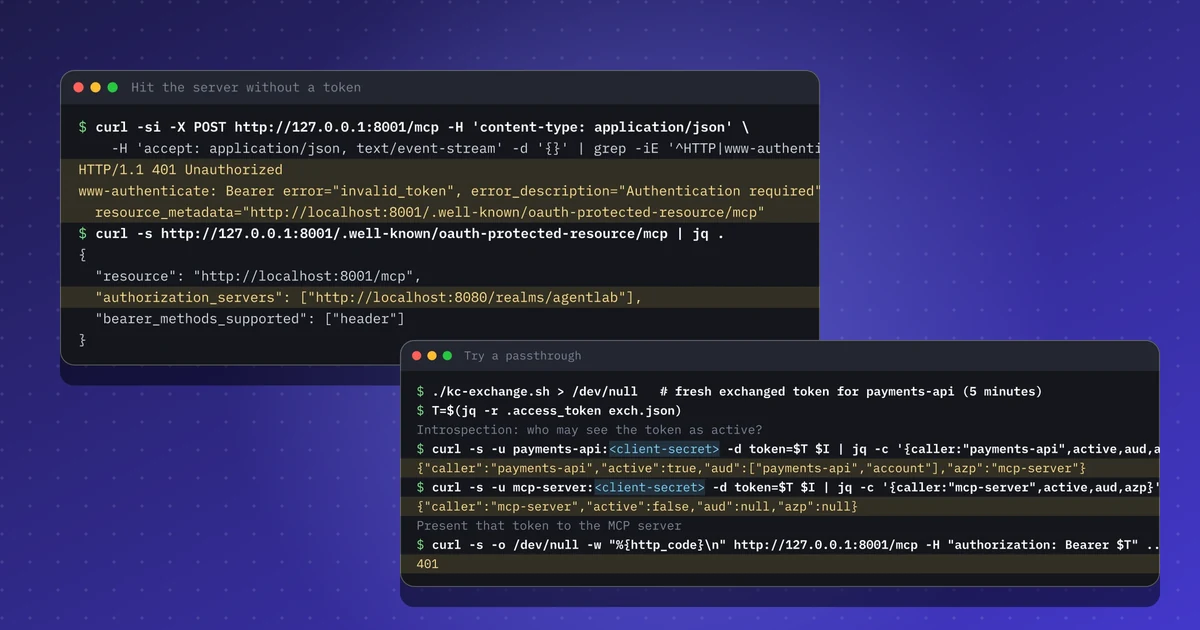
In breve
- Un server MCP è un resource server OAuth: risponde 401 con i Protected Resource Metadata così i client trovano l'authorization server.
- Verifica con introspezione ogni bearer token e rifiuta quelli la cui audience non include il server MCP stesso.
- Per un'API a valle scambia il token (RFC 8693) invece di inoltrare il token del chiamante.
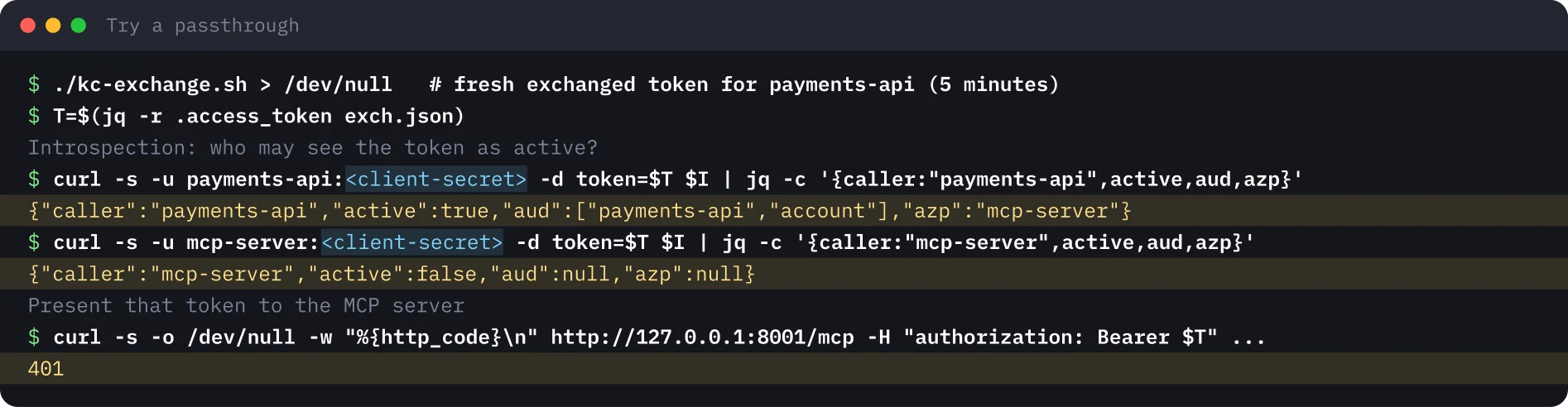
- Un passthrough deliberato fallisce: il token per l'API dei pagamenti risulta inattivo per il server MCP, che risponde 401.
- Registra utente, client dell'agente e audience a valle in una sola riga, così gli audit possono seguire la catena.
Ripeti questo lab
Ho scritto questo lab perché tu possa rifarlo per conto tuo. Ogni passo ha i comandi da copiare e l'output che ho ottenuto io, e puoi segnarlo come fatto. Le spunte restano solo nel tuo browser.
Copia un prompt già pronto per Claude Code, Cursor, Codex o un altro agente di codice. Solo per ambienti di test.
Mostra il prompt
I want to run a hands-on lab from iamops.dev, and I would like your help to do it safely.

Lab: Proteggere un server MCP con OAuth: rifiutare il token passthrough e scambiare per ogni API a valle
Read the whole lab here (Markdown): https://iamops.dev/it/mcp-server-no-token-passthrough.md

What the lab needs before the first step:
- The Keycloak lab is running with its realm, three clients and user alice
- Python 3.12 or newer, curl and jq
- Values I have to set myself (the lab uses placeholders): <ALICE_PASSWORD>, <AGENT_CLIENT_SECRET>, <MCP_SERVER_CLIENT_SECRET>, <PAYMENTS_API_CLIENT_SECRET>

How I want you to work:
1. Read the lab from start to finish first (each step lists its own prerequisites). Then check that the prerequisites are in place and that the tool versions match what the lab expects. Tell me what is missing before you run anything.
2. Run one step at a time. Before each command, show it to me and say in a sentence what it does.
3. Ask me before anything that costs money, creates cloud resources, touches a real tenant or account, or deletes anything. Wait for my answer.
4. Use the placeholders from the lab. Never paste real secrets, tokens or production identities into a command, a file or this chat. If a value is needed, tell me where to set it myself.
5. After each step, compare the output with the expected output in the lab. If it does not match, stop and tell me what differs. Do not carry on or invent a fix without asking me.
6. At the end, report what passed, what failed and which cleanup you did. Then offer to tick the steps off for me. The lab page keeps ticks only in my browser, so if you cannot do that, list the steps I should tick.

This lab is for test environments only. Do not run it against production, or against a tenant or account that holds real data or real users.

You may answer in my language.
Il 10 novembre 2026 WorkOS ha aggiunto il token exchange (RFC 8693) a WorkOS Connect, così che un server MCP possa chiamare API a valle per conto di un utente senza inoltrarne il token. È lo schema che la specifica di autorizzazione MCP si aspetta. L’ho costruito a mano con l’SDK Python ufficiale, così ogni regola si vede all’opera.
Si basa sul laboratorio di token exchange con Keycloak: stesso realm, stessi tre client.
Cosa mostra il laboratorio#
Un server MCP scritto con l’SDK Python ufficiale (mcp 2.3.0) fa da resource server OAuth per un realm Keycloak. Fa quattro cose:
- Risponde a una richiesta senza token con
401e un rimando ai propri Protected Resource Metadata (RFC 9728), così un client trova il server di autorizzazione senza averlo nella configurazione. - Controlla ogni bearer token per introspezione presso Keycloak e rifiuta i token la cui audience non include il server MCP stesso.
- Per uno strumento, scambia il token del chiamante con un token destinato all’API di pagamenti (RFC 8693) invece di inoltrarlo.
- Rifiuta un token emesso per l’API di pagamenti quando qualcuno lo presenta al server MCP (un tentativo di passthrough).
Il verificatore è breve. La riga decisiva è il controllo dell’audience:
data = introspect(token)            # RFC 7662, as the mcp-server client
aud = data.get("aud", [])
aud = [aud] if isinstance(aud, str) else aud
if not data.get("active") or "mcp-server" not in aud:
return None # inactive, or minted for another API: no passthroughL’esecuzione#
Fissate la versione dell’SDK: mcp 2.x ha rinominato FastMCP in MCPServer e gli SDK cambiano le classi di autenticazione tra una versione e l’altra. Il server ascolta su 127.0.0.1:8001.
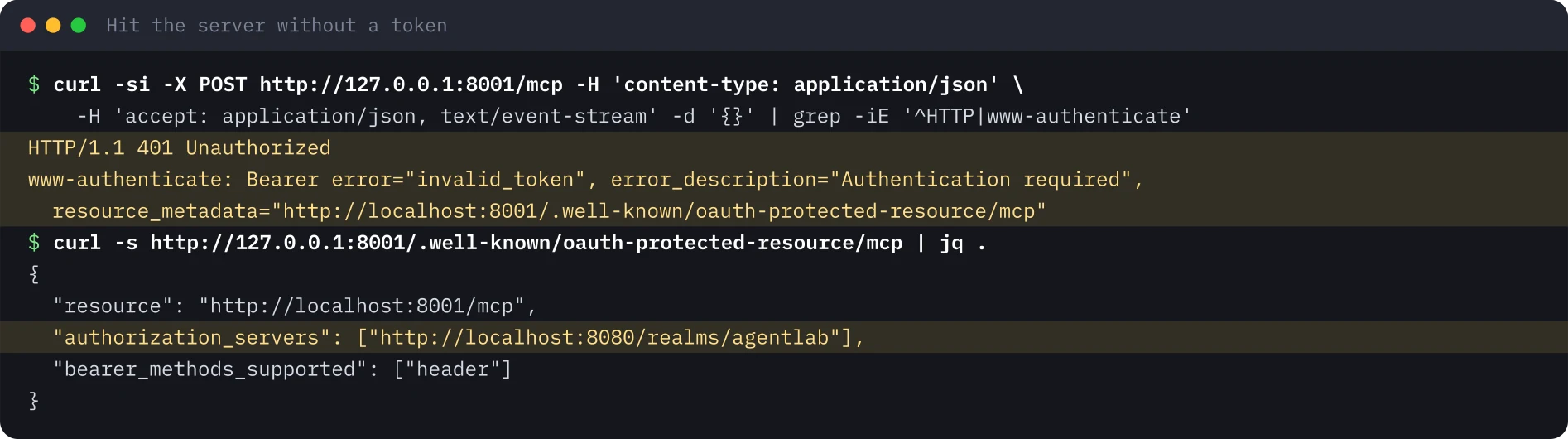
Senza token. La prima richiesta è l’handshake di scoperta con cui parte ogni client MCP: un 401 il cui header WWW-Authenticate contiene un URL resource_metadata, e un documento di metadati che indica il realm come server di autorizzazione.
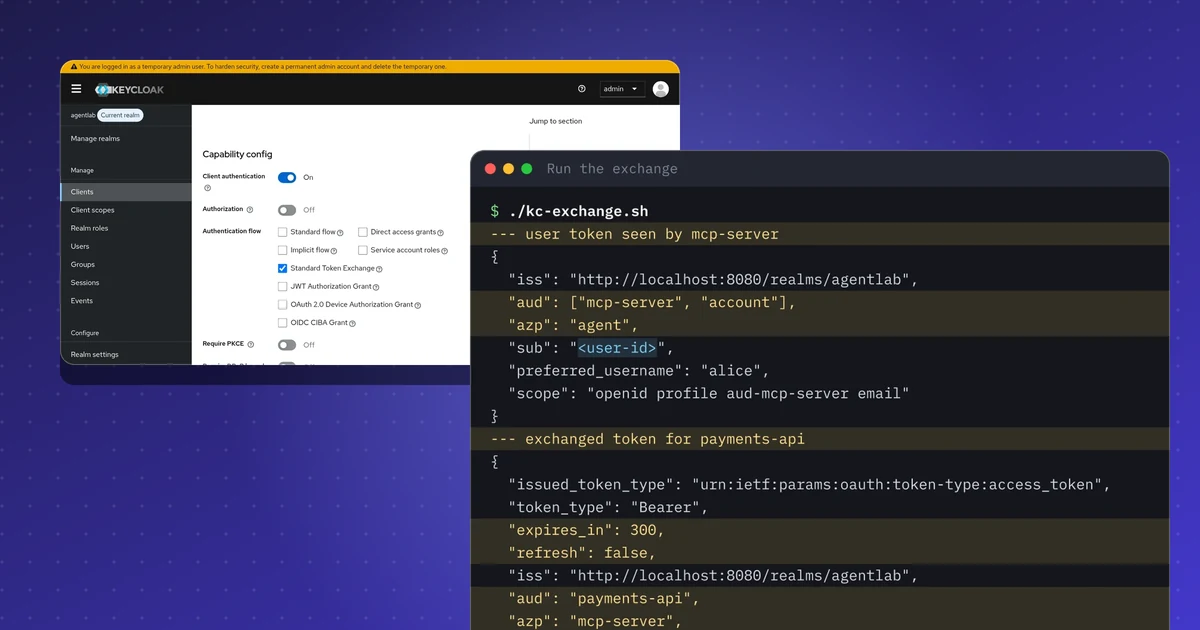
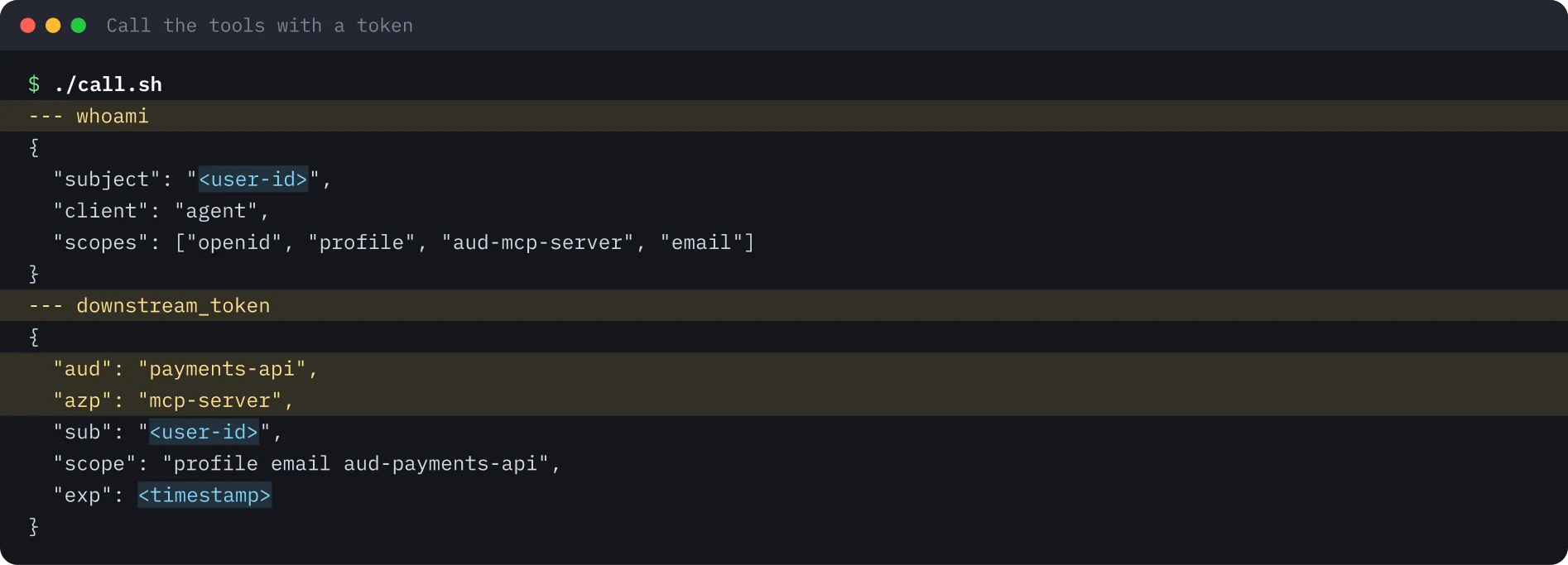
Con un token. Un piccolo script ottiene un token utente per il client agent, apre una sessione MCP e chiama entrambi gli strumenti. whoami mostra che il server vede l’utente attraverso il client agente; downstream_token mostra il server che scambia il token con uno limitato all’API di pagamenti.
La stessa chiamata funziona con il client a riga di comando MCP Inspector, il modo standard per riprodurre ciò che farebbe qualsiasi host MCP. Fissate la sua versione negli script; questo laboratorio ha usato la 2.15.0.
Il tentativo di passthrough. Create un nuovo token scambiato, guardatelo in introspezione da entrambi i lati e presentatelo al server MCP.
Insidie#
- Introspezione o validazione locale? Il laboratorio usa l’introspezione, che dà revoca immediata al prezzo di una richiesta al server di autorizzazione. L’alternativa è la validazione locale del JWT con le chiavi JWKS; annotate cosa si perde e cosa si guadagna.
- Controllate l’audience, non solo la firma. Un token valido per un’altra API resta il token sbagliato. È il controllo dell’audience a trasformare il passthrough in un
401. - I token durano cinque minuti in questa configurazione, quindi generate il token per il passthrough subito prima del test.
- Deriva degli SDK. Nomi delle classi e hook di autenticazione sono cambiati tra le versioni principali; provate con la versione che distribuite.
Indicazioni di sicurezza#
- Un server MCP è un resource server OAuth. Pubblica i metadati, valida l’audience e rifiuta tutto ciò che non è destinato a lui.
- Non inoltrate mai il token del chiamante a un’API a valle. Scambiatelo per ogni audience a valle, più ristretto e di breve durata.
- Lasciate che sia il server di autorizzazione a decidere chi vede un token come attivo. Un token che funziona solo per il destinatario previsto limita ciò che può fare un passaggio compromesso.
- Registrate una riga di log che colleghi utente, client agente e audience a valle; il solo token non racconta a un auditor l’intera storia.
Cosa non è stato eseguito#
Il flusso OAuth dell’interfaccia web di MCP Inspector non è stato eseguito (il client agent del laboratorio ammette per questo un redirect su localhost). Non è stata usata la registrazione dinamica dei client; il client è preregistrato. Tutto è stato eseguito su una sola macchina con account usa e getta. Per questo laboratorio non viene pubblicata alcuna registrazione.
Le immagini del terminale sono state generate dall’output salvato dell’esecuzione, con identificatori, segreti e timestamp sostituiti da segnaposto.
Ripeti questo lab#
Esegui questo lab su un portatile in circa 30 minuti. Serve il realm Keycloak del lab sullo scambio di token, un piccolo server MCP in Python e qualche chiamata curl. Apri ogni passo, copia i blocchi e confronta l'output con il mio.
Ogni valore tra parentesi angolari è un segnaposto per il tuo ambiente di test. Nulla in questa pagina è un identificativo o un segreto reale.
Imposta le variabili una sola volta
# Paste into every terminal you use for this lab. Same values as in the Keycloak lab.
export KC_URL="http://localhost:8080"
export KC_REALM="agentlab"
export ALICE_PASSWORD='<ALICE_PASSWORD>'
export AGENT_SECRET='<AGENT_CLIENT_SECRET>'
export MCP_SECRET='<MCP_SERVER_CLIENT_SECRET>'
export PAYMENTS_SECRET='<PAYMENTS_API_CLIENT_SECRET>'
export TOKEN_URL="$KC_URL/realms/$KC_REALM/protocol/openid-connect/token"
export INTROSPECT_URL="$TOKEN_URL/introspect"
export MCP_URL="http://127.0.0.1:8001/mcp"
0 di 6 passi fatti
Passo 1Installa l'SDK e controlla il realm
Obiettivo. Installa l'SDK Python di MCP in un virtualenv pulito e verifica che il realm Keycloak del primo lab sia ancora attivo.
Prerequisiti
- El lab Keycloak è in esecuzione con il suo realm, tre client e l'utente alice
- Python 3.12 o successivo, curl e jq
python3 -m venv .venv && . .venv/bin/activate
pip install "mcp==2.3.0" httpx
# the realm answers
curl -s -o /dev/null -w "%{http_code}\n" "$KC_URL/realms/$KC_REALM/.well-known/openid-configuration"
Output atteso
Successfully installed ... httpx-... mcp-2.3.0 ...
200Passo 2Scrivi e avvia il server MCP
Obiettivo. Avvia un server MCP che controlla ogni token con l'introspezione e rifiuta quelli non destinati a lui.
Prerequisiti
- El virtualenv del passo precedente è attivo
- Le variabili di env.sh sono impostate in questo terminale e la porta 8001 è libera
"""An MCP server that is an OAuth resource server for Keycloak, and calls a downstream API
for the user with RFC 8693 token exchange. Tested with mcp 2.3.0 and Keycloak 26.8.2. Lab use only."""
import base64
import json
import os

import httpx
from mcp.server.auth.middleware.auth_context import get_access_token
from mcp.server.auth.provider import AccessToken
from mcp.server.auth.settings import AuthSettings
from mcp.server.mcpserver import MCPServer

KC = f"{os.environ['KC_URL']}/realms/{os.environ['KC_REALM']}"
CLIENT_ID = "mcp-server"
CLIENT_SECRET = os.environ["MCP_SECRET"]
RESOURCE = "http://localhost:8001/mcp"


class IntrospectionVerifier:
    """RFC 7662 introspection at Keycloak, then an audience check."""

    async def verify_token(self, token: str) -> AccessToken | None:
        async with httpx.AsyncClient() as http:
            r = await http.post(f"{KC}/protocol/openid-connect/token/introspect",
                                data={"token": token}, auth=(CLIENT_ID, CLIENT_SECRET))
        data = r.json()
        aud = data.get("aud", [])
        aud = [aud] if isinstance(aud, str) else aud
        if not data.get("active") or CLIENT_ID not in aud:
            return None  # inactive, or minted for another API: no token passthrough
        return AccessToken(token=token, client_id=data.get("azp", ""),
                           scopes=data.get("scope", "").split(), expires_at=data.get("exp"),
                           subject=data.get("sub"), claims={"iss": data.get("iss")})


mcp = MCPServer(
    "payments-lab",
    token_verifier=IntrospectionVerifier(),
    auth=AuthSettings(issuer_url=KC, resource_server_url=RESOURCE, validate_token_resource=False),
)


def claims(jwt: str) -> dict:
    part = jwt.split(".")[1]
    return json.loads(base64.urlsafe_b64decode(part + "=" * (-len(part) % 4)))


@mcp.tool()
async def whoami() -> dict:
    """Who called this MCP server, according to the bearer token."""
    t = get_access_token()
    return {"subject": t.subject, "client": t.client_id, "scopes": t.scopes}


@mcp.tool()
async def downstream_token() -> dict:
    """Exchange the caller's token for a payments-api token (RFC 8693) and show its claims."""
    t = get_access_token()
    async with httpx.AsyncClient() as http:
        r = await http.post(f"{KC}/protocol/openid-connect/token", auth=(CLIENT_ID, CLIENT_SECRET), data={
            "grant_type": "urn:ietf:params:oauth:grant-type:token-exchange",
            "subject_token": t.token,
            "subject_token_type": "urn:ietf:params:oauth:token-type:access_token",
            "requested_token_type": "urn:ietf:params:oauth:token-type:access_token",
            "audience": "payments-api",
            "scope": "aud-payments-api",
        })
    body = r.json()
    if "access_token" not in body:
        return {"error": body}
    c = claims(body["access_token"])
    return {k: c.get(k) for k in ("aud", "azp", "sub", "scope", "exp")}


if __name__ == "__main__":
mcp.run(transport="streamable-http", host="127.0.0.1", port=8001)python payments_mcp.py # keep this terminal openOutput atteso
INFO:     Started server process [12345]
INFO:     Waiting for application startup.
INFO:     Application startup complete.
INFO: Uvicorn running on http://127.0.0.1:8001 (Press CTRL+C to quit)Passo 3Chiama il server senza token
Obiettivo. Guarda l'handshake di discovery: un 401 che punta ai Protected Resource Metadata e un documento di metadati che nomina il realm.
Prerequisiti
- Il server del passo precedente è in esecuzione
- Usa un secondo terminale con env.sh caricato
curl -si -X POST "$MCP_URL" -H 'content-type: application/json' \
  -H 'accept: application/json, text/event-stream' -d '{}' | grep -iE '^HTTP|www-authenticate'
curl -s http://127.0.0.1:8001/.well-known/oauth-protected-resource/mcp | jq .
Output atteso
HTTP/1.1 401 Unauthorized
www-authenticate: Bearer error="invalid_token", error_description="Authentication required", resource_metadata="http://localhost:8001/.well-known/oauth-protected-resource/mcp"
{
  "resource": "http://localhost:8001/mcp",
  "authorization_servers": [
    "http://localhost:8080/realms/agentlab"
  ],
  "bearer_methods_supported": [
    "header"
  ]
}Passo 4Chiama i due strumenti con un token utente
Obiettivo. Ottieni un token per il client agent, apri una sessione MCP e chiama whoami e downstream_token.
Prerequisiti
- Il server è ancora in esecuzione nel primo terminale
- jq installato; lo script usa il password grant, che va bene solo nei lab
#!/usr/bin/env bash
# Get a user token for the agent client, open an MCP session and call both tools with curl.
set -euo pipefail
TOKEN=$(curl -s -d grant_type=password -d client_id=agent -d client_secret="$AGENT_SECRET" \
  -d username=alice -d password="$ALICE_PASSWORD" -d scope=openid "$TOKEN_URL" | jq -r .access_token)
H=(-H "authorization: Bearer $TOKEN" -H 'content-type: application/json' -H 'accept: application/json, text/event-stream')
SID=$(curl -s -D - -o /dev/null "${H[@]}" "$MCP_URL" -d '{"jsonrpc":"2.0","id":1,"method":"initialize","params":{"protocolVersion":"2025-06-18","capabilities":{},"clientInfo":{"name":"curl","version":"0"}}}' \
  | awk -F': ' 'tolower($1)=="mcp-session-id"{print $2}' | tr -d '\r')
curl -s "${H[@]}" -H "mcp-session-id: $SID" -H 'mcp-protocol-version: 2025-06-18' "$MCP_URL" -d '{"jsonrpc":"2.0","method":"notifications/initialized"}' >/dev/null
for TOOL in whoami downstream_token; do
  echo "--- $TOOL"
  curl -s "${H[@]}" -H "mcp-session-id: $SID" -H 'mcp-protocol-version: 2025-06-18' "$MCP_URL" \
    -d "{\"jsonrpc\":\"2.0\",\"id\":2,\"method\":\"tools/call\",\"params\":{\"name\":\"$TOOL\",\"arguments\":{}}}" | sed -n 's/^data: //p' | jq -r '.result.content[0].text'
donechmod +x call.sh && ./call.shOutput atteso
--- whoami
{
  "subject": "<user-id>",
  "client": "agent",
  "scopes": [
    "openid",
    "profile",
    "aud-mcp-server",
    "email"
  ]
}
--- downstream_token
{
  "aud": "payments-api",
  "azp": "mcp-server",
  "sub": "<user-id>",
  "scope": "aud-payments-api profile email",
  "exp": <timestamp>
}Passo 5Prova un passthrough di proposito
Obiettivo. Prendi il token emesso per la API dei pagamenti e mostralo al server MCP. Deve essere rifiutato.
Prerequisiti
- Un token scambiato appena emesso: dura 5 minuti, quindi eseguilo subito
# 1. a user token for the agent, then the exchange as the MCP server (same calls as in the Keycloak lab)
USER_AT=$(curl -s -d grant_type=password -d client_id=agent -d client_secret="$AGENT_SECRET" \
  -d username=alice -d password="$ALICE_PASSWORD" -d scope=openid "$TOKEN_URL" | jq -r .access_token)
T=$(curl -s -u "mcp-server:$MCP_SECRET" -d grant_type=urn:ietf:params:oauth:grant-type:token-exchange \
  -d subject_token="$USER_AT" -d subject_token_type=urn:ietf:params:oauth:token-type:access_token \
  -d requested_token_type=urn:ietf:params:oauth:token-type:access_token \
  -d audience=payments-api -d scope=aud-payments-api "$TOKEN_URL" | jq -r .access_token)
# 2. who may see that token as active?
curl -s -u "payments-api:$PAYMENTS_SECRET" -d token="$T" "$INTROSPECT_URL" | jq -c '{caller:"payments-api",active,aud,azp}'
curl -s -u "mcp-server:$MCP_SECRET" -d token="$T" "$INTROSPECT_URL" | jq -c '{caller:"mcp-server",active,aud,azp}'
# 3. present it to the MCP server
curl -s -o /dev/null -w "%{http_code}\n" "$MCP_URL" -H "authorization: Bearer $T" \
  -H 'content-type: application/json' -H 'accept: application/json, text/event-stream' -d '{}'
Output atteso
{"caller":"payments-api","active":true,"aud":["payments-api","account"],"azp":"mcp-server"}
{"caller":"mcp-server","active":false,"aud":null,"azp":null}
401Passo 6Pulizia
Obiettivo. Ferma il server, rimuovi il virtualenv e lo script e cancella i segreti dalla shell.
Prerequisiti
- Keycloak si pulisce nel lab Keycloak, nel passo di pulizia
pkill -f payments_mcp.py || true
deactivate 2>/dev/null || true
rm -rf .venv payments_mcp.py call.sh
unset ALICE_PASSWORD AGENT_SECRET MCP_SECRET PAYMENTS_SECRET USER_AT T
# check: nothing listens on port 8001 any more
curl -s -o /dev/null -w "%{http_code}\n" "$MCP_URL"
Output atteso
000Fonti#
Discuti questo articolo#
Ti è stato utile? Condividilo e dimmi cosa ne pensi.
Questo articolo in formato Markdown · RSS · JSON feed
Nuovi articoli via email
Una email a settimana con nuovi articoli e lab. Disiscrizione in qualsiasi momento.
Il tuo indirizzo è salvato su Kit, il servizio che invia le email. Dettagli