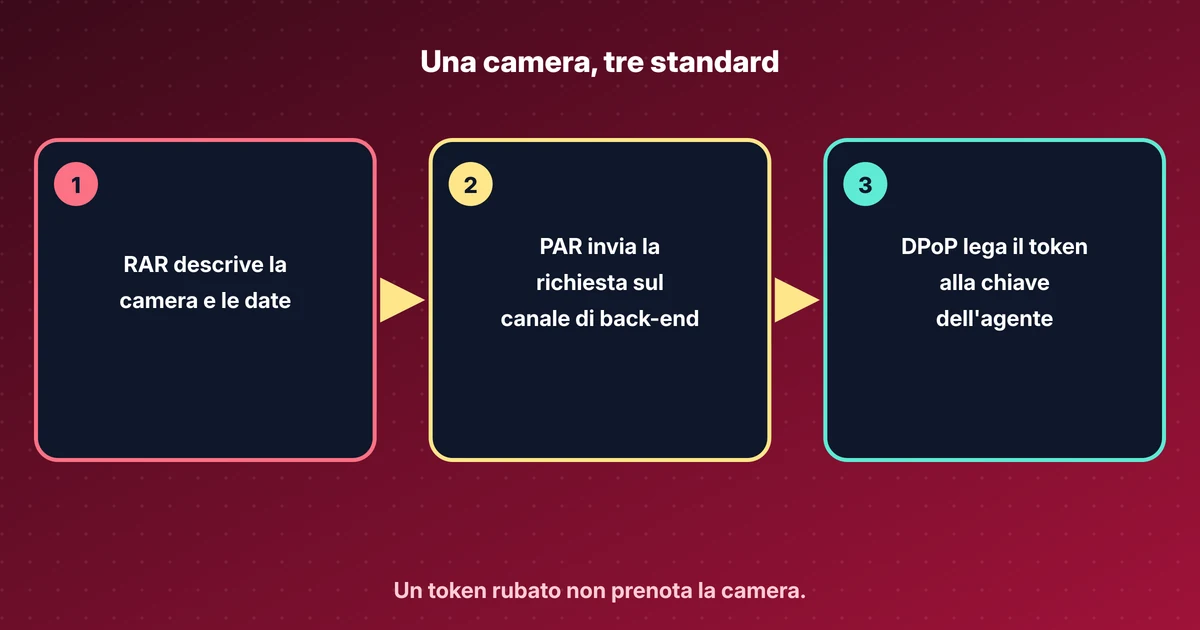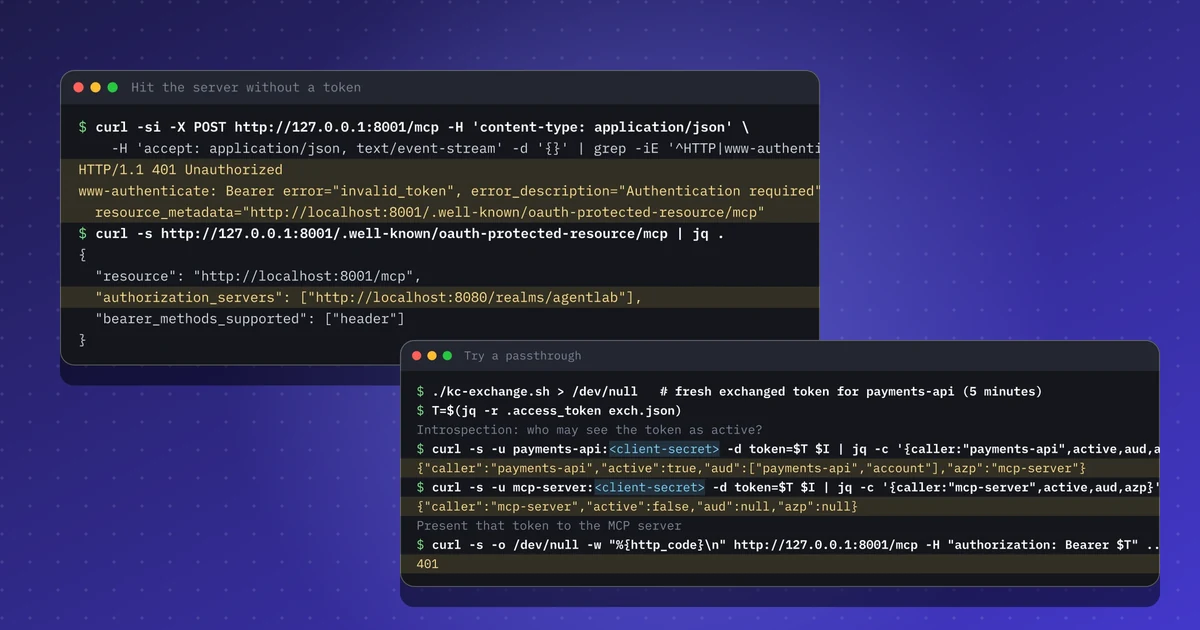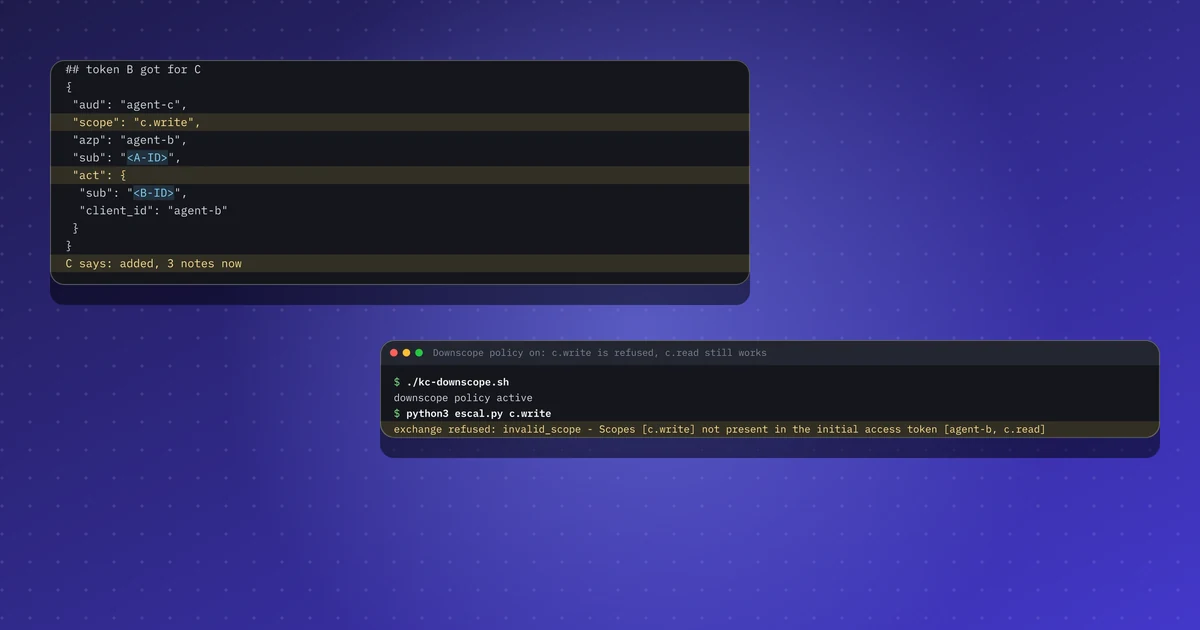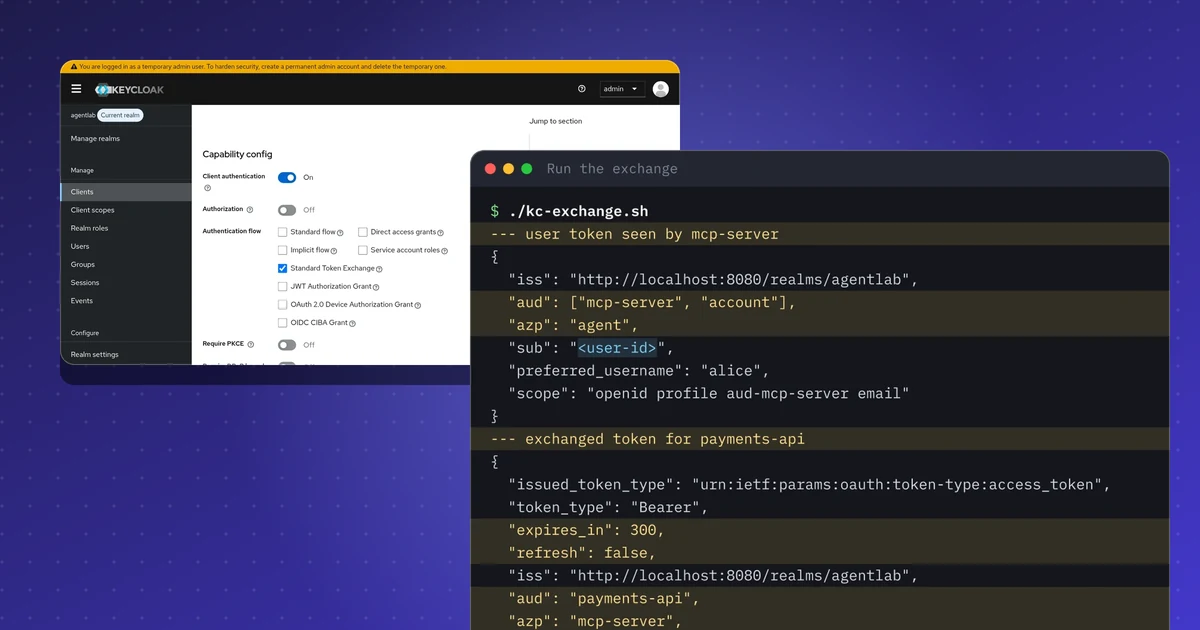
In breve
- Un bearer token vale per chiunque lo possieda. Con DPoP (RFC 9449) il token è legato a una chiave e ogni richiesta richiede una prova nuova firmata con quella chiave.
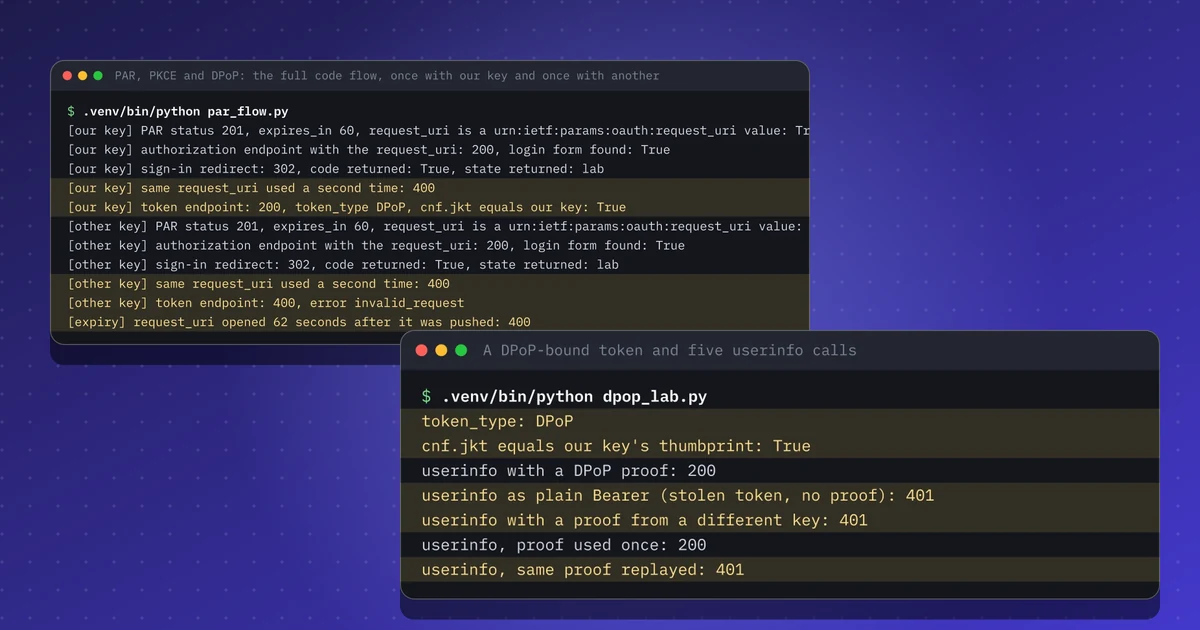
- In Keycloak 26.8.2 ho ottenuto un token DPoP con cnf.jkt uguale alla mia chiave. Inviato come Bearer semplice, con la prova di un'altra chiave o con una prova riusata, lo stesso token ha ricevuto 401.
- PAR (RFC 9126) sposta i parametri di autorizzazione in una chiamata sul canale posteriore. Il request_uri è durato 60 secondi e si è aperto una sola volta; con dpop_jkt nella richiesta il codice si riscatta solo con la stessa chiave.
- Keycloak rifiuta i token senza prova solo se nel client è attivo Require DPoP bound tokens. Ho provato questa impostazione.
- Non provati: RAR, un resource server che valida le prove da sé, il binding mTLS e il binding del refresh token.
Ripeti questo lab
Ho scritto questo lab perché tu possa rifarlo per conto tuo. Ogni passo ha i comandi da copiare e l'output che ho ottenuto io, e puoi segnarlo come fatto. Le spunte restano solo nel tuo browser.
Copia un prompt già pronto per Claude Code, Cursor, Codex o un altro agente di codice. Solo per ambienti di test.
Mostra il prompt
I want to run a hands-on lab from iamops.dev, and I would like your help to do it safely.

Lab: DPoP e PAR con Keycloak: token vincolati al mittente per gli agenti IA
Read the whole lab here (Markdown): https://iamops.dev/it/dpop-par-keycloak-sender-constrained-tokens.md

What the lab needs before the first step:
- Java 21 (for example Eclipse Temurin), curl, jq and unzip
- Port 8080 free; keep this terminal open and use a second one for the next steps
- Values I have to set myself (the lab uses placeholders): <ADMIN_PASSWORD>, <ALICE_PASSWORD>, <AGENT_CLIENT_SECRET>

How I want you to work:
1. Read the lab from start to finish first (each step lists its own prerequisites). Then check that the prerequisites are in place and that the tool versions match what the lab expects. Tell me what is missing before you run anything.
2. Run one step at a time. Before each command, show it to me and say in a sentence what it does.
3. Ask me before anything that costs money, creates cloud resources, touches a real tenant or account, or deletes anything. Wait for my answer.
4. Use the placeholders from the lab. Never paste real secrets, tokens or production identities into a command, a file or this chat. If a value is needed, tell me where to set it myself.
5. After each step, compare the output with the expected output in the lab. If it does not match, stop and tell me what differs. Do not carry on or invent a fix without asking me.
6. At the end, report what passed, what failed and which cleanup you did. Then offer to tick the steps off for me. The lab page keeps ticks only in my browser, so if you cannot do that, list the steps I should tick.

This lab is for test environments only. Do not run it against production, or against a tenant or account that holds real data or real users.

You may answer in my language.
Il 15 novembre 2026 Hudson Rock ha descritto un marketplace che vende log di infostealer con un profilo scritto da un’IA per ogni vittima. Il venditore di un annuncio sosteneva di avere token di sessione API Anthropic Claude validi. Hudson Rock scrive che lo screenshot non dimostra né il tipo di token né se funzioni ancora, quindi lo tratto come un’affermazione, non come un fatto. Il punto generale vale comunque: un bearer token in un log rubato funziona per chiunque lo abbia.
RFC 9700 dice che i server di autorizzazione e le risorse DOVREBBERO vincolare i token al mittente, con mTLS o DPoP. Volevo vedere come appare sul filo, quindi ho provato DPoP e le richieste di autorizzazione inviate (PAR) su un Keycloak locale. Anche le slide IETF 127 su ID-JAG aggiungono una variante legata a DPoP, che trovo nei miei appunti su quell’incontro.
Ho scritto una breve spiegazione di DPoP, PAR e RAR. Lo strumento DPoP può costruire e verificare una prova.
Cosa mostra questo lab#
- Un token normale non ha il claim
cnf. Un token legato con DPoP hacnf.jkt, l’impronta della mia chiave. - Il token legato funziona con una prova nuova della mia chiave. Fallisce come Bearer semplice, con la prova di un’altra chiave e quando la stessa prova viene inviata due volte.
- Con una sola impostazione del client, Keycloak si rifiuta di emettere un token se la richiesta non ha una prova.
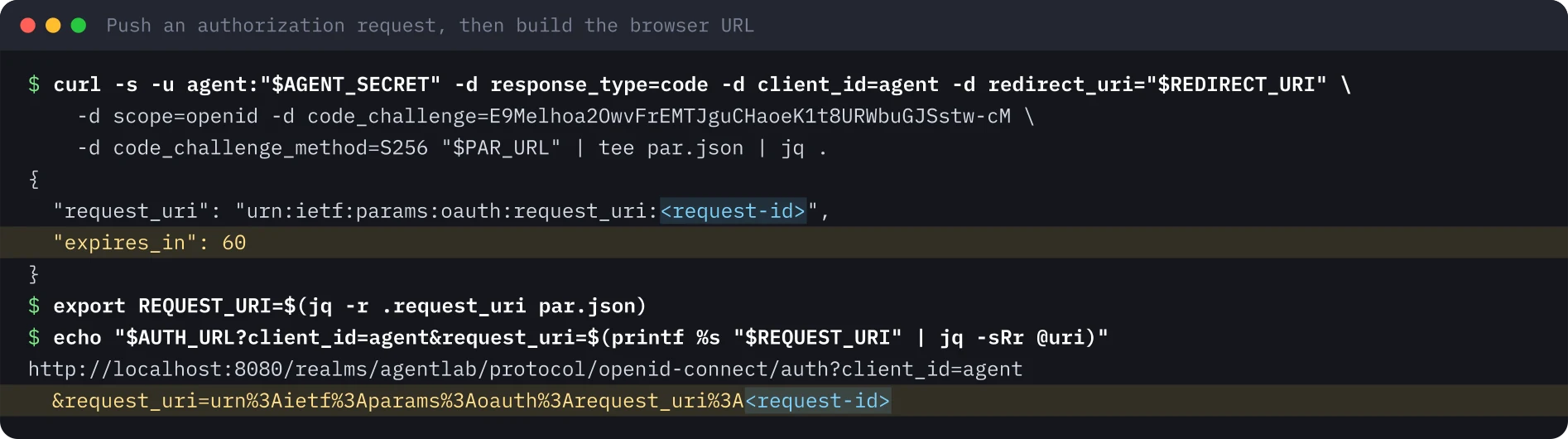
- Una richiesta di autorizzazione inviata con PAR restituisce un
request_uriche dura 60 secondi e si apre una volta sola. Condpop_jktil codice di autorizzazione si riscatta solo con la stessa chiave.
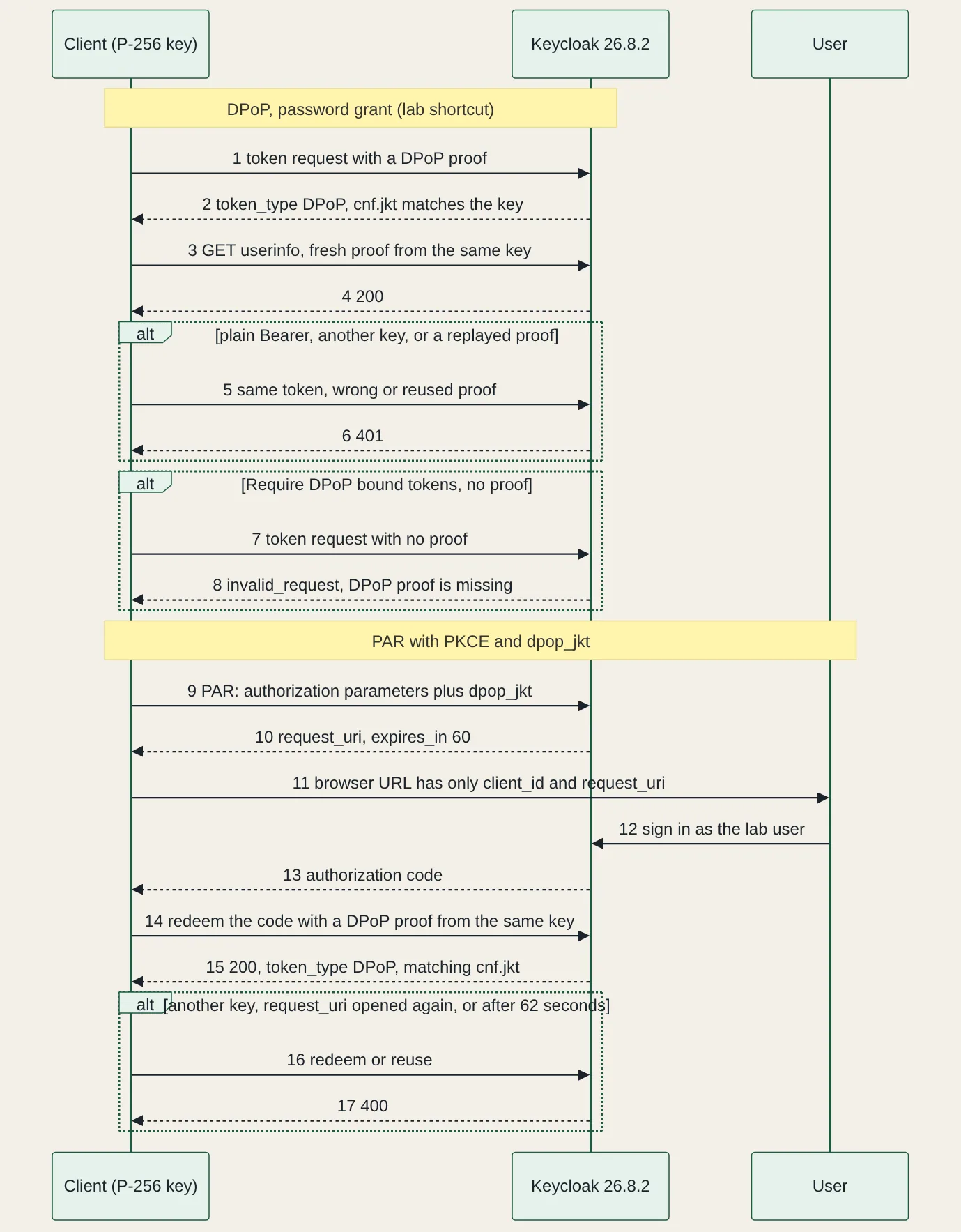
Preparazione#
Keycloak 26.8.2 girava dalla distribuzione zip con Java 21 in modalità sviluppo, da un unzip pulito. Gli script richiedono Python 3.13, PyJWT 2.15.1, cryptography 50.0.2 e httpx 0.28.1. Il realm ha un utente, un client confidenziale chiamato agent e nient’altro. La parte DPoP usa il password grant perché è rapido e per nessun altro motivo. La parte PAR usa l’authorization code flow con PKCE, guidato da uno script invece che da un browser.
Un token normale, poi uno legato#
Prima il punto di partenza: una normale richiesta di token. token_type è Bearer e non c’è il claim cnf, quindi chiunque copi questo token può usarlo.

Poi la stessa richiesta con una prova DPoP. La prova è un piccolo JWT con typ impostato a dpop+jwt, la mia chiave pubblica nell’header jwk e i claim htm (metodo HTTP), htu (URL), iat e un jti unico. Per le chiamate a una risorsa contiene anche ath, un hash del token di accesso. L’ho firmata con una chiave P-256 usa e getta.
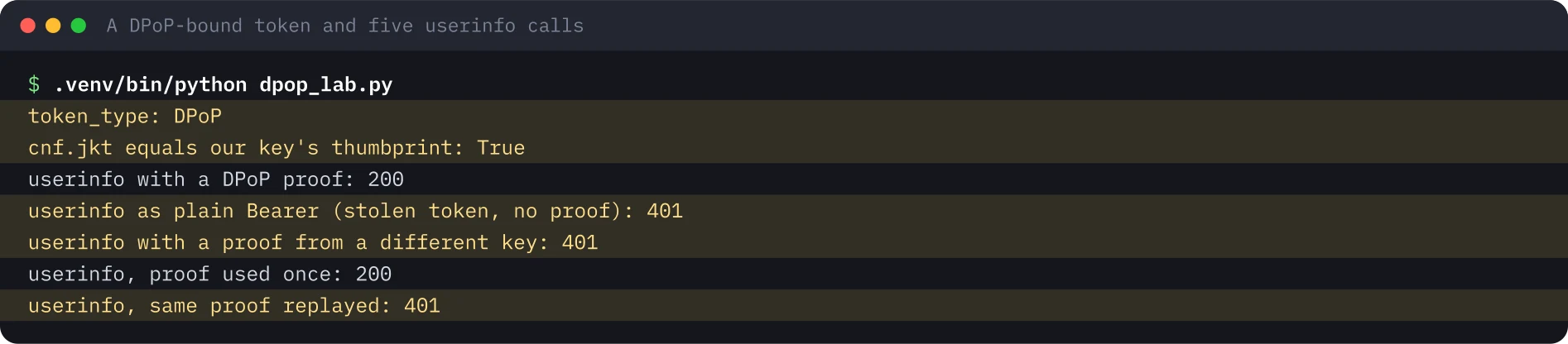
Il cnf.jkt del token è uguale all’impronta RFC 7638 della mia chiave. Il meccanismo è tutto qui: il server confronta la chiave nella prova con quella indicata nel token. Keycloak ha anche rifiutato una prova già vista, cioè il controllo di replay su jti di RFC 9449.
Far richiedere DPoP al client#
Il punto di partenza mostra una lacuna. Se un client non richiede DPoP, Keycloak consegna comunque un bearer token semplice a chi non invia nessuna prova. L’impostazione del client si chiama Require DPoP bound tokens ed è descritta nella guida di amministrazione. Con kcadm.sh è l’attributo dpop.bound.access.tokens.
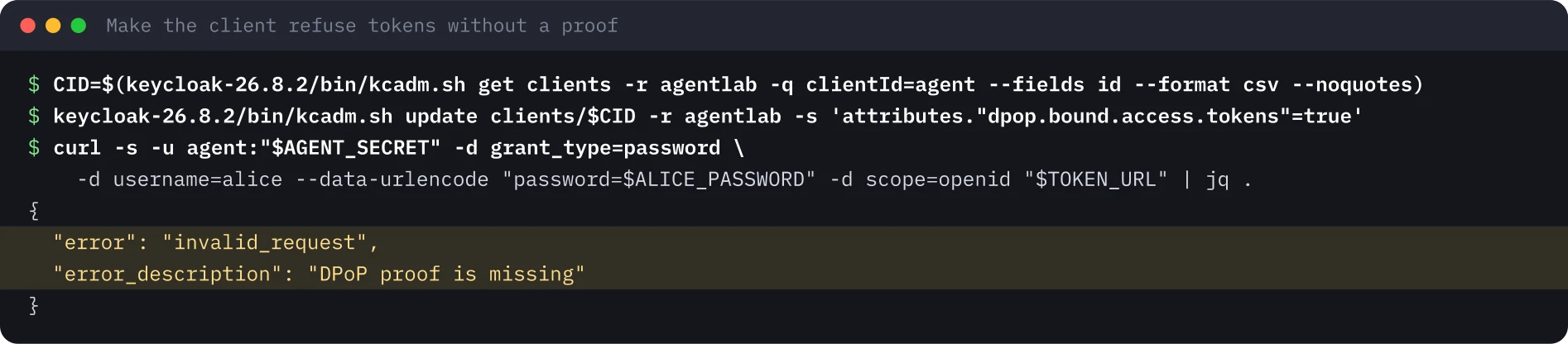
Tutto ciò che segue è stato eseguito con questa impostazione attiva.
Richieste di autorizzazione inviate (PAR)#
Con PAR il client invia i parametri di autorizzazione all’endpoint PAR su un canale posteriore autenticato e riceve un request_uri. Il browser porta solo client_id e questo riferimento. Il valore di code_challenge nella prima immagine è l’esempio di RFC 7636, che è pubblico.
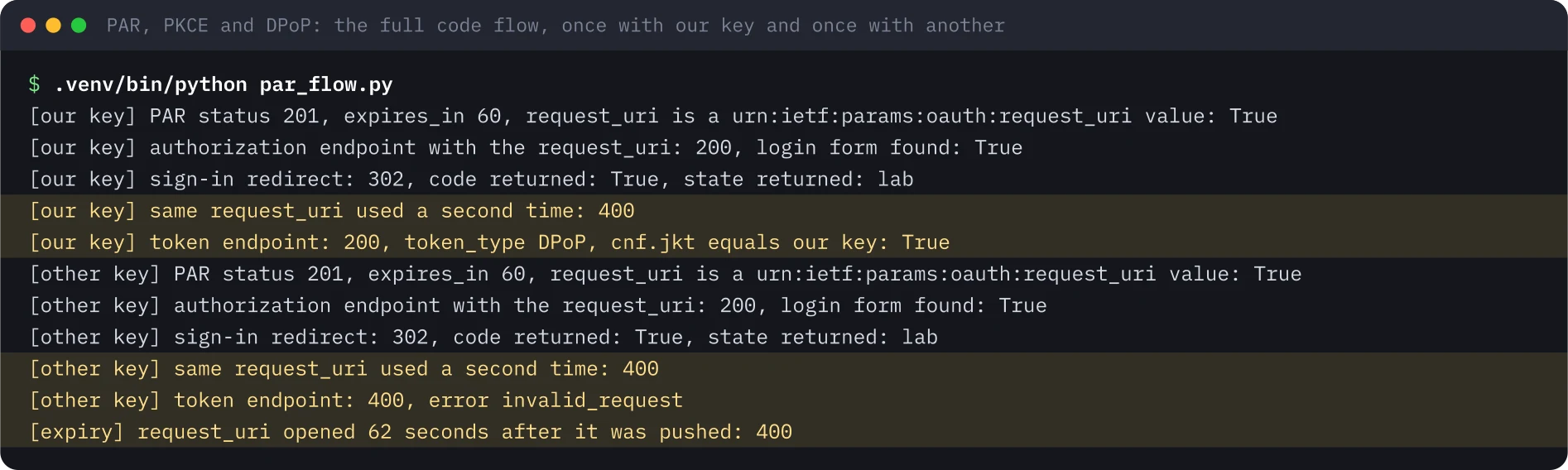
Il secondo script esegue tutto il code flow. Invia la richiesta con dpop_jkt impostato sull’impronta della mia chiave, apre l’endpoint di autorizzazione con il request_uri, accede come utente del lab e riscatta il codice all’endpoint dei token con una prova DPoP. Poi ripete tutto, ma riscatta con un’altra chiave.
Trappole#
- Il cookie jar di Python e
localhost. La prima versione dello script ha perso il cookie di sessione di Keycloak e ha ricevuto 400 sulla pagina di login. Ora gestisco i cookie a mano nello script. - L’errore per la chiave sbagliata. Riscattare un codice legato con un’altra chiave ha restituito
invalid_request, noninvalid_grant. Controlla lo status, non un solo codice. - La prima apertura consuma il
request_uri. L’endpoint di autorizzazione ha risposto con un redirect e riaprire lo stessorequest_uriha restituito 400. - Il password grant è una scorciatoia. RFC 9700 dice che NON DEVE essere usato.
Cosa ne ricavo per la sicurezza#
- Attiva Require DPoP bound tokens per ogni client. Senza, chi ha le credenziali del client può comunque chiedere un bearer token semplice.
- Metti
dpop_jktnella richiesta inviata, così anche il codice di autorizzazione è legato alla chiave. - Usa PAR con PKCE per i client agente, così scope e redirect URI non passano da un browser.
- È una mia opinione: dove vive la chiave conta quanto il binding. Una chiave salvata accanto al token nello stesso log dà a un infostealer entrambe le metà.
Cosa non ho provato#
Non ho provato RAR (authorization_details), un resource server mio che controlli da sé htu, htm, ath, jti e cnf.jkt, il binding mTLS, il binding del refresh token e i client pubblici. Qui i controlli li ha fatti l’endpoint userinfo di Keycloak. Per questo lab non c’è una registrazione né uno screenshot della console. Il lab ha usato solo account usa e getta.
Le immagini del terminale sono state generate dall’output salvato dell’esecuzione del 20 novembre 2026, con l’identificativo della richiesta sostituito da un segnaposto. L’esecuzione ha usato la porta 8180 perché la 8080 era occupata, e le immagini mostrano 8080.
Ripeti questo lab#
Per questo lab servono Java 21, Python 3.13, curl, jq e unzip. Conta circa 30 minuti, più un minuto di attesa per il controllo della scadenza. Apri ogni passo, copia i blocchi e confronta l’output con il mio.
Ogni valore tra parentesi angolari è un segnaposto per il tuo ambiente di test. Nulla in questa pagina è un identificativo o un segreto reale.
Imposta le variabili una sola volta
# Paste into every terminal you use for this lab. Replace each <PLACEHOLDER> with a throwaway value of your own.
export KC_VERSION="26.8.2"
export KC_URL="http://localhost:8080"
export KC_REALM="agentlab"
export KC_ADMIN_USER="admin"
export KC_ADMIN_PASSWORD='<ADMIN_PASSWORD>'
export ALICE_PASSWORD='<ALICE_PASSWORD>'
export AGENT_SECRET='<AGENT_CLIENT_SECRET>'
export REDIRECT_URI="http://localhost:6274/oauth/callback"
export TOKEN_URL="$KC_URL/realms/$KC_REALM/protocol/openid-connect/token"
export PAR_URL="$KC_URL/realms/$KC_REALM/protocol/openid-connect/ext/par/request"
export AUTH_URL="$KC_URL/realms/$KC_REALM/protocol/openid-connect/auth"
0 di 8 passi fatti
Passo 1Avvia Keycloak in modalità sviluppo
Obiettivo. Avvia un server di autorizzazione locale che controlli del tutto, per vedere DPoP e PAR sul filo.
Prerequisiti
- Java 21 (per esempio Eclipse Temurin), curl, jq e unzip
- Porta 8080 libera; tieni aperto questo terminale e usa un secondo terminale per i passi successivi
curl -LO "https://github.com/keycloak/keycloak/releases/download/$KC_VERSION/keycloak-$KC_VERSION.zip"
unzip -q "keycloak-$KC_VERSION.zip"
export KC_BOOTSTRAP_ADMIN_USERNAME="$KC_ADMIN_USER" KC_BOOTSTRAP_ADMIN_PASSWORD="$KC_ADMIN_PASSWORD"
"keycloak-$KC_VERSION/bin/kc.sh" start-dev --http-port 8080
Output atteso
Running the server in development mode. DO NOT use this configuration in production.
INFO  [org.keycloak.services] (main) KC-SERVICES0077: Created temporary admin user with username admin
INFO  [io.quarkus] (main) Keycloak 26.8.2 on JVM (powered by Quarkus 3.40.1.1) started in 8.418s. Listening on: http://localhost:8080
INFO [io.quarkus] (main) Profile dev activated.Passo 2Crea il realm, un utente e un client; installa le librerie Python
Obiettivo. Crea il realm agentlab con l’utente alice e un client confidenziale chiamato agent, poi fissa le versioni delle tre librerie Python usate dagli script.
Prerequisiti
- Keycloak del passo precedente è in esecuzione e env.sh è caricato in questo terminale
- Python 3.13 con il modulo venv
#!/usr/bin/env bash
# Realm, one user and one client for the DPoP and PAR lab. Lab only: throwaway secrets.
set -euo pipefail
KCADM="keycloak-$KC_VERSION/bin/kcadm.sh"
$KCADM config credentials --server "$KC_URL" --realm master --user "$KC_ADMIN_USER" --password "$KC_ADMIN_PASSWORD"
$KCADM create realms -s realm="$KC_REALM" -s enabled=true
$KCADM create users -r "$KC_REALM" -s username=alice -s enabled=true -s [email protected] -s emailVerified=true -s firstName=Alice -s lastName=Lab
$KCADM set-password -r "$KC_REALM" --username alice --new-password "$ALICE_PASSWORD"
# The agent client: confidential. Password grant is on only because this is a lab; the PAR step uses the code flow.
$KCADM create clients -r "$KC_REALM" -s clientId=agent -s publicClient=false -s secret="$AGENT_SECRET" \
  -s directAccessGrantsEnabled=true -s standardFlowEnabled=true -s "redirectUris=[\"$REDIRECT_URI\"]"
echo "realm $KC_REALM ready"python3 -m venv .venv
.venv/bin/pip install -q PyJWT==2.15.1 cryptography==50.0.2 httpx==0.28.1
.venv/bin/pip list 2>/dev/null | grep -i -E "^(pyjwt|cryptography|httpx) "Output atteso
Logging into http://localhost:8080 as user admin of realm master
Created new realm with id 'agentlab'
Created new user with id '<user-id>'
Created new client with id '<client-id>'
realm agentlab ready
cryptography      50.0.2
httpx             0.28.1
PyJWT 2.15.1Passo 3Ottieni un token normale e cerca cnf
Obiettivo. Guarda il punto di partenza: token_type Bearer e nessun claim cnf, quindi il token non è legato a nessuna chiave.
Prerequisiti
- Il realm e il client del passo precedente
curl -s -u agent:"$AGENT_SECRET" -d grant_type=password \
  -d username=alice --data-urlencode "password=$ALICE_PASSWORD" -d scope=openid "$TOKEN_URL" \
  | jq '{token_type, cnf: (.access_token | split(".")[1] | @base64d | fromjson | .cnf)}'
Output atteso
{
  "token_type": "Bearer",
  "cnf": null
}Passo 4Ottieni un token legato con DPoP e provalo in cinque modi
Obiettivo. Genera una chiave P-256 usa e getta, chiedi un token con una prova DPoP, controlla cnf.jkt, poi chiama userinfo con una prova, come Bearer semplice, con un’altra chiave e con una prova riusata.
Prerequisiti
- Il venv del passo 2; env.sh caricato
- Il client non richiede ancora DPoP, quindi questo passo funziona così com’è
"""DPoP lab: get a DPoP-bound token from Keycloak, check cnf.jkt, call userinfo with and without a proof.
Tested with Keycloak 26.8.2, PyJWT 2.15.1, cryptography 50.0.2 and httpx 0.28.1. Lab-only secrets, read from the environment."""
import base64, hashlib, json, os, time, uuid
import httpx, jwt
from cryptography.hazmat.primitives.asymmetric import ec

TOKEN_URL = os.environ["TOKEN_URL"]
USERINFO = TOKEN_URL.replace("/token", "/userinfo")

def new_key():
    key = ec.generate_private_key(ec.SECP256R1())
    pub = json.loads(jwt.algorithms.ECAlgorithm.to_jwk(key.public_key()))
    return key, {k: pub[k] for k in ("crv", "kty", "x", "y")}

def thumbprint(pub):  # RFC 7638: SHA-256 over the required members in lexicographic order
    return b64(hashlib.sha256(json.dumps(pub, separators=(",", ":"), sort_keys=True).encode()).digest())

def b64(raw):
    return base64.urlsafe_b64encode(raw).rstrip(b"=").decode()

def proof(key, pub, htm, htu, ath=None, jti=None):
    claims = {"jti": jti or str(uuid.uuid4()), "htm": htm, "htu": htu, "iat": int(time.time())}
    if ath:
        claims["ath"] = ath  # hash of the access token, binds the proof to this token
    return jwt.encode(claims, key, algorithm="ES256", headers={"typ": "dpop+jwt", "jwk": pub})

key, pub = new_key()
r = httpx.post(TOKEN_URL, headers={"DPoP": proof(key, pub, "POST", TOKEN_URL)}, data={
    "grant_type": "password", "client_id": "agent", "client_secret": os.environ["AGENT_SECRET"],
    "username": "alice", "password": os.environ["ALICE_PASSWORD"], "scope": "openid"})
body = r.json()
print("token_type:", body.get("token_type"), body.get("error_description", ""))
at = body["access_token"]
cnf = jwt.decode(at, options={"verify_signature": False}).get("cnf")
print("cnf.jkt equals our key's thumbprint:", cnf.get("jkt") == thumbprint(pub))
ath = b64(hashlib.sha256(at.encode()).digest())

def userinfo(label, headers):
    print(f"{label}:", httpx.get(USERINFO, headers=headers).status_code)

userinfo("userinfo with a DPoP proof", {"Authorization": f"DPoP {at}", "DPoP": proof(key, pub, "GET", USERINFO, ath)})
userinfo("userinfo as plain Bearer (stolen token, no proof)", {"Authorization": f"Bearer {at}"})
other, other_pub = new_key()
userinfo("userinfo with a proof from a different key", {"Authorization": f"DPoP {at}", "DPoP": proof(other, other_pub, "GET", USERINFO, ath)})
reused = proof(key, pub, "GET", USERINFO, ath)
userinfo("userinfo, proof used once", {"Authorization": f"DPoP {at}", "DPoP": reused})
userinfo("userinfo, same proof replayed", {"Authorization": f"DPoP {at}", "DPoP": reused}).venv/bin/python dpop_lab.pyOutput atteso
token_type: DPoP
cnf.jkt equals our key's thumbprint: True
userinfo with a DPoP proof: 200
userinfo as plain Bearer (stolen token, no proof): 401
userinfo with a proof from a different key: 401
userinfo, proof used once: 200
userinfo, same proof replayed: 401Passo 5Fai rifiutare al client i token senza prova
Obiettivo. Attiva Require DPoP bound tokens per il client agent e ripeti la richiesta semplice. Keycloak dovrebbe rifiutarla.
Prerequisiti
- Hai fatto login in kcadm (il passo 2 lo ha fatto)
KCADM="keycloak-$KC_VERSION/bin/kcadm.sh"
CID=$($KCADM get clients -r "$KC_REALM" -q clientId=agent --fields id --format csv --noquotes)
$KCADM update clients/$CID -r "$KC_REALM" -s 'attributes."dpop.bound.access.tokens"=true'
# The same plain request as before, now without a proof
curl -s -u agent:"$AGENT_SECRET" -d grant_type=password \
  -d username=alice --data-urlencode "password=$ALICE_PASSWORD" -d scope=openid "$TOKEN_URL" | jq .
Output atteso
{
  "error": "invalid_request",
  "error_description": "DPoP proof is missing"
}Passo 6Invia una richiesta di autorizzazione con PAR e costruisci l’URL del browser
Obiettivo. Invia i parametri di autorizzazione all’endpoint PAR sul canale posteriore. La risposta è un request_uri che dura 60 secondi.
Prerequisiti
- env.sh caricato; il segreto del client è quello impostato in env.sh
# The code_challenge below is the public example value from RFC 7636
curl -s -u agent:"$AGENT_SECRET" -d response_type=code -d client_id=agent -d redirect_uri="$REDIRECT_URI" \
  -d scope=openid -d code_challenge=E9Melhoa2OwvFrEMTJguCHaoeK1t8URWbuGJSstw-cM \
  -d code_challenge_method=S256 "$PAR_URL" | tee par.json | jq .
export REQUEST_URI=$(jq -r .request_uri par.json)
echo "$AUTH_URL?client_id=agent&request_uri=$(printf %s "$REQUEST_URI" | jq -sRr @uri)"
Output atteso
{
  "request_uri": "urn:ietf:params:oauth:request_uri:<request-id>",
  "expires_in": 60
}
http://localhost:8080/realms/agentlab/protocol/openid-connect/auth?client_id=agent&request_uri=urn%3Aietf%3Aparams%3Aoauth%3Arequest_uri%3A<request-id>Passo 7Esegui tutto il flusso con la nostra chiave e con un’altra chiave
Obiettivo. Invia la richiesta con dpop_jkt, accedi come alice da uno script, riscatta il codice con la chiave giusta e con una sbagliata, prova il request_uri due volte e aspetta che scada. Il controllo della scadenza richiede circa un minuto.
Prerequisiti
- Passo 5 fatto, quindi il client richiede DPoP
- Il venv del passo 2
"""PAR + PKCE + DPoP authorization code flow against Keycloak, driven from a script (no browser).
Tested with Keycloak 26.8.2, PyJWT 2.15.1, cryptography 50.0.2 and httpx 0.28.1. Lab-only secrets, read from the environment."""
import base64, hashlib, json, os, re, secrets, time, uuid
from urllib.parse import urlparse, parse_qs, urlencode
import httpx, jwt
from cryptography.hazmat.primitives.asymmetric import ec
E = os.environ
TOKEN_URL, PAR_URL, AUTH_URL, REDIRECT = E["TOKEN_URL"], E["PAR_URL"], E["AUTH_URL"], E["REDIRECT_URI"]
def b64(raw): return base64.urlsafe_b64encode(raw).rstrip(b"=").decode()
def new_key():
key = ec.generate_private_key(ec.SECP256R1())
pub = json.loads(jwt.algorithms.ECAlgorithm.to_jwk(key.public_key()))
return key, {k: pub[k] for k in ("crv", "kty", "x", "y")}
def jkt(pub): return b64(hashlib.sha256(json.dumps(pub, separators=(",", ":"), sort_keys=True).encode()).digest())
def proof(key, pub, htm, htu):
claims = {"jti": str(uuid.uuid4()), "htm": htm, "htu": htu, "iat": int(time.time())}
return jwt.encode(claims, key, algorithm="ES256", headers={"typ": "dpop+jwt", "jwk": pub})
def flow(label, redeem_with_wrong_key=False):
key, pub = new_key()
verifier = b64(secrets.token_bytes(32))
challenge = b64(hashlib.sha256(verifier.encode()).digest())
# 1. Push the request over the back channel. dpop_jkt binds the authorization code to our key.
par = httpx.post(PAR_URL, auth=("agent", E["AGENT_SECRET"]), data={
"response_type": "code", "client_id": "agent", "redirect_uri": REDIRECT, "scope": "openid", "state": "lab",
"code_challenge": challenge, "code_challenge_method": "S256", "dpop_jkt": jkt(pub)})
par_body = par.json()
request_uri = par_body["request_uri"]
print(f"[{label}] PAR status {par.status_code}, expires_in {par_body['expires_in']}, request_uri is a urn:ietf:params:oauth:request_uri value: {request_uri.startswith('urn:ietf:params:oauth:request_uri:')}")
# 2. The browser only carries client_id and the request_uri. A tiny cookie jar stands in for the browser.
jar = {}
def browse(method, url, **kw):
r = httpx.request(method, url, cookies=jar, follow_redirects=False, **kw)
for line in r.headers.get_list("set-cookie"):
name, _, rest = line.partition("=")
jar[name] = rest.split(";")[0]
return r
page = browse("GET", AUTH_URL, params={"client_id": "agent", "request_uri": request_uri})
while page.status_code == 302:
page = browse("GET", page.headers["location"])
form = re.search(r'<form[^>]*id="kc-form-login"[^>]*action="([^"]+)"', page.text)
print(f"[{label}] authorization endpoint with the request_uri: {page.status_code}, login form found: {bool(form)}")
done = browse("POST", form.group(1).replace("&", "&"), data={"username": "alice", "password": E["ALICE_PASSWORD"]})
query = parse_qs(urlparse(done.headers["location"]).query)
code = query["code"][0]
print(f"[{label}] sign-in redirect: {done.status_code}, code returned: {bool(code)}, state returned: {query['state'][0]}")
again = browse("GET", AUTH_URL, params={"client_id": "agent", "request_uri": request_uri})
print(f"[{label}] same request_uri used a second time: {again.status_code}")
# 3. Redeem the code with a DPoP proof (ours, or a different key's).
use_key, use_pub = (new_key() if redeem_with_wrong_key else (key, pub))
tok = httpx.post(TOKEN_URL, headers={"DPoP": proof(use_key, use_pub, "POST", TOKEN_URL)}, data={
"grant_type": "authorization_code", "code": code, "redirect_uri": REDIRECT, "client_id": "agent",
"client_secret": E["AGENT_SECRET"], "code_verifier": verifier})
body = tok.json()
if tok.status_code == 200:
cnf = jwt.decode(body["access_token"], options={"verify_signature": False}).get("cnf", {})
print(f"[{label}] token endpoint: {tok.status_code}, token_type {body['token_type']}, cnf.jkt equals our key: {cnf.get('jkt') == jkt(pub)}")
else:
print(f"[{label}] token endpoint: {tok.status_code}, error {body.get('error')}")
def expiry():
key, pub = new_key()
par = httpx.post(PAR_URL, auth=("agent", E["AGENT_SECRET"]), data={
"response_type": "code", "client_id": "agent", "redirect_uri": REDIRECT, "scope": "openid", "state": "lab",
"code_challenge": b64(hashlib.sha256(b"unused-verifier").digest()), "code_challenge_method": "S256"})
time.sleep(par.json()["expires_in"] + 2)
late = httpx.get(AUTH_URL, params={"client_id": "agent", "request_uri": par.json()["request_uri"]}, follow_redirects=True)
print(f"[expiry] request_uri opened {par.json()['expires_in'] + 2} seconds after it was pushed: {late.status_code}")
flow("our key")
flow("other key", redeem_with_wrong_key=True)
expiry().venv/bin/python par_flow.pyOutput atteso
[our key] PAR status 201, expires_in 60, request_uri is a urn:ietf:params:oauth:request_uri value: True
[our key] authorization endpoint with the request_uri: 200, login form found: True
[our key] sign-in redirect: 302, code returned: True, state returned: lab
[our key] same request_uri used a second time: 400
[our key] token endpoint: 200, token_type DPoP, cnf.jkt equals our key: True
[other key] PAR status 201, expires_in 60, request_uri is a urn:ietf:params:oauth:request_uri value: True
[other key] authorization endpoint with the request_uri: 200, login form found: True
[other key] sign-in redirect: 302, code returned: True, state returned: lab
[other key] same request_uri used a second time: 400
[other key] token endpoint: 400, error invalid_request
[expiry] request_uri opened 62 seconds after it was pushed: 400Passo 8Pulizia
Obiettivo. Ferma Keycloak ed elimina tutto ciò che il lab ha creato, compresa la distribuzione scaricata e l’ambiente Python.
Prerequisiti
- Nient’altro usa la porta 8080 o la directory keycloak
# Stop Keycloak: press Ctrl+C in the first terminal, or:
pkill -f "$PWD/keycloak-$KC_VERSION" || true
sleep 5
rm -rf "keycloak-$KC_VERSION" "keycloak-$KC_VERSION.zip" .venv dpop_lab.py par_flow.py kc-dpop-lab.sh par.json
unset KC_ADMIN_PASSWORD ALICE_PASSWORD AGENT_SECRET REQUEST_URI CID
# check: nothing listens on port 8080 any more
curl -s -o /dev/null -w "%{http_code}\n" "$KC_URL/"
Output atteso
000Fonti#
- Hudson Rock (InfoStealers), Inside the AI-Powered Marketplace Turning Infected Computers Into Searchable Profiles (15 Nov 2026)
- RFC 9449: OAuth 2.0 Demonstrating Proof of Possession (DPoP)
- RFC 9126: OAuth 2.0 Pushed Authorization Requests
- RFC 9700: Best Current Practice for OAuth 2.0 Security
- RFC 7636: Proof Key for Code Exchange by OAuth Public Clients
- Keycloak Server Administration Guide: DPoP bound tokens
- Keycloak release notes (DPoP supported in 26.4.0, authorization code binding to a DPoP key in 26.1.0)
- IETF 127 slides: Identity Assertion Authorization Grant (Parecki, McGuinness, Campbell)
Questo articolo in formato Markdown · RSS · JSON feed
Nuovi articoli via email
Una email a settimana con nuovi articoli e lab. Disiscrizione in qualsiasi momento.
Il tuo indirizzo è salvato su Kit, il servizio che invia le email. Dettagli