Kurz gesagt
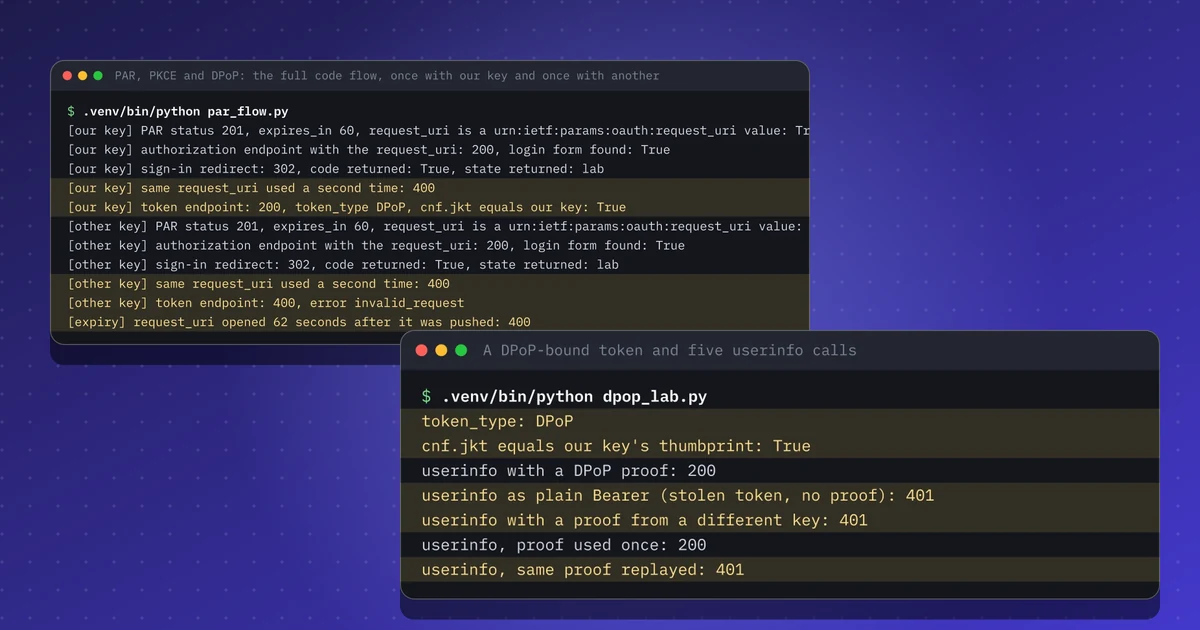
- Ein Bearer-Token gilt für jeden, der es besitzt. Mit DPoP (RFC 9449) ist das Token an einen Schlüssel gebunden, und jede Anfrage braucht einen frischen, mit diesem Schlüssel signierten Nachweis.
- In Keycloak 26.8.2 erhielt ich ein DPoP-gebundenes Token, dessen cnf.jkt zu meinem Schlüssel passte. Als einfaches Bearer-Token, mit dem Nachweis eines anderen Schlüssels oder mit einem wiederverwendeten Nachweis bekam dasselbe Token ein 401.
- PAR (RFC 9126) verlegt die Autorisierungsparameter in einen Aufruf über den Hintergrundkanal. Der request_uri galt 60 Sekunden und ließ sich einmal öffnen, und mit dpop_jkt im gesendeten Request ließ sich der Code nur mit demselben Schlüssel einlösen.
- Keycloak lehnt Tokens ohne Nachweis nur ab, wenn beim Client Require DPoP bound tokens eingeschaltet ist. Ich habe diese Einstellung getestet.
- Nicht getestet: RAR, ein Resource Server, der Nachweise selbst prüft, mTLS-Bindung und die Bindung von Refresh Tokens.
Dieses Lab nachbauen
Dieses Lab habe ich so geschrieben, dass Sie es selbst nachbauen können. Jeder Schritt enthält die Befehle zum Kopieren und die Ausgabe, die ich bekommen habe, und Sie können ihn als erledigt abhaken. Die Haken bleiben nur in diesem Browser.
Kopiert einen fertigen Prompt für Claude Code, Cursor, Codex oder einen anderen Coding-Agenten. Nur für Testumgebungen.
Prompt anzeigen
I want to run a hands-on lab from iamops.dev, and I would like your help to do it safely.

Lab: DPoP und PAR mit Keycloak: senderbeschränkte Tokens für KI-Agenten
Read the whole lab here (Markdown): https://iamops.dev/de/dpop-par-keycloak-sender-constrained-tokens.md

What the lab needs before the first step:
- Java 21 (for example Eclipse Temurin), curl, jq and unzip
- Port 8080 free; keep this terminal open and use a second one for the next steps
- Values I have to set myself (the lab uses placeholders): <ADMIN_PASSWORD>, <ALICE_PASSWORD>, <AGENT_CLIENT_SECRET>

How I want you to work:
1. Read the lab from start to finish first (each step lists its own prerequisites). Then check that the prerequisites are in place and that the tool versions match what the lab expects. Tell me what is missing before you run anything.
2. Run one step at a time. Before each command, show it to me and say in a sentence what it does.
3. Ask me before anything that costs money, creates cloud resources, touches a real tenant or account, or deletes anything. Wait for my answer.
4. Use the placeholders from the lab. Never paste real secrets, tokens or production identities into a command, a file or this chat. If a value is needed, tell me where to set it myself.
5. After each step, compare the output with the expected output in the lab. If it does not match, stop and tell me what differs. Do not carry on or invent a fix without asking me.
6. At the end, report what passed, what failed and which cleanup you did. Then offer to tick the steps off for me. The lab page keeps ticks only in my browser, so if you cannot do that, list the steps I should tick.

This lab is for test environments only. Do not run it against production, or against a tenant or account that holds real data or real users.

You may answer in my language.
Am 15. November 2026 beschrieb Hudson Rock einen Marktplatz, der Infostealer-Logs mit einem KI-geschriebenen Profil jedes Opfers verkauft. Der Verkäufer eines Angebots behauptete, gültige Anthropic-Claude-API-Sitzungstokens zu haben. Hudson Rock schreibt, der Screenshot belege weder die Tokenart noch ob es noch funktioniert. Ich behandle das daher als Behauptung, nicht als Tatsache. Der allgemeine Punkt gilt in jedem Fall: Ein Bearer-Token in einem gestohlenen Log funktioniert für jeden, der es hat.
RFC 9700 sagt, Autorisierungs- und Resource Server SOLLTEN Access Tokens an den Sender binden, mit mTLS oder DPoP. Ich wollte sehen, wie das auf der Leitung aussieht, und habe DPoP und Pushed Authorization Requests (PAR) gegen ein lokales Keycloak getestet. Auch die IETF-127-Folien zu ID-JAG fügen eine DPoP-gebundene Variante hinzu, die ich in meinen Notizen zu diesem Treffen behandle.
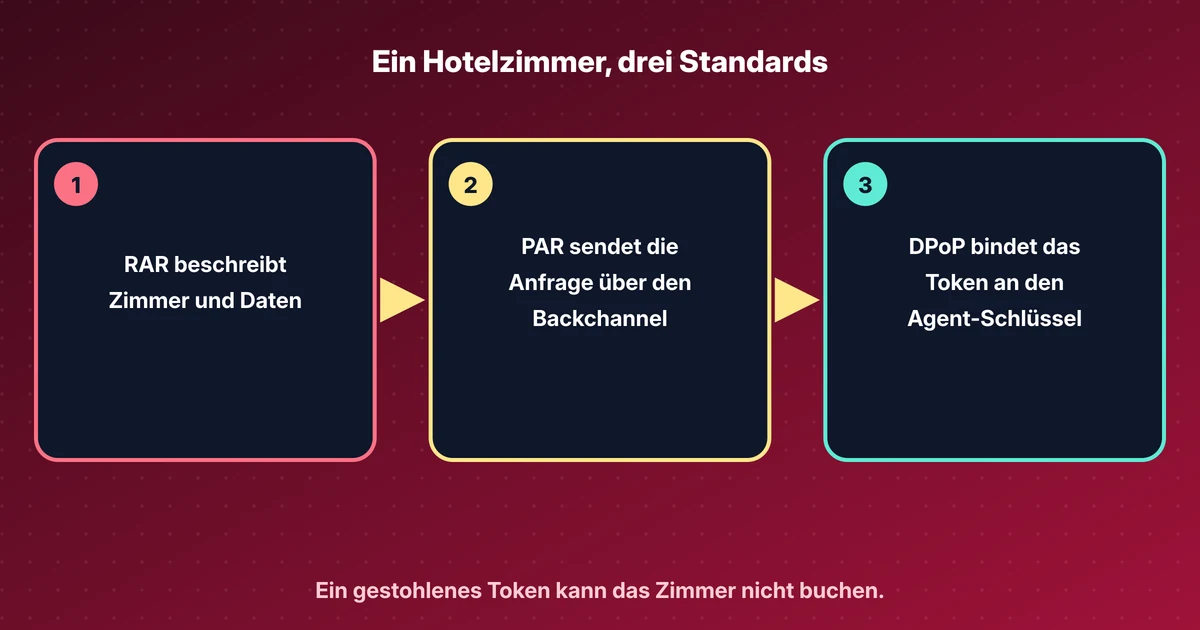
Ich habe eine kurze Erklärung zu DPoP, PAR und RAR geschrieben. Das DPoP-Tool kann einen Nachweis erzeugen und prüfen.
Was dieses Lab zeigt#
- Ein normales Token trägt keinen
cnf-Claim. Ein DPoP-gebundenes Token trägtcnf.jkt, den Fingerabdruck meines Schlüssels. - Das gebundene Token funktioniert mit einem frischen Nachweis meines Schlüssels. Es scheitert als einfaches Bearer-Token, mit dem Nachweis eines anderen Schlüssels und wenn derselbe Nachweis zweimal gesendet wird.
- Mit einer einzigen Client-Einstellung verweigert Keycloak die Ausgabe eines Tokens, wenn die Anfrage keinen Nachweis enthält.
- Ein per PAR gesendeter Autorisierungsrequest liefert einen
request_uri, der 60 Sekunden gilt und sich einmal öffnen lässt. Mitdpop_jktlässt sich der Autorisierungscode nur mit demselben Schlüssel einlösen.
Aufbau#
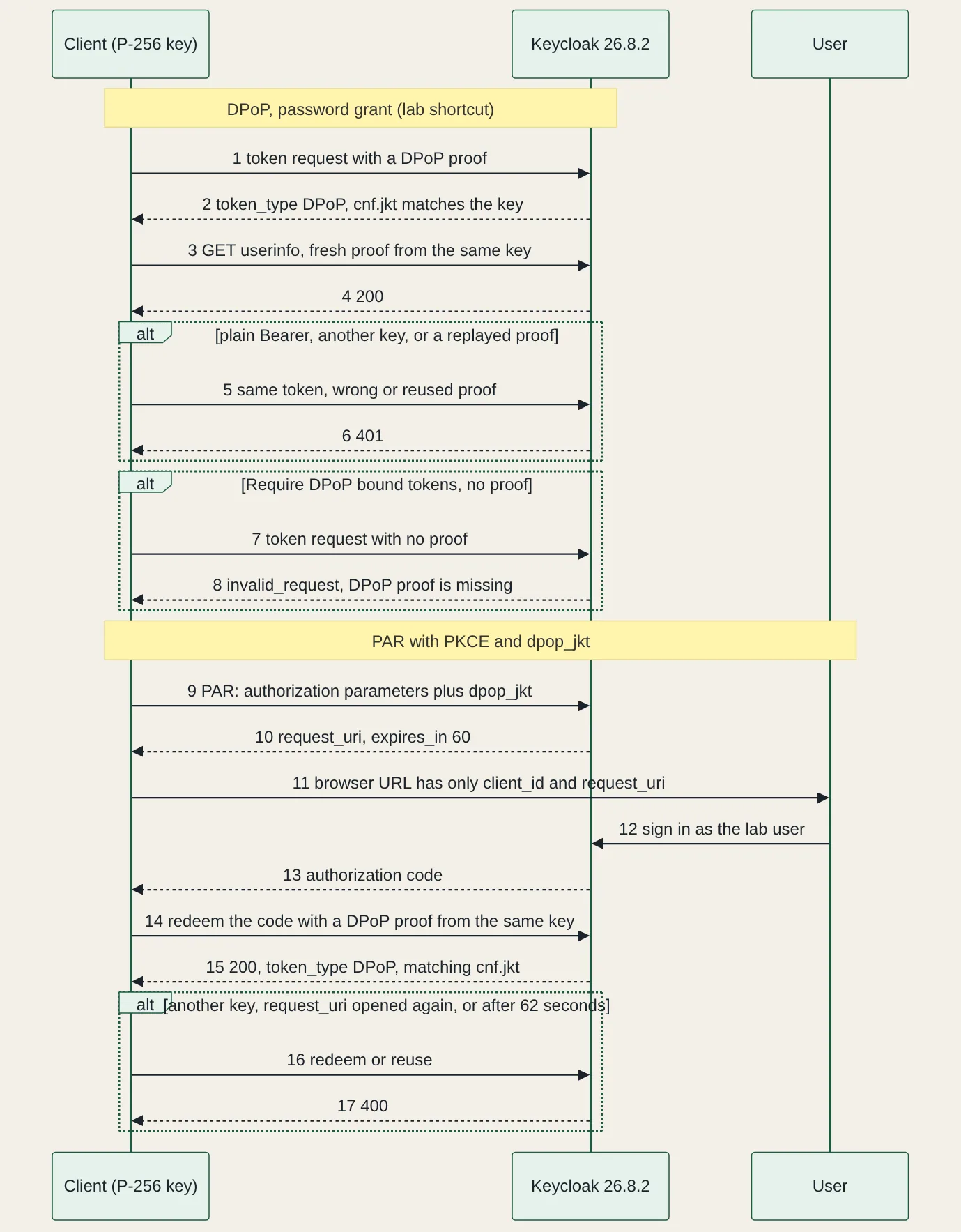
Keycloak 26.8.2 lief aus der Zip-Distribution mit Java 21 im Entwicklungsmodus, aus einem frisch entpackten Archiv. Die Skripte brauchen Python 3.13, PyJWT 2.15.1, cryptography 50.0.2 und httpx 0.28.1. Der Realm hat einen Benutzer, einen vertraulichen Client namens agent und sonst nichts. Der DPoP-Teil nutzt den Password Grant, weil er schnell geht und aus keinem anderen Grund. Der PAR-Teil nutzt den Authorization-Code-Flow mit PKCE, gesteuert von einem Skript statt von einem Browser.
Ein normales Token, dann ein gebundenes#
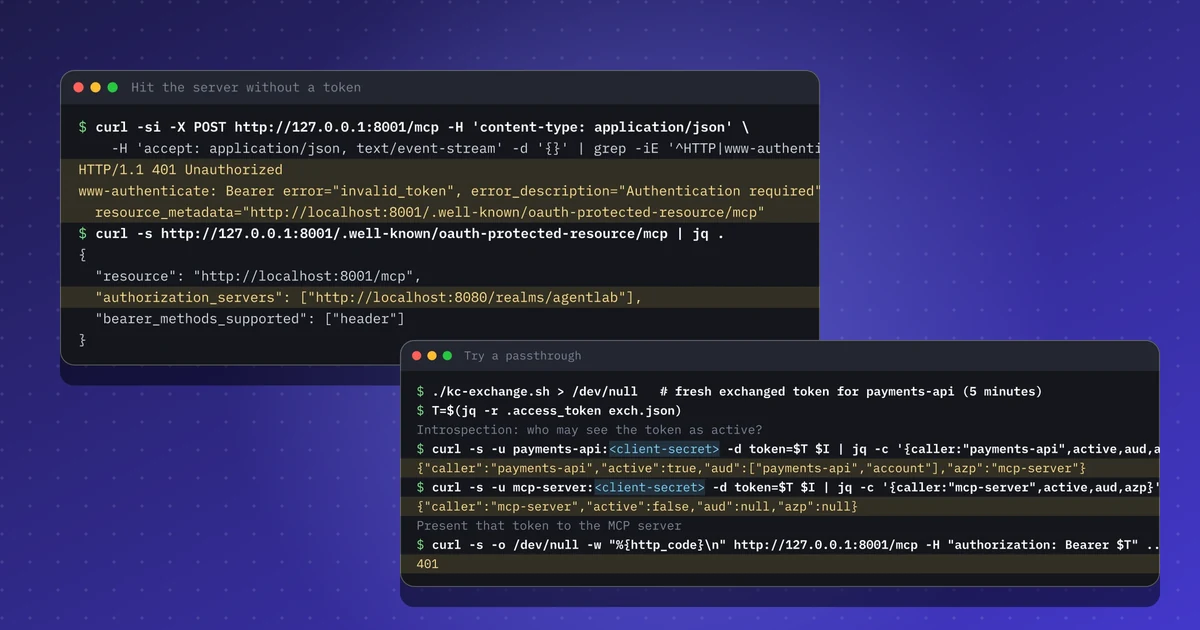
Zuerst die Ausgangslage: eine einfache Token-Anfrage. token_type ist Bearer, und es gibt keinen cnf-Claim. Wer dieses Token kopiert, kann es also benutzen.

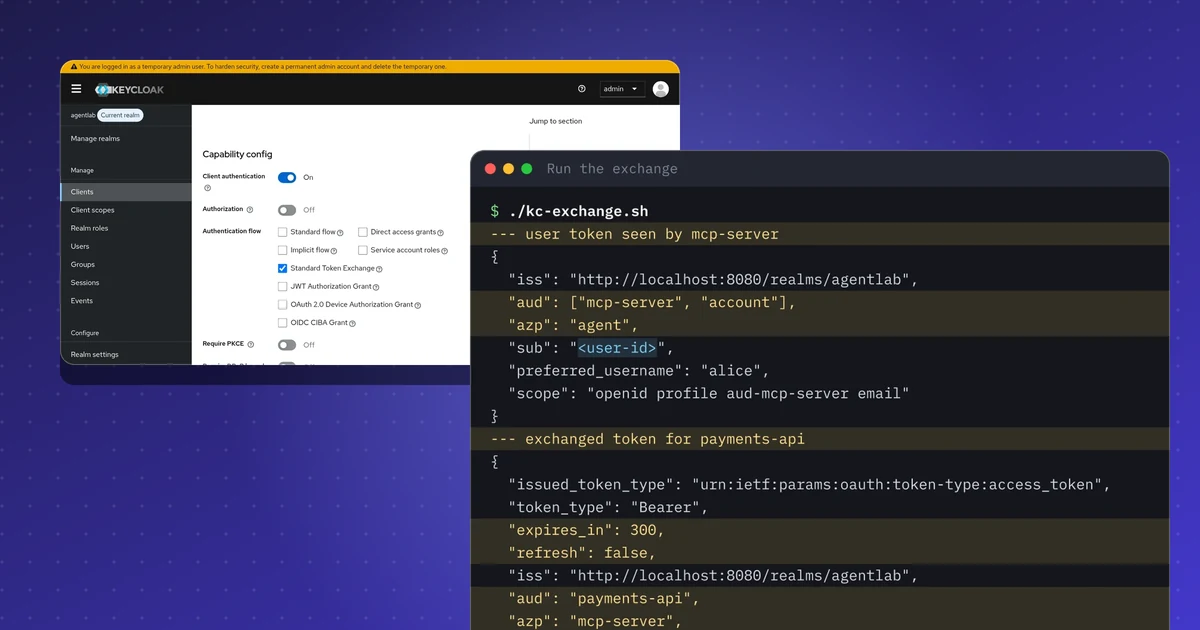
Dann dieselbe Anfrage mit einem DPoP-Nachweis. Der Nachweis ist ein kleines JWT mit typ gleich dpop+jwt, meinem öffentlichen Schlüssel im jwk-Header und den Claims htm (HTTP-Methode), htu (URL), iat und einer eindeutigen jti. Bei Aufrufen einer Ressource enthält er außerdem ath, einen Hash des Access Tokens. Ich habe ihn mit einem Wegwerf-P-256-Schlüssel signiert.
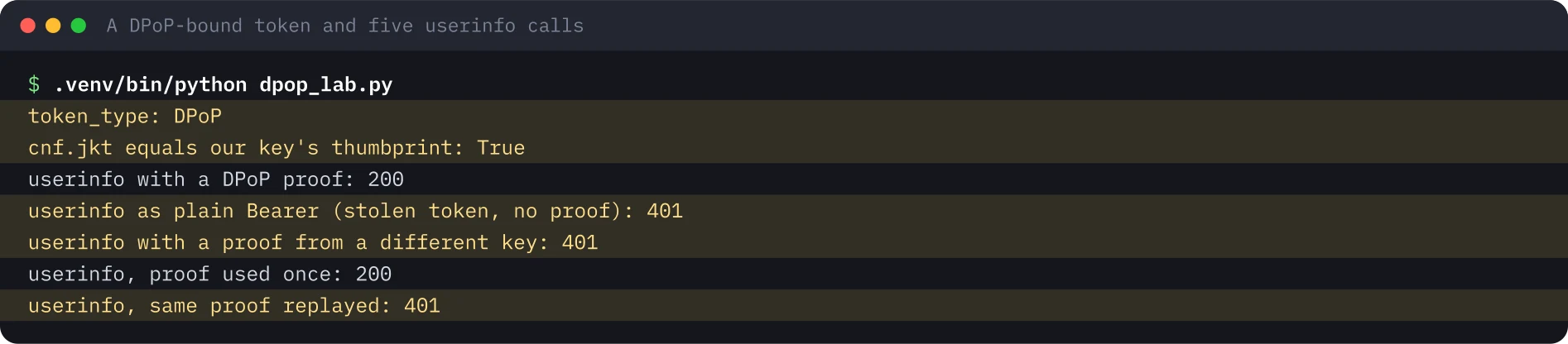
Das cnf.jkt des Tokens entspricht dem RFC-7638-Fingerabdruck meines Schlüssels. Mehr ist der Mechanismus nicht: Der Server vergleicht den Schlüssel im Nachweis mit dem Schlüssel, den das Token nennt. Keycloak lehnte auch einen bereits gesehenen Nachweis ab, also die jti-Replay-Prüfung aus RFC 9449.
Den Client DPoP verlangen lassen#
Die Ausgangslage zeigt eine Lücke. Verlangt ein Client kein DPoP, gibt Keycloak weiterhin ein einfaches Bearer-Token an Aufrufer ohne Nachweis aus. Die Client-Einstellung heißt Require DPoP bound tokens und steht im Administrationshandbuch. Über kcadm.sh ist es das Attribut dpop.bound.access.tokens.
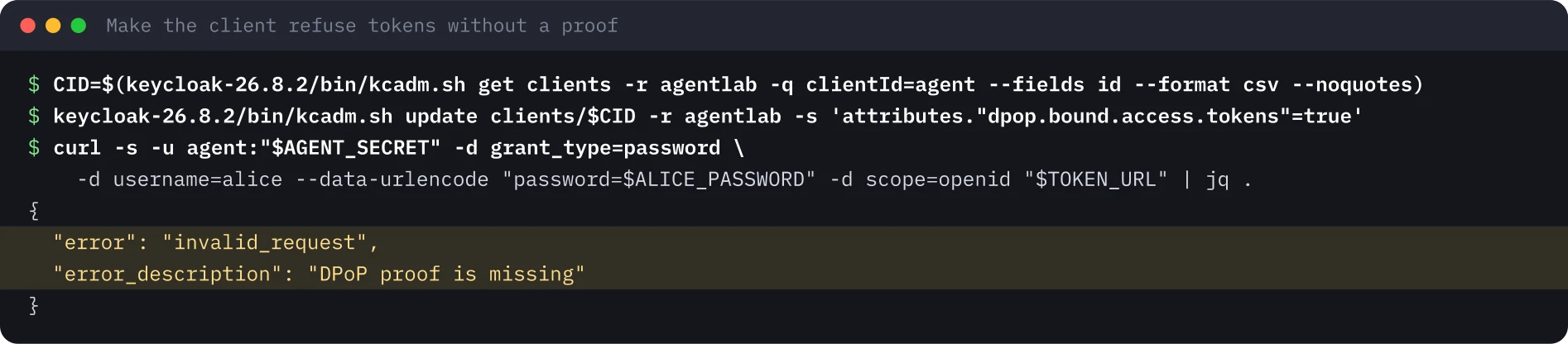
Alles Weitere lief mit dieser Einstellung.
Pushed Authorization Requests#
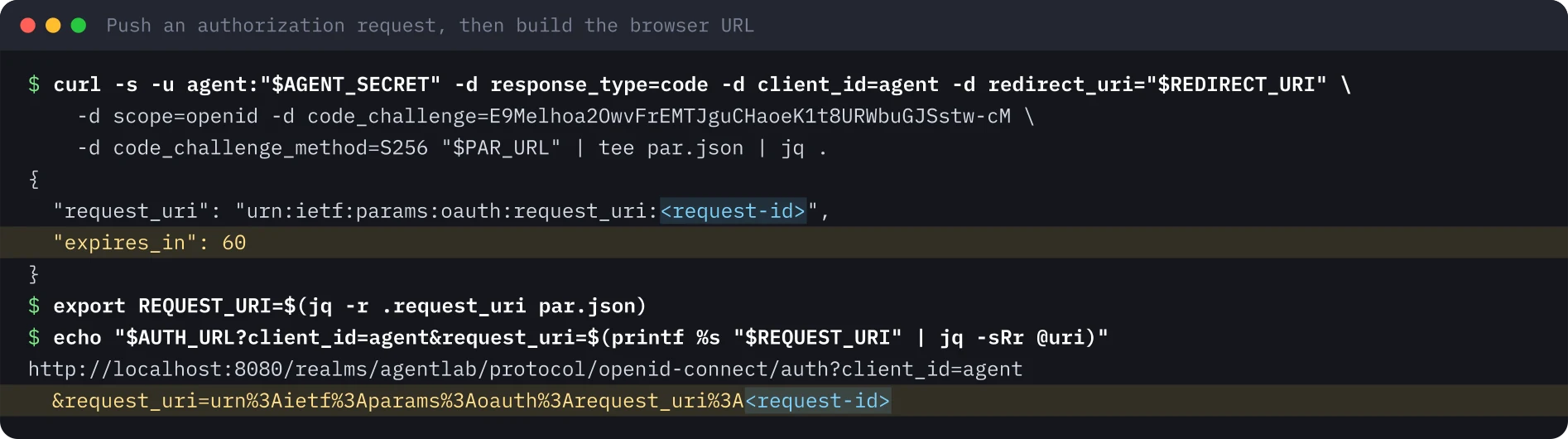
Mit PAR sendet der Client die Autorisierungsparameter über einen authentifizierten Hintergrundkanal an den PAR-Endpunkt und erhält einen request_uri zurück. Der Browser trägt nur client_id und diese Referenz. Der Wert von code_challenge im ersten Bild ist das öffentliche Beispiel aus RFC 7636.
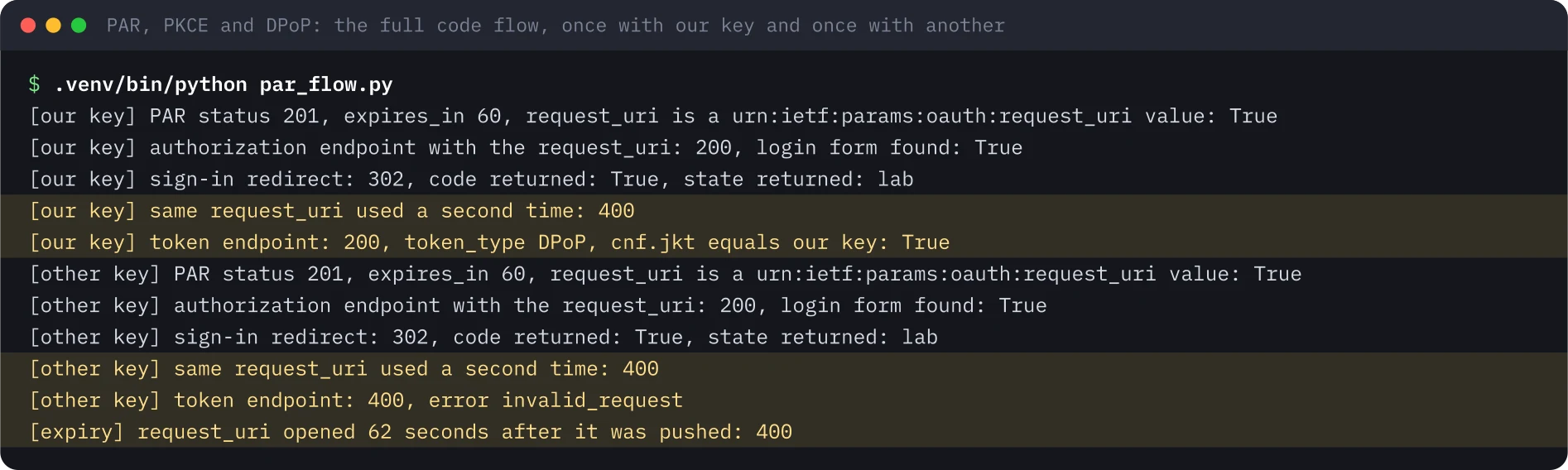
Das zweite Skript führt den ganzen Code-Flow aus. Es sendet den Request mit dpop_jkt auf den Fingerabdruck meines Schlüssels, öffnet den Autorisierungsendpunkt mit dem request_uri, meldet sich als Lab-Benutzer an und löst den Code am Token-Endpunkt mit einem DPoP-Nachweis ein. Danach wiederholt es alles und löst mit einem anderen Schlüssel ein.
Stolpersteine#
- Pythons Cookie-Jar und
localhost. Meine erste Version des Flow-Skripts verlor das Keycloak-Sitzungscookie und bekam auf der Login-Seite ein 400. Jetzt führe ich die Cookies im Skript von Hand mit. - Der Fehler beim falschen Schlüssel. Das Einlösen eines gebundenen Codes mit einem anderen Schlüssel lieferte
invalid_request, nichtinvalid_grant. Testen Sie auf den Status, nicht auf einen einzelnen Code. - Das erste Öffnen verbraucht den
request_uri. Der Autorisierungsendpunkt antwortete mit einem Redirect, und das erneute Öffnen desselbenrequest_urilieferte 400. - Der Password Grant ist eine Abkürzung. RFC 9700 sagt, er DARF NICHT verwendet werden.
Folgerungen für die Sicherheit#
- Schalten Sie Require DPoP bound tokens pro Client ein. Ohne die Einstellung kann ein Aufrufer mit den Client-Zugangsdaten weiterhin ein einfaches Bearer-Token anfordern.
- Setzen Sie
dpop_jktin den gesendeten Request, damit auch der Autorisierungscode an den Schlüssel gebunden ist. - Nutzen Sie PAR mit PKCE für Agenten-Clients, damit Scopes und Redirect-URIs nie durch einen Browser laufen.
- Das ist meine Meinung: Wo der Schlüssel liegt, zählt so viel wie die Bindung. Ein Schlüssel, der neben dem Token im selben Log liegt, gibt einem Infostealer beide Hälften.
Was ich nicht getestet habe#
Nicht getestet habe ich RAR (authorization_details), einen eigenen Resource Server, der htu, htm, ath, jti und cnf.jkt selbst prüft, mTLS-Bindung, die Bindung von Refresh Tokens und öffentliche Clients. Geprüft hat hier der userinfo-Endpunkt von Keycloak. Für dieses Lab gibt es weder eine Aufzeichnung noch einen Screenshot der Konsole. Das Lab hat nur Wegwerf-Konten benutzt.
Die Terminalbilder wurden aus der gespeicherten Ausgabe des Laufs vom 20. November 2026 gerendert, die Request-Kennung ist durch einen Platzhalter ersetzt. Der Lauf nutzte Port 8180, weil 8080 belegt war, und die Bilder zeigen 8080.
Dieses Lab nachbauen#
Für dieses Lab brauchen Sie Java 21, Python 3.13, curl, jq und unzip. Planen Sie etwa 30 Minuten ein, plus eine Minute Wartezeit für die Ablaufprüfung. Öffnen Sie jeden Schritt, kopieren Sie die Blöcke und vergleichen Sie die Ausgabe mit meiner.
Jeder Wert in spitzen Klammern ist ein Platzhalter für Ihre Testumgebung. Nichts auf dieser Seite ist eine echte Kennung oder ein echtes Geheimnis.
Variablen einmal setzen
# Paste into every terminal you use for this lab. Replace each <PLACEHOLDER> with a throwaway value of your own.
export KC_VERSION="26.8.2"
export KC_URL="http://localhost:8080"
export KC_REALM="agentlab"
export KC_ADMIN_USER="admin"
export KC_ADMIN_PASSWORD='<ADMIN_PASSWORD>'
export ALICE_PASSWORD='<ALICE_PASSWORD>'
export AGENT_SECRET='<AGENT_CLIENT_SECRET>'
export REDIRECT_URI="http://localhost:6274/oauth/callback"
export TOKEN_URL="$KC_URL/realms/$KC_REALM/protocol/openid-connect/token"
export PAR_URL="$KC_URL/realms/$KC_REALM/protocol/openid-connect/ext/par/request"
export AUTH_URL="$KC_URL/realms/$KC_REALM/protocol/openid-connect/auth"
0 von 8 Schritten erledigt
Schritt 1Keycloak im Entwicklungsmodus starten
Ziel. Starten Sie einen lokalen Autorisierungsserver, den Sie vollständig kontrollieren, um DPoP und PAR auf der Leitung zu sehen.
Voraussetzungen
- Java 21 (zum Beispiel Eclipse Temurin), curl, jq und unzip
- Port 8080 frei; lassen Sie dieses Terminal offen und nutzen Sie für die nächsten Schritte ein zweites
curl -LO "https://github.com/keycloak/keycloak/releases/download/$KC_VERSION/keycloak-$KC_VERSION.zip"
unzip -q "keycloak-$KC_VERSION.zip"
export KC_BOOTSTRAP_ADMIN_USERNAME="$KC_ADMIN_USER" KC_BOOTSTRAP_ADMIN_PASSWORD="$KC_ADMIN_PASSWORD"
"keycloak-$KC_VERSION/bin/kc.sh" start-dev --http-port 8080
Erwartete Ausgabe
Running the server in development mode. DO NOT use this configuration in production.
INFO  [org.keycloak.services] (main) KC-SERVICES0077: Created temporary admin user with username admin
INFO  [io.quarkus] (main) Keycloak 26.8.2 on JVM (powered by Quarkus 3.40.1.1) started in 8.418s. Listening on: http://localhost:8080
INFO [io.quarkus] (main) Profile dev activated.Schritt 2Realm, einen Benutzer und einen Client anlegen; die Python-Bibliotheken installieren
Ziel. Legen Sie den Realm agentlab mit dem Benutzer alice und einem vertraulichen Client namens agent an und installieren Sie dann die drei Python-Bibliotheken der Skripte in fester Version.
Voraussetzungen
- Keycloak aus dem vorigen Schritt läuft und env.sh ist in diesem Terminal geladen
- Python 3.13 mit dem Modul venv
#!/usr/bin/env bash
# Realm, one user and one client for the DPoP and PAR lab. Lab only: throwaway secrets.
set -euo pipefail
KCADM="keycloak-$KC_VERSION/bin/kcadm.sh"
$KCADM config credentials --server "$KC_URL" --realm master --user "$KC_ADMIN_USER" --password "$KC_ADMIN_PASSWORD"
$KCADM create realms -s realm="$KC_REALM" -s enabled=true
$KCADM create users -r "$KC_REALM" -s username=alice -s enabled=true -s [email protected] -s emailVerified=true -s firstName=Alice -s lastName=Lab
$KCADM set-password -r "$KC_REALM" --username alice --new-password "$ALICE_PASSWORD"
# The agent client: confidential. Password grant is on only because this is a lab; the PAR step uses the code flow.
$KCADM create clients -r "$KC_REALM" -s clientId=agent -s publicClient=false -s secret="$AGENT_SECRET" \
  -s directAccessGrantsEnabled=true -s standardFlowEnabled=true -s "redirectUris=[\"$REDIRECT_URI\"]"
echo "realm $KC_REALM ready"python3 -m venv .venv
.venv/bin/pip install -q PyJWT==2.15.1 cryptography==50.0.2 httpx==0.28.1
.venv/bin/pip list 2>/dev/null | grep -i -E "^(pyjwt|cryptography|httpx) "Erwartete Ausgabe
Logging into http://localhost:8080 as user admin of realm master
Created new realm with id 'agentlab'
Created new user with id '<user-id>'
Created new client with id '<client-id>'
realm agentlab ready
cryptography      50.0.2
httpx             0.28.1
PyJWT 2.15.1Schritt 3Ein normales Token holen und nach cnf suchen
Ziel. Sehen Sie die Ausgangslage: token_type Bearer und kein cnf-Claim, das Token ist also an keinen Schlüssel gebunden.
Voraussetzungen
- Der Realm und der Client aus dem vorigen Schritt
curl -s -u agent:"$AGENT_SECRET" -d grant_type=password \
  -d username=alice --data-urlencode "password=$ALICE_PASSWORD" -d scope=openid "$TOKEN_URL" \
  | jq '{token_type, cnf: (.access_token | split(".")[1] | @base64d | fromjson | .cnf)}'
Erwartete Ausgabe
{
  "token_type": "Bearer",
  "cnf": null
}Schritt 4Ein DPoP-gebundenes Token holen und auf fünf Arten testen
Ziel. Erzeugen Sie einen Wegwerf-P-256-Schlüssel, fordern Sie ein Token mit DPoP-Nachweis an, prüfen Sie cnf.jkt und rufen Sie dann userinfo auf: mit Nachweis, als einfaches Bearer-Token, mit einem anderen Schlüssel und mit einem wiederverwendeten Nachweis.
Voraussetzungen
- Das venv aus Schritt 2; env.sh geladen
- Der Client verlangt DPoP noch nicht, dieser Schritt läuft also wie geschrieben
"""DPoP lab: get a DPoP-bound token from Keycloak, check cnf.jkt, call userinfo with and without a proof.
Tested with Keycloak 26.8.2, PyJWT 2.15.1, cryptography 50.0.2 and httpx 0.28.1. Lab-only secrets, read from the environment."""
import base64, hashlib, json, os, time, uuid
import httpx, jwt
from cryptography.hazmat.primitives.asymmetric import ec

TOKEN_URL = os.environ["TOKEN_URL"]
USERINFO = TOKEN_URL.replace("/token", "/userinfo")

def new_key():
    key = ec.generate_private_key(ec.SECP256R1())
    pub = json.loads(jwt.algorithms.ECAlgorithm.to_jwk(key.public_key()))
    return key, {k: pub[k] for k in ("crv", "kty", "x", "y")}

def thumbprint(pub):  # RFC 7638: SHA-256 over the required members in lexicographic order
    return b64(hashlib.sha256(json.dumps(pub, separators=(",", ":"), sort_keys=True).encode()).digest())

def b64(raw):
    return base64.urlsafe_b64encode(raw).rstrip(b"=").decode()

def proof(key, pub, htm, htu, ath=None, jti=None):
    claims = {"jti": jti or str(uuid.uuid4()), "htm": htm, "htu": htu, "iat": int(time.time())}
    if ath:
        claims["ath"] = ath  # hash of the access token, binds the proof to this token
    return jwt.encode(claims, key, algorithm="ES256", headers={"typ": "dpop+jwt", "jwk": pub})

key, pub = new_key()
r = httpx.post(TOKEN_URL, headers={"DPoP": proof(key, pub, "POST", TOKEN_URL)}, data={
    "grant_type": "password", "client_id": "agent", "client_secret": os.environ["AGENT_SECRET"],
    "username": "alice", "password": os.environ["ALICE_PASSWORD"], "scope": "openid"})
body = r.json()
print("token_type:", body.get("token_type"), body.get("error_description", ""))
at = body["access_token"]
cnf = jwt.decode(at, options={"verify_signature": False}).get("cnf")
print("cnf.jkt equals our key's thumbprint:", cnf.get("jkt") == thumbprint(pub))
ath = b64(hashlib.sha256(at.encode()).digest())

def userinfo(label, headers):
    print(f"{label}:", httpx.get(USERINFO, headers=headers).status_code)

userinfo("userinfo with a DPoP proof", {"Authorization": f"DPoP {at}", "DPoP": proof(key, pub, "GET", USERINFO, ath)})
userinfo("userinfo as plain Bearer (stolen token, no proof)", {"Authorization": f"Bearer {at}"})
other, other_pub = new_key()
userinfo("userinfo with a proof from a different key", {"Authorization": f"DPoP {at}", "DPoP": proof(other, other_pub, "GET", USERINFO, ath)})
reused = proof(key, pub, "GET", USERINFO, ath)
userinfo("userinfo, proof used once", {"Authorization": f"DPoP {at}", "DPoP": reused})
userinfo("userinfo, same proof replayed", {"Authorization": f"DPoP {at}", "DPoP": reused}).venv/bin/python dpop_lab.pyErwartete Ausgabe
token_type: DPoP
cnf.jkt equals our key's thumbprint: True
userinfo with a DPoP proof: 200
userinfo as plain Bearer (stolen token, no proof): 401
userinfo with a proof from a different key: 401
userinfo, proof used once: 200
userinfo, same proof replayed: 401Schritt 5Den Client Tokens ohne Nachweis ablehnen lassen
Ziel. Schalten Sie Require DPoP bound tokens für den Client agent ein und wiederholen Sie die einfache Token-Anfrage. Keycloak sollte sie jetzt ablehnen.
Voraussetzungen
- Sie sind bei kcadm angemeldet (Schritt 2 hat das erledigt)
KCADM="keycloak-$KC_VERSION/bin/kcadm.sh"
CID=$($KCADM get clients -r "$KC_REALM" -q clientId=agent --fields id --format csv --noquotes)
$KCADM update clients/$CID -r "$KC_REALM" -s 'attributes."dpop.bound.access.tokens"=true'
# The same plain request as before, now without a proof
curl -s -u agent:"$AGENT_SECRET" -d grant_type=password \
  -d username=alice --data-urlencode "password=$ALICE_PASSWORD" -d scope=openid "$TOKEN_URL" | jq .
Erwartete Ausgabe
{
  "error": "invalid_request",
  "error_description": "DPoP proof is missing"
}Schritt 6Eine Autorisierungsanfrage per PAR senden und die Browser-URL bauen
Ziel. Senden Sie die Autorisierungsparameter über den Hintergrundkanal an den PAR-Endpunkt. Die Antwort ist ein request_uri, der 60 Sekunden gilt.
Voraussetzungen
- env.sh geladen; das Client-Geheimnis ist das aus env.sh
# The code_challenge below is the public example value from RFC 7636
curl -s -u agent:"$AGENT_SECRET" -d response_type=code -d client_id=agent -d redirect_uri="$REDIRECT_URI" \
  -d scope=openid -d code_challenge=E9Melhoa2OwvFrEMTJguCHaoeK1t8URWbuGJSstw-cM \
  -d code_challenge_method=S256 "$PAR_URL" | tee par.json | jq .
export REQUEST_URI=$(jq -r .request_uri par.json)
echo "$AUTH_URL?client_id=agent&request_uri=$(printf %s "$REQUEST_URI" | jq -sRr @uri)"
Erwartete Ausgabe
{
  "request_uri": "urn:ietf:params:oauth:request_uri:<request-id>",
  "expires_in": 60
}
http://localhost:8080/realms/agentlab/protocol/openid-connect/auth?client_id=agent&request_uri=urn%3Aietf%3Aparams%3Aoauth%3Arequest_uri%3A<request-id>Schritt 7Den ganzen Code-Flow mit unserem und mit einem anderen Schlüssel ausführen
Ziel. Senden Sie die Anfrage mit dpop_jkt, melden Sie sich per Skript als alice an, lösen Sie den Code mit dem richtigen und mit einem falschen Schlüssel ein, nutzen Sie den request_uri zweimal und warten Sie, bis er abläuft. Die Ablaufprüfung dauert etwa eine Minute.
Voraussetzungen
- Schritt 5 erledigt, der Client verlangt also DPoP
- Das venv aus Schritt 2
"""PAR + PKCE + DPoP authorization code flow against Keycloak, driven from a script (no browser).
Tested with Keycloak 26.8.2, PyJWT 2.15.1, cryptography 50.0.2 and httpx 0.28.1. Lab-only secrets, read from the environment."""
import base64, hashlib, json, os, re, secrets, time, uuid
from urllib.parse import urlparse, parse_qs, urlencode
import httpx, jwt
from cryptography.hazmat.primitives.asymmetric import ec
E = os.environ
TOKEN_URL, PAR_URL, AUTH_URL, REDIRECT = E["TOKEN_URL"], E["PAR_URL"], E["AUTH_URL"], E["REDIRECT_URI"]
def b64(raw): return base64.urlsafe_b64encode(raw).rstrip(b"=").decode()
def new_key():
key = ec.generate_private_key(ec.SECP256R1())
pub = json.loads(jwt.algorithms.ECAlgorithm.to_jwk(key.public_key()))
return key, {k: pub[k] for k in ("crv", "kty", "x", "y")}
def jkt(pub): return b64(hashlib.sha256(json.dumps(pub, separators=(",", ":"), sort_keys=True).encode()).digest())
def proof(key, pub, htm, htu):
claims = {"jti": str(uuid.uuid4()), "htm": htm, "htu": htu, "iat": int(time.time())}
return jwt.encode(claims, key, algorithm="ES256", headers={"typ": "dpop+jwt", "jwk": pub})
def flow(label, redeem_with_wrong_key=False):
key, pub = new_key()
verifier = b64(secrets.token_bytes(32))
challenge = b64(hashlib.sha256(verifier.encode()).digest())
# 1. Push the request over the back channel. dpop_jkt binds the authorization code to our key.
par = httpx.post(PAR_URL, auth=("agent", E["AGENT_SECRET"]), data={
"response_type": "code", "client_id": "agent", "redirect_uri": REDIRECT, "scope": "openid", "state": "lab",
"code_challenge": challenge, "code_challenge_method": "S256", "dpop_jkt": jkt(pub)})
par_body = par.json()
request_uri = par_body["request_uri"]
print(f"[{label}] PAR status {par.status_code}, expires_in {par_body['expires_in']}, request_uri is a urn:ietf:params:oauth:request_uri value: {request_uri.startswith('urn:ietf:params:oauth:request_uri:')}")
# 2. The browser only carries client_id and the request_uri. A tiny cookie jar stands in for the browser.
jar = {}
def browse(method, url, **kw):
r = httpx.request(method, url, cookies=jar, follow_redirects=False, **kw)
for line in r.headers.get_list("set-cookie"):
name, _, rest = line.partition("=")
jar[name] = rest.split(";")[0]
return r
page = browse("GET", AUTH_URL, params={"client_id": "agent", "request_uri": request_uri})
while page.status_code == 302:
page = browse("GET", page.headers["location"])
form = re.search(r'<form[^>]*id="kc-form-login"[^>]*action="([^"]+)"', page.text)
print(f"[{label}] authorization endpoint with the request_uri: {page.status_code}, login form found: {bool(form)}")
done = browse("POST", form.group(1).replace("&", "&"), data={"username": "alice", "password": E["ALICE_PASSWORD"]})
query = parse_qs(urlparse(done.headers["location"]).query)
code = query["code"][0]
print(f"[{label}] sign-in redirect: {done.status_code}, code returned: {bool(code)}, state returned: {query['state'][0]}")
again = browse("GET", AUTH_URL, params={"client_id": "agent", "request_uri": request_uri})
print(f"[{label}] same request_uri used a second time: {again.status_code}")
# 3. Redeem the code with a DPoP proof (ours, or a different key's).
use_key, use_pub = (new_key() if redeem_with_wrong_key else (key, pub))
tok = httpx.post(TOKEN_URL, headers={"DPoP": proof(use_key, use_pub, "POST", TOKEN_URL)}, data={
"grant_type": "authorization_code", "code": code, "redirect_uri": REDIRECT, "client_id": "agent",
"client_secret": E["AGENT_SECRET"], "code_verifier": verifier})
body = tok.json()
if tok.status_code == 200:
cnf = jwt.decode(body["access_token"], options={"verify_signature": False}).get("cnf", {})
print(f"[{label}] token endpoint: {tok.status_code}, token_type {body['token_type']}, cnf.jkt equals our key: {cnf.get('jkt') == jkt(pub)}")
else:
print(f"[{label}] token endpoint: {tok.status_code}, error {body.get('error')}")
def expiry():
key, pub = new_key()
par = httpx.post(PAR_URL, auth=("agent", E["AGENT_SECRET"]), data={
"response_type": "code", "client_id": "agent", "redirect_uri": REDIRECT, "scope": "openid", "state": "lab",
"code_challenge": b64(hashlib.sha256(b"unused-verifier").digest()), "code_challenge_method": "S256"})
time.sleep(par.json()["expires_in"] + 2)
late = httpx.get(AUTH_URL, params={"client_id": "agent", "request_uri": par.json()["request_uri"]}, follow_redirects=True)
print(f"[expiry] request_uri opened {par.json()['expires_in'] + 2} seconds after it was pushed: {late.status_code}")
flow("our key")
flow("other key", redeem_with_wrong_key=True)
expiry().venv/bin/python par_flow.pyErwartete Ausgabe
[our key] PAR status 201, expires_in 60, request_uri is a urn:ietf:params:oauth:request_uri value: True
[our key] authorization endpoint with the request_uri: 200, login form found: True
[our key] sign-in redirect: 302, code returned: True, state returned: lab
[our key] same request_uri used a second time: 400
[our key] token endpoint: 200, token_type DPoP, cnf.jkt equals our key: True
[other key] PAR status 201, expires_in 60, request_uri is a urn:ietf:params:oauth:request_uri value: True
[other key] authorization endpoint with the request_uri: 200, login form found: True
[other key] sign-in redirect: 302, code returned: True, state returned: lab
[other key] same request_uri used a second time: 400
[other key] token endpoint: 400, error invalid_request
[expiry] request_uri opened 62 seconds after it was pushed: 400Schritt 8Aufräumen
Ziel. Stoppen Sie Keycloak und löschen Sie alles, was das Lab erzeugt hat, einschließlich der heruntergeladenen Distribution und der Python-Umgebung.
Voraussetzungen
- Nichts anderes nutzt Port 8080 oder das Keycloak-Verzeichnis
# Stop Keycloak: press Ctrl+C in the first terminal, or:
pkill -f "$PWD/keycloak-$KC_VERSION" || true
sleep 5
rm -rf "keycloak-$KC_VERSION" "keycloak-$KC_VERSION.zip" .venv dpop_lab.py par_flow.py kc-dpop-lab.sh par.json
unset KC_ADMIN_PASSWORD ALICE_PASSWORD AGENT_SECRET REQUEST_URI CID
# check: nothing listens on port 8080 any more
curl -s -o /dev/null -w "%{http_code}\n" "$KC_URL/"
Erwartete Ausgabe
000Quellen#
- Hudson Rock (InfoStealers), Inside the AI-Powered Marketplace Turning Infected Computers Into Searchable Profiles (15 Nov 2026)
- RFC 9449: OAuth 2.0 Demonstrating Proof of Possession (DPoP)
- RFC 9126: OAuth 2.0 Pushed Authorization Requests
- RFC 9700: Best Current Practice for OAuth 2.0 Security
- RFC 7636: Proof Key for Code Exchange by OAuth Public Clients
- Keycloak Server Administration Guide: DPoP bound tokens
- Keycloak release notes (DPoP supported in 26.4.0, authorization code binding to a DPoP key in 26.1.0)
- IETF 127 slides: Identity Assertion Authorization Grant (Parecki, McGuinness, Campbell)
Dieser Beitrag als Markdown · RSS · JSON feed
Neue Beiträge per E-Mail
Eine E-Mail pro Woche mit neuen Beiträgen und Labs. Jederzeit abbestellbar.
Ihre Adresse wird bei Kit gespeichert, dem Dienst, der die E-Mails versendet. Details