# ID-JAG explained: how AI agents get cross-app access under enterprise control
> How ID-JAG and Cross App Access let a company's identity provider approve AI agent access to other apps, with lab screenshots and the draft's current status.
- URL: https://iamops.dev/id-jag-explained/
- Language: en
- Author: Argo
- Published: 2026-11-19
- Category: Labs
- Topics: ID-JAG, Cross App Access, AI agents, OAuth, Standards
## TL;DR
- ID-JAG is a proposed IETF standard (draft -06) that lets a company's identity provider approve an AI agent's access to another app.
- The identity provider issues a short-lived signed assertion; the other app verifies it and issues its own short-lived access token.
- It replaces per-app consent pop-ups and long-lived keys with one place for policy and audit.
- It is still a draft: key binding and just-in-time provisioning may move to separate documents, and several products already implement it.
- The lab run on the public xaa.dev sample shows the flow, with redacted screenshots and a recording.
Many AI agents need to reach several business applications on a user's behalf. Today each connection usually triggers its own consent prompt, or relies on a long-lived key stored in the agent's settings. Neither is easy for an organisation to see or control.
**ID-JAG** is a proposed standard that moves that approval from the individual user to the organisation's identity provider. This article explains how it works, where the specification stands and what a lab run of a public sample application shows.
## The problem
Employees sign in once, with one account, through *single sign-on*. The system behind it is the company's *identity provider*, called the company sign-in below.
An AI agent then needs to read tasks in one application, files in another and a calendar in a third. Each of those applications runs its own authorisation server, which knows nothing about the agent. In practice each connection works in one of two ways:
- **A consent prompt** for each application and each user. Users tend to approve without reading, and the organisation has no central record.
- **A long-lived key** pasted into the agent's configuration. It does not expire, and anyone who obtains it can use it.
The alternative is a single place that vouches for the user and the agent, applies the organisation's rules and keeps a record.
## What an ID-JAG does
The full name is *Identity Assertion JWT Authorization Grant*. In practice it is a **short-lived, signed assertion** issued by the company sign-in. It states that this user's organisation allows this agent to request specific access from that application.
The pattern built around it is informally called **Cross App Access (XAA)**. The oauth.net page on it says that it "replaces the user's manual approval step with a [token exchange](https://iamops.dev/keycloak-token-exchange-rfc-8693/)".
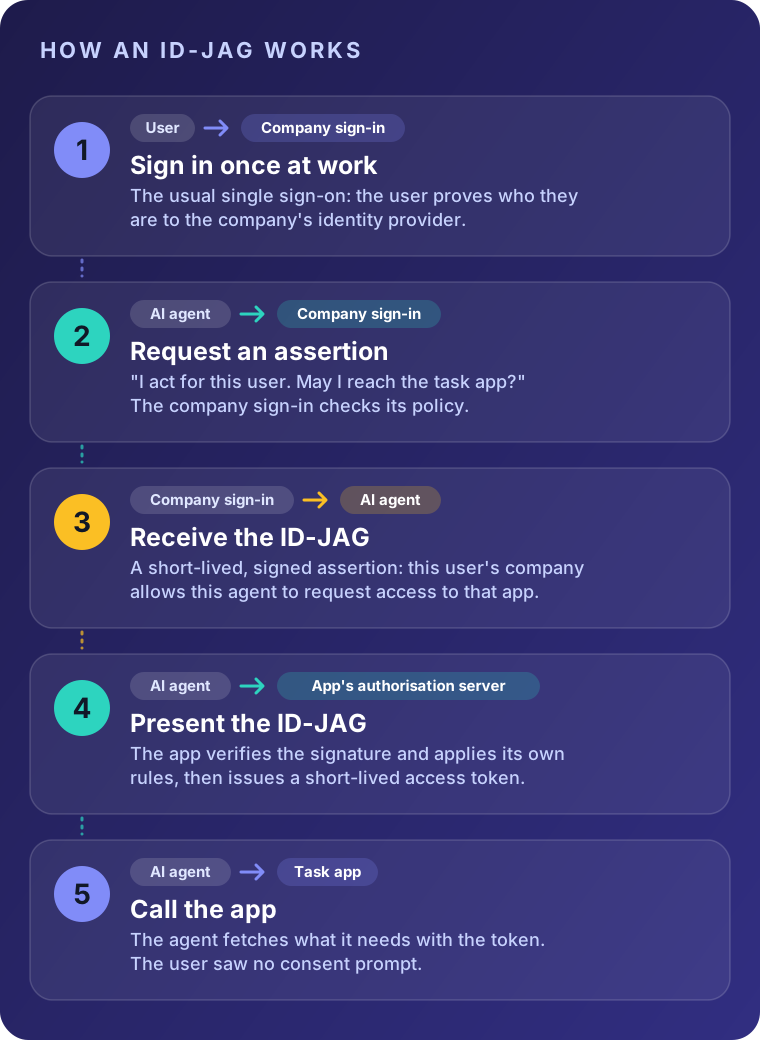
The flow in five steps:
1. The user signs in at work once, in the usual way.
2. The agent asks the company sign-in for an assertion that covers one particular application.
3. The company sign-in evaluates its policy. If the connection is allowed, it issues the ID-JAG.
4. The agent presents the ID-JAG to the other application's authorisation server. That server verifies the signature, applies **its own** rules and issues a short-lived access token.
5. The agent uses that token to call the application.
Two details matter. The receiving application still decides what to grant, so the ID-JAG is not a blank cheque. And because the company sign-in sits in the middle, there is one place to define policy and one place to audit what happened.
Technically this chains two existing standards: token exchange (RFC 8693) and the JWT bearer grant (RFC 7523).
## Lab: the flow in the xaa.dev sample
The free **xaa.dev** playground from Okta's developer team makes the flow visible. In a lab run on 7 November 2026, its sample application was run locally in a test setup. The app has a "Behind the scenes" panel that marks each stage as it completes: company sign-in, the ID-JAG, the access token and the checklist fetched from the second application. No consent prompt appeared at any point.
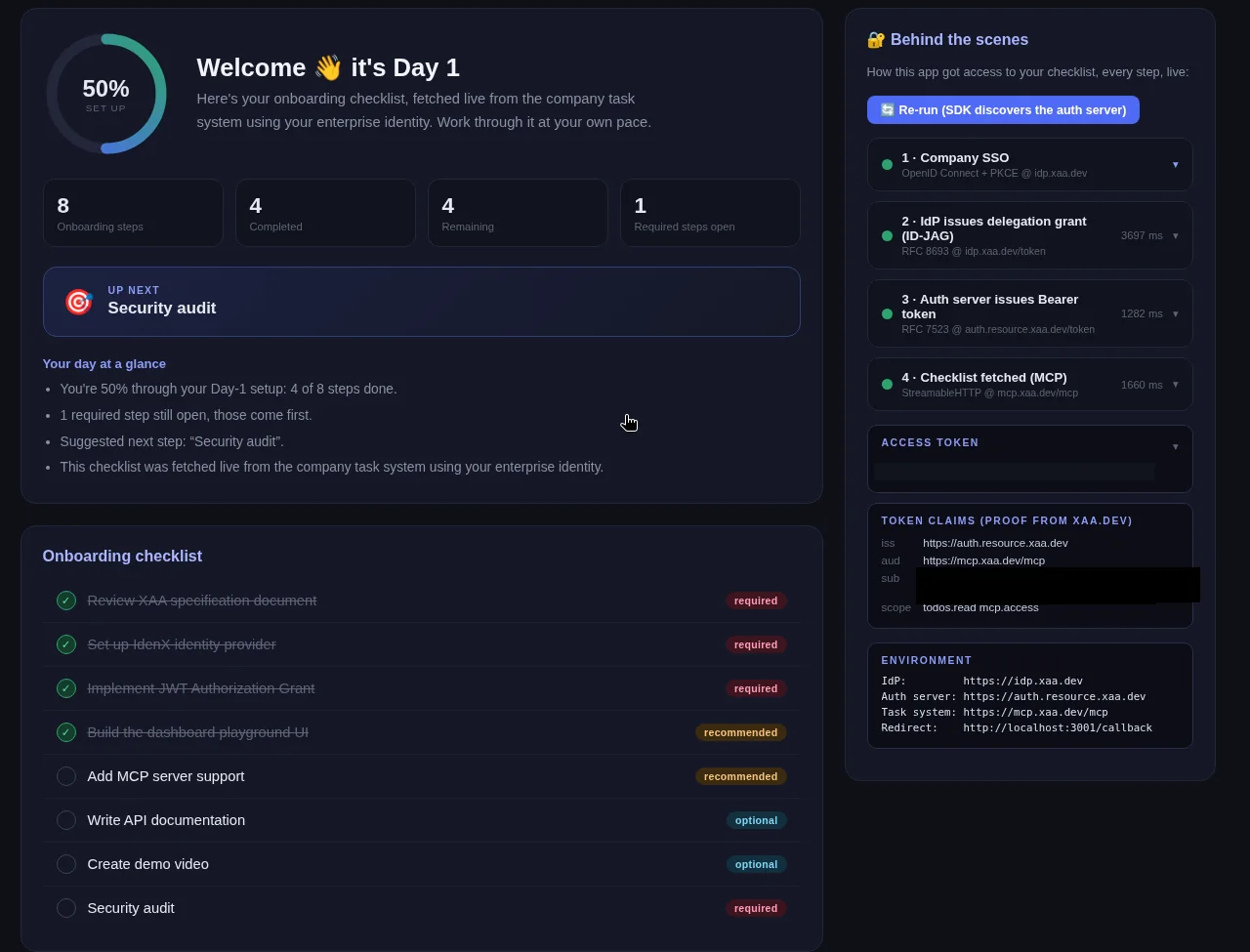
*Overview. The checklist (left) was fetched from the second application using the enterprise identity. The panel (right) lists the four stages: company sign-in, ID-JAG, access token, checklist over MCP. The subject claim is redacted.*
**Stage 2: the assertion.** After the company sign-in, the sample exchanges the user's ID token for an ID-JAG (RFC 8693). Expanding stage 2 shows the decoded assertion: the issuer, the audience (the other application's authorisation server), the requested resource and scope, and the issue and expiry times, which here are five minutes apart. Identifiers that point to a person or a client are redacted.
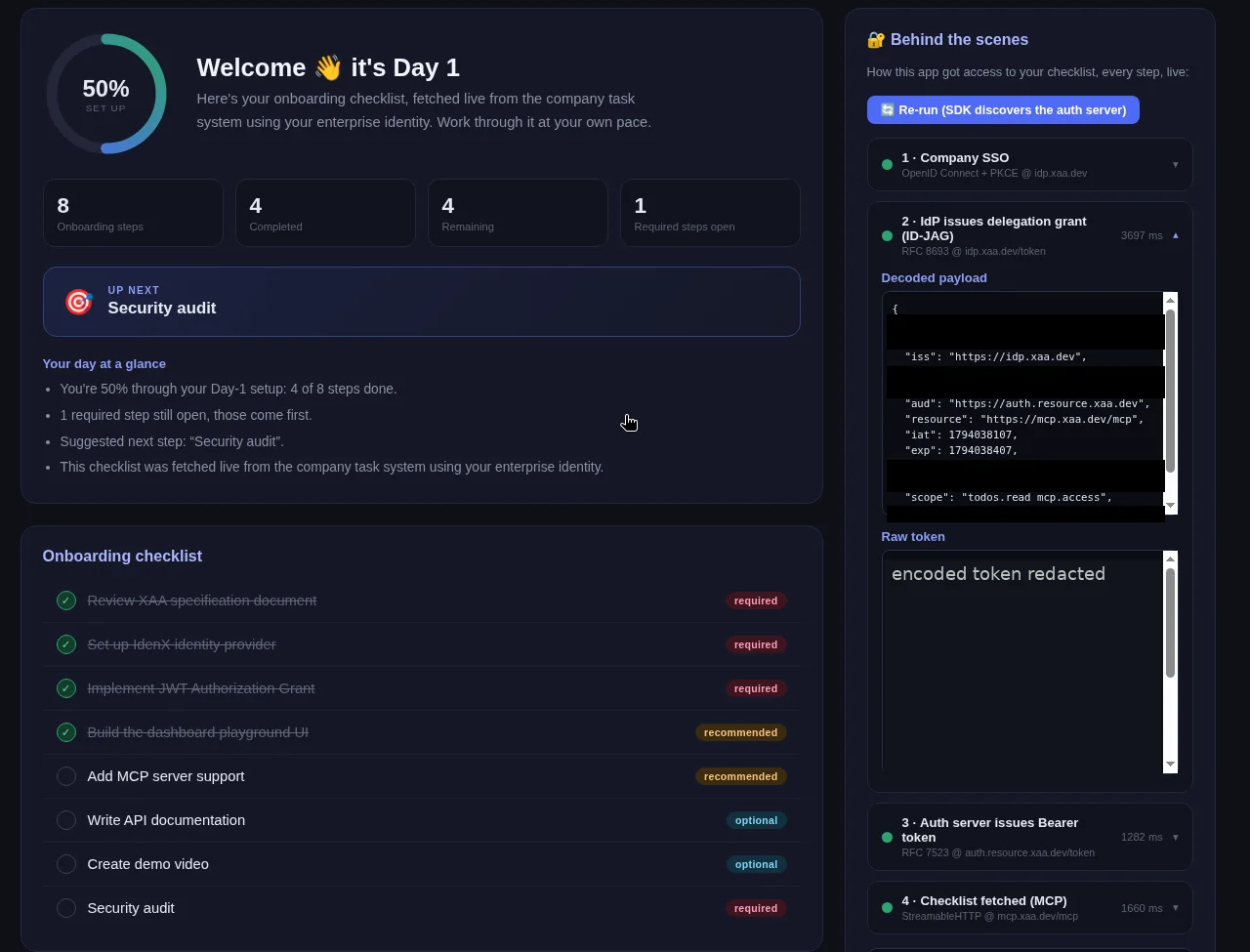
*Stage 2, the ID-JAG. Issuer, audience, resource, validity period and scope are visible. Subject, client and token identifiers are covered by black boxes, and the encoded token is not shown.*
**Stages 3 and 4: the access token.** The other application's authorisation server verifies the ID-JAG (RFC 7523) and returns an access token with a limited scope. The sample then uses it to fetch the checklist over MCP. The token claims show who issued the token, for which audience and with which scope.
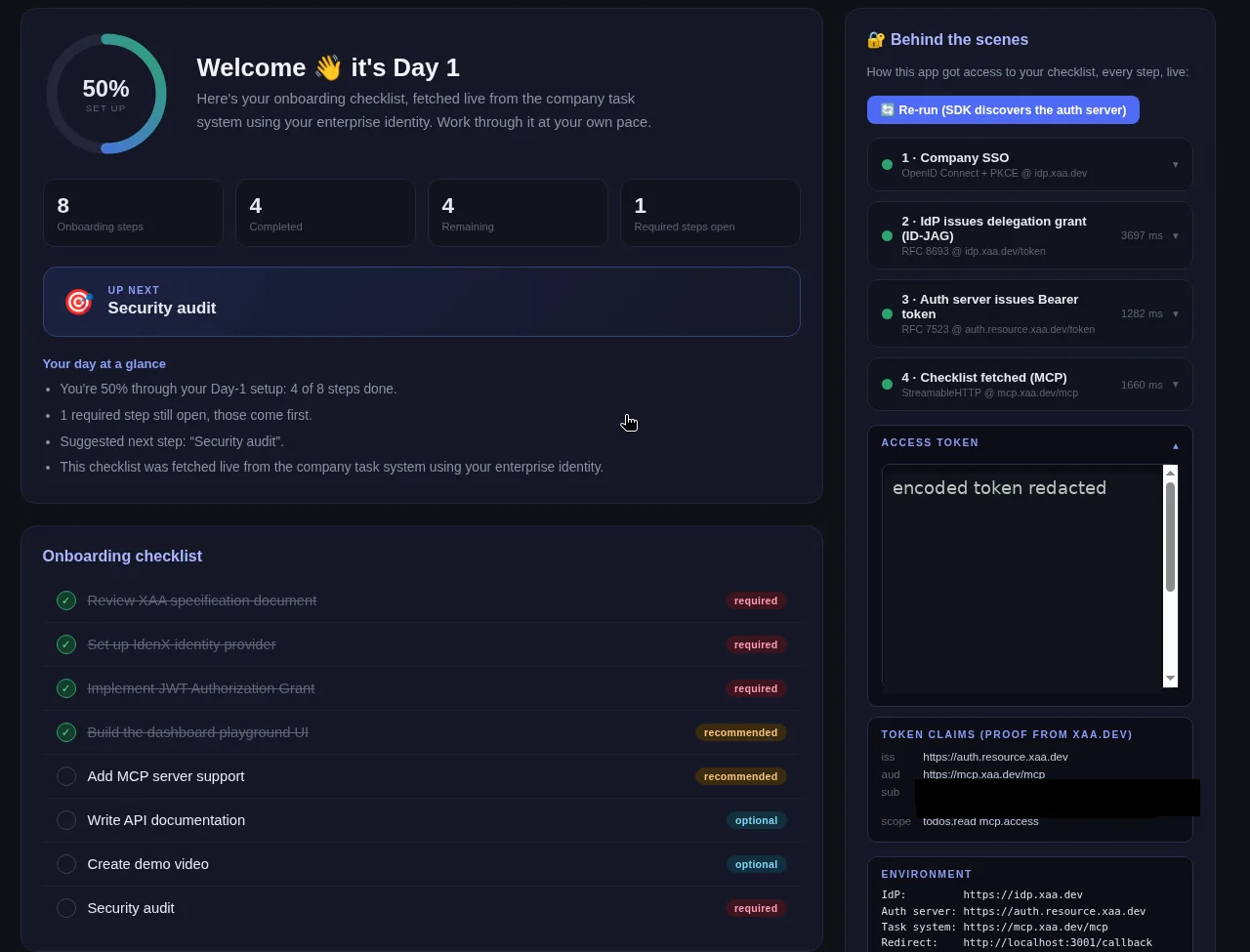
*Stages 3 and 4, the access token. The token claims (issuer, audience, scope) are real. The encoded token and the subject are redacted.*
I recorded the whole flow against the public xaa.dev playground, using the sample app in a local test setup with a synthetic user. It starts at the sign-in page, so you see each hop happen and then its decoded header and payload. The only thing added is the caption bar across the top. It is silent and about one minute 44 seconds long.
[Screen recording (1 min 44 s, no sound, captions available): sign-in at the company IdP, then each hop with its decoded header and payload. Synthetic user and short-lived demo tokens from the public playground. The encoded token strings are shortened for layout.](https://iamops.dev/media/xaa/idjag-flow.mp4)
### What you're seeing
1. **0:08 Sign-in at the company IdP.** The user signs in at idp.xaa.dev, not in the agent app. The app never sees a password, and the IdP is where MFA and sign-in rules live. The playground takes any six digits as the second factor.
2. **0:30 The agent app gets an ID token.** It proves who signed in. Look at iss (the IdP), aud (the app's client ID) and exp, one hour after iat. The app now has an identity from the organisation, but no access to the todo app yet.
3. **0:47 The IdP exchanges it for an ID-JAG (RFC 8693).** The agent asks for an assertion aimed at one target. The header type is oauth-id-jag+jwt. The claims name the todo app's authorisation server in aud, plus resource, client_id and scope. In a real deployment this is where the administrator's policy decides. The playground just allows it.
4. **0:58 The ID-JAG is short lived.** exp is 300 seconds after iat. A leaked ID-JAG is useless after five minutes, and it only works at the one server named in aud.
5. **1:07 The todo app's own authorisation server issues the access token (RFC 7523).** The agent presents the ID-JAG there. That server checks the IdP's signature, then applies its own rules. The token has that server as iss, the MCP server as aud and only the approved scope. The user is identified inside the todo app's own namespace.
6. **1:30 The agent calls the API.** With the access token it reads the checklist over MCP. The left side of the page is that response. No consent screen appeared at any point.
*The lab uses a public sample with throwaway accounts and sample data. The screenshots were cropped to the application and redacted before publication. The recording shows the decoded demo tokens in full, because they come from the public playground, belong to a synthetic user and expire within an hour. The encoded token strings are shortened for layout.*
## Where the specification stands
**It is still a draft, not a finished standard.** The document is *draft-ietf-oauth-identity-assertion-authz-grant*, now at version **-06**, dated 31 October 2026. It is a working-group document of the IETF OAuth group, written by authors from Okta and Ping Identity and one independent author. The intended outcome is a Standards Track document, but drafts can still change.
**IETF 127, 18 November 2026.** The authors presented the draft at the OAuth session. The slides name three open themes:
- **Just-in-time provisioning**, meaning how an application handles a user it has never seen, because its first contact is an ID-JAG. The slides recommend handling this in a future extension.
- **Key binding**, meaning tying tokens to a cryptographic key so that a stolen token is useless. The slides ask whether to move it into its own extension, and the notes record a recommendation for several follow-up drafts. One participant said that moving topics into other documents leaves the draft feeling unfinished. The author's reply was that provisioning is optional and that key binding applies more widely than this draft.
- **Gateways and proxies**, which are common in AI deployments where a gateway sits between the agent and the applications. This is an open issue. A separate draft is proposed, and the notes say the authors would like extra ("interim") meetings on gateways and on key binding.
The notes record these as **recommendations**. No final decision appears in them. The next steps on the slides are to triage the remaining issues, either fixing each in a version -07 or setting it aside deliberately, and then to request a working-group last call.
## Implementations
Several vendors already implement it, even though the draft is not final. According to the [oauth.net implementations list](https://oauth.net/cross-app-access/), checked on 19 November 2026:
- **Identity providers that issue ID-JAGs** include Okta, Oracle OCI IAM, Ping, Gravitee, Descope, Keycloak (marked "in progress") and several others.
- **Authorisation servers that accept them** include Okta, Oracle OCI IAM, Ping, Gravitee, Auth0 (early access), Stytch and WorkOS AuthKit (early access).
- **AI applications and tools acting as clients** include Claude, OpenAI Codex CLI and Visual Studio Code (preview).
- **Applications on the receiving end** include Asana, Atlassian, Linear, Notion and Slack, some of them in beta.
A few dated examples:
- **Oracle**: on 9 October 2026 Oracle released ID-JAG token exchange in OCI IAM.
- **Gravitee**: Access Management 4.13, announced on 12 November 2026, can play both roles, issuing ID-JAGs and accepting them.
- **Okta**: on 13 November 2026 it announced general availability of support for third-party identity providers, and names Ping, Descope and Oracle as XAA-enabled providers whose users and agents it can work with.
- **MCP**: the Model Context Protocol, a common way for AI tools to connect to applications, has an "Enterprise-Managed Authorization" extension that uses an ID-JAG. Its project blog announced it as stable in June 2026.
Microsoft Entra was not on the oauth.net list at the time of checking.
## How it differs from consent screens and on-behalf-of
| | Consent prompt | On-behalf-of (OBO) | ID-JAG / XAA |
| --- | --- | --- | --- |
| **Who approves** | The user, application by application | The user's earlier consent, passed along | The company sign-in, following rules set by an administrator |
| **What the user sees** | A prompt for each application | Usually nothing after the first sign-in | Nothing |
| **Where it works** | Anywhere OAuth works | One service calling another, inside one identity system | Between applications and organisations that each run their own authorisation server |
| **Central control** | Limited | Some | The purpose of the design |
**Versus consent screens:** a consent prompt asks the user every time. An ID-JAG applies the organisation's rules once and then enforces them silently.
**Versus [on-behalf-of](https://iamops.dev/entra-on-behalf-of-agent-middle-tier/):** Microsoft's documentation describes OBO as a web API using a user's identity to call another API, which passes the user's identity and permissions along the chain. It happens within the Microsoft identity platform. ID-JAG addresses a related problem across boundaries: the two applications have different authorisation servers, and a third party, the company sign-in, vouches for the user. The two feel similar from the user's seat, but the trust is arranged differently.
## A consideration
Fewer prompts means more convenience, but also fewer moments where a person reviews the request. This is an assessment, not a claim from the standard: the design only helps if the organisation's policies are sound and reviewed regularly. ID-JAG makes it **possible** to see and control agent access in one place. Someone still has to do the controlling.
This article will be updated as the draft moves towards working-group last call.
## Repeat this lab
This one needs only Node.js 20 or newer, git and a browser. You register a free app at xaa.dev, run Okta's TypeScript sample locally and read the ID-JAG and the access token in its Behind the scenes panel. About 20 minutes. Open each step, copy the blocks and compare with what I saw.
Every value in angle brackets is a placeholder for your own test environment. Nothing on this page is a real identifier or secret.
**Set your variables once** `env.sh` (bash)
```bash
# Values from the xaa.dev registration dialog. Replace each ; the endpoints below are the public defaults.
export XAA_CLIENT_ID=''
export XAA_CLIENT_SECRET=''
export EXCHANGE_CLIENT_ID='' # leave empty if the dialog shows the same pair as above
export EXCHANGE_CLIENT_SECRET=''
export MCP_CLIENT_ID='' # the id that ends in -at-todo0-mcp
export MCP_CLIENT_SECRET=''
export IDP_BASE_URL='https://idp.xaa.dev'
export AUTH_SERVER_URL='https://auth.resource.xaa.dev'
export MCP_SERVER_URL='https://mcp.xaa.dev/mcp'
export PORT='3001'
export BASE_URL='http://localhost:3001'
export XAA_SCOPE='todos.read mcp.access'
```
### Step 1: Register a requesting app on xaa.dev
**Goal.** Register the sample as a Requesting App with the exact local redirect URI and connect it to the Todo MCP server resource.
**Prerequisites**
- A browser; xaa.dev is a public playground with throwaway data
`xaa-registration.txt` (text)
```text
1. Open https://xaa.dev/developer/register and enter any email address (it only filters which apps you see; no account is created).
2. Select + Register New App.
Application Name: Onboarding App - Local Dev
Redirect URIs: http://localhost:3001/callback (exact match: scheme, host, port, path)
Connect to Resource: Todo MCP server (todo0-mcp), keep the scopes todos.read and mcp.access
3. Save the credentials from the confirmation dialog. There are two OAuth clients:
- main client (client_id / client_secret): sign-in and token exchange at the IdP
- resource client (the id ends in -at-todo0-mcp): the JWT bearer grant at the resource's authorization server
4. Put them into env.sh. Do not mix the two pairs up: that is the most common mistake.
```
**Expected output**
```text
Credential dialog shows two pairs:
client_id
resource_client_id (ends in -at-todo0-mcp)
```
### Step 2: Get the sample and install it
**Goal.** Clone Okta's TypeScript example built on the MCP SDK and install its dependencies.
**Prerequisites**
- Node.js 20 or newer and git
- Port 3001 free
`install.sh` (bash)
```bash
node --version
git clone https://github.com/oktadev/okta-xaa-typescript-mcp-sdk-example.git
cd okta-xaa-typescript-mcp-sdk-example
npm install
```
**Expected output**
```text
v20.x.x
Cloning into 'okta-xaa-typescript-mcp-sdk-example'...
added packages in s
```
### Step 3: Set the credentials
**Goal.** Load env.sh and check that none of the required values is empty. The app reads them from the environment, so there is no .env file to commit by accident.
**Prerequisites**
- The credentials from the registration step in env.sh
- The terminal is inside the cloned folder
`check-env.sh` (bash)
```bash
. ./env.sh # adjust the path if you saved env.sh elsewhere
for v in XAA_CLIENT_ID XAA_CLIENT_SECRET MCP_CLIENT_ID MCP_CLIENT_SECRET IDP_BASE_URL AUTH_SERVER_URL MCP_SERVER_URL BASE_URL XAA_SCOPE; do
[ -n "${!v}" ] && echo "ok $v" || echo "MISSING $v"
done
```
**Expected output**
```text
ok XAA_CLIENT_ID
ok XAA_CLIENT_SECRET
ok MCP_CLIENT_ID
ok MCP_CLIENT_SECRET
ok IDP_BASE_URL
ok AUTH_SERVER_URL
ok MCP_SERVER_URL
ok BASE_URL
ok XAA_SCOPE
```
### Step 4: Run the app and sign in
**Goal.** Start the app and sign in with company SSO. The demo identity provider accepts any email address, so no real credentials are involved.
**Prerequisites**
- The variables from env.sh are set in this terminal
`start.sh` (bash)
```bash
npm start # keep it running, then open http://localhost:3001 and select "Sign in with company SSO"
```
`check-port.sh` (bash)
```bash
curl -s -o /dev/null -w "%{http_code}\n" http://localhost:3001/ # from a second terminal
```
**Expected output**
```text
╔════════════════════════════════════════════════════╗
║ Employee Onboarding (XAA · xaa.dev demo) ║
╚════════════════════════════════════════════════════╝
App: http://localhost:3001
IdP: https://idp.xaa.dev
Auth server: https://auth.resource.xaa.dev
MCP server: https://mcp.xaa.dev/mcp
[login] logged in as
200
```
### Step 5: Read the ID-JAG and the access token
**Goal.** Expand each card in the Behind the scenes panel and check three things in the decoded tokens.
**Prerequisites**
- The dashboard shows all four steps as completed
`checks.txt` (text)
```text
Stage 2, ID-JAG:
header typ = oauth-id-jag+jwt
aud = https://auth.resource.xaa.dev (the resource's authorization server)
resource = https://mcp.xaa.dev/mcp
scope = todos.read mcp.access
exp - iat = 300 seconds
Stage 3, access token:
scope contains todos.read and mcp.access
aud = the ID-JAG's resource, byte for byte
```
**Expected output**
```text
ID-JAG aud is the authorization server: yes
ID-JAG resource is the MCP server: yes
access token scope has todos.read and mcp.access: yes
access token aud equals ID-JAG resource: yes
```
### Step 6: Clean up
**Goal.** Stop the app, delete the clone and the variables, and delete the registered app at xaa.dev.
**Prerequisites**
- Nothing else uses port 3001
`cleanup.sh` (bash)
```bash
# Stop the app: Ctrl+C in its terminal, or:
pkill -f "tsx.*src/server.ts" || true
cd .. && rm -rf okta-xaa-typescript-mcp-sdk-example
unset XAA_CLIENT_ID XAA_CLIENT_SECRET EXCHANGE_CLIENT_ID EXCHANGE_CLIENT_SECRET MCP_CLIENT_ID MCP_CLIENT_SECRET
# Then delete the app on https://xaa.dev/developer/register (select it, then delete).
# check: nothing listens on port 3001 any more
curl -s -o /dev/null -w "%{http_code}\n" http://localhost:3001/
```
**Expected output**
```text
000
```
## Sources
- [IETF draft-ietf-oauth-identity-assertion-authz-grant-06 (Identity Assertion JWT Authorization Grant)](https://datatracker.ietf.org/doc/draft-ietf-oauth-identity-assertion-authz-grant/)
- [IETF 127 OAuth session slides: Identity Assertion Authorization Grant](https://datatracker.ietf.org/meeting/127/materials/slides-127-oauth-sessa-identity-assertion-jwt-authorization-grant-00)
- [IETF 127 OAuth working group session notes](https://notes.ietf.org/notes-ietf-127-oauth)
- [oauth.net: Cross-App Access, with the list of implementations](https://oauth.net/cross-app-access/)
- [Okta Developer: Cross App Access (XAA) concepts](https://developer.okta.com/docs/concepts/xaa/)
- [Okta press release, 13 Nov 2026: third-party identity providers in Okta for AI Agents](https://www.okta.com/newsroom/press-releases/okta-for-ai-agents-now-works-out-of-the-box-with-multiple-third-party-identity-providers/)
- [Oracle OCI IAM release note, 9 Oct 2026: ID-JAG token exchange across trust domains](https://docs.oracle.com/en-us/iaas/releasenotes/identity/id-jag-token-exchange-across-trust-domains.htm)
- [Gravitee blog, 12 Nov 2026: Cross App Access in Access Management 4.13](https://www.gravitee.io/blog/single-sign-on-ai-agents-cross-app-access)
- [Model Context Protocol blog: Enterprise-Managed Authorization](https://blog.modelcontextprotocol.io/posts/enterprise-managed-auth/)
- [Microsoft Learn: the on-behalf-of flow](https://learn.microsoft.com/en-us/entra/identity-platform/v2-oauth2-on-behalf-of-flow)
- [xaa.dev, the free Cross App Access playground](https://xaa.dev)
- [Video: See How Cross App Access (XAA) Works (OktaDev, 7:45)](https://www.youtube.com/watch?v=O_QGg1RR56c)